1. Танилцуулга
This manual provides essential instructions for the safe and efficient operation of your Itel TV A3210IE 80cm (32-inch) HD Ready Smart TV. Please read this manual thoroughly before using your television and retain it for future reference.
2. Аюулгүй байдлын мэдээлэл
Аюулгүй ажиллагааг хангах, эвдрэлээс урьдчилан сэргийлэхийн тулд дараах урьдчилан сэргийлэх арга хэмжээг дагаж мөрдөнө.
- Гал болон цахилгаан цочролоос сэргийлэхийн тулд зурагтыг бороо, чийгэнд бүү тавь.
- Агааржуулалтын нүхийг хааж болохгүй. Агаарын урсгалыг хэвийн болгохын тулд ТВ-ийн эргэн тойронд хангалттай зайг ханга.
- Телевизийг унахаас сэргийлж тогтвортой, тэгш гадаргуу дээр байрлуул.
- Цахилгааны утсыг алхах, хавчихаас хамгаална.
- Аянга шуургатай үед эсвэл удаан хугацаагаар ашиглаагүй үед ТВ-ээ салга.
- Бүх үйлчилгээг мэргэшсэн үйлчилгээний ажилтнуудад шилжүүлээрэй.
3. Багцын агуулга
Бүх зүйл багцад байгаа эсэхийг шалгана уу:
- Itel TV A3210IE 80cm (32-inch) HD Ready Smart TV
- Алсын удирдлага
- TV Stand (if applicable for desktop placement)
- Цахилгааны утас
- Хэрэглэгчийн гарын авлага (энэ баримт бичиг)
- Screws for stand assembly (if applicable)
4. Тохиргоо
4.1 Физик тохиргоо
Your Itel TV A3210IE can be placed on a stand or wall-mounted. Ensure the TV is placed on a stable surface or securely mounted to a wall.
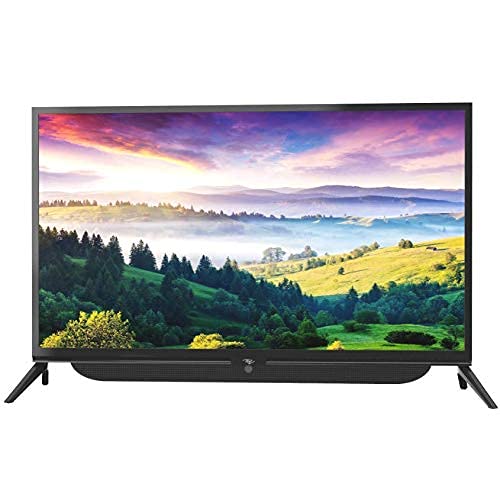
Зураг 4.1: Урд view of the Itel TV A3210IE with its stand. The television features a slim bezel design and a central stand for stable placement on a flat surface.
For wall mounting, use a compatible VESA mount (not included) and follow the instructions provided with the mount. The TV's sleek design with slim bezels allows for a modern aesthetic in any room.
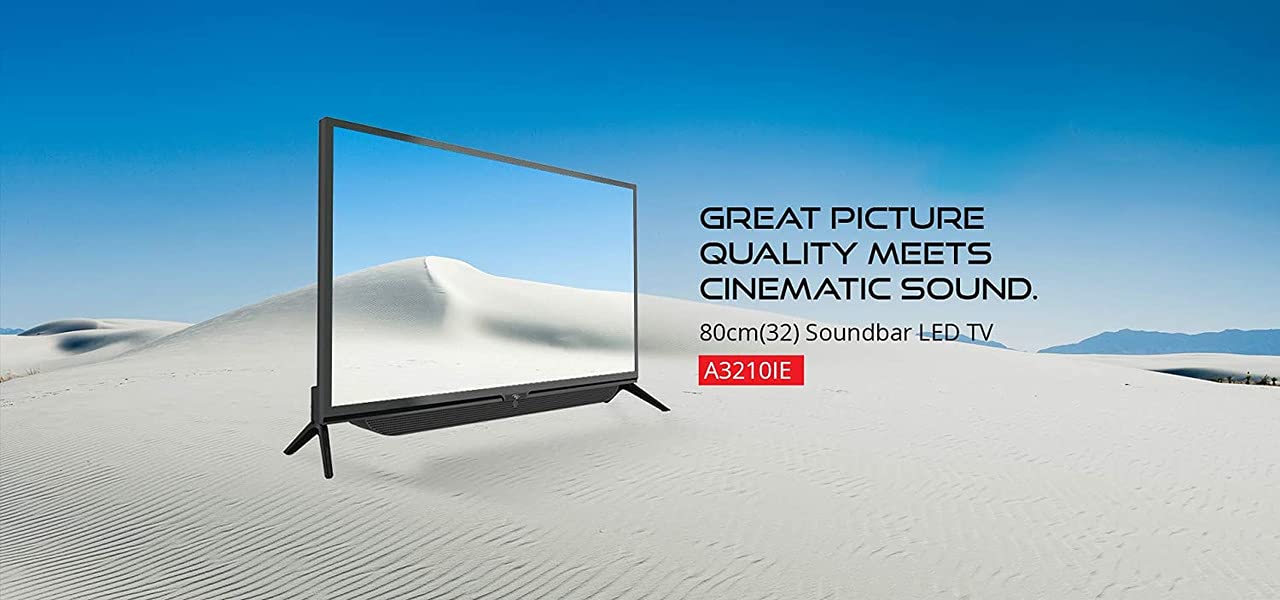
Зураг 4.2: Хажуу тал view of the Itel TV A3210IE, highlighting its slim profile. Энэ view demonstrates the television's compact design, suitable for various living spaces.
4.2 Анхдагч асаалттай
- Цахилгааны утсыг зурагт, дараа нь цахилгаан залгуурт холбоно.
- Алсын удирдлага эсвэл ТВ өөрөө асаах товчийг дарна уу.
- Follow the on-screen instructions to complete the initial setup, including language selection and time zone.
4.3 Сүлжээний холболт
Smart TV-ийн онцлогт хандахын тулд ТВ-ээ интернетэд холбоно уу:
- Navigate to the "Settings" menu on your TV.
- "Сүлжээ" эсвэл "Wi-Fi тохиргоо"-г сонгоно уу.
- Жагсаалтаас Wi-Fi сүлжээгээ сонгоод нууц үгээ оруулна уу.
- Once connected, the TV will indicate a successful internet connection.
5. ТВ ажиллуулах
5.1 Үндсэн функцууд
- Асаах/унтраах: Алсын удирдлага эсвэл ТВ дээрх асаах товчийг ашиглана уу.
- Дууны хяналт: Алсын удирдлага дээрх дууг нэмэгдүүлэх/дооруулах товчийг ашиглана уу.
- Оролтын эх сурвалж: Press the "Source" or "Input" button on the remote to switch between HDMI, USB, and other connected devices.
- Навигац: Use the arrow keys and "OK" button on the remote to navigate menus.
5.2 Ухаалаг ТВ-ийн онцлогууд
The Itel TV A3210IE runs on Android OS, providing access to a range of smart features:
- Дамжуулах үйлчилгээ: Access popular streaming applications directly from the TV's home screen.
- Web Хөтөч: Use the built-in browser to surf the internet.
- App Store: Нэгдсэн програмын дэлгүүрээс нэмэлт програмуудыг татаж аваад суулгаарай.
- Дэлгэц толин тусгал: Share content from compatible smartphones or tablets to the TV screen.
5.3 Гадаад төхөөрөмжүүдийг холбох
The TV offers multiple connectivity options:
- HDMI портууд: Connect gaming consoles, Blu-ray players, set-top boxes, or laptops.
- USB портууд: Connect USB drives to play media files (зураг, видео, хөгжим).
- VGA порт: Connect older computers or laptops.

Figure 5.1: A user engaged in gaming on the Itel TV A3210IE. This illustrates the TV's capability to connect with gaming consoles for an immersive entertainment experience.
6. Засвар үйлчилгээ
Proper maintenance ensures the longevity of your TV:
- Дэлгэц цэвэрлэх: Дэлгэцийг зөөлөн, хуурай, хөвөнгүй даавуугаар зөөлөн арчина. Зөрүүд тэмдгийн хувьд бага зэрэг dampустай даавуу эсвэл зурагтуудад тусгайлан зориулсан дэлгэц цэвэрлэгч. Дэлгэц рүү шууд шингэн цацаж болохгүй.
- Шүүгээ цэвэрлэх: ТВ-ийн шүүгээг зөөлөн, хуурай даавуугаар цэвэрлэ. Зүлгүүрийн цэвэрлэгч, уусгагч хэрэглэхээс зайлсхий.
- Агааржуулалт: Агааржуулалтын нүхнүүд нь тоос шороо, бөглөрөлгүй байгаа эсэхийг шалгаарай.
- Цахилгааны утас: Цахилгааны утсанд гэмтэл байгаа эсэхийг тогтмол шалгана уу.
7. Алдаа засах
Нийтлэг асуудлууд болон тэдгээрийн шийдлүүдийг энэ хэсгээс үзнэ үү:
| Асуудал | Боломжит шалтгаан | Шийдэл |
|---|---|---|
| Хүч чадалгүй | Power cord disconnected; Power outlet not working | Цахилгааны утасны холболтыг шалгах; Өөр төхөөрөмжтэй залгуурыг турших |
| Зураг байхгүй ч дуу чимээ байна | Incorrect input source selected; Backlight issue | Press "Source" button to select correct input; Contact support if backlight is faulty |
| Дуу алга, гэхдээ зураг байна | Дууны түвшин хаагдсан эсвэл хэт бага байна; Гадаад аудио төхөөрөмжийн асуудал | Unmute or increase volume; Check connections to external audio devices |
| Алсын удирдлага ажиллахгүй байна | Батерей дууссан; Алсын удирдлага болон ТВ-ийн хоорондох саад тотгор | Replace batteries; Remove obstructions; Ensure remote is pointed at TV sensor |
| Wi-Fi-д холбогдох боломжгүй байна | Нууц үг буруу; Чиглүүлэгчийн асуудал; ТВ чиглүүлэгчээс хэт хол байна | Verify password; Restart router; Move TV closer to router or use a Wi-Fi extender |
8. Техникийн үзүүлэлтүүд
Key technical specifications for the Itel TV A3210IE:
- Брэнд: Itel
- Загварын нэр: A3210IE
- Дэлгэцийн хэмжээ: 80cm (32-inch)
- Шийдвэр: HD бэлэн (1366 x 768 пиксел)
- Үйлдлийн систем: Android
- Онцлог шинж чанарууд: Smart TV, Android OS
- Холболтын технологи: HDMI, USB, VGA
- Техник хангамжийн интерфейс: USB, USB төрөл C
- Аудио гаралтын горим: Стерео
- Ватtage: 16 ватт
- Viewөнцөг 178 градус
- Харьцаа: 16:9
- Суурилуулах төрөл: Ханын бэхэлгээ
- Барааны жин: 6 кг 500 гр
- Багцын хэмжээ: 74.2 x 56.5 x 34.5 см
9. Баталгаат хугацаа ба дэмжлэг
For warranty information and technical support, please refer to the warranty card included with your product or visit the official Itel customer support webсайт. Худалдан авалтын баримтаа баталгаат нэхэмжлэлд зориулж худалдан авалтын баталгаа болгон хадгална уу.