
Танилцуулга
Thank you for choosing the Ringway TB810A Electronic Keyboard. This manual provides essential information for the safe and efficient use of your instrument. Please read it thoroughly before operating the keyboard and keep it for future reference.
Аюулгүй байдлын мэдээлэл
- Эрчим хүчний хангамж: Зөвхөн заасан тэжээлийн адаптер эсвэл батерейг ашиглана уу. Боть байгаа эсэхийг баталгаажуулна ууtage matches the keyboard's requirements.
- Ус ба чийг: Do not expose the keyboard to water or excessive moisture. Avoid placing liquids near the instrument.
- Агааржуулалт: Ensure proper ventilation around the keyboard. Do not block ventilation openings.
- Цэвэрлэгээ: Clean the keyboard with a soft, dry cloth. Do not use abrasive cleaners or solvents.
- Харьцуулах: Handle the keyboard with care. Avoid dropping or subjecting it to strong impacts.
Багцын агуулга
Бүх зүйл багцад байгаа эсэхийг шалгана уу:
- Ringway TB810A Electronic Keyboard
- Цахилгаан адаптер (хэрэв байгаа бол)
- Хөгжмийн амралт
- Хэрэглэгчийн гарын авлага
Бүтээгдэхүүн дууссанview
The Ringway TB810A is a 61-key electronic keyboard designed for various skill levels. It features touch-sensitive keys, a multi-function LCD, and a wide range of voices and accompaniment styles.
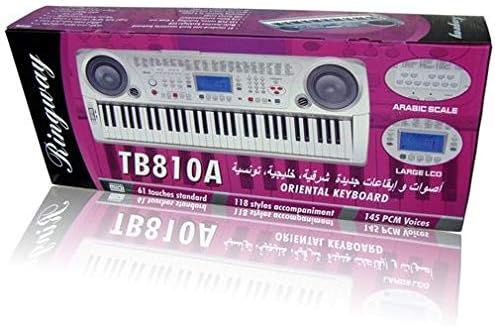
Зураг 1: Урд view of the Ringway TB810A Electronic Keyboard, showcasing the 61 keys, built-in speakers, and control panel.

Зураг 2: Өнцөг view of the Ringway TB810A Electronic Keyboard, including the detachable music rest.
Тохиргоо
- Савлах: Гар болон бүх дагалдах хэрэгслийг савлагаанаас болгоомжтой авч хая.
- Эрчим хүчний холболт:
- AC адаптер: Connect the AC adapter to the DC 12V input jack on the rear panel of the keyboard, then plug it into a standard wall outlet.
- Батерей: If using batteries, open the battery compartment on the underside of the keyboard and insert the required batteries (not included), ensuring correct polarity.
- Хөгжмийн амралт: Хөгжмийн үлдсэн хэсгийг гарны дээд самбар дээрх зориулалтын үүрэнд оруулна уу.
- Headphones/Audio Output: For private practice, connect 3.5mm headphones to the headphone jack. To connect to an external amplifier or sound system, use the Line Out jack.
- Дөрөө: Connect an optional sustain pedal to the Pedal jack for enhanced expression.
Ашиглалтын заавар
1. Асаах/унтраах, дууны түвшин
- дээр дарна уу ХҮЧ гарыг асаах эсвэл унтраах товчлуур.
- ашиглан мастер дууны түвшинг тохируулна уу Мастер боть бариул.
2. Дэлгэц ба хяналтын самбар
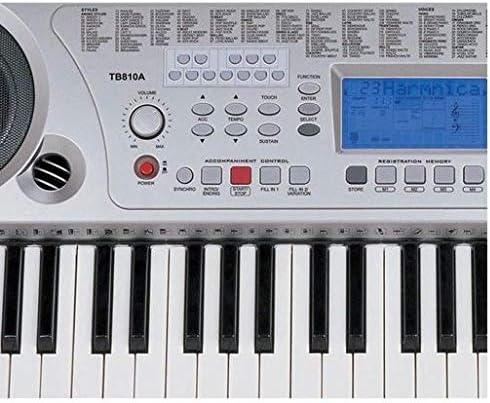
Зураг 3: Ойрын зураг view of the control panel, showing the LCD screen, power button, volume knob, and various function buttons.
- The multi-function LCD screen displays current settings, voice numbers, rhythm numbers, and other operational information. It is backlit for visibility.
- Use the numeric keypad and +/- buttons to select voices, rhythms, and other parameters.
3. Voices (Tones)
- The keyboard features 141 PCM voices.
- To select a voice, press the ДУГААР button, then use the numeric keypad or +/- buttons to enter the desired voice number.
- Полифони: The keyboard supports 64-note polyphony, allowing multiple notes to sound simultaneously.
4. Accompaniment Styles (Rhythms)
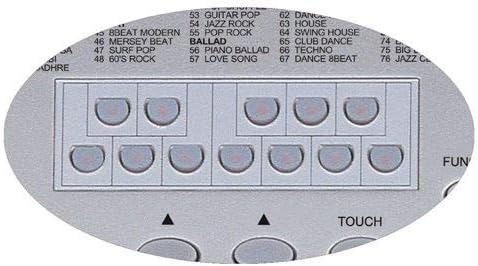
Figure 4: Detail of the rhythm selection buttons, showing various style categories.
- The keyboard includes 118 auto accompaniment styles, including 3 Arabic rhythm groups.
- To select a style, press the ЗАГВАР button, then use the numeric keypad or +/- товчлуурууд.
- Дагалдан явах хяналт: гэх мэт товчлууруудыг ашиглана уу синк хийх, START/STOP, ТАНИЛЦУУЛГА/Төгсгөл, Дүүргэх 1, ба FILL 2/VARIATION to control the accompaniment.
5. Key Modes
- Ердийн: Standard playing mode.
- Ганц бие: Single-finger chord recognition for accompaniment.
- Fingered: Full-finger chord recognition for accompaniment.
- Хуваах: Divides the keyboard into two sections, allowing different voices to be played on each side.
6. Lesson Function (3 Steps)
The keyboard offers a 3-step lesson function to help users learn songs.
- Lesson 1 (One-Key Play): Practice timing by pressing any key to advance the melody.
- Lesson 2 (Follow Me): The keyboard waits for you to play the correct note before proceeding.
- Lesson 3 (Ensemble): Play along with the accompaniment, focusing on rhythm and melody.
- The keyboard includes 50 lesson songs (numbered 51 to 100).
7. Демо дуунууд
The keyboard has 100 demo songs (numbered 01 to 100) for listening pleasure and demonstration of instrument capabilities.
8. Бичлэг хийх
- The multi-track recording feature allows you to record and play back your performances.
- Refer to the specific recording section in the full manual for detailed instructions on how to record and playback.
9. Registration Memory
Store and recall up to 4 panel settings (voices, rhythms, tempo, etc.) using the registration memory function.
10. Бусад функцууд
- Хөрвүүлэх: Adjust the pitch of the keyboard in semitone steps.
- Ая: Fine-tune the overall pitch.
- Хүрэх: Enable or disable touch sensitivity for the keys.
- Октав: Shift the keyboard's pitch up or down by octaves.
- Тогтворжуулах: Apply a sustain effect to notes.
- Найрал дуу: Add a chorus effect to the sound.
- Хуваах: Divide the keyboard into two sections with different voices.
- Эв найрамдал: Add harmony notes to your melody.
- MIDI оролт/гаралт: Connect the keyboard to other MIDI devices or a computer using the MIDI USB port for advanced control and recording.
Засвар үйлчилгээ
- Цэвэрлэгээ: Wipe the keyboard surface with a soft, dry, lint-free cloth. For stubborn dirt, slightly dampen the cloth with water and mild soap, then wipe dry immediately.
- Хадгалах: When not in use for extended periods, store the keyboard in a dry, dust-free environment, away from direct sunlight and extreme temperatures.
- Зай солих: If using batteries, replace them when the power indicator dims or the keyboard functions become unstable. Always replace all batteries at once with new ones of the same type.
Алдааг олж засварлах
| Асуудал | Боломжит шалтгаан | Шийдэл |
|---|---|---|
| Хүч чадалгүй | Power adapter not connected, batteries depleted/incorrectly inserted | Check AC adapter connection; replace batteries ensuring correct polarity. |
| Дуу алга | Volume too low, headphones connected, external device connected to Line Out | Increase Master Volume; disconnect headphones; check external audio connections. |
| Түлхүүрүүд хариу өгөхгүй байна | Keyboard in a specific mode (e.g., Lesson mode waiting for input) | Exit lesson mode or reset the keyboard (refer to full manual for reset procedure). |
| Гажуудсан дуу чимээ | Volume too high, faulty connection | Lower volume; check all cable connections. |
Үзүүлэлтүүд
| Онцлог | Тодорхойлолт |
|---|---|
| Түлхүүрүүд | 61 standard touch-sensitive keys |
| Дэлгэц | Multi-function LCD with backlight |
| Полифони | 64 тэмдэглэл |
| Дуу хоолой | 141 PCM voices |
| Дагалдах хэв маяг | 118 styles (including 3 Arabic rhythm groups) |
| Хичээлийн функц | 3-step (One-Key Play, Follow Me, Ensemble) |
| Lesson Songs | 50 songs (51-100) |
| Демо дуунууд | 100 songs (01-100) |
| Бичлэг хийж байна | Multi-track recording and playback |
| Бүртгэлийн ой | 4 panel settings |
| Холболт | MIDI In/Out (USB), Pedal, Line Out, Aux In (Mobile), DC 12V |
| Чихэвчний залгуур | 3.5 мм |
| Эрчим хүчний эх үүсвэр | AC Adapter (DC 12V) or Batteries |
| Хэмжээ (L x W x H) | 950 мм × 350 мм × 130 мм |
| Төгсгөлийн төрөл | Гялгар |
| Ур чадварын түвшин | Бүгд |
| Загвар | Орчин үеийн |
Баталгаат болон дэмжлэг
For warranty information and technical support, please refer to the warranty card included with your product or contact your local Ringway distributor. Keep your purchase receipt as proof of purchase for any warranty claims.