
1. Оршил ба түүнээс дээшview
This manual provides comprehensive instructions for the installation, operation, maintenance, and troubleshooting of your Commax DRC-4DC 4-Button Outdoor Intercom with Camera. This device is designed to facilitate communication and access control for up to four separate apartments or units, featuring an integrated camera for visual verification of visitors.
2. Аюулгүй байдлын мэдээлэл
- Суулгах, ажиллуулахын өмнө бүх зааврыг анхааралтай уншина уу.
- Ensure all wiring is performed by a qualified electrician to prevent electrical shock or damage to the unit.
- Do not expose the unit to excessive moisture or extreme temperatures beyond its operating range.
- This product does not require or contain batteries.
- This product is not classified as dangerous, toxic, or containing hazardous waste materials subject to special transport, storage, or disposal regulations.
- Засвар үйлчилгээ хийх эсвэл утас холбохоос өмнө цахилгааныг салга.
3. Багцын агуулга
Бүх зүйл багцад байгаа эсэхийг шалгана уу:
- Commax DRC-4DC Outdoor Intercom Unit with Camera
- Суурилуулах эрэг ба зангуу
- Холболтын диаграм
- Хэрэглэгчийн гарын авлага (энэ баримт бичиг)
4. Тохиргоо ба суурилуулалт
4.1 Суурилуулалтын байршлыг сонгох
Select a suitable outdoor location for the intercom unit. The ideal height for installation is typically between 145 cm and 155 cm (57-61 inches) from the ground to the center of the camera lens. Ensure the location provides a clear view of visitors and is protected from direct, heavy rainfall if possible, to prolong the unit's lifespan.
4.2 Төхөөрөмжийг суурилуулах
- Mark the desired mounting holes on the wall using the unit or mounting bracket as a template.
- Тэмдэглэсэн байрлалуудад чиглүүлэгч нүх өрөмдөнө. Шаардлагатай бол ханын зангууг оруулна уу.
- Secure the intercom unit to the wall using the provided screws. Ensure it is firmly attached and level.
4.3 утас холболт
Refer to the included wiring diagram for detailed connection instructions. General connections include:
- Эрчим хүчний хангамж: Connect the appropriate power source as indicated in the wiring diagram.
- Indoor Monitors: Connect the video and audio lines to the corresponding indoor monitors for each apartment.
- Хаалга суллах: If using an electronic door lock, connect the door release wires to the lock mechanism.
Чухал: All wiring should be done with the power supply disconnected. Incorrect wiring can damage the unit or pose a safety hazard. Professional installation is highly recommended.
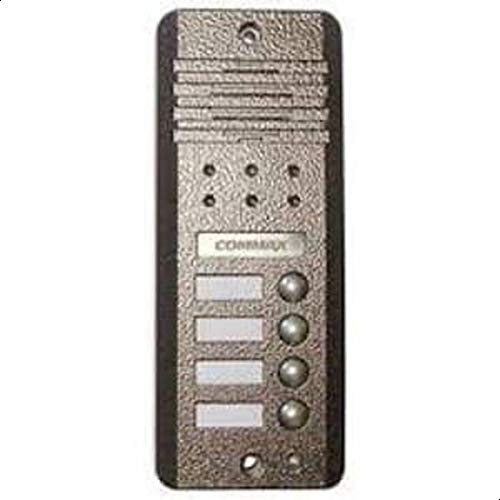
Figure 1: Commax DRC-4DC Outdoor Intercom Unit. This image shows the front view of the outdoor intercom unit with its four call buttons and integrated camera lens.
5. Ашиглалтын заавар
5.1 For Visitors
- To call an apartment, press the corresponding numbered button (1, 2, 3, or 4) on the intercom unit.
- Wait for the resident to answer. You can then speak through the intercom's microphone and listen through its speaker.
5.2 For Residents (using an indoor monitor, sold separately)
- When a visitor presses a button on the outdoor unit, your indoor monitor will ring and display the visitor's image.
- To answer the call, press the 'Talk' button on your indoor monitor. You can then engage in two-way audio communication with the visitor.
- руу view the visitor without answering the call, press the 'Monitor' button (if available on your indoor unit).
- To unlock the door, press the 'Door Release' button on your indoor monitor. This will activate the connected electronic door lock.
6. Засвар үйлчилгээ
6.1 Цэвэрлэгээ
To clean the exterior of the intercom unit, use a soft, damp cloth. Do not use abrasive cleaners, solvents, or harsh chemicals, as these can damage the finish or electronic components. Gently wipe the camera lens to ensure a clear image.
6.2 Үе үеийн хяналт шалгалт
Periodically check the unit for any signs of physical damage, loose mounting screws, or frayed wiring. Ensure all connections remain secure. If any damage is observed, contact a qualified technician for repair.
7. Алдаа засах
| Асуудал | Боломжит шалтгаан | Шийдэл |
|---|---|---|
| No power to the outdoor unit. | Loose wiring, power supply issue. | Check all power connections. Ensure the power supply is active. Consult wiring diagram. |
| Доторх дэлгэц дээр видео байхгүй. | Loose video cable, obstructed camera lens, faulty camera. | Check video cable connections. Clean the camera lens. If problem persists, contact support. |
| No audio (microphone/speaker). | Loose audio cables, faulty microphone/speaker. | Check audio cable connections. Ensure nothing is blocking the microphone or speaker. |
| Call buttons not responding. | Internal wiring issue, button malfunction. | Check internal connections (refer to wiring diagram). If buttons are physically stuck, gently clean around them. |
| Хаалганы түгжээ ажиллахгүй байна. | Incorrect wiring to door lock, faulty door lock, insufficient power to lock. | Verify door release wiring. Check the door lock mechanism and its power supply. |
8. Техникийн үзүүлэлтүүд
- Загвар: DRC-4DC
- Төрөл: Outdoor Intercom with Camera
- Брэнд: Коммакс
- Number of Call Buttons: 4
- Dimensions (Shipping): 43.4 x 31.4 x 10 см (17.1 x 12.4 x 3.9 инч)
- Жин (Тээвэрлэлт): 2.5 кг (5.5 фунт)
- Зайны шаардлага: Үгүй
- Аюултай материал: Үгүй
9. Баталгаат хугацаа ба дэмжлэг
For warranty information and technical support, please refer to the warranty card included with your product or visit the official Commax webсайт. Худалдан авалтын баримтаа аливаа баталгаат нэхэмжлэлийг худалдан авсан баримт болгон хадгална уу.