
1. Аюулгүй байдлын чухал мэдээлэл
Please read this manual carefully before operating the appliance and keep it for future reference. Failure to follow these instructions may result in electric shock, fire, or injury.
- Цахилгаан хангамж нь ботьтой таарч байгаа эсэхийг шалгаарайtagүнэлгээний шошгон дээр заасан e.
- Гэмтсэн утас, залгууртай төхөөрөмжийг бүү ажиллуул.
- Төхөөрөмжийг дулааны эх үүсвэр, нарны шууд тусгалаас хол байлга.
- Агаарын оролт, гаралтыг хааж болохгүй.
- This appliance contains R290 refrigerant. Handle with care and ensure proper ventilation during installation and maintenance.
- Цэвэрлэх, засвар үйлчилгээ хийхээсээ өмнө төхөөрөмжийг үргэлж салга.
- Цэвэрлэхдээ химийн уусгагчийг бүү ашигла.
- Энэхүү төхөөрөмжийг бие бялдар, мэдрэхүйн болон сэтгэцийн хомсдолтой, эсвэл туршлага, мэдлэг дутмаг хүмүүс (хүүхдүүдийг оролцуулан) ашиглахад зориулагдаагүй бөгөөд хэрэв тэдэнд аюулгүй байдлыг нь хариуцдаг хүнээс тухайн төхөөрөмжийг ашиглах зааварчилгаа өгөөгүй л бол.
2. Багцын агуулга
Савлахдаа бүх эд зүйлс байгаа бөгөөд гэмтэлгүй эсэхийг шалгаарай.
- 1 x Klarstein Kraftwerk Smart Portable Air Conditioner
- 1 x Алсын удирдлага
- 1 x Window Sealing Kit (for tilt windows)
- 1 x Exhaust Hose with Connectors
- 1 x Water Drainage Hose
- 1 х хэрэглэгчийн гарын авлага (Англи хэл)

Image: Contents of the delivery, including the air conditioner unit, remote control, window sealing kit, exhaust hose, and drainage hose.
3. Тохиргоо ба суурилуулалт
3.1 Нэгжийг байрлуулах
Place the air conditioner on a flat, stable surface. Ensure there is at least 30 cm (12 inches) of space around the unit for proper airflow. The integrated castors allow for easy movement between rooms.

Image: The portable air conditioner with integrated wheels for easy transport.
3.2 Яндангийн хоолойг суурилуулах
- Яндангийн хоолойг нэгжийн арын хэсэгт байрлах агаарын залгуурт холбоно.
- Хоолойг хамгийн ойрын цонх эсвэл нээлхий рүү сунгана.
- Use the provided window sealing kit to secure the exhaust hose in the window opening, preventing hot air from re-entering the room.

Image: Quick installation with the window kit, showing the exhaust hose and window seal.
3.3 Drainage Hose (Dehumidifier Mode)
For continuous dehumidification, connect the drainage hose to the designated outlet and route it to a suitable drain or container. In cooling mode, water typically evaporates, but manual drainage may be required if the internal tank fills.
4. Ашиглалтын заавар
4.1 Хяналтын самбар ба алсын удирдлага
The unit can be controlled via the touch control panel on top of the unit or the included remote control. The remote control requires 2x AAA batteries (not included).
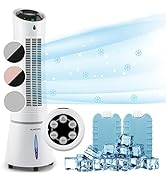
Image: Digital display and remote control for the air conditioner.
4.2 Үйлдлийн горимууд
- Хөргөх горим: Reduces room temperature. Set desired temperature and fan speed.
- Чийгшүүлэгч горим: Агаар дахь илүүдэл чийгийг арилгана.
- Фен горим: Хөргөхгүйгээр агаарыг эргэлдүүлдэг. Хүссэн сэнсний хурдыг сонгоно уу.
- Унтах горим: Operates quietly with reduced fan speed and gradually increases temperature for comfortable sleep.
4.3 Smart Control (App & Alexa)
The Klarstein Kraftwerk Smart can be controlled via the Klarstein app on your smartphone and is compatible with Amazon Alexa and Google Home. Follow the app's instructions for pairing the device.

Image: Simple and practical use with the Klarstein app, compatible with Amazon Alexa and Google Home.
4.4 Таймер функц
Тодорхой хугацааны дараа төхөөрөмжийг автоматаар асаах эсвэл унтраахын тулд таймер функцийг ашиглана уу.
5. Засвар үйлчилгээ
Тогтмол засвар үйлчилгээ нь таны агааржуулагчийн ашиглалтын хугацааг уртасгаж, оновчтой гүйцэтгэлийг баталгаажуулдаг. Ямар нэгэн засвар үйлчилгээ хийхээсээ өмнө нэгжийг үргэлж салга.
5.1 Агаар шүүгчийг цэвэрлэх
The air filter should be cleaned every two weeks or more frequently depending on usage. A dirty filter reduces efficiency.
- Төхөөрөмжийг унтрааж, салга.
- Агаарын шүүлтүүрийг төхөөрөмжийн ар эсвэл хажуу талаас олж, салга.
- Clean the filter with a vacuum cleaner or wash it with warm water and mild detergent.
- Шүүлтүүрийг дахин оруулахын өмнө бүрэн хатахыг хүлээнэ үү.
5.2 Нэгжийн гадна талыг цэвэрлэх
Төхөөрөмжийн гадна талыг зөөлөн арчиж, damp даавуу. Хүчтэй химийн бодис, зүлгүүр, уусгагчийг бүү ашигла.
5.3 Улирлын чанартай хадгалалт
Хэрэв төхөөрөмжийг удаан хугацаагаар хадгалах бол:
- Төхөөрөмжөөс хуримтлагдсан усыг зайлуулна.
- Агаар шүүгчийг цэвэрлэ.
- Тоос шорооноос хамгаалахын тулд нэгжийг таглана.
- Хуурай, сэрүүн газар хадгална.
6. Алдаа засах
Хэрэглэгчийн дэмжлэгтэй холбогдохоосоо өмнө нийтлэг асуудал болон шийдлүүдийн талаар дараах хүснэгтийг үзнэ үү.
| Асуудал | Боломжит шалтгаан | Шийдэл |
|---|---|---|
| Төхөөрөмж асахгүй байна. | No power, power cord unplugged, fuse blown. | Check power connection, wall outlet, and circuit breaker. |
| Хөргөлт хангалтгүй. | Dirty air filter, blocked air intake/outlet, room too large, windows/doors open, exhaust hose not properly installed. | Clean filter, clear obstructions, ensure proper room size for unit capacity, close windows/doors, check exhaust hose installation. |
| Нэгж дуу чимээтэй байна. | Unit not on a flat surface, internal components vibrating. | Ensure unit is on a level surface. Some operational noise is normal for portable AC units. |
| Ус гоожих. | Drainage plug not properly sealed, drainage hose blocked or improperly connected. | Check drainage plug and hose connections. Clear any blockages in the drainage hose. |
| Wi-Fi холболтын асуудал. | Incorrect Wi-Fi settings, 5GHz network used, temporary glitch. | Ensure you are connecting to a 2.4GHz Wi-Fi network. Try unplugging the unit for 10 seconds, then reconnecting. Refer to the app's pairing instructions. |
7. Техникийн үзүүлэлтүүд
| Онцлог | Дэлгэрэнгүй |
|---|---|
| Брэнд | КЛАРШТЕЙН |
| Загварын нэр | Kraftwerk Smart |
| Хөргөх хүчин чадал | 10,000 BTU (2.9 кВт) |
| Цэвэршүүлэх хүчин чадал | 23 литр |
| Агаарын урсгалын хэмжээ | 440 м³/цаг |
| Санал болгож буй өрөөний хэмжээ | 29-49 м² |
| Дуу чимээний түвшин | 50 dB (Min) / 65 dB (Max) |
| Эрчим хүчний хэмнэлтийн ангилал | A |
| Хөргөгч | R-290 |
| Эрчим хүчний хэрэглээ | 1150 ватт |
| Ботьtage | 220 вольт |
| Хэмжээ (D x W x H) | 38P x 35.5lx 82.2H см |
| Жин | 26 кг |
| Хяналтын арга | Алсын удирдлага, програмын удирдлага |
| Шүүлтүүрийн төрөл | Нүүрс |

Image: Energy efficiency label for the product.
Image: Technical drawing with product dimensions.
8. Баталгаат хугацаа ба хэрэглэгчийн дэмжлэг
8.1 Баталгаат хугацааны мэдээлэл
This product comes with a limited warranty. Please refer to the warranty card included in your package or contact customer support for detailed terms and conditions. The warranty covers manufacturing defects under normal use.
8.2 Хэрэглэгчийн дэмжлэг
For technical assistance, spare parts, or any questions regarding your Klarstein Kraftwerk Smart air conditioner, please contact Klarstein customer support. Contact details can typically be found on the official Klarstein webсайт эсвэл таны худалдан авалтын баримт бичигт.
Before contacting support, please have your model number (Kraftwerk Smart) and purchase date available.