
1. Танилцуулга
The NICGIGA GS1620P is an unmanaged 18-port Gigabit Power over Ethernet (PoE) switch designed for reliable network connectivity and power delivery. It features 16 Gigabit PoE+ ports and 2 Gigabit uplink ports, providing a total power budget of 250W. This switch is suitable for various applications, including IP camera surveillance, wireless access points, and IP phone systems. Its plug-and-play design ensures easy installation without complex configuration.

Зураг 1.1: Урд ба хойд view of the NICGIGA GS1620P switch, highlighting the 16 PoE ports, 2 uplink ports, and power input. This image illustrates how the switch transmits both data and power over a single Ethernet cable.
2. Бүтээгдэхүүний онцлог
- 16 Gigabit PoE+ Ports: Provides Power over Ethernet (PoE+) for compatible devices, supporting IEEE 802.3af/at standards.
- 2 Gigabit Uplink Ports: Dedicated ports for high-speed connection to a network backbone or NVR.
- 250W Total Power Budget: Delivers up to 30W per PoE port, with a maximum total power output of 250W for all PoE devices.
- VLAN горим: Features a physical switch to enable VLAN isolation, enhancing network security and bandwidth management by isolating PoE ports while allowing communication with uplink ports.
- Бат бөх металл хайрцаг: Durable metal housing for robust protection and efficient heat dissipation.
- Industrial Fan: Built-in fan for effective cooling, ensuring stable operation and extended device lifespan.
- Plug and Play: Unmanaged switch design requires no software configuration, simplifying installation.
- Суулгах сонголтууд: Supports desktop, wall mount, or 19-inch rack mount installations.
- 4КВ аянгын хамгаалалт: Integrated protection against lightning strikes to safeguard the device and connected equipment.
- Автомат MDI/MDIX: Шулуун эсвэл хөндлөн кабелийг автоматаар илрүүлж, тохируулдаг.
- Non-Blocking Data Forwarding: Ensures full wire-speed performance across all ports.
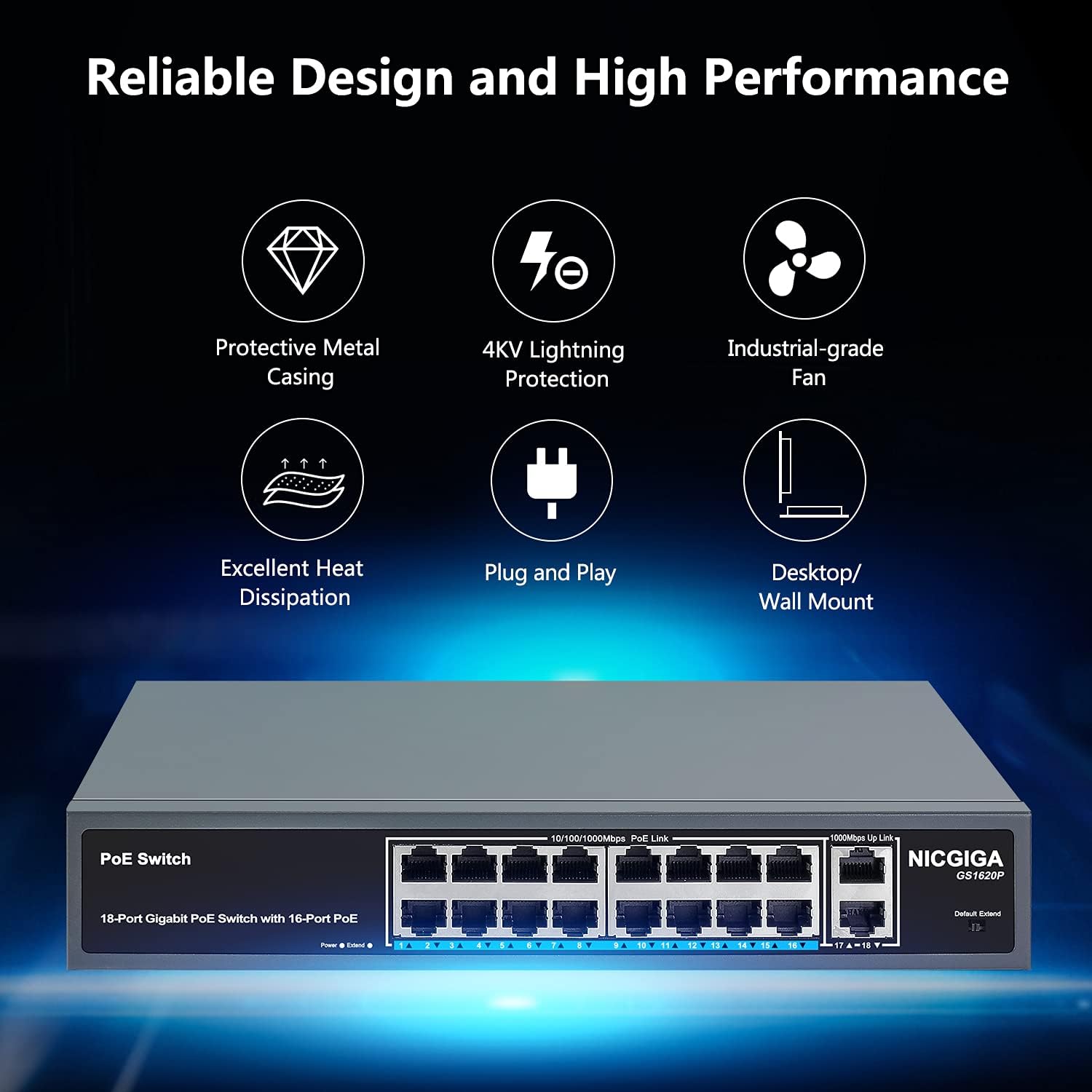
Image 2.1: Key features of the NICGIGA GS1620P switch, including its protective metal casing, 4KV lightning protection, industrial-grade fan for cooling, excellent heat dissipation, plug-and-play functionality, and versatile desktop/wall mount options.
3. Багцын агуулга
Please verify the contents of your package upon opening:
- NICGIGA 18-Port Gigabit PoE Switch (GS1620P)
- Цахилгааны утас
- Rack Mount Kit (for 19-inch rack installation)
- Хэрэглэгчийн гарын авлага (энэ баримт бичиг)
If any items are missing or damaged, please contact NICGIGA customer support immediately.
4. Тохируулах заавар
4.1 Физик суурилуулалт
- Байршил сонгоно уу: Place the switch on a stable, flat surface (desktop), mount it on a wall, or install it in a 19-inch rack using the provided kit. Ensure adequate ventilation around the switch to prevent overheating.
- Эрчим хүчний холболт: Connect the provided power cord to the AC IN port on the rear panel of the switch and then to a standard AC power outlet (100-240V).
- Сүлжээний холболтууд:
- Connect your Power over Ethernet (PoE) compatible devices (e.g., IP cameras, wireless access points, IP phones) to any of the 16 PoE+ ports (ports 1-16) using standard Ethernet cables.
- Connect your network backbone (e.g., router, NVR, main switch) to one of the 2 Gigabit uplink ports (ports 17-18) using a standard Ethernet cable.

Image 4.1: Basic setup diagram illustrating the connection of the switch to power and then connecting PoE devices (IP phone, IP camera, wireless AP) and a router to the switch.
4.2 Rack Mount Installation (Optional)
For 19-inch rack installation, attach the provided rack mount brackets to the sides of the switch using the included screws. Then, secure the switch into your standard 19-inch equipment rack.

Image 4.2: Illustration of the 19-inch rackmount design, showing the switch dimensions and the included rack mount kit for installation in a standard equipment rack.
5. Ашиглалтын заавар
5.1 асаалттай байна
After connecting the power cord, the switch will automatically power on. The Power LED indicator on the front panel will illuminate, indicating that the device is receiving power.
5.2 LED үзүүлэлтүүд
| Үзүүлэлт | Статус | Тодорхойлолт |
|---|---|---|
| Эрчим хүчний LED | On | Шилжүүлэгч асаалттай байна. |
| Link/Act LED (Per Port) | On | Төхөөрөмж порт руу холбогдсон байна. |
| Анивчих | Портоор дамжуулан өгөгдөл дамжуулагдаж эсвэл хүлээн авагдаж байна. | |
| PoE LED (Per PoE Port) | On | PoE power is being supplied to the connected device. |
| Анивчих | PoE power fault or overload detected. |
5.3 VLAN Mode
The switch features a physical VLAN switch on the front panel. When enabled, this mode isolates the PoE ports (ports 1-16) from each other, preventing direct communication between them. All PoE ports can still communicate with the uplink ports (ports 17-18). This feature enhances network security and can improve bandwidth utilization for specific applications like surveillance systems.
- Default (VLAN Disabled): Бүх портууд хоорондоо харилцах боломжтой.
- Extend (VLAN Enabled): PoE ports are isolated from each other but can communicate with uplink ports.

Image 5.1: Visual representation of VLAN Port Isolation, demonstrating how the VLAN switch isolates PoE ports from each other while maintaining connectivity to the uplink ports, improving network bandwidth and security.
6. Засвар үйлчилгээ
- Цэвэрлэгээ: Шилжүүлэгчийн гадна талыг зөөлөн, хуурай даавуугаар цэвэрлэ. Шингэн болон аэрозол цэвэрлэгч хэрэглэж болохгүй.
- Агааржуулалт: Ensure that the ventilation openings are not blocked. Maintain adequate space around the switch for proper airflow.
- Байгаль орчны нөхцөл: Operate the switch within the specified temperature and humidity ranges (refer to Specifications section).
- Програм хангамжийн шинэчлэлтүүд: As an unmanaged switch, firmware updates are typically not required.
7. Алдаа засах
| Асуудал | Боломжит шалтгаан | Шийдэл |
|---|---|---|
| Хүч чадалгүй | Power cord not connected or power outlet is faulty. | Ensure the power cord is securely connected to both the switch and a working power outlet. Check the power outlet with another device. |
| No Link/Activity on a Port | Faulty Ethernet cable, incorrect cable type, or connected device is off/faulty. | Verify the Ethernet cable is correctly connected and not damaged. Ensure the connected device is powered on and functioning. Try a different port or cable. |
| No PoE Power to Device | Device is not PoE compatible, total power budget exceeded, or faulty cable. | Ensure the connected device supports IEEE 802.3af/at PoE standards. Check the total power consumption of all connected PoE devices to ensure it does not exceed 250W. Verify the Ethernet cable. If the PoE LED is flashing, there might be a power fault or overload. |
| Network Performance Issues | High network traffic, faulty cables, or incorrect VLAN setting. | Check for excessive network activity. Ensure all cables are in good condition. If VLAN mode is enabled, ensure it is configured as desired for your network setup. |
8. Техникийн үзүүлэлтүүд
| Онцлог | Дэлгэрэнгүй |
|---|---|
| Загварын дугаар | GS1620P |
| Портын тоо | 18 (16 PoE+, 2 Гигабит Uplink) |
| PoE стандарт | IEEE 802.3af / at |
| Порт бүрт хамгийн их PoE хүч | 30 Вт |
| Нийт PoE эрчим хүчний төсөв | 250 Вт |
| Өгөгдөл дамжуулах хурд | 10/100/1000 Mbps (Гигабит) |
| Шилжүүлэгч хүчин чадал | 12 Gbps |
| VLAN горим | Supported (Port Isolation) |
| Интерфейсийн төрөл | ЦА |
| Кейсийн материал | Металл |
| Бүтээгдэхүүний хэмжээс | 10.63 x 7.09 x 1.77 инч |
| Зүйлийн жин | 4.29 фунт |
| Ашиглалтын температур | -10°C - 55°C (14°F - 131°F) |
| Эрчим хүчний оролт | Хувьсах гүйдэл 100-240 В |
9. Баталгаат хугацаа ба дэмжлэг
NICGIGA provides a нэг жилийн баталгаат хугацаа for this product from the date of purchase. This warranty covers defects in materials and workmanship under normal use.
Additionally, NICGIGA offers насан туршийн техникийн дэмжлэг for all its products. If you encounter any issues or have questions regarding the installation, operation, or troubleshooting of your GS1620P switch, please contact our support team.
For support, please visit the official NICGIGA webсайтаас эсвэл бүтээгдэхүүнийхээ савлагаанд өгөгдсөн холбоо барих мэдээллийг харна уу.
10. Бүтээгдэхүүний видео
Video 10.1: An official product video from NICGIGA showcasing the features and applications of the 18-Port Gigabit PoE Switch. This video provides a visual overview of the switch's capabilities and how it can be used in various networking environments.