
Saooer BLUE 20A
Saooer 20A Solar Charge Controller User Manual
Model: BLUE 20A
Танилцуулга
This manual provides essential information for the safe and efficient operation of your Saooer 20A Solar Charge Controller. This intelligent regulator is designed to manage the working of solar panels and batteries in a solar system, featuring dual USB ports for mobile device charging. It is compatible with 12V and 24V systems and includes multiple protection functions to ensure system efficiency and prolong battery lifespan.

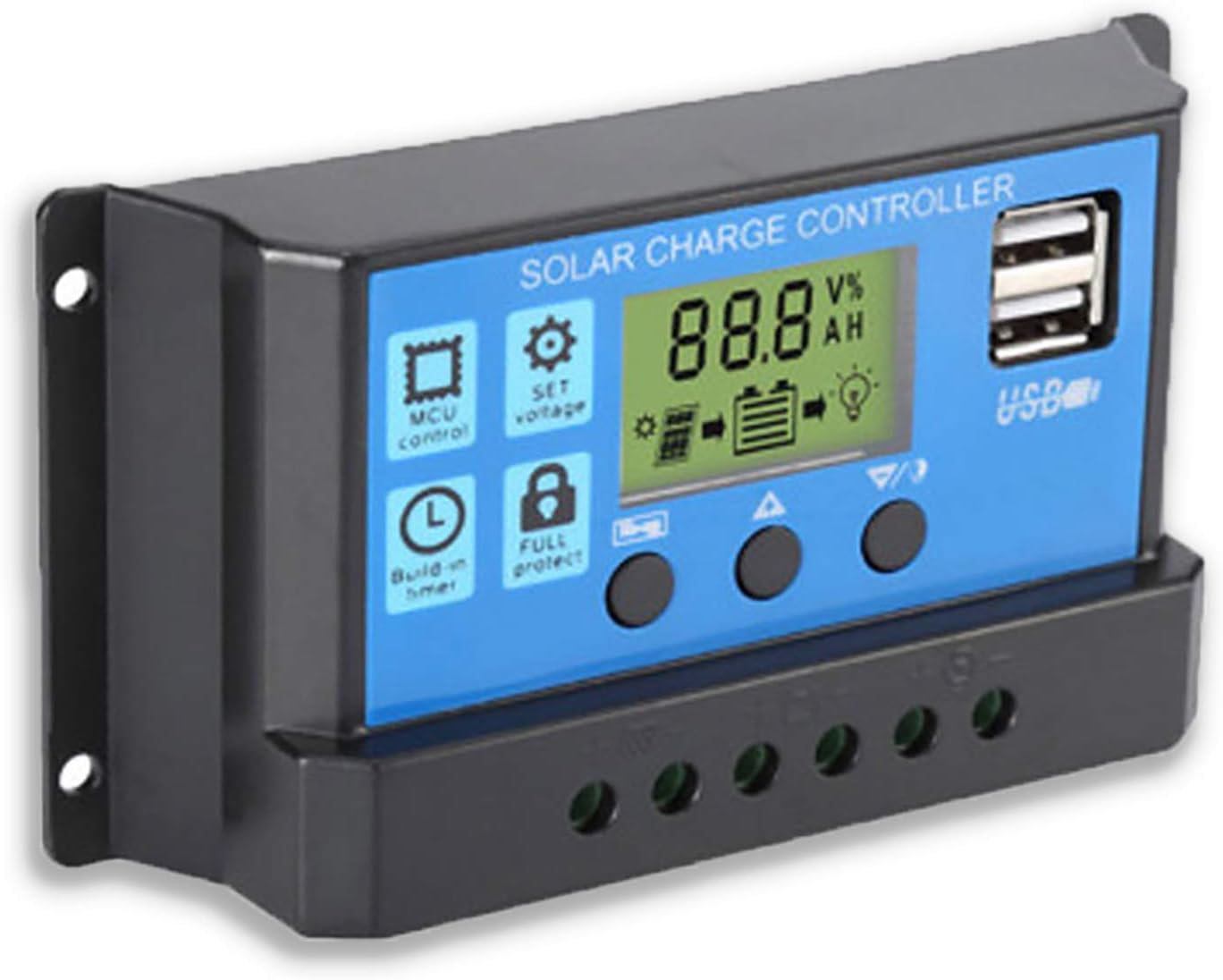
Зураг 1: Урд view of the Saooer 20A Solar Charge Controller.
Аюулгүй ажиллагааны зааварчилгаа
- Ensure all connections are correct before powering on the controller. Incorrect wiring can damage the device or connected components.
- The controller is designed for indoor use or in a protected environment. Avoid exposure to direct sunlight, high temperatures, or moisture.
- Хянагчийг өөрөө задлах эсвэл засах гэж бүү оролдоорой. Мэргэшсэн ажилтнуудад үйлчилгээ үзүүлээрэй.
- Хүүхдийн гар хүрэхгүй газар хадгална.
- This controller is only suitable for lead-acid batteries: OPEN, AGM, GEL. Do not use with other battery types like Lithium-ion or LiFePO4, as this may cause damage or safety hazards.
- Always connect the battery first, then the solar panel, and finally the load. When disconnecting, reverse the order: disconnect the load, then the solar panel, and finally the battery.
Бүтээгдэхүүний онцлог
- Автомат системийн хэмжээtage Тодорхойлолт: Automatically detects 12V/24V system voltage.
- PWM цэнэглэлт: Efficient Pulse Width Modulation charging mode.
- Хос USB порт: Provides 5V/2A output for charging mobile devices.
- LCD дэлгэц: Clear display of status and data, allowing for convenient mode switching and parameter configuration.
- Олон хамгаалалтын функцууд: Includes short-circuit protection, open-circuit protection, reverse protection, and over-load protection.
- Тохируулах параметрүүд: User-adjustable charge and discharge parameters.
- Температурын нөхөн олговор: Automatic temperature compensation for optimal charging.
Тохиргоо ба суурилуулалт
Follow these steps carefully to install your solar charge controller. Incorrect installation can lead to damage or malfunction.
- Утас бэлтгэх: Ensure all wires are properly stripped and have appropriate connectors if necessary. Use wires of sufficient gauge for your system's current.
- Батерейг холбоно уу: Connect the battery to the charge regulator first. Observe correct polarity (+ to + and - to -). The controller will automatically recognize the battery voltage (12V эсвэл 24V).
Зураг 2: Хажуу тал view showing the connection terminals for battery, solar panel, and load.
- Нарны хавтанг холбох: Connect the solar panel to the solar charge controller. Ensure correct polarity.
- Ачааллыг холбоно уу: Connect the consumer or load to the charge controller regulator. Ensure correct polarity.
Чухал тэмдэглэл: Always connect the battery first, then the solar panel, and finally the load. When disconnecting the controller, please remove the solar panel, then the load, and finally the battery. This sequence helps the controller recognize the battery voltage correctly and prevents damage.
Ашиглалтын заавар
LCD дэлгэц ба товчлуурууд

Зураг 3: Өнцөг view showing the LCD display and control buttons.
The controller features an LCD display and three buttons for operation:
- Цэсийн товчлуур: Used to cycle through display modes and enter parameter setting mode.
- Дээш товчлуур: Used to increase values or navigate upwards in menus.
- Доош товч: Used to decrease values or navigate downwards in menus.
Дэлгэцийн горимууд
Press the Menu button to cycle through the following display modes:
- Батерейны эзлэхүүнtage (V)
- Нарны хавтан Voltage (V)
- Ачааллын гүйдэл (A)
- Battery Temperature (°C)
- Цэнэглэх гүйдэл (A)
- Цэнэглэх гүйдэл (A)
- Load Working Mode (24H, 0-23H, 0H)
Параметрийн тохиргоо
To enter parameter setting mode, press and hold the Menu button for 5 seconds. Use the Up and Down buttons to adjust values, and the Menu button to confirm and move to the next parameter. Press and hold Menu again to exit setting mode.
| Параметр | Тодорхойлолт | Default (12V) | Range (12V) |
|---|---|---|---|
| B01/B02/B03 | Battery Type Selection (B01=Lead-acid, B02=Lithium Ion, B03=LiFePO4) | В01 | Үгүй |
| Charge Off Voltage | Ботьtage at which charging stops | 14.4 В | 13.0V - 15.0V |
| Discharge Reconnect Voltage | Ботьtage at which load reconnects after low voltage салгах | 12.6 В | 11.0V - 13.5V |
| Discharge Stop Voltage | Ботьtage at which load disconnects to protect battery | 10.7 В | 9.0V - 11.5V |
| Load Working Time | Timer for load output (24H, 0-23H, 0H) | 24 цаг | Үгүй |
Note: For 24V systems, multiply the 12V values by two.
Засвар үйлчилгээ
- Тогтмол үзлэг: Бүх холболтын битүүмжлэл болон зэврэлтийг үе үе шалгаж байх.
- Цэвэр байдал: Keep the controller clean and free from dust. Use a dry cloth for cleaning.
- Агааржуулалт: Ensure adequate ventilation around the controller to prevent overheating.
- Батерейны эрүүл мэнд: Батерейны хэмжээг хянахtage and health regularly. Replace batteries as needed.
Алдааг олж засварлах
| Асуудал | Боломжит шалтгаан | Шийдэл |
|---|---|---|
| Controller not powering on / LCD blank | Батерей холбогдоогүй эсвэл туйлшрал нь урвуу байна; Батерейны хэмжээtage хэтэрхий бага. | Check battery connections and polarity. Ensure battery has sufficient charge. |
| Нарны хавтан батерей цэнэглэхгүй байна | Solar panel not connected or reverse polarity; Insufficient sunlight; Damaged solar panel. | Check solar panel connections and polarity. Ensure panel is in direct sunlight. Test solar panel output. |
| Ачаалах ажиллахгүй байна | Load not connected or reverse polarity; Battery voltage too low (low voltage disconnect); Overload protection activated. | Check load connections and polarity. Charge battery. Reduce load or check for short circuit. |
| USB портууд цэнэглэгдэхгүй байна | Батерейны эзлэхүүнtage too low; Device not compatible; Faulty USB cable. | Ensure battery is charged. Try a different device or cable. |
| Controller gets hot | Хэт ачаалал; Агааржуулалт муу. | Reduce load. Ensure controller has adequate airflow and is not in an enclosed space. |
Үзүүлэлтүүд
| Онцлог | Дэлгэрэнгүй |
|---|---|
| Загвар | ЦЭНХЭР 20А |
| Системийн ботьtage | 12V / 24V авто |
| Хамгийн их цэнэглэх/цэнэглэх гүйдэл | 20 А |
| USB гаралт | Dual USB, 5V/2A (Max) |
| Зайны төрлийн нийцтэй байдал | Lead-acid (OPEN, AGM, GEL) |
| Бүтээгдэхүүний хэмжээс | 5.12 x 2.76 x 1.5 inches (133mm x 70mm x 38mm approx.) |
| Зүйлийн жин | 5 унц |
| Дэлгэц | LCD |
| Ашиглалтын температур | -35 хэмээс +60 хэм хүртэл |

Figure 4: Product dimensions of the solar charge controller.
Баталгаат болон дэмжлэг
For warranty information or technical support, please contact the manufacturer, Saooer, through their official channels. Refer to your purchase documentation for specific warranty terms and contact details.
Үйлдвэрлэгч: Saooer
ASIN: B095764VB7
UPC: 605832982977
хаягаар зочилж болно Saooer Store on Amazon Дэлгэрэнгүй мэдээлэл авах эсвэл дэмжлэгтэй холбоо барина уу.
Ask a question about this manual
Ask about setup, troubleshooting, compatibility, parts, safety, or missing instructions. Manuals+ will review the question and use this page’s manual context to help answer it.