
Танилцуулга
This manual provides detailed instructions for the safe and efficient operation of your DIGITNOW M513 Record Player. Please read this manual thoroughly before using the product and retain it for future reference. This record player features a belt-drive turntable, external stereo speakers, Bluetooth connectivity, and Vinyl-to-MP3 recording capabilities.
Бүтээгдэхүүн дууссанview
Пянз тоглуулагчийнхаа бүрэлдэхүүн хэсэг болон удирдлагуудтай танилцаарай.
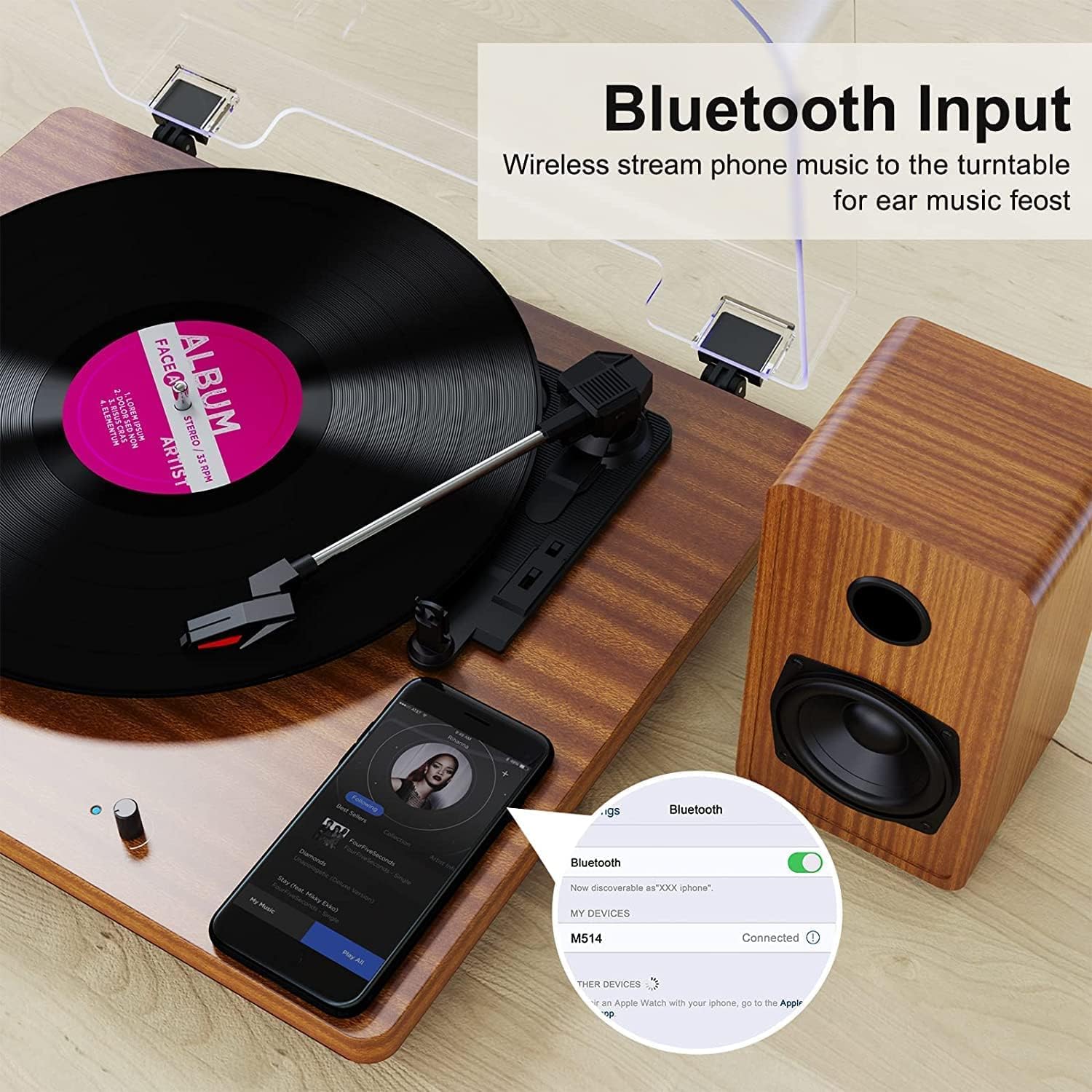
Figure 1: DIGITNOW M513 Record Player with external speakers and Bluetooth connectivity.
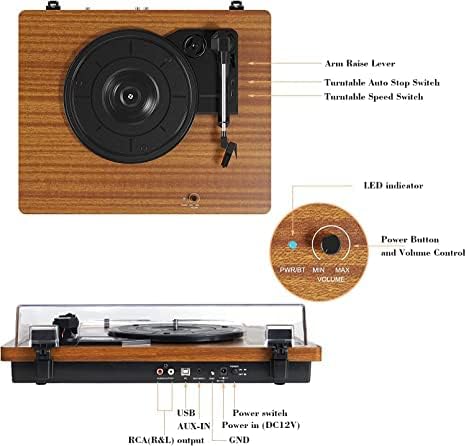
Figure 2: Top and rear panel controls including arm raise lever, auto stop switch, speed switch, power button, volume control, USB, AUX-IN, RCA(R&L) output, power input, and ground.
Гол бүрэлдэхүүн хэсгүүд:
- Эргэдэг таваг: Where vinyl records are placed.
- Тоник зэвсэг: Үзгийг барьж, пянзны ховилыг хянадаг.
- Зүү (Зүү): Бичлэгээс аудио мэдээллийг уншдаг.
- External Stereo Speakers: Аудио гаралтыг хангах.
- Тоосны бүрхэвч: Эргэлтийн тавцанг тоосноос хамгаална.
- Хяналтын самбар: Includes power, volume, speed selection, and input/output ports.
Тохиргоо
- Савлах: Carefully remove all components from the packaging. Ensure all accessories (dust cover, 45 RPM adapter, RCA output cables, ground wire, USB cable, user manual) are present.
- Байршил: Place the record player on a stable, level surface away from direct sunlight, heat sources, and excessive vibration. Position the external speakers for optimal sound distribution.
- Чанга яригчийг холбох: Connect the provided external stereo speakers to the RCA output ports on the rear of the record player using the RCA cables. Ensure correct left (L) and right (R) connections.
- Эрчим хүчний холболт: Connect the DC 12V power adapter to the power input port on the rear of the unit, then plug the adapter into a wall outlet.
- Тоосны бүрхүүл суурилуулах: Тоосны тагийг эргэдэг тавиурын ар талд байрлах нугаснуудад бэхлэнэ.
Ашиглалтын заавар
Бичлэг тоглуулах
- Асаах: Turn the Power/Volume knob clockwise to power on the unit. The LED indicator will illuminate.
- Хурд сонгох: Choose the appropriate speed (33, 45, or 78 RPM) using the speed switch located on the top panel. Use the 45 RPM adapter for 7-inch records with large center holes.
- Байрны бичлэг: Винил пянзыг эргэдэг таваг дээр болгоомжтой тавь.
- Гараа өргөх: Use the arm raise lever to gently lift the tonearm.
- Гарны байрлал: Тонер гарыг бичлэгийн хүссэн эхлэлийн зам дээр хөдөлгөнө үү.
- Доод гар: Slowly lower the tonearm using the arm raise lever. The stylus will make contact with the record, and playback will begin.
- Дууны хэмжээг тохируулах: Power/Volume товчлуурыг ашиглан дууны хэмжээг тохируулна уу.
- Автомат зогсоох: The record player features an auto-stop function. When enabled via the Auto Stop switch, the platter will stop spinning automatically when the record finishes. If disabled, the platter will continue to spin.
- Тоглуулахыг дуусгах: At the end of the record, or when you wish to stop, use the arm raise lever to lift the tonearm, return it to the tonearm rest, and then lower the lever. Turn the Power/Volume knob counter-clockwise to power off the unit.

Зураг 3: Нарийвчилсан view of the stylus, belt-driven design for smooth music, and 33/45/78 RPM speed options for various record sizes.
Bluetooth холболт
The record player can receive audio wirelessly from your Bluetooth-enabled devices.
- Bluetooth горимыг идэвхжүүлэх: Ensure the record player is powered on. The unit will automatically enter Bluetooth receiving mode if no record is playing or AUX input is not connected. The LED indicator may change color or blink to indicate Bluetooth mode.
- Төхөөрөмж дээрх Bluetooth-г идэвхжүүлэх: Ухаалаг утас эсвэл бусад Bluetooth төхөөрөмж дээрээ Bluetooth-г идэвхжүүлж, боломжтой төхөөрөмжүүдийг хайж олоорой.
- Төхөөрөмжийг холбох: Select "DIGITNOW" or a similar name from the list of available devices to pair. Once connected, you will hear a confirmation sound.
- Аудио тоглуулах: Play music from your device, and it will stream through the record player's speakers.
Video 1: Demonstrates the setup and Bluetooth connection process for the DIGITNOW M513 Record Player, including placing a record and pairing with a smartphone.
Винилээс MP3 хүртэл бичлэг хийх
Convert your vinyl records to digital MP3 files via a USB connection to your computer.
- Компьютерт холбогдох: Use the provided USB cable to connect the record player's USB port (PC OUT) to a USB port on your Mac or PC.
- Програм хангамж суулгах: Refer to the detailed instructions in the included user manual for information on compatible recording software and installation.
- Бичлэг хийж эхлэх: Follow the software's instructions to begin recording audio from your vinyl record to your computer.

Figure 4: Connection diagram illustrating USB for PC recording, AUX-IN for external audio sources like CD players, and RCA OUT for external speakers.
External Audio Connections
- AUX оролт: Connect external audio sources (e.g., CD player, smartphone, digital media player) to the AUX-IN port on the rear panel using a 3.5mm audio cable. The record player will play audio from the connected device through its speakers.
- RCA гаралт: For enhanced or louder sound, connect the RCA(R&L) output ports to an external amplifier or powered speakers using RCA cables.
Засвар үйлчилгээ
- Зүүг цэвэрлэх: Gently clean the stylus regularly with a soft brush designed for stylus cleaning, brushing from back to front. Avoid touching the stylus with your fingers.
- Төхөөрөмжийг цэвэрлэх: Wipe the record player and dust cover with a soft, dry cloth. Do not use abrasive cleaners or solvents.
- Belt Maintenance: The belt-drive system is designed for durability. If the platter does not spin or spins inconsistently, the drive belt may have slipped during shipping or use. Refer to the full user manual for instructions on how to re-seat or replace the drive belt.
- Бүртгэлийн тусламж үйлчилгээ: Keep your records clean and free of dust to ensure optimal sound quality and prolong stylus life. Store records vertically in their sleeves.
Алдааг олж засварлах
| Асуудал | Боломжит шалтгаан | Шийдэл |
|---|---|---|
| Хүч чадалгүй | Цахилгаан адаптер холбогдоогүй эсвэл залгуур ажиллахгүй байна. | Ensure power adapter is securely plugged into the unit and a working wall outlet. Check the power switch. |
| Дуу алга | Volume too low; speakers not connected; incorrect input mode. | Increase volume. Verify speaker connections. Ensure correct input mode (Phono, Bluetooth, AUX). |
| Алгасах эсвэл гуйвуулсан дуу | Dirty or damaged record; worn or dirty stylus; unit not level. | Clean record. Clean or replace stylus. Place unit on a level surface. |
| Бичлэг хэт хурдан/удаан тоглодог | Буруу хурдны тохиргоо. | Adjust the speed switch to 33, 45, or 78 RPM as appropriate for the record. |
| Чимээний чимээ | Ground wire not connected; interference from other electronics. | Ensure the ground wire is properly connected (if applicable). Move the unit away from other electronic devices. |
Үзүүлэлтүүд
- Загвар: M513
- Брэнд: DIGITNOW
- Бүтээгдэхүүний хэмжээ: 15 x 12.87 x 6.22 инч
- Барааны жин: 11.77 фунт
- Хурд: 33 1/3, 45, 78 RPM
- Драйвын төрөл: Туузан хөтөч
- Моторын төрөл: DC мотор
- Холболт: Bluetooth, AUX-IN, RCA Output, USB (for Vinyl-to-MP3 recording)
- Оруулсан бүрэлдэхүүн хэсгүүд: Dust cover, 45 RPM adapter, RCA output cables, ground wire, USB cable, user manual
- Материал: Хуванцар, мод
- Онцлог шинж чанарууд: Bluetooth Function, RCA Output, Vinyl-to-MP3 Recording, Auto Stop
Баталгаат болон дэмжлэг
For warranty information, technical support, or service inquiries, please refer to the contact details provided in the original product packaging or visit the official DIGITNOW webсайт. Худалдан авалтын баримтаа баталгаат нэхэмжлэлд зориулж худалдан авалтын баталгаа болгон хадгална уу.