
Танилцуулга
Thank you for choosing the Hbada Ergonomic Gaming Chair. This manual provides essential information for the safe and efficient assembly, operation, and maintenance of your new chair. Please read these instructions carefully before use and retain them for future reference.

Image: The Hbada Ergonomic Gaming Chair in a modern gaming environment, showcasing its design and presence.
Аюулгүй байдлын мэдээлэл
- Угсрахаас өмнө бүх бүрэлдэхүүн хэсгүүд байгаа эсэхийг шалгаарай. Аль нэг хэсэг нь дутуу, эвдэрсэн тохиолдолд бүү хэрэглээрэй.
- Follow the assembly instructions precisely. Incorrect assembly can lead to instability and injury.
- Сандал дээр бүү зогс. Зөвхөн суухдаа ашиглаарай.
- Хамгийн их жингийн багтаамжаас хэтрүүлж болохгүй (техникийн үзүүлэлтийг үзнэ үү).
- Угсрах явцад хүүхэд, гэрийн тэжээвэр амьтдыг сандал дээрээс хол байлга.
- Материалын задралаас урьдчилан сэргийлэхийн тулд сандлыг нарны шууд тусгал эсвэл хэт өндөр температурт өртөхөөс зайлсхий.
Бүтээгдэхүүний хэмжээс
Understanding the dimensions of your chair is important for proper placement and comfortable use. Below are the key measurements:
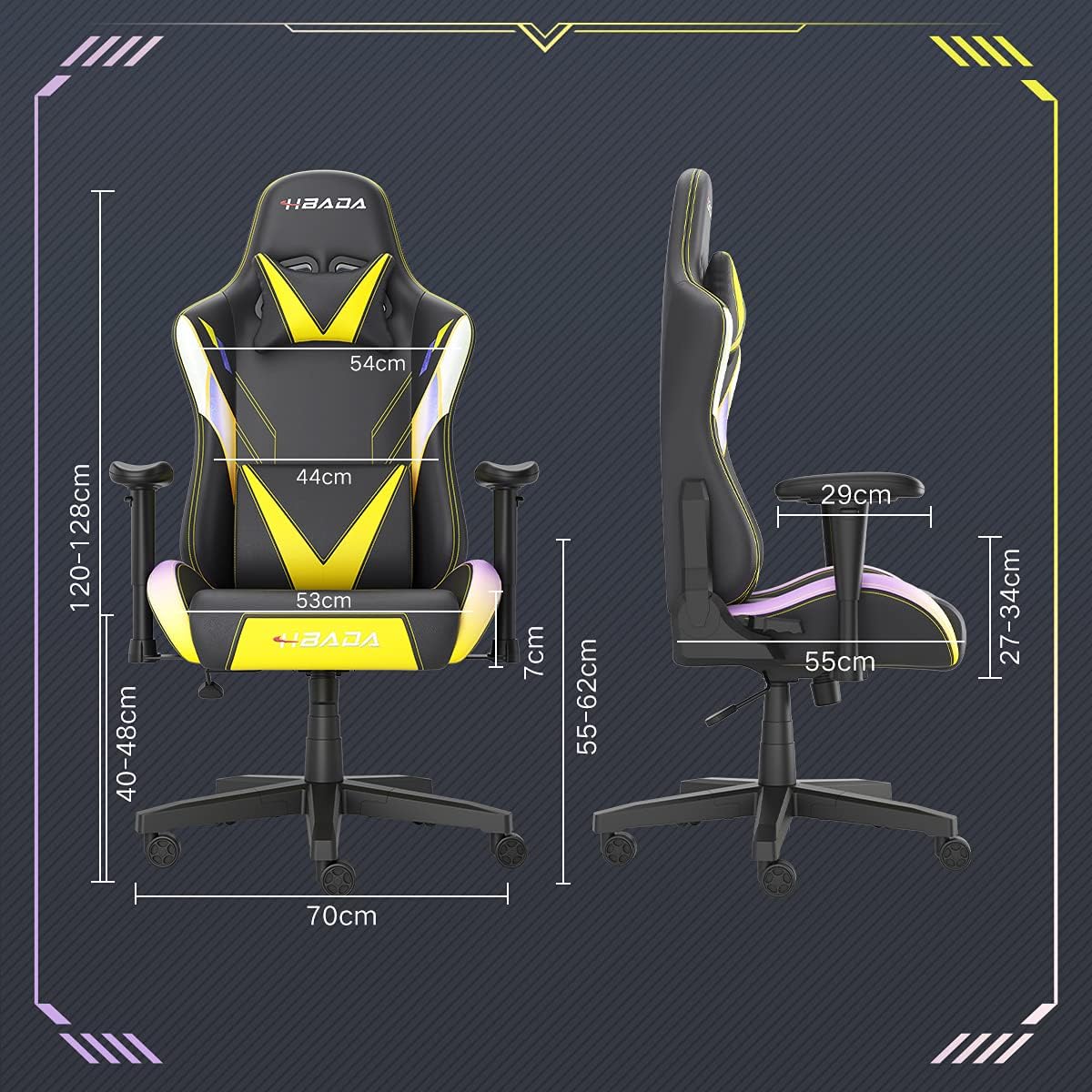
Image: A detailed diagram illustrating the various dimensions of the Hbada Gaming Chair, including height, width, and depth measurements.
- Нийт өндөр: 120-128 cm (adjustable)
- Суудлын өндөр: 40-48 cm (adjustable)
- Суудлын өргөн: 53 см
- Суудлын гүн: 55 см
- Арын түшлэгийн өргөн: 54 cm (shoulder area), 44 cm (lumbar area)
- Сулгуурын өндөр (суудлаас): 7 cm (adjustable)
- Суурийн диаметр: 70 см
Тохиргоо ба угсралт
Please follow these steps carefully to assemble your Hbada Gaming Chair. It is recommended to have a clear, spacious area for assembly.
Угсрах алхамууд:
- Step 1: Assemble the Base and Wheels
Insert the five casters into the holes on the star base. Then, place the gas lift cylinder into the center hole of the base.

Image: Illustration of attaching the five casters to the chair's star-shaped base and inserting the gas lift cylinder.
- Step 2: Attach the Seat and Backrest
Connect the backrest to the seat using the provided screws and mounting plates. Ensure all screws are tightened securely.

Image: Diagram showing the process of securing the backrest to the seat cushion using screws and brackets.
- Алхам 3: Сулгыг суулгана уу
Attach the armrests to the sides of the seat using the designated screws. Make sure they are firmly attached.

Image: Visual guide for attaching the armrests to the chair's seat base.
- Step 4: Connect Seat to Base
Carefully place the assembled seat onto the gas lift cylinder, ensuring it is properly seated and stable.

Image: Depiction of lowering the assembled seat onto the gas lift cylinder, connecting the upper and lower parts of the chair.
- Step 5: Attach Headrest and Lumbar Pillow
Secure the detachable headrest and lumbar support pillow to the chair as desired for optimal comfort.

Image: Instructions for attaching the headrest and lumbar support pillows to the gaming chair.
Ашиглалтын заавар
Your Hbada Gaming Chair is designed with several adjustable features to provide personalized comfort and support.
Key Adjustable Functions:
- Adjustable Sitting Height: Use the lever located under the seat on the right side to raise or lower the chair. Pull the lever up to adjust the height, then release it at your desired position. The seat has an 8 cm elevation range.
- Reclining Backrest (90° to 155°): The backrest can be reclined from 90 degrees (upright) to 155 degrees (nearly flat). Use the recline lever on the side of the chair to adjust the angle. Lean back to your preferred position and lock the lever.
- Тохируулах гарын түшлэг: The armrests can be adjusted in height by 7 cm. Locate the button or lever on the side of each armrest to unlock, adjust, and then lock them into your desired height.
- 360° Free Swivel: The chair features a full 360-degree swivel function, allowing for easy movement and access to your surroundings without needing to move the entire chair.
- Detachable Headrest and Lumbar Support: The chair includes a removable headrest pillow and lumbar support cushion for enhanced ergonomic comfort. Adjust their positions or remove them based on your preference.

Зураг: Бүтэнview of the chair's ergonomic systems, highlighting adjustable sitting height, armrests, 155° reclining, 360° swivel, cool racing casters, and durable base.

Image: The Hbada Gaming Chair demonstrated in its 155-degree reclined position, illustrating the recline controller.
Засвар үйлчилгээ
Regular maintenance will help prolong the life and appearance of your Hbada Gaming Chair.
- PU арьсыг цэвэрлэх: PU арьсан гадаргууг зөөлөн, d-ээр арчинаamp даавуу. Зөрүүд толботой үед зөөлөн савангийн уусмал хэрэглэж, дараа нь цэвэрхэн даавуугаар арчина.amp даавуу. Хүчтэй химийн бодис эсвэл зүлгүүрийн цэвэрлэгчээс зайлсхий, учир нь эдгээр нь материалыг гэмтээж болзошгүй.
- Кастерийн тусламж үйлчилгээ: Periodically check the casters for accumulated dust or hair. Clean them with a brush or vacuum cleaner to ensure smooth movement and prevent damage to your flooring.
- Хүрээ ба эд ангиуд: Бүх шураг, боолтыг нягт байлгахын тулд тогтмол шалгаж үзээрэй. Тогтвортой байдлыг хадгалахын тулд шаардлагатай бол дахин чангална.
- Нарны шууд тусгалаас зайлсхийх: Prolonged exposure to direct sunlight can cause the PU leather to fade and crack. Position your chair away from direct sunlight when possible.
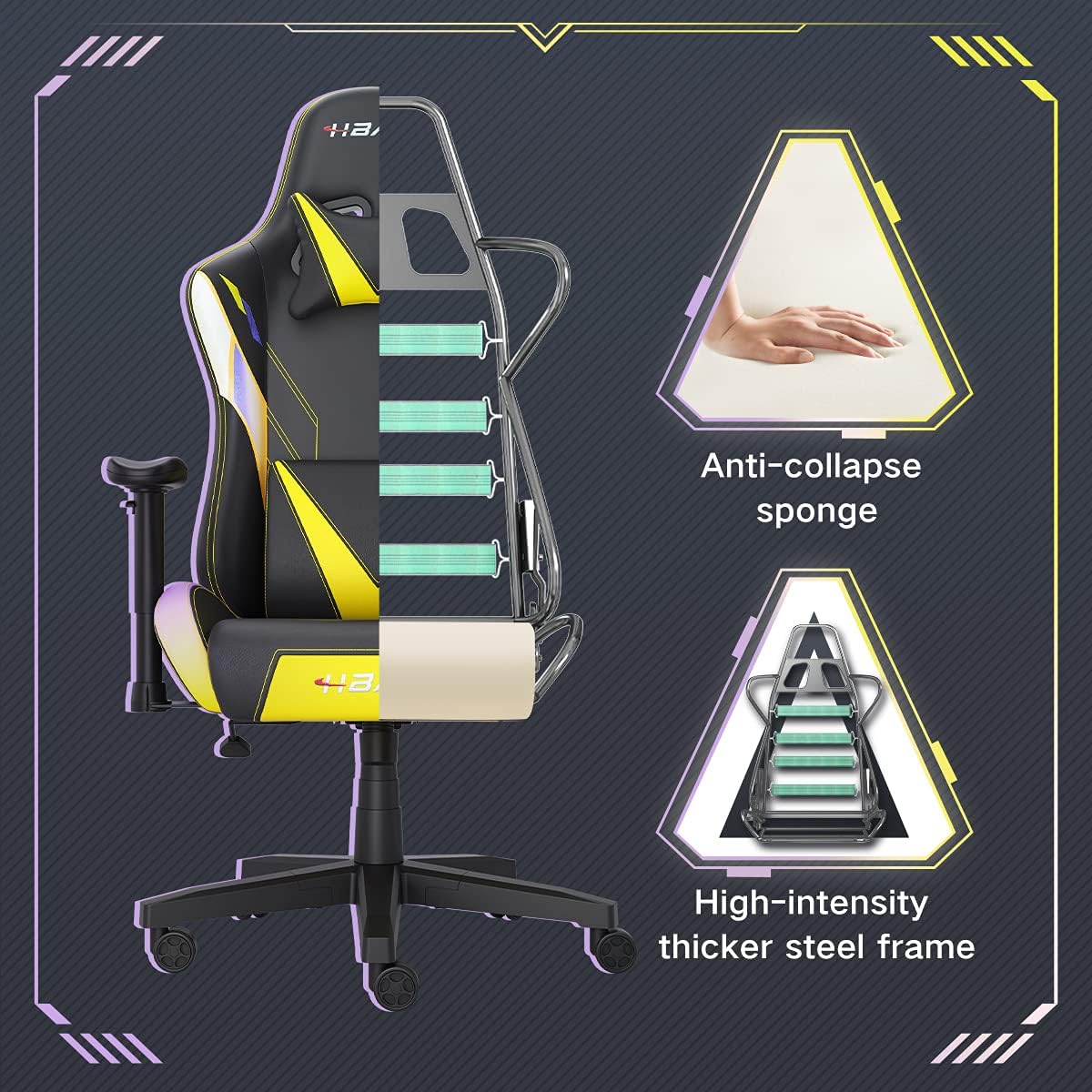
Зураг: зүсэлт view of the chair's internal structure, highlighting the anti-collapse sponge padding and the high-intensity thicker steel frame, indicating durable construction.
Алдааг олж засварлах
If you encounter any issues with your Hbada Gaming Chair, refer to the following common problems and solutions:
| Асуудал | Боломжит шалтгаан | Шийдэл |
|---|---|---|
| Сандал өндрөө тохируулдаггүй | Хийн өргөгч эвдэрсэн эсвэл хөшүүрэг ажиллахгүй байна. | Өндөр тохируулах хөшүүрэг бүрэн холбогдсон эсэхийг шалгаарай. Хэрэв асуудал арилахгүй бол хийн өргөгчийг солих шаардлагатай байж магадгүй. Хэрэглэгчийн дэмжлэгтэй холбогдоно уу. |
| Chair is wobbly or unstable | Суларсан эрэг эсвэл буруу угсралт. | Check all assembly screws and bolts, and tighten them securely. Refer to the assembly instructions. |
| Дугуйнууд жигд өнхрдөггүй | Дугуйнд баригдсан хог хаягдал (үс, тоос). | Сандалыг эргүүлж, дугуйны дугуйнаас хог хаягдлыг зайлуул. |
| Нурууны түшлэг нь налуу биш эсвэл түгжигддэггүй | Хэвтээ механизм гацсан эсвэл хөшүүрэг ажиллахгүй байна. | Ensure the recline lever is fully engaged. Check for any obstructions around the mechanism. |
Үзүүлэлтүүд
| Онцлог | Дэлгэрэнгүй |
|---|---|
| Брэнд | Хбада |
| Загварын дугаар | W203YMA/EU |
| ASIN | B095PSFLKX |
| Өнгө | Шар |
| Материал | PU Leather, Metal Frame |
| Бүтээгдэхүүний хэмжээс | 70 x 70 x 128 см (Урт x Өргөн x Өндөр) |
| Бүтээгдэхүүний жин | 22 кг |
| Онцлог шинж чанарууд | Ergonomic, Swivel, Casters, Headrest Support, Adjustable Recline (90°-155°), Adjustable Seat Height (8cm range), Adjustable Armrests (7cm range) |
| Нэгжийн тоо | 1.0 тоо |
Баталгаат болон дэмжлэг
Your Hbada Gaming Chair comes with a нэг жилийн баталгаат хугацаа худалдан авсан өдрөөс. Энэхүү баталгаа нь ердийн ашиглалтын үеийн үйлдвэрлэлийн согог болон материалын согогийг хамарна.
If you experience any issues during use, including problems with installation, damage, or missing parts, please do not hesitate to contact Hbada customer service. We are committed to providing reliable service and can offer free exchanges for covered issues.
For support, please visit the official Hbada webсайт эсвэл худалдагчтайгаа холбогдоно уу.