
CDIYTOOL 4yhujuyj
CDIYTOOL 100A MPPT Solar Charge Controller User Manual
Model: 4yhujuyj
Танилцуулга
This manual provides essential information for the safe and efficient operation of your CDIYTOOL 100A MPPT Solar Charge Controller. This controller is designed for 36V, 48V, and 60V battery systems and features an LCD display, multiple load control modes, and dual USB outputs. Please read this manual thoroughly before installation and use.
The controller automatically adapts to 36V/48V/60V systems and is not suitable for 12V/24V systems. It utilizes innovative MPPT technology for high tracking efficiency, detecting the maximum charging current.
Аюулгүй ажиллагааны зааварчилгаа
Always adhere to the following safety guidelines to prevent injury and damage to the controller or other components.
- Ensure the battery has sufficient voltage for the controller to recognize the correct battery type upon first use.
- Connect the battery to the controller first, then connect the solar panels. Reversing this order can damage the controller.
- Оролтын хамгийн их хэмжээtage is 50V. Ensure your solar panel configuration does not exceed this limit. For example, a 19V photovoltaic panel matches a 12V battery, and a 38V photovoltaic panel matches a 24V battery. When a 38V panel is connected, the maximum voltage may reach 42V.
- The controller is suitable for various battery types (including open, lead-acid, gel, and lithium batteries). Refer to the controller's settings for specific battery types.
- The controller provides protection against overvoltage, short circuit, overload, overcharge, and over-discharge.
- Хянагчийг өөрөө задлах эсвэл засах гэж бүү оролдоорой. Үйлчилгээ авахын тулд мэргэшсэн ажилтантай холбогдоно уу.

Image: Excerpt from the user manual detailing safety instructions and a connection diagram.
Бүтээгдэхүүний онцлог
- Олон үйлдэлт LCD дэлгэц: Provides real-time display of charging current, discharge current, and power generation.
- MPPT технологи: Innovative Maximum Power Point Tracking with high efficiency (up to 99%) for optimal solar energy harvesting.
- Найдвартай хамгаалалт: Overvol орноtage, short circuit, overload, overcharge, and over-discharge protection.
- Automatic Focusing MPPT Tracking: Ensures high charging efficiency and bidirectional focusing tracking.
- Температурын нөхөн олговор: Цэнэглэх хэмжээг автоматаар тохируулнаtage based on ambient temperature changes.
- Хос USB гаралт: Provides 5V/2A output for charging mobile devices.

Зураг: Урд view of the CDIYTOOL 100A MPPT Solar Charge Controller, highlighting the LCD display and dual USB ports.
Тохиргоо ба суурилуулалт
Follow these steps for proper installation of the solar charge controller:
- Утас бэлтгэх: Ensure all wires are correctly sized for the expected current and are properly insulated.
- Батерейг холбох: Connect the battery to the charge controller first. Ensure correct polarity (+ to + and - to -). The controller requires sufficient battery voltage to recognize the system type.
- Нарны хавтанг холбох: Connect the solar panel(s) to the charge controller. Ensure correct polarity. Do not exceed the maximum input voltage 50V.
- Connect Load (Optional): Connect your DC load to the load terminals of the controller. The controller can manage load output based on settings.
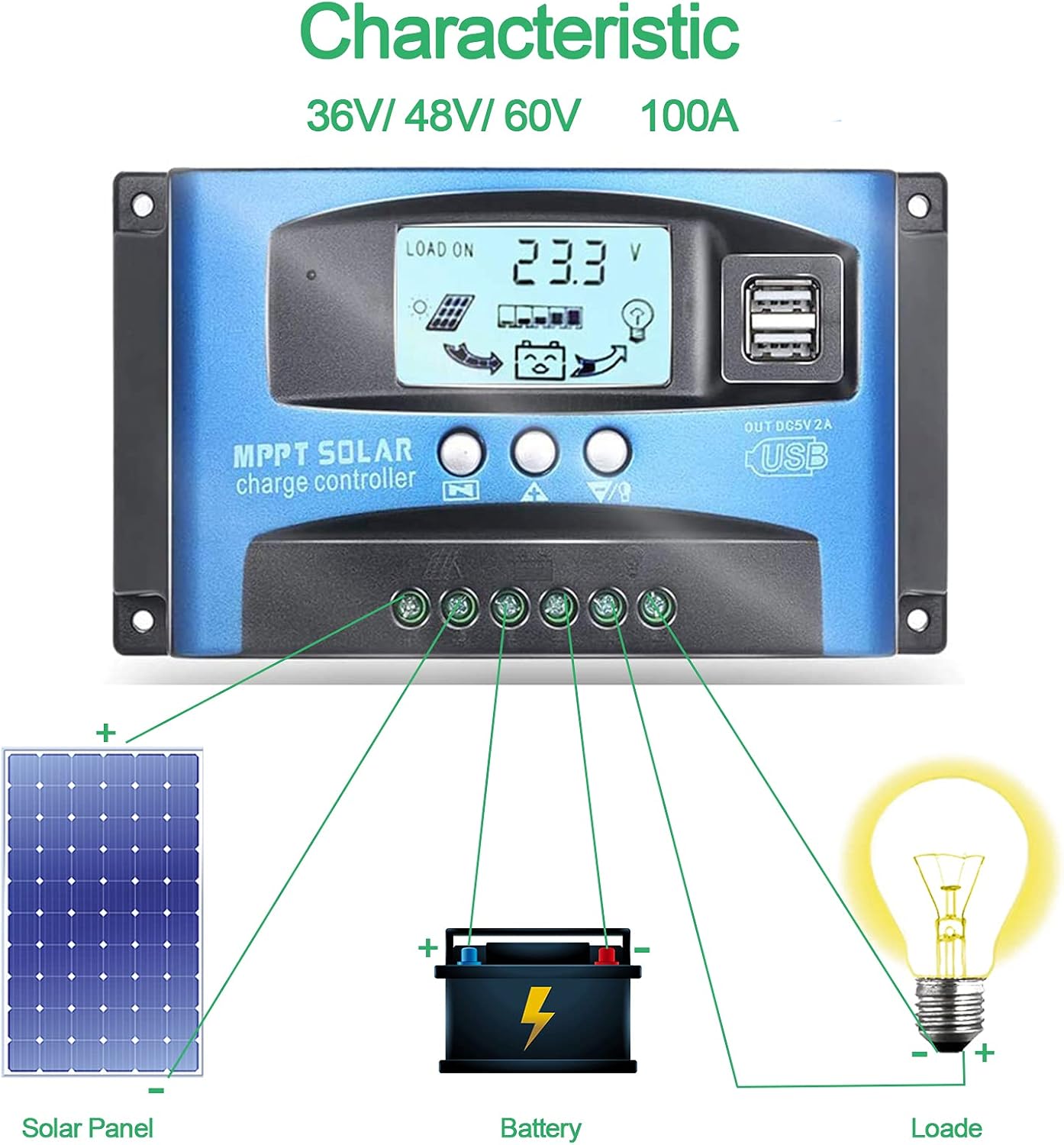
Image: Connection diagram illustrating how to connect solar panels, battery, and load to the charge controller.

Зураг: Нарийвчилсан view of the controller with labels for its components, including buttons, LCD, USB ports, and connection points.
Ашиглалтын заавар
The controller features an LCD display and three buttons for operation: Menu, Page Up, and Page Down/Manual.
LCD дэлгэц
The LCD displays various parameters including battery voltage, charging current, discharge current, and system status. The icons on the display indicate solar panel activity, battery charge level, and load status.
Товчлуурын функцууд
- Цэсийн товчлуур: Press to enter the menu interface and cycle through different settings. Long press to modify parameters.
- Page Up товч: Used to increase values or navigate upwards in menus.
- Page Down/Manual Button: Used to decrease values or navigate downwards in menus. Also functions as a manual load control switch (on/off) when on the main interface.
USB цэнэглэх
The controller is equipped with dual USB ports providing 5V/2A output for charging compatible devices such as mobile phones and tablets.

Image: Demonstration of the controller's dual USB ports being used to charge a mobile phone.
Засвар үйлчилгээ
Тогтмол засвар үйлчилгээ нь таны нарны цэнэгийн зохицуулагчийн урт наслалт, оновчтой ажиллагааг баталгаажуулдаг.
- Холболтуудыг шалгах: Бүх утасны холболтын нягтрал болон зэврэлтийг үе үе шалгаж байгаарай. Сул холболтууд нь цахилгаан тасрах эсвэл хэт халахад хүргэж болзошгүй.
- Цэвэр хянагч: Хянагчийг цэвэр, тоос шороо, хог хаягдлаас цэвэр байлга. Гадаргууг хуурай даавуугаар арчина. Шингэн цэвэрлэгч бүү хэрэглэ.
- Гүйцэтгэлийг хянах: Regularly check the LCD display for normal operation and expected voltage/одоогийн уншилт.
- Батерейны эрүүл мэнд: Ensure your battery is well-maintained and within its recommended operating parameters.
Алдааг олж засварлах
Энэ хэсэг нь танд тулгарч болох нийтлэг асуудлуудын шийдлүүдийг өгдөг.
| Нөхцөл байдал | Болзошгүй шалтгаан | Шийдэл |
|---|---|---|
| Дэлгэц дээр харагдахгүй байна | Батерей холбогдоогүй эсвэл бага эзэлхүүнtage | Connect battery, check battery voltage |
| No charge when sunny | Solar panel reversed or open circuit | Reconnect solar panel, check wiring |
| Ачаалах ажиллахгүй байна | Load short circuit, overload, or over-discharge protection | Check load wiring, reduce load, or charge battery |
| Хянагч цэнэглэхгүй байна | Нарны хавтан ботьtage too low or battery full | Ensure sufficient solar input, check battery status |
The controller includes built-in protections for reverse polarity, overvoltage, short circuit, overload, overcharge, and over-discharge. If an issue persists after troubleshooting, contact customer support.
Үзүүлэлтүүд
| Параметр | Үнэ цэнэ |
|---|---|
| Загвар | 4yhujuyj |
| Брэнд | CDIYTOOL |
| Нэрлэсэн гүйдэл | 100 А |
| Системийн ботьtage | 36V/48V/60V Auto Adapt (Not for 12V/24V) |
| Хамгийн их нарны оролтын хэмжээtage | 50 В |
| USB гаралт | Dual 5V/2A |
| Дэлгэцийн төрөл | LCD |
| Зүйлийн жин | 14.4 унц |
| Багцын хэмжээ | 6.81 x 3.98 x 2.01 инч |

Image: Diagram showing the physical dimensions of the solar charge controller.
Нэмэлт нөөц ба дэмжлэг
For further assistance or to access the mobile application for monitoring, please refer to the following:
Гар утасны програм
The BL-912V APP can be installed on your Android phone to monitor and control the solar charge controller. Scan the QR code below or visit the provided link to download and install the application.
Татаж авах холбоос: http://fir.sdhzwl.cn/5w4b
The mobile phone app allows for remote monitoring of charging and discharging data, daily power generation, and other functions.
Image: Section of the user manual detailing the BL-912V APP installation process, including a QR code.
Баталгаат болон хэрэглэгчийн үйлчилгээ
For warranty information or technical support, please contact CDIYTOOL customer service through the platform where you purchased the product. Keep your purchase receipt for warranty claims.
Ердийн програмууд
The CDIYTOOL MPPT Solar Charge Controller is suitable for a variety of off-grid solar power applications, including:
- Residential solar power systems
- RV and marine solar setups
- Solar street lighting
- Remote monitoring stations
- Хөдөө аж ахуйн усжуулалтын систем

Зураг: Жишээ ньamples of typical applications for the solar charge controller in various settings.
Ask a question about this manual
Ask about setup, troubleshooting, compatibility, parts, safety, or missing instructions. Manuals+ will review the question and use this page’s manual context to help answer it.