
1. Танилцуулга
This manual provides essential instructions for the installation, operation, and maintenance of your Hikvision 8MP AcuSense WDR Mini Bullet Network Camera, model DS-2CD2083G2-IU. Please read this manual thoroughly before using the product and retain it for future reference.
Бүтээгдэхүүн дууссанview
The Hikvision DS-2CD2083G2-IU is a high-performance 8-megapixel (4K) network camera designed for advanced surveillance. It features AcuSense technology for accurate human and vehicle target classification, Wide Dynamic Range (WDR) for clear imaging against strong backlight, and a fixed 2.8mm lens for a wide field of view. Its IP67 rating ensures robust outdoor performance, and the integrated microphone allows for audio monitoring.
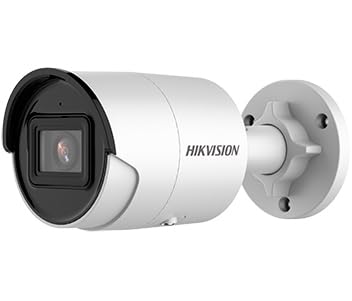
Figure 1: Hikvision 8MP AcuSense WDR Mini Bullet Network Camera (DS-2CD2083G2-IU)
This image displays the Hikvision 8MP AcuSense WDR Mini Bullet Network Camera, highlighting its compact bullet-style design suitable for various installation environments.
Гол онцлогууд
- 8 Megapixel (4K) Resolution: Delivers high-quality, detailed video.
- AcuSense технологи: Reduces false alarms by accurately classifying human and vehicle targets.
- Өргөн динамик хүрээ (WDR): Ensures clear images even in scenes with strong contrast.
- Fixed 2.8mm Lens: өргөнөөр хангадаг viewөнцөг.
- Хэт улаан туяаны (IR) гэрэлтүүлэг: Night vision up to 40 meters.
- IP67 Цаг агаарын хамгаалалтын үнэлгээ: Янз бүрийн цаг агаарын нөхцөлд гадаа ашиглахад тохиромжтой.
- Суурилагдсан микрофон: Enables audio monitoring.
- Integrated Card Reader: Supports local storage (microSD card not included).
2. Аюулгүй байдлын мэдээлэл
Бүтээгдэхүүнийг гэмтээх, гэмтээхгүйн тулд дараах аюулгүй байдлын арга хэмжээг дагаж мөрдөнө үү.
- Ensure the power supply meets the camera's requirements (6.5 Watts).
- Камерыг хэт өндөр температур, чийгшил эсвэл идэмхий орчинд бүү байлга.
- Avoid pointing the lens directly at strong light sources, as this may damage the sensor.
- Суурилуулалтыг орон нутгийн цахилгааны дүрмийн дагуу мэргэшсэн ажилтан гүйцэтгэнэ.
- Зөвхөн үйлдвэрлэгчийн заасан дагалдах хэрэгслийг ашигла.
- Clean the camera lens with a soft, dry cloth. Avoid harsh chemicals.
3. Тохиргоо ба суурилуулалт
3.1 Савлах
Carefully unpack the camera and check for any signs of damage. Ensure all components are present. (Typical components include: camera unit, mounting template, screws, waterproof connector, quick start guide).
3.2 Физик суурилуулалт
The camera is designed for ceiling mounting. Select a suitable location that provides the desired field of view and is within reach of network and power cables. Due to its IP67 rating, it is suitable for outdoor environments.
- Use the provided mounting template to mark drill holes on the ceiling.
- Drill the necessary holes and insert wall plugs if required.
- Secure the camera base to the mounting surface using the supplied screws.
- Хамрах хүрээг оновчтой болгохын тулд камерын өнцгийг тохируулна уу.
3.3 Сүлжээ ба тэжээлийн холболт
This is an IP network camera. It requires a network connection and power. Power over Ethernet (PoE) is typically supported, simplifying installation by delivering both power and data over a single Ethernet cable. If PoE is not used, a separate 12V DC power adapter (not included) will be required.
- Connect an Ethernet cable from your network switch/router to the camera's RJ45 port. Use the waterproof connector for outdoor installations.
- If not using PoE, connect a 12V DC power adapter to the camera's power input.
- Once connected, the camera will power on. Allow a few minutes for it to boot up.
3.4 Анхны тохиргоо
Камер руу нэвтрэх web интерфейсээр дамжуулан a web browser using its default IP address (refer to the quick start guide or use Hikvision's SADP tool to discover the IP address). You will be prompted to set a strong password for security. Follow the on-screen instructions to configure network settings, date/time, and other basic parameters.
4. Ашиглалтын заавар
4.1 Амьд View болон Бичлэг
Анхны тохиргооны дараа та дараахыг хийж болно view the live feed from the camera through its web interface, a Network Video Recorder (NVR), or Hikvision's client software (e.g., iVMS-4200) or mobile app (Hik-Connect). Configure recording schedules and methods (continuous, motion-triggered) via the camera's settings or NVR.
4.2 AcuSense Smart Features
The AcuSense technology allows the camera to distinguish between humans, vehicles, and other moving objects, significantly reducing false alarms caused by animals, rain, or falling leaves. Configure these detection rules in the camera's event settings to receive more accurate alerts.
- Хөдөлгөөн илрүүлэх 2.0: Set up detection zones and sensitivity for human and vehicle events.
- Халдуулалтыг илрүүлэх: Define virtual boundaries, and the camera will trigger an alarm if a human or vehicle crosses them.
- Шугамын огтлолцол илрүүлэлт: Similar to intrusion, but for a specific line.
4.3 Өргөн Динамик Хүрээ (WDR)
WDR compensates for extreme lighting conditions, such as strong backlight, to ensure that both bright and dark areas of the image are clearly visible. This feature is typically enabled by default but can be adjusted in the image settings.
4.4 Infrared (IR) Night Vision
The camera automatically switches to IR mode in low-light conditions, providing clear black-and-white video up to 40 meters. Ensure no obstructions block the IR LEDs for optimal night vision performance.
4.5 Аудио хяналт
With its built-in microphone, the camera can capture audio from the surveillance area. Audio settings, including gain control, can be configured in the camera's web interface. Ensure local regulations regarding audio recording are followed.
5. Засвар үйлчилгээ
- Цэвэрлэгээ: Камерын линз болон гэрийг зөөлөн, d аргаар тогтмол цэвэрлэж байгаарайamp даавуу. Зүлгүүрийн цэвэрлэгч хэрэглэж болохгүй.
- Програм хангамжийн шинэчлэлтүүд: Hikvision албан тушаалтныг үе үе шалгаж байгаарай website for firmware updates. Keeping the firmware updated ensures optimal performance, new features, and security enhancements.
- Кабелийн үзлэг: For outdoor installations, periodically inspect cables and connections for wear or damage, especially the waterproof connectors.
- Нууц үгийн удирдлага: Regularly change your camera's password to maintain security.
6. Алдаа засах
| Асуудал | Боломжит шалтгаан | Шийдэл |
|---|---|---|
| No image/camera offline | No power, network cable disconnected, incorrect IP address. | Check power supply and network cable. Verify IP address using SADP tool. Restart camera. |
| Зургийн чанар муу байна | Dirty lens, incorrect focus (if adjustable), poor lighting, network bandwidth issues. | Clean the lens. Ensure adequate lighting. Check network connection speed. Adjust image settings (WDR, exposure). |
| Хөдөлгөөн илрүүлэлтээс үүссэн хуурамч дохиолол | Sensitivity too high, environmental factors (trees, animals), AcuSense not configured. | Adjust motion detection sensitivity. Configure AcuSense human/vehicle detection. Adjust detection zones. |
| Нэвтрэх боломжгүй web интерфейс | Incorrect IP address, network connectivity issue, browser compatibility. | Verify IP address. Ensure camera and PC are on the same network segment. Try a different browser. |
If the problem persists after attempting these solutions, please contact Hikvision technical support.
7. Техникийн үзүүлэлтүүд
| Онцлог | Дэлгэрэнгүй |
|---|---|
| Загварын дугаар | DS-2CD2083G2-IU |
| Зургийн мэдрэгч | CMOS |
| Макс. Шийдвэр | 8 MP (4K) |
| Линз | 2.8mm тогтмол линз |
| IR муж | 40 метр хүртэл |
| WDR | Дэмжигдсэн |
| AcuSense | Human and Vehicle Target Classification |
| Аудио | Суурилагдсан микрофон |
| Орон нутгийн хадгалах сан | Integrated Card Reader (MicroSD slot) |
| Цаг агаарын хамгаалалттай үнэлгээ | IP67 |
| Эрчим хүчний хэрэглээ | 6.5 ватт |
| Хэмжээ (L x W x H) | 15 x 15 x 8 см (ойролцоогоор) |
| Суурилуулах төрөл | Таазны бэхэлгээ |
| Сэрэмжлүүлгийн төрөл | Motion Only (configurable for human/vehicle) |
8. Баталгаат хугацаа ба дэмжлэг
Hikvision бүтээгдэхүүнүүд нь ихэвчлэн үйлдвэрлэгчийн хязгаарлагдмал баталгаатай ирдэг. Бүтээгдэхүүнтэйгээ хамт ирдэг баталгаат картыг үзэх эсвэл Hikvision-ий албан ёсны вэбсайтад зочилно уу. webТанай бүс нутагт хамаарах баталгаат нөхцлийн дэлгэрэнгүй мэдээллийг сайтаас авна уу.
For technical support, firmware downloads, or further assistance, please visit the official Hikvision support portal or contact their customer service department. Ensure you have your product model number (DS-2CD2083G2-IU) and serial number ready when contacting support.
Албан ёсны Hikvision Webсайт: www.hikvision.com