
1. Танилцуулга
The Sonoro Easy is a compact and portable digital radio designed to provide powerful sound for various occasions. It features FM, DAB+, and Bluetooth connectivity, along with an AUX input for external devices. Its small footprint allows for easy placement in any room, and the intuitive controls ensure straightforward operation. The integrated LED night light and USB charging port add to its versatility, making it an ideal companion for your bedroom, kitchen, or on the go.
2. Тохиргоо
2.1 Савлах
Carefully remove the Sonoro Easy radio from its packaging. Ensure all components are present:
- Sonoro Easy Digital Radio
- Эрчим хүчний адаптер
- Хэрэглэгчийн гарын авлага (энэ баримт бичиг)
2.2 Асаах
The Sonoro Easy can be powered via the included mains adapter or by batteries for portable use.
Цахилгаан эрчим хүч:
- Connect the power adapter to the "12V - 2.5A" DC input port on the rear of the radio.
- Цахилгаан адаптерийг тохирох ханын залгуурт холбоно уу.
- дээр дарна уу Хүч button on the front panel to turn on the device.
Зайны хүч:
The radio supports alkaline or NiMH rechargeable batteries (not included). The battery compartment is located on the bottom of the unit.
- Зайны тасалгааны тагийг нээ.
- Зөв туйлшралыг хангахын тулд шаардлагатай батерейг оруулна уу.
- Зайны тасалгааны тагийг сайтар хаа.
- дээр дарна уу Хүч төхөөрөмжийг асаах товч.

Figure 1: Rear panel connections including power input and antenna.
2.3 Initial Setup and Antenna
Upon first power-on, the radio may perform an initial scan for DAB+ stations. Extend the telescopic antenna for optimal reception for both FM and DAB+ radio.

Figure 2: Front display and controls of the Sonoro Easy radio.
3. Ашиглалтын заавар
3.1 Үндсэн удирдлага
The Sonoro Easy features intuitive controls located on the top and front panels.
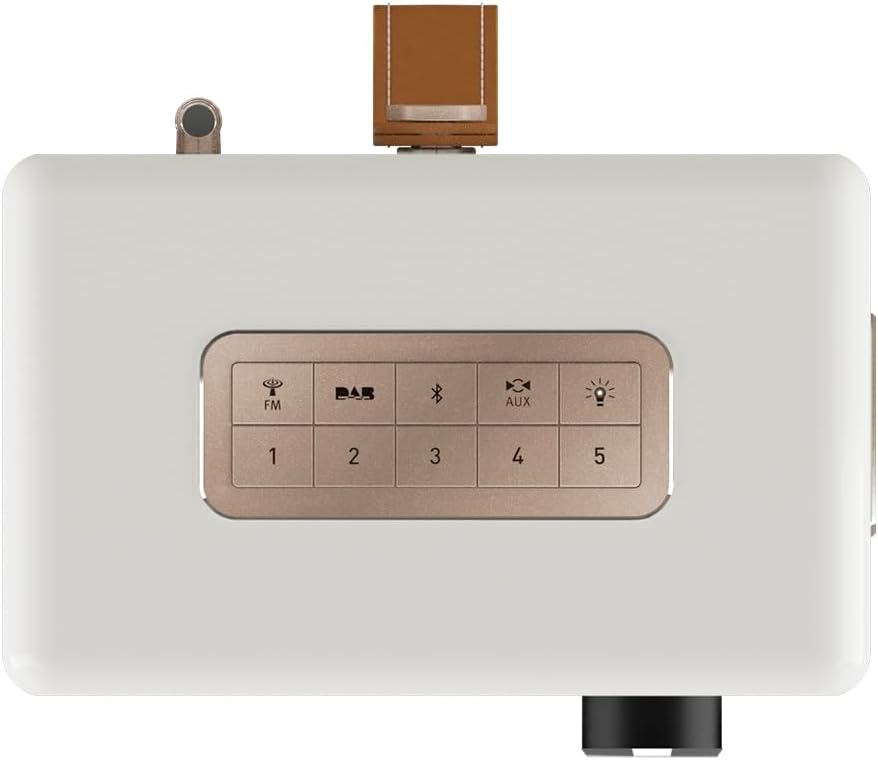
Figure 3: Top panel controls including preset and function buttons.
- Цахилгаан товч: Радиог асаах эсвэл унтраана.
- Ротари бариул: Дууны түвшинг хянах, цэсний навигаци болон сонголтод ашигладаг.
- Урьдчилан тохируулсан товчлуурууд (1-5): Дуртай радио станцуудаа хадгалж, эргэн санах.
- Function Buttons (FM, DAB, Bluetooth, AUX, Night Light): Хүссэн үйлдлийн горимоо сонгоно уу.
3.2 Radio Modes (DAB+ / FM)
DAB+ радио:
- дээр дарна уу DAB button to enter DAB+ mode.
- Радио нь боломжтой станцуудыг автоматаар хайх болно.
- Use the rotary knob to scroll through the station list and press to select.
- To save a station as a preset, press and hold one of the Урьдчилан тохируулсан товчлуурууд (1-5) until the display confirms.
FM радио:
- дээр дарна уу FM товчийг дарж FM горимд орно.
- Use the rotary knob to manually tune to a frequency or press and hold to auto-scan for the next available station.
- To save a station as a preset, press and hold one of the Урьдчилан тохируулсан товчлуурууд (1-5) until the display confirms.
3.3 Bluetooth холболт
- дээр дарна уу Bluetooth button to activate Bluetooth pairing mode. The display will show "Pairing".
- On your mobile device, enable Bluetooth and search for "Sonoro Easy".
- Select "Sonoro Easy" from the list of available devices to connect.
- Once connected, you can stream audio from your device to the radio.
3.4 AUX оролт
- Connect an external audio device (e.g., MP3 player) to the "AUX IN" port on the rear of the radio using a 3.5mm audio cable (not included).
- дээр дарна уу AUX button to select AUX input mode.
- Өөрийн гадаад төхөөрөмжөөс тоглуулахыг удирдах.
3.5 Сэрүүлэг ба Унтлагын цаг
The Sonoro Easy features a dual alarm function and a sleep timer.
- Сэрүүлгийг тохируулах: Access the alarm settings through the menu (usually by pressing the rotary knob and navigating). Follow on-screen prompts to set alarm time, source (buzzer, FM, DAB+), and volume.
- Унтах цаг: The sleep timer allows the radio to turn off automatically after a set period. This function is typically accessed via the menu.
- Залгах функц: When an alarm sounds, pressing the rotary knob or a designated snooze button will temporarily pause the alarm.
3.6 Night Light and USB Charging
- Шөнийн гэрэл: дээр дарна уу Шөнийн гэрэл button (often represented by a light bulb icon) to activate the integrated LED night light on the rear of the unit. This provides subtle background illumination.
- USB цэнэглэх: The USB port (5V - 2.1A) on the side of the radio can be used to charge compatible smartphones or other small devices. Connect your device using its charging cable.
4. Засвар үйлчилгээ
4.1 Цэвэрлэгээ
To maintain the appearance of your Sonoro Easy radio:
- Цэвэрлэхийн өмнө төхөөрөмжийг унтрааж, залгуураас салгасан эсэхийг шалгаарай.
- Зөөлөн, хуурай, хөвөнгүй даавуугаар гадаргууг арчина.
- Зөрүүд тэмдгийн хувьд бага зэрэг dampen the cloth with water. Avoid abrasive cleaners, solvents, or chemical sprays.
4.2 Хадгалалт
When not in use for extended periods, store the radio in a cool, dry place away from direct sunlight and extreme temperatures. If using batteries, remove them to prevent leakage.
5. Алдаа засах
| Асуудал | Боломжит шалтгаан | Шийдэл |
|---|---|---|
| Цахилгаан байхгүй / Радио асахгүй байна. | Power adapter not connected or faulty. Batteries depleted or incorrectly inserted. | Check power adapter connection and wall outlet. Replace or recharge batteries, ensuring correct polarity. |
| Poor radio reception (DAB+ / FM). | Antenna not extended. Weak signal in the area. Interference from other electronics. | Телескоп антенныг бүрэн сунга. Радиогийн байрлалыг өөрчил. Бусад электрон төхөөрөмжөөс холдуул. |
| Bluetooth төхөөрөмж холбогдож чадахгүй байна. | Radio not in pairing mode. Device too far away. Bluetooth disabled on source device. | Ensure radio is in Bluetooth pairing mode. Move device closer to the radio. Enable Bluetooth on your source device. |
| AUX оролтоос дуу гарахгүй байна. | AUX cable not connected properly. Radio not in AUX mode. Volume too low on radio or source device. | Check AUX cable connection. Select AUX mode on the radio. Increase volume on both the radio and the external device. |
| Дэлгэц хэт тод эсвэл хэт бүдэг байна. | Display brightness setting needs adjustment. | Adjust display brightness through the radio's menu settings. |
6. Техникийн үзүүлэлтүүд
| Онцлог | Дэлгэрэнгүй |
|---|---|
| Брэнд | Соноро |
| Загварын дугаар | 88f59bc4-6f28-4e95-95de-ba49a597f237 |
| Өнгө | Цагаан царцсан |
| Тааруулах технологи | DAB+, FM |
| Холболт | Bluetooth, AUX In, USB (charging) |
| Онцлог шинж чанарууд | Portable, Dual Alarm, Sleep Timer, Snooze, Dimmable Display, LED Night Light, USB Charging Port |
| Эрчим хүчний эх үүсвэр | Mains (12V - 2.5A), Battery (Alkaline or NiMH, not included) |
| USB гаралт | 5V - 2.1A (for charging external devices) |
| Хэмжээ (L x W x H) | 18.6 см х 15.6 см х 11.8 см |
| Илтгэгч | 3" Full-range speaker with Bass Reflex tube |
| Материал | Hand-polished wooden cabinet |
7. Баталгаат хугацаа ба дэмжлэг
7.1 Бүтээгдэхүүний баталгаа
The Sonoro Easy Digital Radio comes with a Үйлдвэрлэгчийн 2 жилийн баталгаат хугацаа худалдан авсан өдрөөс. Энэхүү баталгаа нь ердийн ашиглалтын үед хийгдсэн материал, хийцийн согогийг хамарна. Баталгаат заргад зориулж худалдан авалтаа нотлох баримтаа үлдээнэ үү.
Баталгаат үйлчилгээнд хамаарахгүй:
- Осол, зүй бусаар ашиглах, зүй бусаар ашиглах, үер, гал түймэр, газар хөдлөлт болон бусад гадны шалтгааны улмаас учирсан хохирол.
- Damage caused by operating the product outside the permitted or intended uses described in this manual.
- Damage caused by service performed by anyone who is not an authorized representative of Sonoro.
- Products or parts that have been modified to alter functionality or capability without the written permission of Sonoro.
7.2 Хэрэглэгчийн дэмжлэг
For technical assistance, warranty claims, or further information, please contact Sonoro customer support. Contact details can typically be found on the official Sonoro webсайт эсвэл бүтээгдэхүүний сав баглаа боодол дээр.
Please visit the official Sonoro website for the most up-to-date support information and contact options.