
1. Танилцуулга
The ABB AD1NO-R-15m is an analog time switch designed for daily scheduling with a 15-minute switching interval. This modular device features one normally open (NO) channel and includes a power reserve function to maintain timekeeping during power outages. It is suitable for various electrical scheduling applications.
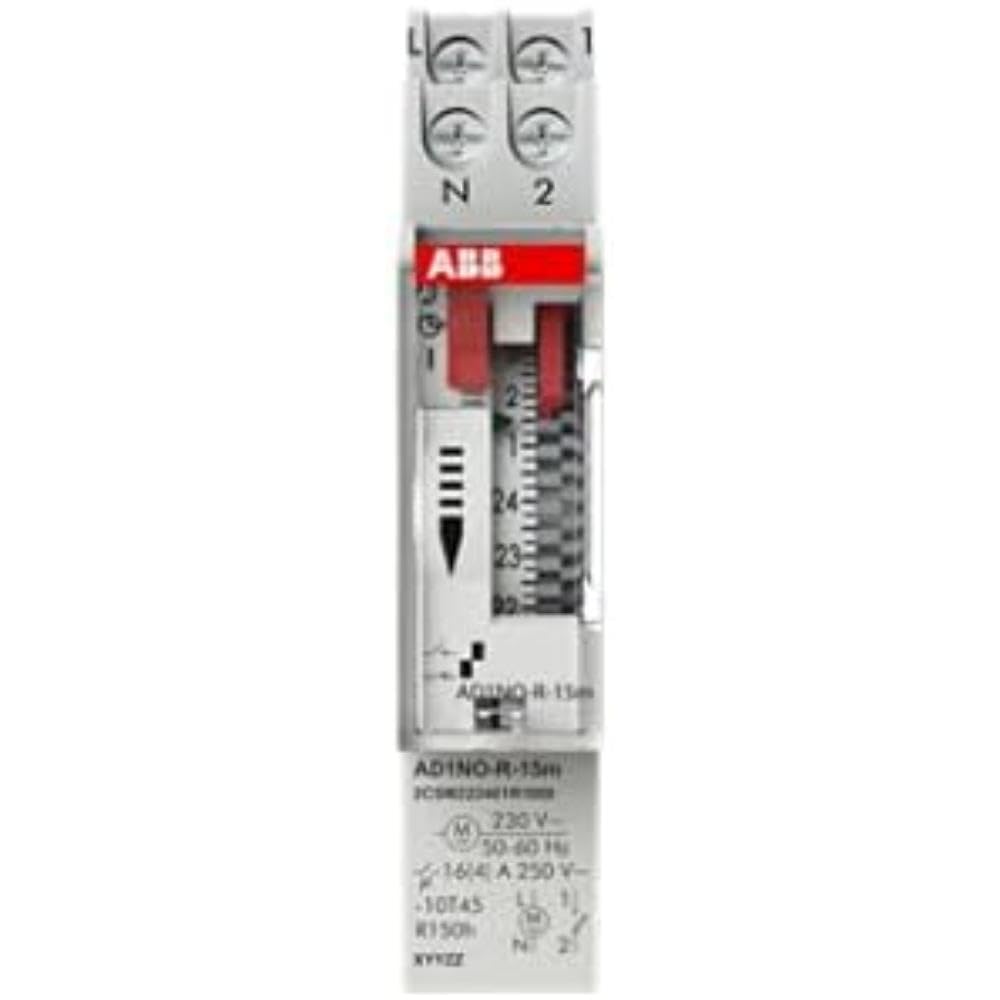
Зураг 1: Урд view of the ABB AD1NO-R-15m Modular Device Switch, highlighting its compact design and control interface.
2. Аюулгүй ажиллагааны чухал заавар
Please read and understand all safety instructions before installing, operating, or maintaining this device. Failure to follow these instructions may result in electric shock, fire, or serious injury.
- Суурилуулалт, засвар үйлчилгээг зөвхөн мэргэшсэн ажилтнууд хийх ёстой.
- Disconnect power before installation, maintenance, or servicing to prevent electric shock.
- Ensure all wiring complies with local and national electrical codes and regulations.
- Хэрэв төхөөрөмж эвдэрсэн мэт байвал түүнийг ажиллуулж болохгүй.
- Энэ төхөөрөмжийг хуурай орчинд ашиглах зориулалттай.
3. Бүтээгдэхүүн дууссанview
The AD1NO-R-15m is an analog time switch with the following key features:
- Аналог залгах: For setting daily schedules.
- 15-Minute Switching: Allows precise control over connected circuits with 15-minute intervals.
- 1 Normally Open (NO) Channel: Нэг цахилгаан хэлхээг хянадаг.
- Эрчим хүчний нөөц: Maintains timekeeping for a specified duration during power interruptions.
- Модульчлагдсан загвар: Suitable for integration into standard electrical panels on a DIN rail.
Note: The power reserve ensures the timer continues to function accurately even if the main power supply is temporarily lost.
4. Тохиргоо ба суурилуулалт
Follow these steps for proper installation of the AD1NO-R-15m Modular Device Switch:
- Эрчим хүчийг салгах: Before beginning, ensure the main power supply to the installation area is completely disconnected at the circuit breaker or fuse box. Verify with a voltage шалгагч.
- Суурилуулалт: Mount the AD1NO-R-15m switch onto a standard DIN rail within an appropriate electrical enclosure. Ensure it is securely fastened.
- Утас:
- Connect the incoming phase (L) and neutral (N) wires to the designated input terminals of the time switch.
- Connect the load wire from the output terminal of the time switch to the device you wish to control.
- Ensure all connections are tight and secure. Refer to the wiring diagram printed on the device for specific terminal identification.
- Эрчим хүчийг сэргээх: Once all connections are verified and secure, close the electrical enclosure and restore power to the circuit.
Always consult a qualified electrician for installation if you are unsure or lack experience with electrical wiring.
5. Ашиглалтын заавар
To set the time and program the switching schedule:
- Одоогийн цагийг тохируулах: Rotate the analog dial clockwise until the current time aligns precisely with the reference arrow or marker on the device's face.
- Program Switching Times: The dial features small segments around its perimeter. Push in the segments corresponding to the times you want the connected circuit to be ON. Pull out segments for OFF periods. Each segment typically represents a 15-minute interval.
- Operating Mode (if applicable): If your model includes a manual override switch (e.g., ON, AUTO, OFF), ensure it is set to "AUTO" for programmed operation.
The internal power reserve will automatically charge when the device is powered, ensuring continued accurate timekeeping during short power outages.
6. Засвар үйлчилгээ
The AD1NO-R-15m is designed for minimal maintenance. Follow these guidelines to ensure optimal performance:
- Цэвэрлэгээ: Keep the device clean and free from dust. Use a dry, soft cloth for cleaning. Do not use liquid cleaners, abrasive materials, or solvents.
- Шалгалт: Periodically inspect the wiring connections for tightness and any signs of wear, corrosion, or damage. Ensure all terminals are secure.
- Байгаль орчны нөхцөл: Гэмтлээс урьдчилан сэргийлэхийн тулд ашиглалтын орчин нь тогтоосон температур болон чийгшлийн хязгаарт байгаа эсэхийг шалгаарай.
There are no user-serviceable parts inside this device. Do not attempt to open the casing, учир нь энэ нь баталгааг хүчингүй болгож, таныг цахилгааны аюулд өртүүлж болзошгүй.
7. Алдаа засах
If you encounter issues with your AD1NO-R-15m switch, refer to the table below for common problems and solutions:
| Асуудал | Боломжит шалтгаан | Шийдэл |
|---|---|---|
| Device not switching | Цахилгаан хангамж байхгүй | Check the circuit breaker or fuse. Ensure wiring connections are correct and secure. |
| Device not switching | Буруу програмчлал | Re-check the dial settings and ensure the correct segments are pushed in or pulled out for desired ON/OFF times. |
| Device not switching | Гараар дарж өөрчлөх үйлдэл хийгдсэн | Set the operating mode switch to "AUTO" for programmed operation. |
| Эрчим хүч авсны дараа цаг хугацаа буруу байнаtage | Power reserve depleted or faulty | Allow the device to charge its power reserve by keeping it connected to power. If the issue persists, contact customer support. |
If the problem persists after attempting these solutions, please contact ABB customer support for further assistance.
8. Техникийн үзүүлэлтүүд
- Загвар: AD1NO-R-15m
- Хэсгийн дугаар: 2CSM222461R1000
- Үйлдвэрлэгч: АББ
- Төрөл: Аналог цагийн шилжүүлэгч
- Switching Interval: 15 минут
- Сувгууд: 1 Ихэвчлэн нээлттэй (NO)
- Эрчим хүчний нөөц: Тиймээ
- Барааны жин: Ойролцоогоор 2.82 унц (80 грамм)
- Бүтээгдэхүүний хэмжээ: Ойролцоогоор 3.54 x 0.69 x 2.6 инч (90 x 17.5 x 66 мм)
- Суурилуулах төрөл: DIN Rail (Wall Mount)
- Оруулсан бүрэлдэхүүн хэсгүүд: Modular device switch
- Шаардлагатай батерей: No (features internal power reserve)
- ASIN: B09BP4PFMF
- Эхний боломжтой: 21 оны арванхоёрдугаар сарын 2024
Жич: Техникийн үзүүлэлтүүдийг урьдчилан мэдэгдэлгүйгээр өөрчилж болно.
9. Баталгаат хугацаа ба дэмжлэг
Баталгаат хугацааны мэдээлэл
For detailed warranty terms and conditions, please refer to the official ABB warranty statement provided with your purchase or visit the official ABB webсайт. Баталгаат нэхэмжлэл гаргахын тулд худалдан авалтаа нотлох баримтаа хадгалаарай.
Хэрэглэгчийн дэмжлэг
For technical assistance, troubleshooting, or service inquiries, please contact ABB customer support through their official webсайт эсвэл таны бүтээгдэхүүний савлагаанд заасан холбоо барих мэдээлэл.
ABB-ийн албан ёсны Webсайт: www.abb.com