
Танилцуулга
This manual provides detailed instructions for the setup, operation, and maintenance of your DT96 Smartwatch. Please read this guide thoroughly to ensure proper use and to maximize the features of your device.
Багцын агуулга
Upon opening your DT96 Smartwatch package, please verify that all the following items are included:
- DT96 Smartwatch Unit
- Зэвэрдэггүй ган оосор
- Силикон оосор
- Цэнэглэх кабель
- Хэрэглэгчийн гарын авлага (энэ баримт бичиг)

Image: The DT96 Smartwatch unit shown with both the included stainless steel mesh strap and an additional black silicone strap.
Тохиргоо
1. Ухаалаг цагийг цэнэглэж байна
Before first use, fully charge your DT96 Smartwatch. Connect the charging cable to the charging port on the back of the watch and plug the other end into a USB power adapter (not included) or a computer's USB port.
- Цэнэглэх хугацаа: Бүрэн цэнэглэхэд ойролцоогоор 2 цаг зарцуулна.
- Зайны хугацаа: Up to 7-9 days in standby mode.
2. Installing the Straps
Your DT96 Smartwatch comes with two interchangeable straps: one stainless steel and one silicone. To install a strap:
- Locate the quick-release pins on the strap.
- Insert one end of the pin into the lug hole on the watch casing.
- Slide the quick-release lever to retract the other end of the pin, align it with the opposite lug hole, and release the lever.
- Gently pull the strap to ensure it is securely attached.
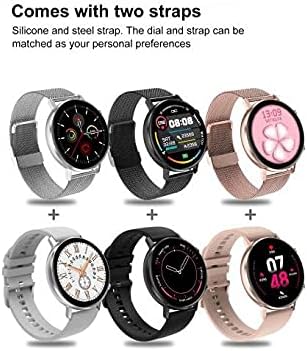
Зураг: Жишээ ньamples of the DT96 Smartwatch fitted with different strap types, including silicone and steel, demonstrating customization options.
3. Апп суулгах, холбох
To unlock the full functionality of your DT96 Smartwatch, you need to install the companion application on your smartphone and pair the devices via Bluetooth.
- Апп татаж авах: Scan the QR code in the quick start guide (if provided) or search for the official DT96 companion app in your smartphone's app store (e.g., Apple App Store or Google Play Store).
- Bluetooth-г идэвхжүүлэх: Ухаалаг утсан дээрээ Bluetooth идэвхжсэн эсэхийг шалгаарай.
- Програмыг нээх: Launch the DT96 app and follow the on-screen instructions to create an account or log in.
- Төхөөрөмжийг хослуулах: Within the app, navigate to the device pairing section. The app will search for available devices. Select "DT96" from the list.
- Хослолтыг баталгаажуулах: Хослуулах хүсэлт таны утас болон ухаалаг цаг дээр гарч ирж магадгүй. Хоёр төхөөрөмж дээр хослохыг баталгаажуулна уу.
- Хэлний тохиргоо: The smartwatch supports multiple languages including Chinese, English, Russian, German, Spanish, Portuguese, French, Japanese, Italian, and Polish. Language settings are typically managed through the companion app.
Ашиглалтын заавар
The DT96 Smartwatch features a touch-sensitive display and physical buttons for navigation and control.
1. Үндсэн навигаци
- Мэдрэгчтэй дэлгэц: Цэс болон функцуудаар гүйлгэхийн тулд зүүн, баруун, дээш эсвэл доош шударна уу. Сонголт сонгохын тулд товшино уу.
- Хажуугийн товчлуурууд: Use the physical buttons on the side of the watch to return to the home screen, power on/off, or access specific functions as defined in the app.
2. Үндсэн шинж чанарууд
The DT96 Smartwatch offers a range of features to enhance your daily life:
- Үйл ажиллагаа хянагч: Monitors steps, distance, and calories burned. Access daily activity summaries through the watch or the companion app.
- Мэдэгдэл: Receive alerts for calls, messages, and app notifications directly on your wrist. Ensure notification permissions are granted in the companion app.
- Цагийн дэлгэц: Digital time display with customizable watch faces.
- Зүрхний цохилтын хяналт: Tracks your heart rate throughout the day. Consult the app for detailed heart rate data and trends.
- Унтлагын хяналт: Гүн нойр, хөнгөн унтах, сэрэх цаг зэрэг таны нойрны хэв маягт дүн шинжилгээ хийнэ.
- SpO2 монитор: Цусны хүчилтөрөгчийн түвшинг хэмждэг.
- Хөгжим тоглуулагчийн хяналт: Холбогдсон ухаалаг утсан дээрээ хөгжим тоглуулахыг удирдаарай.
- Цаг агаар: View current weather conditions (requires app connection and location permissions).
- Alarm, Calculator, Calendar, Stop Watch, Reminders: Access these utility functions directly from the watch.
3. Цагны нүүрийг өөрчлөх
Personalize your DT96 Smartwatch with various watch faces:
- The watch comes with 4 pre-installed watch face styles.
- Additional watch faces (over 14) can be downloaded and applied through the companion app.
- Open the app, navigate to the watch face section, select your preferred design, and sync it to your watch.
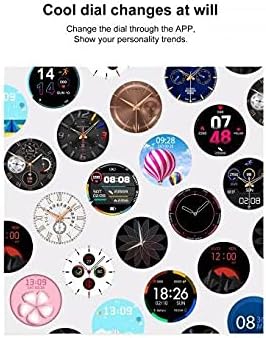
Image: A selection of diverse watch faces available for customization on the DT96 Smartwatch, demonstrating various styles and information displays.
Засвар үйлчилгээ
1. Ухаалаг цагаа цэвэрлэж байна
To keep your DT96 Smartwatch in optimal condition:
- Дэлгэцийг арчиж, casinзөөлөн, хөвөнгүй даавуугаар арчина.
- Зөрүүд тэмдгийн хувьд бага зэрэг dampдаавуугаар усаар. Химийн хатуу бодис, зүлгүүрийн материал ашиглахаас зайлсхий.
- Үр ашигтай цэнэглэхийн тулд цэнэглэх контактуудыг тогтмол цэвэрлэж байгаарай.
2. Усны эсэргүүцэл
The DT96 Smartwatch is water-resistant. However, it is not suitable for diving, hot showers, or prolonged submersion. Avoid exposing the watch to hot water or steam, as this can damage the seals.
Алдааг олж засварлах
If you encounter issues with your DT96 Smartwatch, refer to the following common solutions:
- Цаг асахгүй байна: Цаг бүрэн цэнэглэгдсэн эсэхийг шалгаарай. Үүнийг дор хаяж 30 минутын турш цэнэглэгчтэй холбоно уу.
- Ухаалаг утастай холбох боломжгүй:
- Таны утас болон цаг дээр Bluetooth идэвхжсэн эсэхийг шалгаарай.
- Цаг нь таны утасны хүрээн дотор байгаа эсэхийг шалгаарай.
- Утас болон ухаалаг цагаа дахин эхлүүлнэ үү.
- Апп-аар дамжуулан төхөөрөмжийг салгаж, дахин холбож үзнэ үү.
- Мэдэгдэл харагдахгүй байна:
- Check notification permissions in your phone's settings for the DT96 app.
- Ensure notifications are enabled within the DT96 companion app.
- Verify that the watch is properly connected to your phone via Bluetooth.
- Inaccurate activity data: Ensure the watch is worn snugly on your wrist. Calibrate the app if there's an option.
- Дэлгэц хариу өгөхгүй байна: Try restarting the watch by pressing and holding the side button. If unresponsive, allow the battery to drain completely and then recharge.
Үзүүлэлтүүд
| Онцлог | Дэлгэрэнгүй |
|---|---|
| Загварын нэр | DT96 |
| Холболтын технологи | Bluetooth 5.0 |
| Дэлгэцийн төрөл | Digital, Touch Screen |
| Дэлгэцийн нягтрал | 240 x 240 пиксел |
| Хэлбэр | Дугуй |
| Кейсийн материал | Зэвэрдэггүй ган |
| Оосорны материал | Silicone, Stainless Steel (interchangeable) |
| Усны эсэргүүцлийн түвшин | Усны хамгаалалттай |
| Зорилтот үзэгчид | Юнисекс насанд хүрсэн |
| Тохиромжтой төхөөрөмжүүд | Ухаалаг утас |
| Дэмжигдсэн програмууд | Alarm, Calculator, Calendar, Contacts, Email, Fitness Tracker, GPS (via phone), Heart Rate Monitor, Messages, Multisport Tracker, Music Player, Pedometer, Phone, Reminders, Sleep Monitor, SpO2 Monitor, Stop Watch, Voice Assistant, Weather |
| Цэнэглэх хугацаа | Ойролцоогоор 2 цаг |
| Зогсоолын цаг | 7-9 хоног |
| Дэмжигдсэн хэл | Chinese, English, Russian, German, Spanish, Portuguese, French, Japanese, Italian, Polish |

Image: Technical diagram illustrating the dimensions of the DT96 Smartwatch, including watch face diameter, thickness, strap width, and recommended wrist circumference.
Баталгаат болон дэмжлэг
For warranty information, please refer to the documentation provided at the time of purchase or contact your retailer. For technical support, please refer to the contact information provided by the manufacturer or retailer.
Always ensure you are using the latest version of the companion app for optimal performance and access to new features.