
1. Танилцуулга
This manual provides essential information for the safe and efficient use of your new Hyundai 43-inch 4K Ultra HD Smart LED TV, model UHDHY43WSR4BYI5. Please read these instructions thoroughly before operating the television and retain them for future reference. This guide covers setup, operation, maintenance, and troubleshooting to ensure you get the best experience from your device.

Image: Hyundai 43-inch 4K Smart LED TV front view хамт WebOS интерфейс.
2. Аюулгүй байдлын мэдээлэл
Цахилгаан цочрол, гал түймэр, эсвэл телевизорт гэмтэл учруулах эрсдлийг бууруулахын тулд дараах үндсэн аюулгүй байдлын урьдчилан сэргийлэх арга хэмжээг үргэлж дагаж мөрдөөрэй.
- Эрчим хүчний эх үүсвэр: ТВ-ийг зөвхөн зөв дуутай хувьсах гүйдлийн тэжээлийн залгуурт холбоноtagе бүтээгдэхүүний шошгон дээр заасны дагуу.
- Агааржуулалт: Ensure adequate ventilation around the TV. Do not block ventilation openings or place the TV on soft surfaces that may block airflow.
- Ус ба чийг: Зурагтыг бороо, чийгэнд бүү тавь. Зурагт дээр ваар зэрэг шингэнээр дүүрсэн зүйлийг бүү байрлуул.
- Цэвэрлэгээ: Цэвэрлэхийн өмнө ТВ-ээ салга. Зөөлөн, хуурай даавуу хэрэглээрэй. Шингэн цэвэрлэгч, аэрозол цэвэрлэгч хэрэглэж болохгүй.
- Байршил: ТВ-ийг тогтвортой, тэгш гадаргуу дээр байрлуул. Нарны шууд тусгалд эсвэл дулааны эх үүсвэрийн ойролцоо байрлуулахаас зайлсхий.
- Хүүхдүүд: Хүүхдүүдийг зурагт эсвэл түүний тавьсан тавилга дээр авирч болохгүйг хянаж байгаарай.
3. Багцын агуулга
Бүх зүйл багцад байгаа эсэхийг шалгана уу:
- 1 x Hyundai 43-inch LED TV
- 1 x Remote Control (Magic Remote)
- 1 х хэрэглэгчийн гарын авлага
- 1 х Баталгаат карт
- 1 x Pair of Table Stand
- 1 х хананд холбох хэрэгсэл
4. Физик тохиргоо
4.1. ТВ суурилуулах
Your TV supports both table-top placement and wall mounting. Choose the method that best suits your environment.
Ширээний тавиур суурилуулах:
- Дэлгэцийг гэмтээхгүйн тулд зурагтыг зөөлөн, цэвэр гадаргуу дээр доош харуулан болгоомжтой байрлуул.
- Attach the provided table stands to the designated slots on the bottom of the TV using the screws included in the kit. Ensure they are securely fastened.
- ТВ-ийг тогтвортой, тэгш гадаргуу дээр байрлуул.
Хананд суурилуулах:
Use the included wall mount kit. Follow the instructions provided with the wall mount kit for safe and secure installation. It is recommended to have professional assistance for wall mounting.

Image: Diagram illustrating the dimensions of the Hyundai 43-inch Smart LED TV, showing width, height, and depth with stand. Also indicates screen size and weights.
4.2. Холбох кабель
Connect the power cord to the TV and then to a wall outlet. Connect your external devices (e.g., set-top box, gaming console, Blu-ray player) to the appropriate ports.
- HDMI: For high-definition audio and video. Your TV has multiple HDMI ports.
- USB: For connecting USB storage devices for media playback. Your TV has 2 USB ports.
- RF ДАХЬ: Антен эсвэл кабелийн ТВ холбох зориулалттай.
- Ethernet (RJ45): Утастай интернет холболтын хувьд.
- Оруулсан: Нийлмэл видео болон стерео аудио кабель ашиглан хуучин төхөөрөмжүүдийг холбоход зориулагдсан.
- Оптик: Дижитал аудио гаралтыг дууны самбар эсвэл гэрийн театрын системд гаргах зориулалттай.

Зураг: Ар талд view of the Hyundai 43-inch Smart LED TV, showing the mounting points and general layout of the back panel.
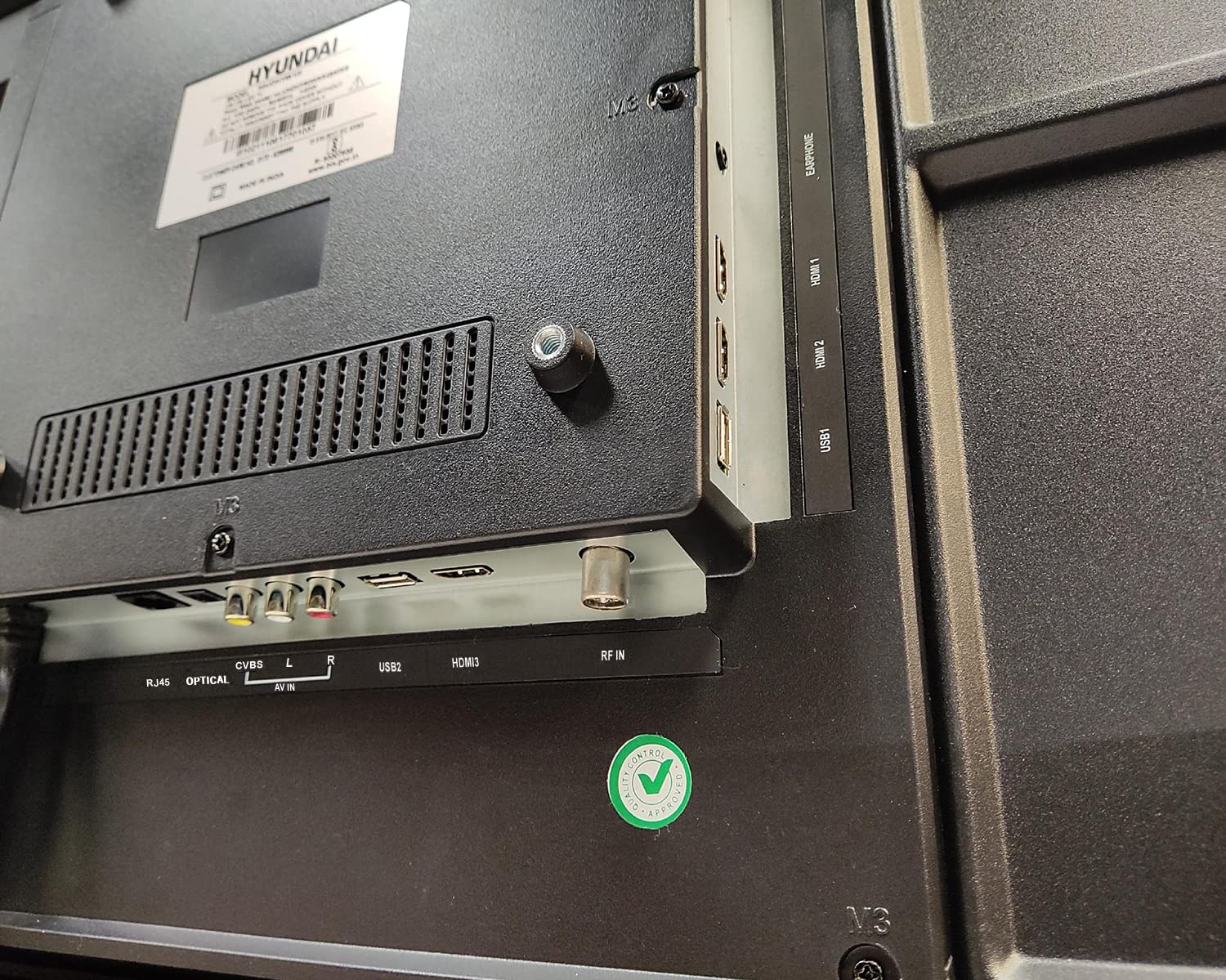
Зураг: Ойролцоогоор view of the connectivity ports on the rear of the Hyundai 43-inch Smart LED TV, including HDMI, USB, RF IN, AV IN, Optical, and RJ45 Ethernet.
5. Initial Power On & Basic Operation
5.1. Анх удаагийн тохиргоо
Цахилгааныг холбосны дараа алсын удирдлага эсвэл ТВ дээрх асаах товчийг дарна уу. ТВ нь таныг анхны тохиргооны процессоор удирдан чиглүүлэх бөгөөд үүнд:
- Хэлний сонголт
- Улс/Бүс нутгийн сонголт
- Сүлжээний холболт (Wi-Fi эсвэл Ethernet)
- Channel scanning (for antenna/cable TV)
- Нөхцөл, нөхцлийг хүлээн зөвшөөрч байна
5.2. Шидэт удирдлага ашиглах
Your Hyundai TV comes with a Magic Remote, offering intuitive control through pointing, clicking, scrolling, and voice commands.

Image: Diagram detailing the features of the Hyundai Magic Remote, including Air Mouse, Single Click Access, Scroll wheel, Voice Control, Universal Control, and Hot Keys for Netflix and Prime Video.
- Агаарын хулгана: Курсорыг хөдөлгөхийн тулд алсын удирдлагатай дэлгэц рүү чиглүүлнэ үү.
- Гүйлгэх дугуй: Use the wheel to scroll through menus and web pages, or zoom in/out.
- Дуут удирдлага: Press the microphone button and speak your commands to search for content or control the TV.
- Халуун товчлуурууд: Dedicated buttons for popular streaming services like Netflix and Prime Video for quick access.
- Бүх нийтийн хяналт: The Magic Remote can control compatible external devices such as set-top boxes and sound systems.

Image: Front and angled side view of the Hyundai Magic Remote, showcasing түүний эргономик дизайн, товчлуурын зохион байгуулалт.
6. Ухаалаг ТВ-ийн онцлогууд (Webүйлдлийн систем)
Your Hyundai TV is powered by WebOS, offering a user-friendly interface and access to a wide range of smart features.
6.1. Интернетэд холбогдож байна
For smart features, connect your TV to the internet:
- Wi-Fi: Go to Settings > Network > Wi-Fi Connection, select your network, and enter the password. The TV supports 5 GHz / 2.4 GHz Dual Band Wi-Fi.
- Ethernet: Connect an Ethernet cable from your router to the RJ45 port on the TV.
6.2. Навигац WebOS and Apps
The WebOS launcher bar provides quick access to installed applications, inputs, and settings. Use the Magic Remote to navigate.
- Урьдчилан суулгасан програмууд: Enjoy popular streaming services like Netflix, Prime Video, Disney+ Hotstar, YouTube, ZEE5, SonyLIV, Voot, ALT Balaji, and Hungama.
- Агуулгын дэлгүүр: Download additional applications from the WebOS Content Store.
- ThinQ хиймэл оюун ухаан: Utilize AI features for personalized recommendations and smart home integration.
- Magic Mobile Connection: Easily connect your smartphone to the TV for content sharing.
- Хуваалцах хяналт: Share content from your mobile device to the TV.
- Миракаст: Wirelessly mirror your compatible device's screen to the TV.

Image: Hyundai 43-inch Smart TV displaying WebOS home screen with various smart features like ThinQ AI, 4K Upscaling, HDR10, Magic Remote, MEMC, Miracast, Bezel-less design, Dual Band Wi-Fi, Dolby Audio, Bluetooth 5.0, Real Cinema Experience, and Alexa.

Зураг: дээрээс доош view of the Hyundai 43-inch Smart TV screen showing popular streaming app logos including Netflix, Disney+ Hotstar, Prime Video, ZEE5, SonyLIV, Voot, YouTube, ALT Balaji, and Hungama.
7. Засвар үйлчилгээ
7.1. ТВ цэвэрлэх
Цэвэрлэхийн өмнө ТВ-ээ үргэлж салга.
- Дэлгэц: Зөөлөн, хөвөнгүй даавуугаар дэлгэцийг зөөлөн арчина. Зөрүүд тэмдгийн хувьд хөнгөнөөр dampдаавууг усаар эсвэл тусгай дэлгэц цэвэрлэгчээр сайтар арчиж (LED дэлгэцэнд аюулгүй эсэхийг шалгаарай). Дэлгэц рүү шууд шингэн цацаж болохгүй.
- Их бие: Wipe the TV frame and back panel with a soft, dry cloth. Avoid using abrasive cleaners or solvents.
7.2. Програм хангамжийн шинэчлэлтүүд
Your TV may receive software updates to improve performance and add new features. It is recommended to keep your TV connected to the internet to receive these updates automatically or check for them manually in the settings menu.
8. Алдаа засах
Хэрэв танд ТВ-тэй холбоотой асуудал тулгарвал дараах нийтлэг асуудал, шийдлүүдийг үзнэ үү.
| Асуудал | Боломжит шийдэл |
|---|---|
| Хүч чадалгүй | Check if the power cord is securely plugged into both the TV and the wall outlet. Ensure the outlet is working. Try a different power outlet. |
| Зураг, дуу байхгүй | Verify that the correct input source is selected. Check all cable connections (HDMI, AV, etc.). Ensure external devices are powered on. |
| Алсын удирдлага ажиллахгүй байна | Check the batteries and replace them if necessary. Ensure there are no obstructions between the remote and the TV. Re-pair the Magic Remote if it has become disconnected. |
| Wi-Fi холболтын асуудал | Restart your router and modem. Check the Wi-Fi password. Ensure the TV is within range of your Wi-Fi router. Try a wired Ethernet connection. |
| Ухаалаг функцууд хариу өгөхгүй байна | Check your internet connection. Restart the TV by unplugging it for a few minutes and plugging it back in. Ensure the TV's software is up to date. |
Хэрэв эдгээр шийдлүүдийг туршиж үзсэний дараа асуудал хэвээр байвал хэрэглэгчийн дэмжлэгтэй холбогдоно уу.
9. Техникийн үзүүлэлтүүд
Key technical specifications for the Hyundai UHDHY43WSR4BYI5 TV:
- Загвар: UHDHY43WSR4BYI5
- Дэлгэцийн хэмжээ: 109 см (43 инч)
- Шийдвэр: 4K Ultra HD (3840 x 2160 пиксел)
- Дэлгэцийн технологи: LED, A+ Display Type
- Үйлдлийн систем: WebOS
- Процессор: ARM CA55 1.1 GHz Quad Core Processor
- RAM: 1.5 ГБ
- ROM: 8 ГБ
- Сэргээх хурд: 60 Гц
- Аудио гаралт: 20 Watts Box Speakers, Dolby Ultra Surround
- Холболт: Wi-Fi (Dual Band 5 GHz / 2.4 GHz), Bluetooth 5.0, HDMI (multiple), USB (2 ports), Ethernet (RJ45), Headphone, AV In, Optical
- Онцлог шинж чанарууд: Simplink (HDMI CEC), Magic Mobile Connection, Share Control, ThinQ AI, Magic Remote with Voice Control and Air Mouse, HDR10, 4K Upscaling, MEMC, Miracast, Bezel-less design, Alexa built-in.
- Бүтээгдэхүүний хэмжээс (LxWxH): 96.2 x 56.7 x 9 см (суурьгүй)
- Барааны жин: 6.7 kg (without stand), 6.8 kg (with table stand)
- Эрчим хүчний эх үүсвэр: AC 130 Volts, 108 Watts
- Viewөнцөг 178 градус
10. Баталгаат хугацаа ба дэмжлэг
Your Hyundai 43-inch 4K Ultra HD Smart LED TV comes with a 1 жилийн баталгаат хугацаа худалдан авсан өдрөөс эхлэн. Баталгаат хугацааны нэхэмжлэлийн хувьд худалдан авалтын баримт болон баталгаат картаа хадгална уу.
For technical support, service requests, or further assistance, please contact Goldenarch Consumer Electronics Pvt. Ltd., the manufacturer, at smiles@Hyundaice.in or call 0172 52-99-999.