
U.S. Solid USS-DBS00061
U.S. Solid Electronic Precision Balance 1200g User Manual
Model: USS-DBS00061
Танилцуулга
This manual provides detailed instructions for the safe and efficient operation of your U.S. Solid Electronic Precision Balance 1200g. Please read this manual thoroughly before using the device to ensure proper functionality and to prevent damage.
The U.S. Solid Electronic Precision Balance is designed for accurate weighing in industrial and laboratory environments, offering a capacity of 1200g with a 0.01g resolution. Key features include an LCD display with backlight, dual power options (AC/battery), 19 measurement units, and an RS232 interface for data communication.
Аюулгүй байдлын мэдээлэл
- Тэнцвэрийг үргэлж тогтвортой, чичиргээгүй тэгш гадаргуу дээр ажиллуул.
- Тэнцвэрийг хэт өндөр температур, чийгшил эсвэл нарны шууд тусгалд өртөхөөс зайлсхий.
- Балансыг 1200 гр-аас хэтрүүлж хэтрүүлж болохгүй.
- Тэнцвэрийг цэвэр байлгаж, тоос шороо, идэмхий бодисоос ангид байлга.
- Use only the provided AC adapter or specified batteries (4xDC1.5V) for power.
- Disconnect power before cleaning or if the balance will not be used for an extended period.
Багцын агуулга
Савлахдаа бүх эд зүйлс байгаа бөгөөд гэмтэлгүй эсэхийг шалгана уу:
- U.S. Solid Electronic Precision Balance (Model USS-DBS00061)
- Зэвэрдэггүй ган жинлэх таваг
- AC Power Adapter (100V-240V)
- Dust Protective Cover
- Хэрэглэгчийн гарын авлага

Image: The U.S. Solid Electronic Precision Balance shown with its stainless steel weighing pan, AC power adapter, and dust protective cover.
Бүтээгдэхүүн дууссанview
Familiarize yourself with the main components of the balance:
- Жинлэх таваг: Жинлэх зүйлсийг байрлуулах зориулалттай зэвэрдэггүй ган тавцан.
- LCD дэлгэц: Digital screen with blue backlight for displaying weight and other information.
- Хяналтын самбар: Buttons for Power, Counting (COU), Unit (UNIT), and Tare/Calibration (TARE/CAL).
- RS232 порт: For connecting to a computer or printer.
- Хөлийг тэгшлэх: Adjustable feet for ensuring the balance is level.
- Хөөсний түвшин: Indicator to assist with proper leveling.
- Эрчим хүчний оролт: Port for AC adapter or battery compartment.

Зураг: Ойрын зураг view of the balance's LCD display and control buttons, including Power, COU, UNIT, and TARE/CAL.

Зураг: хажуу тал view of the balance, highlighting the RS232 communication port for external device connection.
Тохиргоо
1. Савлах ба байрлуулах
Carefully remove the balance from its packaging. Place the balance on a firm, level, and vibration-free surface. Ensure it is away from direct sunlight, drafts, and sources of heat or cold that could affect accuracy.
2. Эрчим хүчний холболт
The balance can be powered by either the AC adapter or 4xDC1.5V batteries.
- Хувьсах гүйдлийн хүч: Connect the provided AC adapter to the power input port on the rear of the balance, then plug it into a suitable AC 100V-240V power outlet.
- Зайны хүч: Open the battery compartment on the underside of the balance and insert 4xDC1.5V batteries, ensuring correct polarity.

Зураг: Ар талд view of the balance, showing the power input port.

Image: Underside of the balance with the battery compartment open, showing where to insert batteries.
3. Leveling the Balance
Accurate measurements require the balance to be perfectly level. Adjust the leveling feet located at the bottom of the balance until the bubble in the bubble level indicator is centered within the circle.

Image: A visual guide demonstrating the process of leveling the balance using the bubble indicator and adjustable feet.
4. Warm-up Time
For optimal accuracy, allow the balance to warm up for at least 30 minutes after initial power-on or after a power loss. This stabilizes the internal components.
Ашиглалтын заавар
1. Асаах/унтраах
- дээр дарна уу Хүч товч () to turn the balance on.
- -г удаан дар Хүч button for a few seconds to turn the balance off.
2. Нэгжийн хувиргалт
The balance supports 19 different measurement units. Press the НЭГЖ button to cycle through the available units (e.g., g, kg, ct, oz, lb, etc.).

Image: An illustration of the balance display and a list of 19 selectable measurement units.
3. Савны функц
To subtract the weight of a container, place the empty container on the weighing pan and press the TARE/CAL button. The display will reset to zero, allowing you to weigh only the contents.
4. Шалгалт тохируулга
Recalibration is recommended after moving the balance or if accuracy is in question. Refer to the specific calibration procedure in the full manual for your model. Typically, this involves pressing and holding the TARE/CAL button and following on-screen prompts with a known calibration weight.

Image: A visual representation of the calibration function, indicating the TARE/CAL button and the need for a calibration weight.
5. Counting Function (COU)
The balance can count items of uniform weight. To use this function:
- Place a known quantity of items (e.g., 10, 20, 50, 100, 150, 200, 250, or 500) on the pan.
- дээр дарна уу COU товч.
- Select the corresponding sample quantity using the НЭГЖ button, then confirm.
- The balance will now display the count of items placed on the pan.

Image: An illustration demonstrating the piece counting feature, showing various sample quantities for setup.
6. RS232 Харилцаа холбоо
The RS232 interface allows for serial data exchange with a computer or printer. This is useful for recording weighing results and minimizing manual data entry errors. Consult your computer or printer's manual for specific connection and software requirements.
Засвар үйлчилгээ
- Цэвэрлэгээ: Зөөлөн, d-ээр тэнцвэрийг арчинаamp cloth. Do not use abrasive cleaners or solvents. Ensure no liquid enters the internal components.
- Хадгалах: When not in use, cover the balance with the provided dust protective cover. Store in a dry, stable environment.
- Зай солих: If using batteries, replace all four batteries when the low battery indicator appears on the display.
Алдааг олж засварлах
| Асуудал | Боломжит шалтгаан | Шийдэл |
|---|---|---|
| Display shows "Err" or unstable readings | Overload, unstable surface, drafts, or magnetic interference. | Remove excess weight. Ensure balance is level and on a stable surface. Relocate away from drafts or magnetic fields. |
| Баланс асахгүй байна | Цахилгаангүй, батерей нь дууссан эсвэл AC адаптер эвдэрсэн байна. | Check AC adapter connection. Replace batteries if using battery power. |
| Буруу уншилтууд | Not leveled, not warmed up, needs calibration, or environmental factors. | Level the balance. Allow warm-up time. Perform calibration. Ensure stable environment. |
| RS232 холбооны алдаа | Incorrect cable, driver issues, or software settings. | Verify cable connection. Install necessary drivers. Check software settings. |
Үзүүлэлтүүд
- Загвар: USS-DBS00061
- Хүчин чадал: 1200 гр
- Шийдвэр: 0.01 гр
- Дэлгэц: Арын гэрэлтүүлэг бүхий LCD дэлгэц
- Эрчим хүчний хангамж: AC 100V-240V (adapter included) or 4xDC1.5V Batteries
- Хэмжих нэгжүүд: 19 switchable units (g, kg, ct, Tola, TAR, Dram, PKT, Grain, TMR, gsm, tlJ, mo, Penny weight, Ounce, Pound, Taiwan Tael, Troy-Ounce, Hong Kong Tael, %)
- Интерфэйс: RS232 порт
- Онцлог шинж чанарууд: Bubble leveling, height adjustable feet, dust protective cover, counting function.
- Хэмжээ: Approximately 11" (L) x 7.1" (W) x 3.2" (H)
- Жин: Ойролцоогоор 2.73 фунт
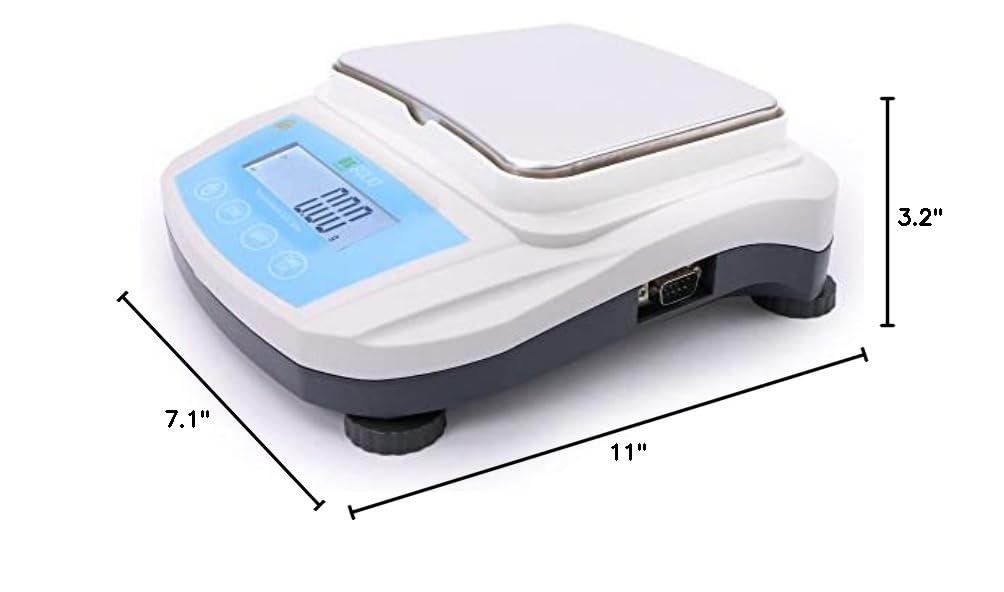
Image: Diagram showing the approximate dimensions of the balance: 11 inches long, 7.1 inches wide, and 3.2 inches high.
Баталгаат болон дэмжлэг
U.S. Solid products are designed for reliability and performance. For warranty information, technical support, or service inquiries, please refer to the contact information provided with your purchase documentation or visit the official U.S. Solid webсайт.
Баталгаат заргад зориулж худалдан авалтаа нотлох баримтаа үлдээнэ үү.
Ask a question about this manual
Ask about setup, troubleshooting, compatibility, parts, safety, or missing instructions. Manuals+ will review the question and use this page’s manual context to help answer it.