
1. Бүтээгдэхүүн дууссанview
The LAUNCH Creader Elite for GM is a professional-grade bi-directional OBD2 scanner designed specifically for GM vehicles (Buick, Chevrolet, Cadillac, GMC, Alpheon, Ravon, Pontiac, Saturn, Hummer, Oldsmobile, Holden, Daewoo, Workhorse). This diagnostic tool offers comprehensive full system diagnostics, all special reset functions, and full OBD2 modes for a wide range of vehicle models from 1996 to 2025. Featuring a 4-inch HD touchscreen and Android 5.0 system, it provides a user-friendly interface and lifetime free WiFi updates.

Зураг 1: Урд view of the LAUNCH Creader Elite for GM OBD2 Scanner. The device is orange and black with a color touchscreen display.
2. Хайрцагт юу байна
- 1 * Scan Tool fit for GM
- 1 * C төрлийн цэнэглэгч кабель
- 1 * OBD2 Connector Cable
- 1 * Хэрэглэгчийн гарын авлага
- 1 * Түргэн эхлүүлэх гарын авлага

Image 2: Contents of the LAUNCH Creader Elite for GM package, including the main unit, cables, and documentation.
3. Тохиргоо ба эхлүүлэх
- Төхөөрөмжийг цэнэглэж байна: Connect the scanner to a power source using the provided Type C Charging Cable. Ensure the device is fully charged before first use.
- Анхны тохиргоо: Upon first power-on, select your preferred language and time zone.
- Сүлжээний холболт: Connect the device to a Wi-Fi network for software updates and online features. Navigate to 'Settings' > 'Network' to configure Wi-Fi. Note: Some older Wi-Fi security protocols (WPA) may be required for connection.
- Програм хангамжийн шинэчлэл: It is highly recommended to update the software immediately after connecting to Wi-Fi. Go to 'Upgrade' on the main menu and download all available updates. This ensures access to the latest vehicle models and functions.
- Тээврийн хэрэгслийн холболт: Locate your vehicle's OBD2 port (typically under the dashboard). Connect the OBD2 Connector Cable from the scanner to the vehicle's OBD2 port. Ensure the vehicle's ignition is turned ON (engine can be off).
4. Ашиглалтын заавар
4.1 Системийн бүрэн оношлогоо
The Creader Elite for GM supports full system diagnostics for GM vehicles, including Engine (ENG), ABS, SAS, SRS, TPMS, EPB, BMS, and Fuel Systems. This allows for reading and clearing codes, viewing live data, and retrieving ECU version information across all major vehicle systems.

Image 3: Screenshot showing a quick diagnosis and detailed report generated by the scanner.
4.2 Хоёр чиглэлт хяналт (Идэвхтэй туршилт)
Perform active tests to send commands to various vehicle systems and components to test their operational status. This function helps in quickly identifying faulty components without using the vehicle's controls.

Image 4: Visual representation of bi-directional control, showing the scanner interacting with vehicle actuators and sensors. Examples include fuel injector pump, A/C clutch, door/window lock test, and radiator fan control.
4.3 Special Reset Functions for GM
Access a wide array of special reset functions tailored for GM vehicles. These include, but are not limited to, Brake Reset, Oil Reset, Steering Angle Sensor (SAS) Calibration, Suspension Reset, Seat Calibration, Battery Matching, Throttle Relearn, EPB Reset, Injector Coding, DPF Regeneration, Gearbox Adaptive, BMS Reset, Crankshaft Relearn, ABS Bleeding, and TPMS Diagnostic. The availability of specific functions may vary by car model and year.

Зураг 5: Дууслааview of various service functions available for Chevrolet, Buick, Cadillac, and GMC vehicles, such as Brake Reset, Oil Reset, and Throttle Relearn.
4.4 OBD2 Functions for All Brands
In addition to GM-specific features, the scanner also functions as a universal OBD2 code reader for all car brands manufactured after 1996. It supports all 10 OBD2 modes, allowing you to read and erase generic trouble codes, view freeze frame data, check I/M readiness, and perform O2 sensor tests.
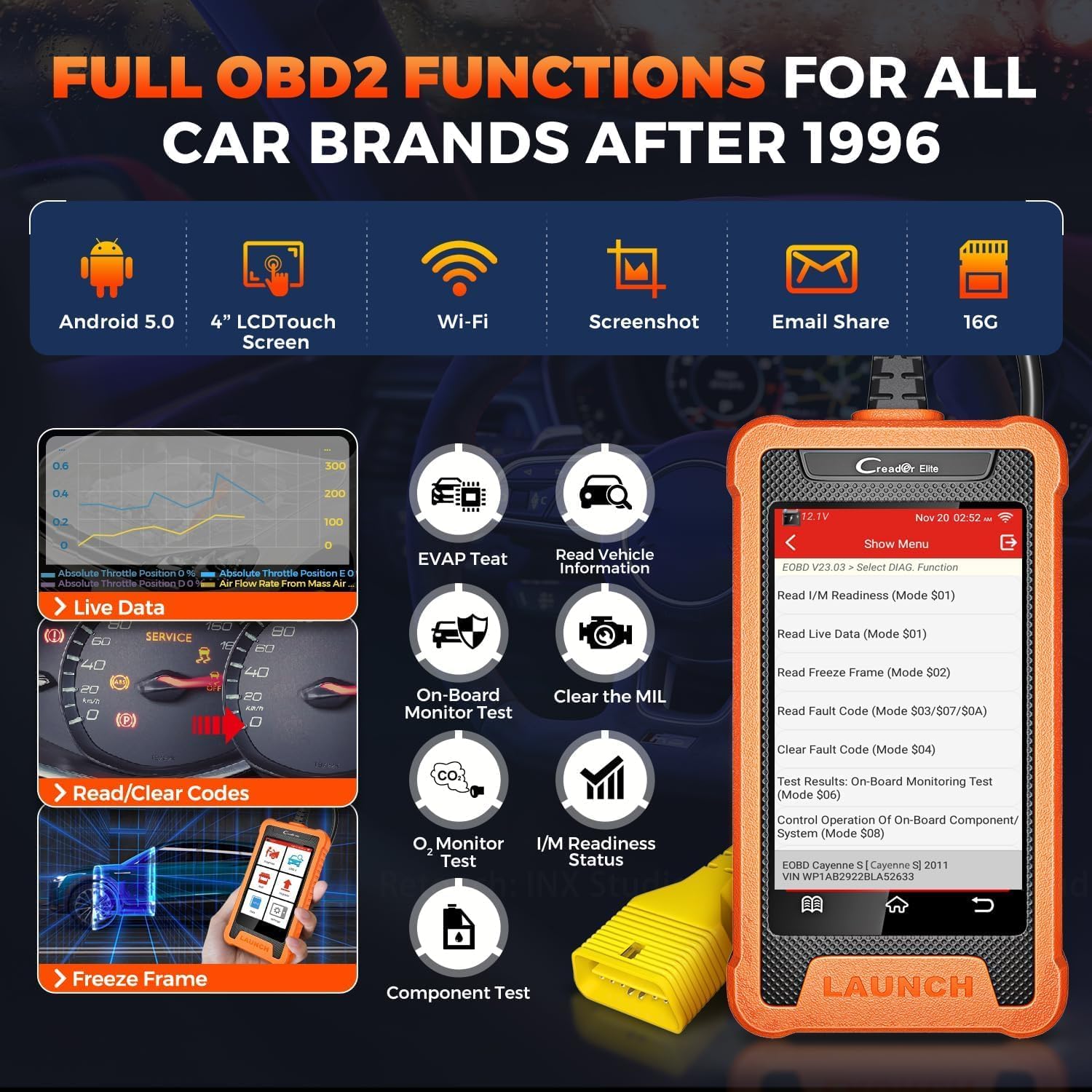
Image 6: Display of the scanner's main menu showing options for Diagnose, OBD II, Reset, Upgrade, Mall, and Settings, highlighting its universal OBD2 capabilities.
4.5 AutoVIN Scan
The AutoVIN Scan feature automatically identifies vehicle information (VIN, year, make, model) for most vehicles (2006+), streamlining the diagnostic process. If AutoVIN fails, manual VIN entry is supported.

Image 7: The scanner displaying the AutoVIN scan result, showing the VIN, year, make, and model of a Chevrolet Equinox.
4.6 Шууд өгөгдлийн урсгал
View live data streams in text or graph format for multiple parameters simultaneously (4-in-1 graphing). This helps in real-time monitoring of vehicle performance and identifying intermittent issues.

Image 8: A collage of user-friendly features, including 4-in-1 live data streaming, real-time battery voltage display, and diagnostic report sharing.
4.7 ADAS шалгалт тохируулга
The tool supports ADAS (Advanced Driver-Assistance Systems) calibration for camera-based and radar-based systems, including LKA (Lane Keeping Assist), ACC (Adaptive Cruise Control), LDW (Lane Departure Warning), and AVM (Around View Monitor) systems. Note that not all resets are available for all models and years.
4.8 Personalization and Customization
The scanner offers advanced personalization and customization options for GM vehicles, allowing users to modify certain vehicle settings and behaviors. This includes functions like Battery Register, Compression Test, Cylinder Power Balance, Throttle Position Reset, Brake Reset, Oil Life Reset, Fuel Composition Reset, and Fuel Trim Reset.
4.9 Quick Operation Guide on Launch X431 GM Scanner
Video 1: A quick operation guide demonstrating how to use the Launch X431 GM scanner for various diagnostic tasks. This video provides a visual walkthrough of the scanner's interface and basic functions.
4.10 How to Reset a Free Special Function on Scanner
Video 2: This video demonstrates the process of resetting a special function on the scanner. It guides users through the menu options to access and perform specific resets.
5. Засвар үйлчилгээ
- Програм хангамжийн шинэчлэлтүүд: Regularly check for and install software updates via Wi-Fi to ensure compatibility with the latest vehicle models and access new features.
- Цэвэрлэгээ: Зөөлөн ашиглах, damp төхөөрөмжийг цэвэрлэх даавуу. Хүчтэй химийн бодис, зүлгүүрийн материалаас зайлсхий.
- Хадгалах: Store the scanner in a dry, cool place away from direct sunlight and extreme temperatures.
- Кабель арчилгаа: Inspect the OBD2 connector cable regularly for any signs of wear or damage. Replace if necessary to ensure reliable connection.
6. Алдаа засах
- Төхөөрөмж асахгүй байна: Ensure the device is fully charged or connected to a power source. Check the Type C charging cable for damage.
- Тээврийн хэрэгсэлтэй холбоогүй:
- Verify the OBD2 connector cable is securely plugged into both the scanner and the vehicle's OBD2 port.
- Ensure the vehicle's ignition is turned ON.
- Тээврийн хэрэгслийн батерейны цэнэг байгаа эсэхийг шалгана ууtage is sufficient (displayed on the scanner).
- Confirm the vehicle model and year are correctly selected in the diagnostic menu.
- Wi-Fi холболтын асуудал:
- Ensure the Wi-Fi network is within range and the password is correct.
- Check your router settings; some older devices may require WPA security instead of WPA2.
- AutoVIN Not Working: If AutoVIN fails, manually enter the VIN. Ensure the vehicle's ignition is on.
- Functions Not Available for Specific Vehicle: Not all special functions are available for every vehicle model and year. Consult the compatibility list or contact support with your vehicle's details.
7. Техникийн үзүүлэлтүүд
| Тодорхойлолт | Үнэ цэнэ |
|---|---|
| Брэнд | ЭХЛҮҮЛЭХ |
| Эрчим хүчний эх үүсвэр | Утастай цахилгаан |
| Үйлдлийн систем | Android 5.0 |
| Дэлгэцийн хэмжээ | 4 инч |
| Автомашины тохирох төрөл | Vehicle Specific Fit (GM) |
| UPC | 884508007859 |
| Дэмжигдсэн тээврийн хэрэгсэл | GM vehicles 1996-2025 (excluding EV, may require CANFD adapter for 21-25 GM) |
| Хэлнүүд | 11 цэсийн сонголтууд |
8. Баталгаат хугацаа ба дэмжлэг
This product comes with a 5-year manufacturer warranty. For any service problems, suggestions, or support, please contact your local dealer first. You can also contact LAUNCH HQ via email at overseas.service@cnlaunch.com or sales@cnlaunch.com. The device supports lifetime free WiFi updates.