
1. Танилцуулга
This manual provides essential information for the safe and efficient operation of your TechniSat DIGITRADIO 370 IR. Please read these instructions carefully before using the device and retain them for future reference.
2. Аюулгүй ажиллагааны заавар
- Гал болон цахилгаан цочролоос сэргийлэхийн тулд төхөөрөмжийг бороо, чийгэнд бүү тавь.
- Do not block ventilation openings. Ensure adequate space around the device for proper airflow.
- Зөвхөн төхөөрөмжид дагалдаж ирсэн тэжээлийн адаптерийг ашиглана уу.
- Төхөөрөмжийг радиатор, халаалтын төхөөрөмж, зуух болон бусад төхөөрөмж (үүнд) зэрэг дулааны эх үүсвэрийн ойролцоо байрлуулахаас зайлсхий. ampөргөгч) дулаан үүсгэдэг.
- Цахилгааны утсыг гишгэх, хавчихаас хамгаалаарай, ялангуяа залгуур, залгуур, төхөөрөмжөөс гарах цэг дээр.
- Аянга шуурганы үед эсвэл удаан хугацаагаар ашиглаагүй үед энэ төхөөрөмжийг цахилгааны залгуураас салга.
- Бүх үйлчилгээг мэргэшсэн үйлчилгээний ажилтнуудад шилжүүлээрэй. Төхөөрөмж нь цахилгаан тэжээлийн утас, залгуур гэмтсэн, шингэн асгарсан, эд зүйл унасан, бороо, чийгэнд өртсөн, хэвийн ажиллахгүй байгаа тохиолдолд засвар үйлчилгээ хийх шаардлагатай. , эсвэл хасагдсан.
3. Багцын агуулга
Бүх зүйл багцад байгаа эсэхийг шалгана уу:
- TechniSat DIGITRADIO 370 IR (Black)
- Алсын удирдлага
- Эрчим хүчний адаптер
- Хэрэглэгчийн гарын авлага (энэ баримт бичиг)
4. Хяналт ба холболтууд

Зураг 4.1: Урд самбар дээшview
The image above displays the front panel of the DIGITRADIO 370 IR, featuring the central display, volume and tuning/OK rotary knobs, and various control buttons such as Power, Mode, Preset, Scan, and Back.
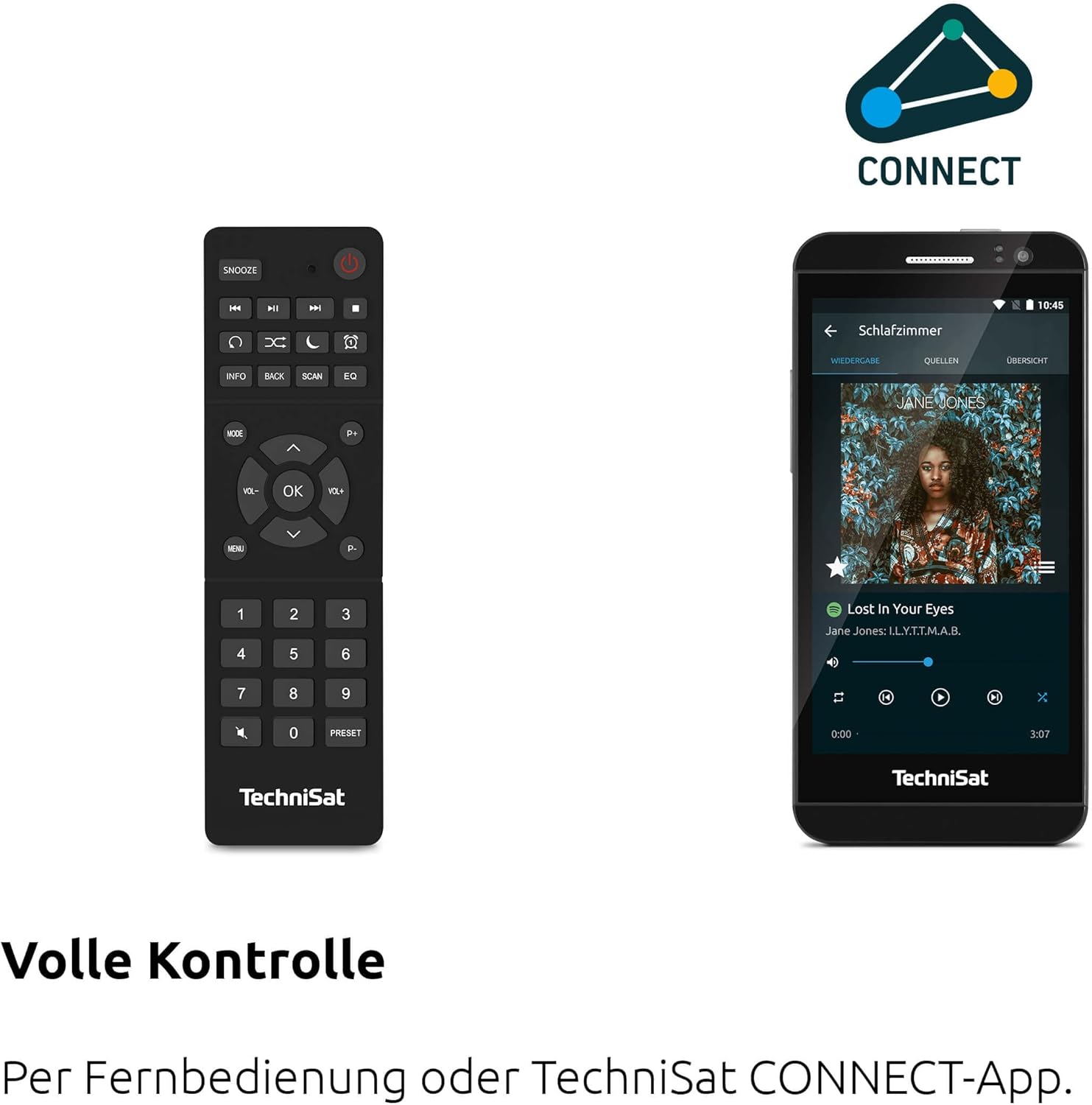
Figure 4.2: Remote Control and App Interface
This image shows the included remote control with buttons for power, snooze, mode, info, scan, EQ, preset numbers, volume, and navigation. It also illustrates the TechniSat CONNECT app interface on a smartphone, providing an alternative control method.
Урд самбарын удирдлага:
- Цахилгаан товч: Төхөөрөмжийг асаах/унтраах.
- Горимын товчлуур: Switches between DAB+, FM, Internet Radio, Bluetooth, AUX, and USB modes.
- Урьдчилан тохируулах товчлуур: Хадгалсан радио станцын урьдчилсан тохиргоонд ханддаг.
- Эзлэхүүний товчлуур: Аудио гаралтын түвшинг тохируулна.
- Тохируулга/OK товчлуур: Цэс рүү шилжиж, сонголтыг баталгаажуулна.
- Скан хийх товч: Initiates station scanning in radio modes.
- Буцах товчлуур: Өмнөх цэс эсвэл дэлгэц рүү буцна.
- Дэлгэц: 2.4-inch TFT color display for information and menu navigation.
Арын самбарын холболтууд:
- Эрчим хүчний оролт: Нийлүүлсэн тэжээлийн адаптерийг холбоно уу.
- Нэмэлт: Гадны аудио төхөөрөмжийг холбох 3.5 мм үүр.
- Чихэвчний Жак: Хувийн сонсоход зориулсан 3.5 мм үүр.
- USB порт: For MP3 playback from USB drives and charging external devices.
5. Тохиргоо
5.1 Анхдагч асаалт
- Place the DIGITRADIO 370 IR on a stable, flat surface.
- Extend the telescopic antenna for optimal DAB+ and FM reception.
- Connect the power adapter to the DC IN port on the rear of the radio and then to a wall outlet.
- Press the Power button on the front panel or remote control to turn on the device.
- Хэлний сонголт, сүлжээний тохиргоо зэрэг анхны тохиргоог хийхийн тулд дэлгэцэн дээрх зааврыг дагана уу.
5.2 Network Configuration (WLAN)
To access Internet Radio and app control, the device must be connected to a Wi-Fi network.
- Navigate to the 'Settings' menu using the Tuning/OK knob.
- Select 'Network' and then 'Wi-Fi Setup'.
- The radio will scan for available networks. Select your desired network from the list.
- Enter the Wi-Fi password using the on-screen keyboard and the Tuning/OK knob.
- Confirm the connection. Once connected, the Wi-Fi icon will appear on the display.
6. Ашиглалтын заавар

Figure 6.1: Radio Diversity
This image highlights the multiple radio reception options available: DAB+ Digital Radio, Internet Radio via WLAN, and UKW/FM analog radio.
6.1 DAB+ радио
- Press the 'Mode' button until 'DAB+' is selected.
- The radio will automatically scan for available DAB+ stations during the first use. To initiate a scan manually, press the 'Scan' button.
- Use the Tuning/OK knob to scroll through the list of available stations. Press the knob to select a station.
- To save a station as a preset, press and hold the 'Preset' button, then select a preset number and confirm.
6.2 FM радио
- Press the 'Mode' button until 'FM' is selected.
- Press the 'Scan' button to automatically search for and store FM stations.
- Alternatively, use the Tuning/OK knob to manually tune to a frequency.
- To save a station as a preset, press and hold the 'Preset' button, then select a preset number and confirm.
6.3 Интернет радио
Радио Wi-Fi сүлжээнд холбогдсон эсэхийг шалгаарай (5.2-р хэсгийг үзнэ үү).
- Press the 'Mode' button until 'Internet Radio' is selected.
- Та станцуудыг байршил, төрлөөр нь үзэх эсвэл тодорхой станцуудыг хайж олох боломжтой.
- Use the Tuning/OK knob to navigate and select stations.
- To save a station as a preset, press and hold the 'Preset' button, then select a preset number and confirm.
6.4 Bluetooth аудио дамжуулалт

Figure 6.2: Bluetooth Audio Streaming
This image demonstrates a smartphone wirelessly streaming music to the radio via Bluetooth, indicating the device's capability for wireless music enjoyment.
- Press the 'Mode' button until 'Bluetooth' is selected. The radio will enter pairing mode.
- Ухаалаг утас эсвэл бусад Bluetooth төхөөрөмж дээрээ Bluetooth-г идэвхжүүлж, боломжтой төхөөрөмжүүдийг хайж олоорой.
- Select 'DIGITRADIO 370 IR' from the list to pair.
- Хосолсоны дараа та радиогоор дамжуулан төхөөрөмжөөсөө аудио тоглуулах боломжтой.
6.5 USB Playback and Charging

Figure 6.3: USB Playback and Charging Function
This image illustrates the dual functionality of the USB port: connecting USB storage devices for MP3 playback and using the port to charge compatible devices like smartphones.
- MP3 агуулсан USB флаш дискийг оруулна уу fileрадиогийн ар талд байрлах USB порт руу залгаарай.
- Press the 'Mode' button until 'USB' is selected.
- Use the Tuning/OK knob to navigate through folders and select tracks for playback.
- The USB port can also be used to charge compatible smartphones and other devices. Connect your device's charging cable to the USB port.
6.6 Утасгүй цэнэглэх

Figure 6.4: Wireless Charging Function
This image shows a hand placing a smartphone on the top surface of the radio, demonstrating the wireless charging capability for compatible smartphones.
The DIGITRADIO 370 IR features a wireless charging surface on its top panel.
- Ensure your smartphone or device supports Qi wireless charging.
- Place your compatible device centrally on the designated wireless charging area on top of the radio.
- The device should indicate that charging has begun.
6.7 Alarm Clock, Sleep Timer, and Snooze
The radio includes an alarm clock, sleep timer, and snooze function.
- Сэрүүлэгтэй цаг: Set up to two independent alarms with customizable sources (buzzer, DAB+, FM, Internet Radio) and volume. Access via the 'Settings' menu.
- Унтах цаг: Allows the radio to turn off automatically after a set period (e.g., 15, 30, 60 minutes). Access via the 'Settings' menu.
- Түр хойшлуулах: When an alarm sounds, press the 'Snooze' button on the remote control to temporarily pause the alarm.
6.8 App Control (UNDOK App)
The DIGITRADIO 370 IR can be controlled via the UNDOK app on your smartphone or tablet.
- Download the 'UNDOK' app from your device's app store.
- Ensure your smartphone/tablet and the radio are connected to the same Wi-Fi network.
- Open the UNDOK app; it should automatically detect your DIGITRADIO 370 IR.
- You can now control all major functions of the radio, including mode selection, station tuning, volume, and presets, directly from the app.
7. Засвар үйлчилгээ
7.1 Цэвэрлэгээ
- Цэвэрлэхийн өмнө төхөөрөмжийг цахилгааны залгуураас үргэлж салга.
- Гаднах гадаргууг зөөлөн, хуурай даавуугаар арчина.
- Шингэн цэвэрлэгч, аэрозоль цэвэрлэгч эсвэл хүчтэй химийн уусгагч хэрэглэж болохгүй, учир нь эдгээр нь өнгөлгөөг гэмтээж болзошгүй.
7.2 Хадгалалт
Хэрэв төхөөрөмжийг удаан хугацаагаар хадгалах бол тэжээлийн эх үүсвэрээс салгаж, сэрүүн, хуурай, нарны шууд тусгал болон хэт өндөр температураас хол газар хадгална уу.
8. Алдаа засах
| Асуудал | Боломжит шалтгаан | Шийдэл |
|---|---|---|
| Хүч чадалгүй | Цахилгаан кабель холбогдоогүй; Цахилгаан залгуур гэмтэлтэй | Check power cable connection; Try a different power outlet. |
| Дуу алга | Дууны хэмжээ хэт бага; Дууг хаахыг идэвхжүүлсэн; Буруу эх сурвалж сонгосон | Increase volume; Check if mute is active; Select the correct input source (DAB+, FM, Internet, Bluetooth, USB, AUX). |
| Радио хүлээн авалт муу (DAB+/FM) | Антенн сунгаагүй; Дохио сул; Интерференц | Fully extend the telescopic antenna; Reposition the radio; Avoid placing near other electronic devices. |
| Интернет радио ажиллахгүй байна | No Wi-Fi connection; Incorrect Wi-Fi password; Router issue | Check Wi-Fi connection in settings; Re-enter Wi-Fi password; Restart your Wi-Fi router. |
| Bluetooth холболт амжилтгүй боллоо | Radio not in pairing mode; Device too far; Bluetooth off on source device | Ensure radio is in Bluetooth mode; Move devices closer; Enable Bluetooth on your source device. |
| Утасгүй цэнэглэгч ажиллахгүй байна | Device not Qi-compatible; Device not placed correctly; Phone case too thick | Verify device supports Qi charging; Adjust device position on charging pad; Remove thick phone cases. |
9. Техникийн үзүүлэлтүүд
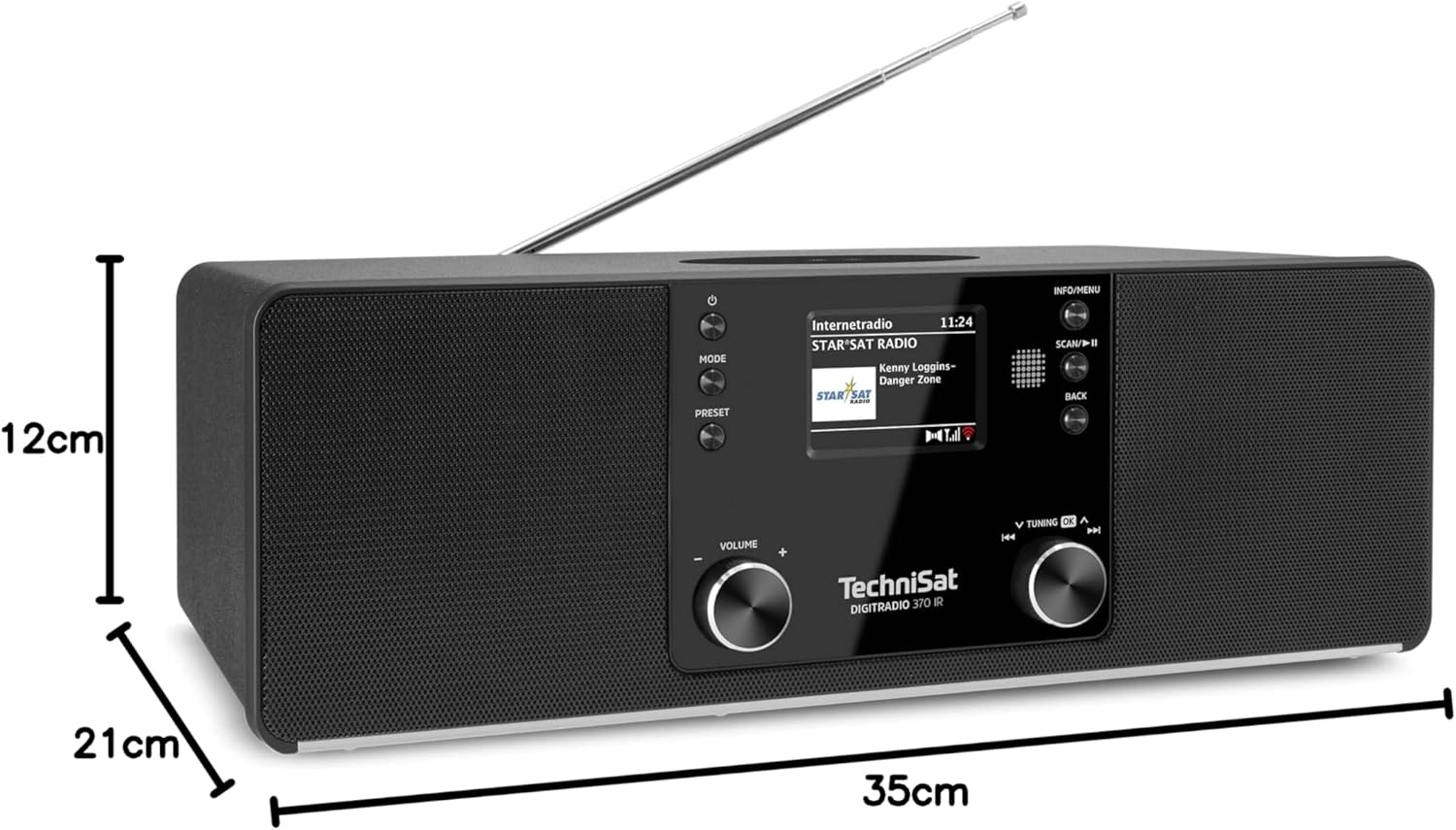
Зураг 9.1: Бүтээгдэхүүний хэмжээс
This image provides a visual representation of the radio's dimensions: 35 cm (length), 12 cm (height), and 21 cm (depth).
| Онцлог | Дэлгэрэнгүй |
|---|---|
| Загварын дугаар | 0000/3971 |
| Брэнд | TechniSat |
| Радио хамтлагуудыг дэмждэг | DAB+, FM, интернет радио |
| Холболтын технологи | Bluetooth, USB, Wireless-Charging, WLAN (2.4 GHz & 5 GHz) |
| Онцлог шинж чанарууд | Wireless Charging, Bluetooth Audio Streaming, USB Playback & Charging, Alarm Clock, Sleep Timer, Snooze, App Control (UNDOK) |
| Аудио гаралтын горим | Стерео |
| Чанга яригчийн гаралтын чадал | 2 x 5 Watts RMS (10 Watts total) |
| Дэлгэцийн төрөл | 2.4 инчийн TFT өнгөт LCD |
| Эрчим хүчний эх үүсвэр | Electric Cord (230 Volts, 60 Hz) |
| Хэмжээ (L x W x H) | 35 x 21 x 12 см |
| Жин | 2.7 кг |
| Орон сууцны материал | Мод |
| Тохиромжтой төхөөрөмжүүд | Smartphone, MP3 player, tablet, laptop, headphones |
| Интерфейсүүд | 3.5 mm Audio (AUX-IN), USB 2.0, 3.5 mm Headphone |
10. Баталгаат хугацаа ба дэмжлэг
10.1 Баталгаат хугацааны мэдээлэл
This product comes with a 2-year warranty (Gewährleistung) from the date of purchase. Please retain your proof of purchase for any warranty claims. The warranty covers manufacturing defects and malfunctions under normal use. It does not cover damage caused by misuse, accidents, unauthorized modifications, or normal wear and tear.
10.2 Хэрэглэгчийн дэмжлэг
For technical assistance, troubleshooting beyond this manual, or warranty inquiries, please contact TechniSat customer support. Refer to the TechniSat official webбүс нутгийнхаа холбоо барих мэдээллийг авах боломжтой сайт.
Онлайн нөөцүүд: Visit the official TechniSat website for updated manuals, FAQs, and support information.