
1. гаруйview
The AZDOME M560-3CH Dash Cam is a sophisticated vehicle recording system designed to capture comprehensive footage of your journeys. It features a 3-channel recording system (front, rear, and interior), a 4-inch IPS touchscreen for intuitive control, and built-in 128GB eMMC storage, eliminating the need for an external SD card. Integrated WiFi and GPS functionalities enhance its utility, allowing for easy video management and route tracking. Advanced features like night vision and 24-hour parking monitoring provide continuous security for your vehicle.
2. Багцын агуулга
- AZDOME M560-3CH Dash Cam Unit
- Машины цэнэглэгч
- Хэрэглэгчийн гарын авлага
- Rear Camera (with cable)
- Сорох цомын уул
3. Бүтээгдэхүүний онцлог

Зураг 3.1: Илүүview of the AZDOME M560-3CH Dash Cam and its associated mobile application interface, showing GPS tracking and video playback.
3.1. Суурилуулсан 128GB eMMC санах ой
The M560 dash cam features advanced high-speed eMMC storage with 128GB capacity. This integrated storage offers superior read and write speeds compared to standard SD cards, ensuring efficient data processing and reliable recording without the risk of data loss associated with external memory cards.

Figure 3.2: Illustration of the integrated 128GB eMMC storage, highlighting its internal placement and capacity.
3.2. 3-Channel Recording System
This dash cam provides comprehensive coverage with three recording channels:
- Урд камер: 4K нягтралтай бичлэг хийдэг.
- Урд + хойд: Records in 2K + 1080P.
- Front + Interior: Records in 2K + 1080P.
- Front + Rear + Interior: Records in 2K + 1080P + 1080P.
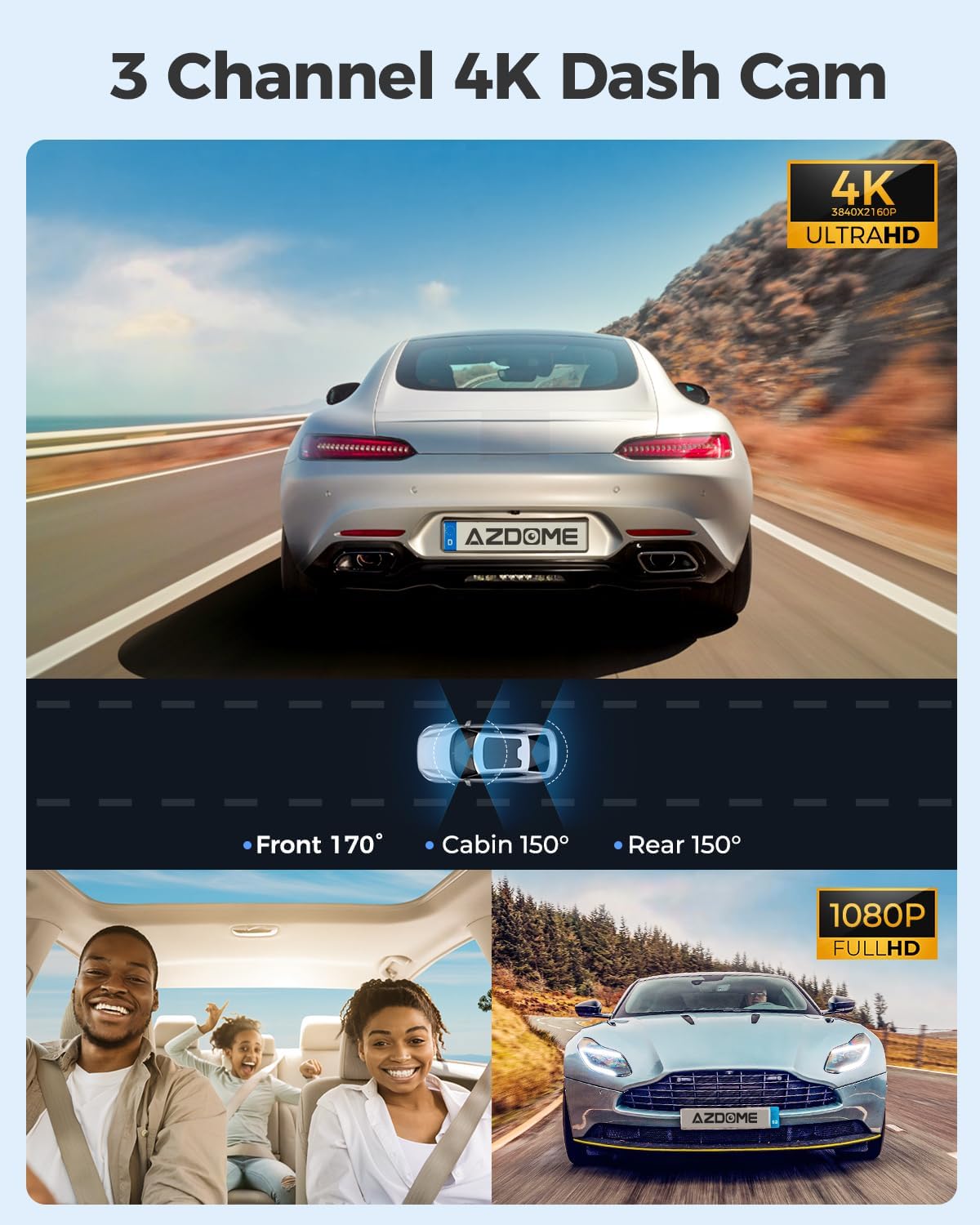
Figure 3.3: Visual representation of the 3-channel recording system, showing the wide-angle coverage from the front, cabin, and rear cameras.
3.3. 4-inch IPS Touchscreen
The dash cam is equipped with a 4-inch IPS touch screen, allowing users to access all functions directly from the device. This includes video recording, playback, and settings adjustments, providing an intuitive user experience.

Figure 3.4: A user interacting with the 4-inch IPS touchscreen, demonstrating its ease of use for navigating menus and settings.
3.4. Built-in Wi-Fi
The AZDOME M560 features integrated Wi-Fi connectivity. This allows users to connect their smartphone to the dash cam to view live video feeds, play back recorded footage, and share videos with others.

Figure 3.5: Illustration of the built-in Wi-Fi functionality, showing how the dash cam connects to a smartphone for live viewing, playback, sharing, and downloading videos.
3.5. Суурилуулсан GPS
With the integrated GPS, the dash cam records the vehicle's location and speed data. This information can be viewed using the AZDOME GPS player, providing accurate tracking and playback of your driving route and movement, which can be crucial evidence in emergencies.

Figure 3.6: Depiction of the built-in GPS feature, illustrating how location, speed, and route data are recorded and can be viewed on a computer or smartphone.
3.6. Шөнийн хараа
The M560 offers excellent night vision capabilities, utilizing the Novatek 96565 processor and GC4653, GC2053, and GC2053 sensors. This technology ensures clear image recording during both day and night conditions.
3.7. 24-Hour Parking Monitoring
The dash cam provides 24-hour parking monitoring with two modes:
- Мөргөлдөөн илрүүлэх горим: The G-sensor detects impacts and automatically locks the video footage.
- Хугацааны горим: The dash cam can record continuously for 24 hours in time-lapse, capturing events efficiently.
Note: 24-hour parking mode requires connection to a 3-lead hardwire kit (not included, search ASIN: B0BML1DK8W) with an output current of 2.5A.

Figure 3.7: Explanation of the 24-hour parking modes, including collision detection and time-lapse recording.
4. Тохиргоо
4.1. Суурилуулалт
- Зураасны камерыг суурилуулах: Attach the suction cup mount to the windshield, ensuring a clear view of the road. Position the dash cam to avoid obstructing your driving view.
- Connecting the Rear Camera: Route the rear camera cable from the main unit to the rear of your vehicle. Secure the rear camera to the rear window.
- Эрчим хүчний холболт: Connect the car charger to the dash cam and plug it into your vehicle's cigarette lighter socket. For 24-hour parking monitoring, a hardwire kit (sold separately) is required.
- Кабелийн менежмент: Neatly tuck away all cables along the windshield trim and dashboard to ensure they do not interfere with driving and maintain a clean appearance.
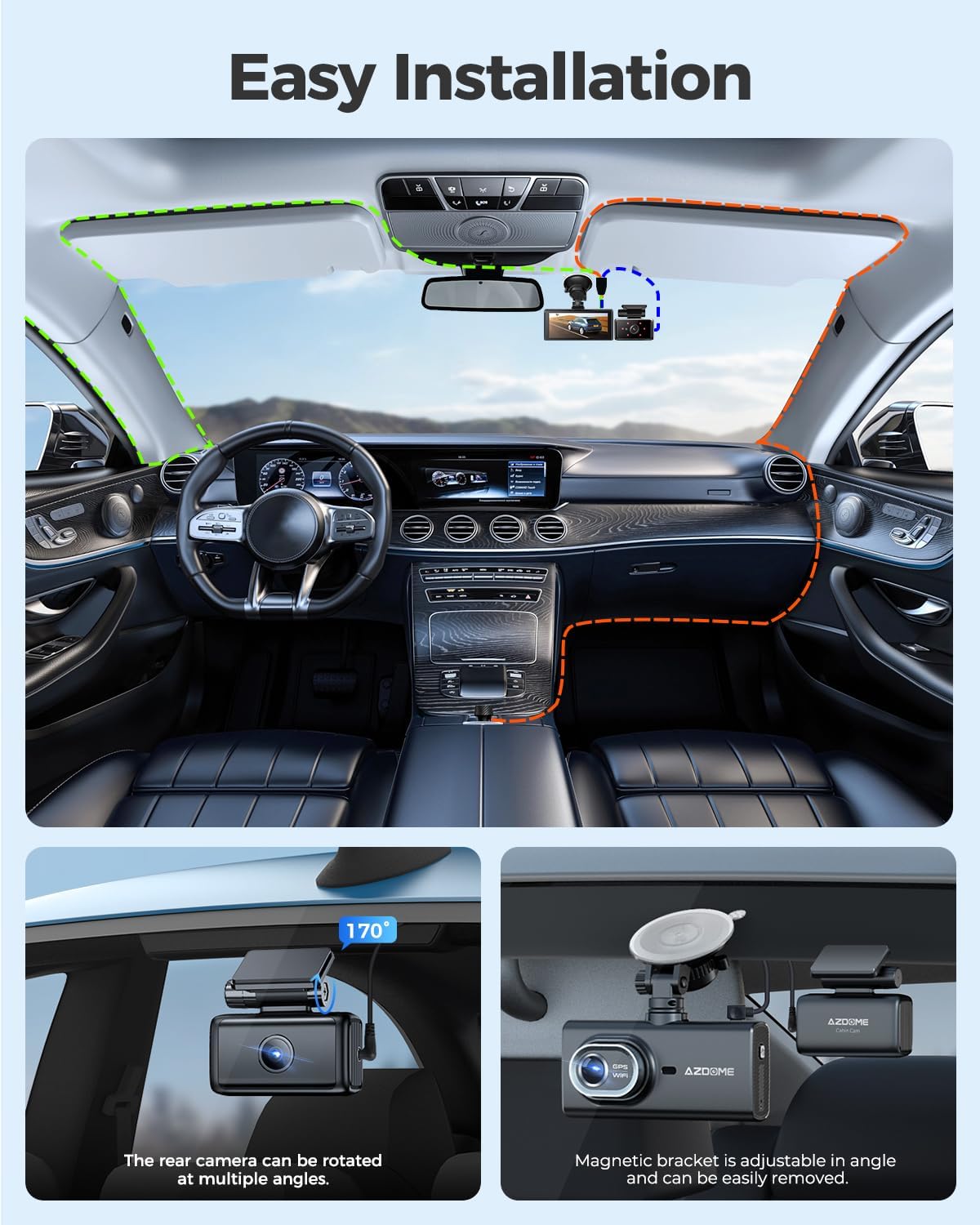
Figure 4.1: Visual guide for the easy installation process, demonstrating proper cable routing and camera placement.
4.2. Анхны тохиргоо
Upon first power-on, the dash cam may prompt you to set the date, time, and language. Follow the on-screen instructions using the touchscreen interface. Ensure these settings are accurate for proper video timestamping and GPS data synchronization.
5. Ашиглалтын заавар
5.1. Асаах/унтраах
- Автомат: The dash cam will automatically power on and begin recording when your vehicle's ignition is turned on (and power is supplied to the car charger).
- Гарын авлага: Press and hold the power button (if available) to manually turn the device on or off.
5.2. Бичлэг хийх горимууд
- Давталтын бичлэг: The dash cam continuously records video in short segments (e.g., 1, 3, or 5 minutes). When the eMMC storage is full, the oldest unlocked files шинэ бичлэгээр дарагдсан байна.
- Яаралтай тусламжийн бичлэг (G-мэдрэгч): In the event of a sudden impact or collision, the built-in G-sensor will detect the event and automatically lock the current video segment, preventing it from being overwritten.
5.3. Мэдрэгч дэлгэцийг ашиглах
Navigate through menus, adjust settings, and review footage by tapping and swiping on the 4-inch IPS touchscreen. Icons on the screen represent various functions such as recording, playback, settings, and Wi-Fi activation.
5.4. Wi-Fi холболт болон аппликейшн хэрэглээ
- Wi-Fi-г идэвхжүүлэх: On the dash cam, enable the Wi-Fi function via the touchscreen menu.
- Ухаалаг утсыг холбох: On your smartphone, search for the dash cam's Wi-Fi network and connect to it. The network name and password are typically displayed on the dash cam screen.
- Use AZDOME App: Open the AZDOME application on your smartphone to access live view, playback recorded videos, download files to your phone, and share them.
5.5. Parking Monitoring Activation
If a hardwire kit is installed, the 24-hour parking monitoring feature will activate automatically when the vehicle is turned off. You can select between collision detection or time-lapse recording modes in the dash cam settings.
6. Засвар үйлчилгээ
- Цэвэрлэгээ: Regularly clean the dash cam lens and screen with a soft, lint-free cloth. Avoid using abrasive cleaners.
- Програм хангамжийн шинэчлэлтүүд: Check the AZDOME official website periodically for firmware updates. Keeping your dash cam's firmware updated ensures optimal performance and access to new features.
- Өгөгдлийн менежмент: While the eMMC storage is reliable, it is recommended to regularly back up important video fileСанамсаргүй алдагдлаас урьдчилан сэргийлэхийн тулд компьютер эсвэл үүлэн хадгалалт руу хадгална уу.
- Температур: Хяналтын камерыг удаан хугацаанд хэт өндөр температурт байлгаж болохгүй, учир нь энэ нь батерейны ашиглалтын хугацаа болон эд ангийн ашиглалтын хугацаанд нөлөөлж болзошгүй юм.
7. Алдаа засах
- Хяналтын камер асахгүй байна: Ensure the car charger is properly connected and the vehicle's power outlet is functioning. Check the power cable for any damage.
- Бичлэгийн асуудал: Verify that loop recording is enabled. If videos are not saving, ensure the eMMC storage is not full of locked files. Format the eMMC if necessary (this will delete all data).
- Wi-Fi холболтын асуудал: Ensure Wi-Fi is enabled on the dash cam and your smartphone. Try restarting both devices. Confirm you are connecting to the correct Wi-Fi network and entering the correct password.
- GPS Not Tracking: Хяналтын камер нь тодорхой байгаа эсэхийг шалгаарай view of the sky for GPS signal acquisition. It may take a few minutes for the GPS to lock onto a signal.
- Дэлгэц хариу өгөхгүй байна: If the touchscreen is unresponsive, try restarting the dash cam. If the issue persists, contact customer support.
- Видео чанар муу: Clean the camera lenses. Ensure the protective film has been removed from the lenses. Adjust video resolution settings if needed.
8. Техникийн үзүүлэлтүүд
| Онцлог | Тодорхойлолт |
|---|---|
| Брэнд | AZDOME |
| Загвар | M560 |
| Бүтээгдэхүүний хэмжээс | 2 x 5 x 12 см |
| Жин | 780 грамм |
| Included Memory Size | 128 ГБ (eMMC) |
| Тохиромжтой төхөөрөмжүүд | Машин |
| Нэмэлт онцлогууд | G Sensor, Night Vision |
| Дэлгэцийн хэмжээ | 4 инч |
| Холболтын технологи | Wi-Fi |
| Суурилуулалтын төрөл | Салхины шил |
| Хяналтын арга | Хүрэх |
| Тээврийн хэрэгслийн үйлчилгээний төрөл | Автомашин |
9. Баталгаат хугацаа ба дэмжлэг
The AZDOME M560-3CH Dash Cam comes with a 12-month warranty. AZDOME also provides 24/7 technical support. Should you encounter any issues or require assistance, please contact AZDOME customer service. The AZDOME R&D team is committed to resolving your concerns within 24 business hours.
For support, please refer to the contact information provided in your product packaging or visit the official AZDOME webсайт.