
1. Танилцуулга
This manual provides essential information and instructions for the safe and efficient use of your Blackview BV7200 Rugged Smartphone. The BV7200 is designed for durability and performance in challenging environments, featuring advanced water and dust resistance, a powerful processor, and a high-capacity battery.
Гол онцлогууд нь:
- IP68 & IP69K Certification: Advanced water and dust resistance for outdoor and demanding conditions.
- MediaTek Helio G85 Processor: Ensures smooth performance for gaming, multitasking, and general use.
- 50MP Dual Camera: Capture high-quality photos, even in low-light conditions.
- 5180 мАч батерей: Long-lasting power with 18W fast charging support.
- 6.1 инчийн HD+ дэлгэц: Durable screen with Corning Gorilla Glass 3, optimized for comfortable viewing.
- Бээлийний горим: Allows screen operation even when wearing gloves.

Зураг: Дууслааview Хар арьстныview BV7200 Rugged Smartphone, highlighting its MediaTek Helio G85 processor, 50MP camera, IP68/IP69K ratings, 5180mAh battery, 6.1-inch display, and Glove Mode.
2. Тохиргоо
2.1. SIM карт болон MicroSD карт суурилуулах
To install your SIM card(s) and/or MicroSD card:
- Төхөөрөмжийн хажуу талд байгаа SIM тавиурыг олоорой.
- Тавиурыг нээхийн тулд өгөгдсөн SIM гаргагч хэрэгслийг ашиглана уу.
- Carefully place your Nano-SIM card(s) and/or MicroSD card into the designated slots, ensuring correct orientation.
- Тавиурыг байрандаа орох хүртэл зөөлөн түлхэж төхөөрөмж рүү оруулна.
2.2. Анхны цэнэглэлт ба асаалттай
Эхлээд ашиглахаасаа өмнө төхөөрөмжийг бүрэн цэнэглэхийг зөвлөж байна.
- Connect the USB Type-C cable to the charging port at the bottom of the phone. Ensure the port cap is securely opened before inserting the cable and closed after charging to maintain water resistance.
- Кабелийн нөгөө үзүүрийг тохирох цахилгаан адаптертай холбож, ханын залгуурт залгаарай.
- Once sufficiently charged, press and hold the Power button (usually on the right side) for a few seconds until the Blackview лого гарч ирнэ.
- Хэлний сонголт, Wi-Fi холболт болон Google акаунтын тохиргоо зэрэг анхны тохиргоог дуусгахын тулд дэлгэцэн дээрх зааврыг дагана уу.
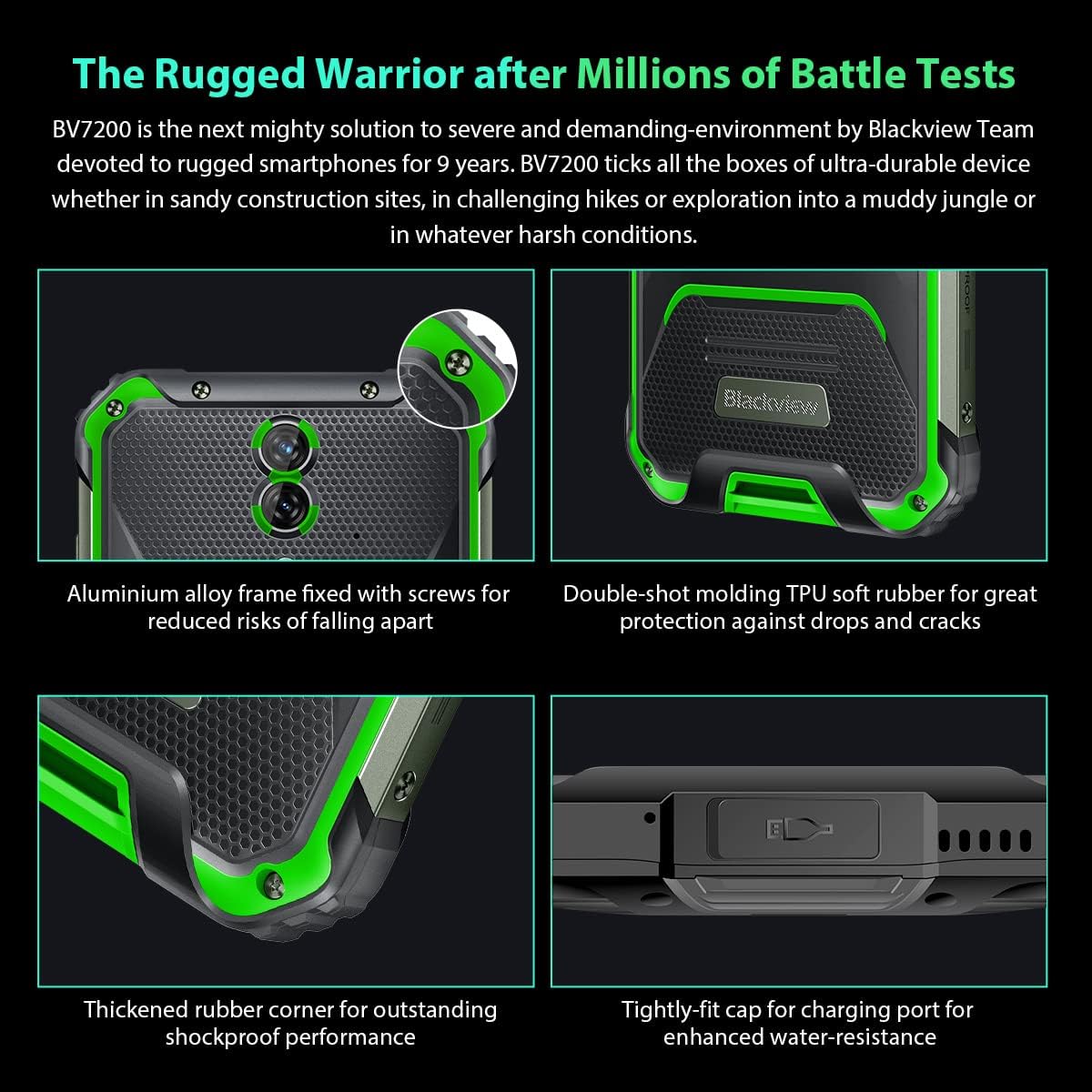
Зураг: Ойролцоогоор views of the Blackview BV7200's rugged construction, including aluminum alloy frame, double-shot molding TPU rubber, thickened rubber corners, and the tightly-fit cap for the charging port, emphasizing its durability and water resistance.
3. Ашиглалтын заавар
3.1. Үндсэн навигаци
Харview BV7200 operates on Doke OS 3.0, based on Android 12. Use touch gestures for navigation:
- Товш: Нэг зүйлийг сонгох эсвэл програмыг нээнэ үү.
- Шудрах: Дэлгэц эсвэл жагсаалтаар гүйлгэх.
- Чимхэх: Зургийг томруулж эсвэл жижигрүүлэх ба web хуудаснууд.
- Урт хэвлэл: Контекст цэс рүү нэвтрэх эсвэл програмын дүрсийг зөөх.
3.2. Камерын хэрэглээ
The BV7200 features a 50MP main rear camera and an 8MP ultra-wide/macro rear camera.
- Камерын програмыг үндсэн дэлгэц эсвэл програмын шургуулга дээрээс нээнэ үү.
- Хүссэн горимоо сонгоно уу (Фото, Видео, Хөрөг зураг, Мэргэжлийн зураг гэх мэт).
- Тодорхой хэсэгт анхаарлаа төвлөрүүлэхийн тулд дэлгэц дээр товшино уу.
- Зураг авах эсвэл видео бичлэг эхлүүлэх/зогсоохын тулд Хөшигний товчийг дарна уу.

Image: Diagram illustrating the Blackview BV7200's 50MP Samsung ISOCELL JN1 main rear camera, 8MP ultra-wide and ultra-macro rear camera, and rear flash, highlighting its photographic capabilities.
3.3. Glove Mode
The BV7200 supports Glove Mode, allowing you to operate the touchscreen while wearing gloves.
- To activate/deactivate Glove Mode, navigate to Settings > Smart Assistant > Glove Mode.
- Ensure this mode is enabled when using gloves for optimal touch responsiveness.

Image: Collage demonstrating the Blackview BV7200's Glove Mode in various scenarios, showing users operating the phone while wearing different types of gloves, emphasizing its utility in cold or industrial environments.
3.4. Water and Dust Resistance (IP68 & IP69K)
The BV7200 is certified IP68 and IP69K, making it resistant to water immersion and high-pressure water jets. This allows for use in aquatic sports or dusty environments.
- Always ensure all port caps (charging port, SIM tray) are securely closed before exposing the device to water or dust.
- Rinse the phone with clean water after exposure to saltwater or chemicals.
- Do not charge the phone if the charging port is wet. Allow it to dry completely.
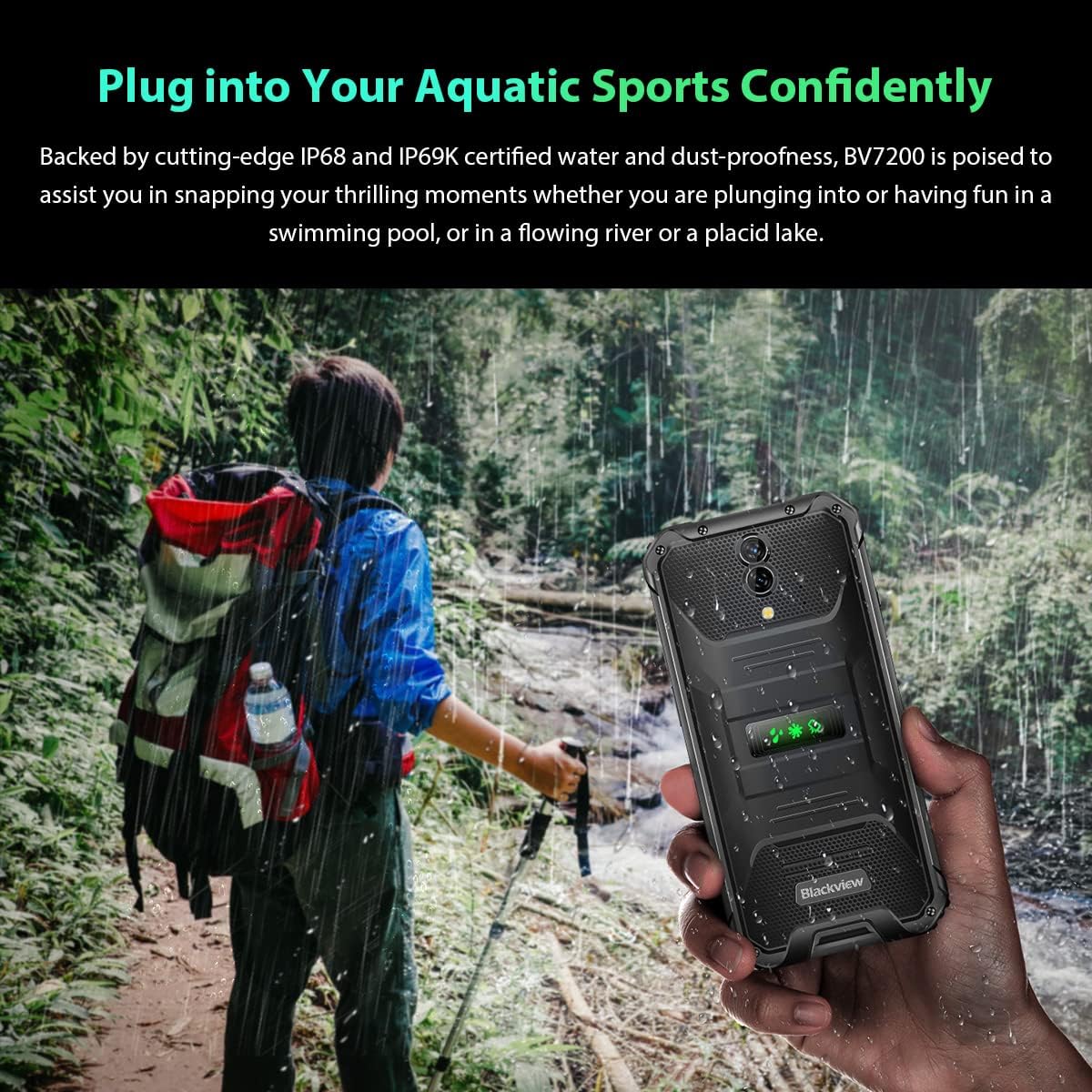
Image: A person holding the Blackview BV7200 near a stream or waterfall, illustrating its water resistance and suitability for outdoor and aquatic activities.
3.5. Зайны удирдлага
The 5180mAh battery provides extended usage. The device supports 18W fast charging.
- Хамгийн сайн цэнэглэх хурд болон аюулгүй байдлын үүднээс анхны цэнэглэгч болон кабелийг ашиглаарай.
- The battery is designed to withstand temperatures down to -10°C.
- To prolong battery life, avoid extreme temperatures and fully discharging the battery regularly.
3.6. Санах ойн өргөтгөл
The BV7200 features 6GB of RAM with an additional 4GB virtual memory expansion, totaling 10GB, for enhanced multitasking and performance.

Image: Graphic illustrating the memory expansion feature of the Blackview BV7200, showing 6GB of physical RAM and an additional 4GB of virtual RAM, combining for a total of 10GB for improved performance.
4. Засвар үйлчилгээ
4.1. Төхөөрөмжөө цэвэрлэж байна
To clean your Blackview BV7200:
- Дэлгэц болон биеийг зөөлөн, хөвөнгүй даавуугаар арчина.
- Зөрүүд шороонд бага зэрэг damp зөөлөн савантай даавуугаар арчиж, дараа нь хуурай арчина.
- Хүчтэй химийн бодис, уусгагч, зүлгүүрийн цэвэрлэгч хэрэглэж болохгүй.
- Ensure all port caps are closed before cleaning with liquids.
4.2. Програм хангамжийн шинэчлэлтүүд
Тохиромжтой гүйцэтгэл, аюулгүй байдал, шинэ функцуудад нэвтрэх боломжийг хангахын тулд програм хангамжийн шинэчлэлтийг тогтмол шалгаж, суулгаарай.
- руу оч Тохиргоо > Систем > Системийн шинэчлэл боломжтой шинэчлэлтүүдийг шалгахын тулд.
- Ensure your device has sufficient battery and a stable Wi-Fi connection before starting an update.
5. Алдаа засах
5.1. Нийтлэг асуудал ба шийдэл
- Төхөөрөмж асахгүй байна: Батерейг цэнэглэсэн эсэхийг шалгаарай. Цэнэглэгчдээ дор хаяж 15 минут холбогдоод дахин асааж үзнэ үү.
- Дэлгэц хариу өгөхгүй байна: Restart the device by holding the Power button for about 10-15 seconds. If the issue persists, try a factory reset (data will be lost).
- Холболтын асуудлууд (Wi-Fi/Bluetooth/Гар утасны дата):
- Wi-Fi/Bluetooth/Мобайл датаг унтрааж асаана уу.
- Төхөөрөмжийг дахин эхлүүлнэ үү.
- Check router/network settings.
- For mobile data, ensure SIM card is correctly inserted and activated.
- Гэмтсэн програмууд: Програмын кэш болон өгөгдлийг цэвэрлэх (Тохиргоо > Аппликейшн > [Аппликейшны нэр] > Санах ой > Кэшийг цэвэрлэх/Өгөгдлийг цэвэрлэх). If the problem continues, uninstall and reinstall the app.
5.2. Үйлдвэрийн тохиргоонд дахин тохируулах
Үйлдвэрийн тохиргоонд нь оруулснаар таны утаснаас бүх өгөгдөл устаж, үйлдвэрийн анхны тохиргоонд нь сэргээгдэнэ. Үргэлжлүүлэхээсээ өмнө чухал өгөгдлөө нөөцөлнө үү.
- руу оч Тохиргоо > Систем > Дахин тохируулах сонголт > Бүх өгөгдлийг устгах (үйлдвэрийн тохиргоонд дахин оруулах).
- Confirm your decision. The device will restart and perform the reset.
6. Техникийн үзүүлэлтүүд
Below are the technical specifications for the Blackview BV7200:
| Онцлог | Тодорхойлолт |
|---|---|
| Брэнд | Харview |
| RAM хэмжээ | 6 GB (expandable to 10GB with virtual RAM) |
| CPU загвар | MediaTek Helio G85 |
| Хадгалах багтаамж | 128 GB (expandable up to 1TB with TF card) |
| Дэлгэцийн хэмжээ | 6.1 инч |
| Шийдвэр | 720 x 1560 HD+ |
| Үүрэн холбооны технологи | 4G |
| Утасгүй сүлжээний технологи | GSM, LTE, Wi-Fi |
| Зайны багтаамж | 5180 мАч |
| Үйлдлийн систем | Андройд 12 (Doke OS 3.0) |
| Ус/тоосны эсэргүүцэл | IP68, IP69K |

Зураг: Нарийвчилсан view of the MediaTek Helio G85 processor, highlighting its specifications including RAM, ROM, GPU, and expandable storage, emphasizing its strong performance capabilities.

Image: Graphic detailing the Blackview BV7200's 6.1-inch HD+ display specifications, including resolution (720x1560), screen-to-body ratio (83%), brightness (380cd/cm2), and PPI (283), emphasizing its visual quality and durability with Corning Gorilla Glass 3.
7. Баталгаат хугацаа ба дэмжлэг
For warranty information and technical support, please refer to the warranty card included with your product or visit the official Blackview webсайт. Баталгаат нэхэмжлэл гаргахын тулд худалдан авалтаа нотлох баримтаа хадгалаарай.
For further assistance, you may contact Blackview customer service through their official channels.