
1. Бүтээгдэхүүн дууссанview
The Phanteks Eclipse G500A DRGB is a high-performance mid-tower chassis designed to accommodate modern PC components with excellent airflow and integrated D-RGB lighting. It features an Ultra-fine Performance Mesh on both the front and top panels, ensuring optimal cooling and dust filtration.

Figure 1: Phanteks Eclipse G500A DRGB Mid Tower Case, Matte White.
Гол онцлогууд:
- Өндөр агаарын урсгалын загвар: Ultra-fine Performance Mesh on front and top panels for superior cooling and dust filtration.
- Integrated D-RGB Lighting: Built-in D-RGB lighting on the front and side, controllable via manual buttons or motherboard synchronization.
- Урьдчилан суулгасан фенүүд: Includes three high-performance M25-140 D-RGB fans.
- Өргөн хүрээтэй хөргөлтийн дэмжлэг: Supports up to 420mm radiators in the front and 360mm in the top.
- Өргөн интерьер: Accommodates full-length GPUs and offers vertical GPU mounting options (with optional bracket).
- Уян хатан хадгалах: Multiple HDD and SSD locations, including dedicated SSD brackets and stackable HDD bays.
- Орчин үеийн урд талын оролт/гаралт: Features 10Gbps USB-C, 2x USB 3.0, Microphone/Headphone Combo, Power button, and D-RGB controls.
2. Тохиргоо ба суурилуулалт
This section provides general guidelines for installing components into your Phanteks Eclipse G500A DRGB chassis. Always refer to your component manuals for specific installation instructions.
2.1 Явах эд ангиудыг бэлтгэх
Before installing components, ensure the chassis is placed on a stable, flat surface. Remove the side panels by gently pulling them open (they are hinged) to access the interior.
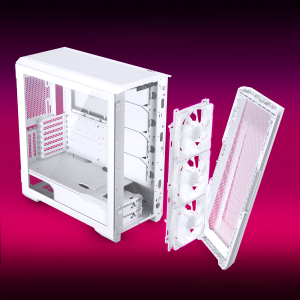
Figure 2: The removable front panel allows for easy installation of fans and radiators.
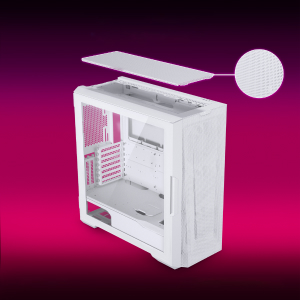
Figure 3: The removable top mesh panel facilitates fan and radiator installation.
2.2 Эх хавтангийн суурилуулалт
The G500A supports ATX, micro-ATX, mini-ITX, and E-ATX motherboards (up to 280mm wide). Install the necessary standoffs for your motherboard form factor, then secure the motherboard with screws.
2.3 Цахилгаан хангамжийн нэгж (PSU) суурилуулах
Install the PSU at the bottom rear of the chassis. The G500A supports PSUs up to 250mm in length (195mm if all 4 bottom HDD positions are used).
2.4 Хадгалах төхөөрөмж суурилуулах
The case offers extensive storage options:
- 2.5" SSD: Up to 9 dedicated 2.5" drive bays are included.
- 3.5" HDD: Two stackable 3.5" HDD bays are included, expandable up to a total of 10 HDD bays.

Figure 4: Multiple storage options for 2.5" and 3.5" drives.
2.5 График карт (GPU) суурилуулах
The G500A supports graphics cards up to 435mm in length. For vertical GPU mounting, an optional bracket (PH-VGPUKT4.0_03) or riser cable is required.
2.6 Хөргөлтийн систем суурилуулах
The chassis supports various fan and radiator configurations:
- Фэнүүдийн дэмжлэг:
- Front: 3x 120mm or 3x 140mm (3x 140mm pre-installed)
- Top: 3x 120mm or 3x 140mm
- Арын: 1x 120мм эсвэл 1x 140мм
- Liquid Cooling Radiator Support:
- Front: Up to 360mm (120mm radiator) or 420mm (140mm radiator)
- Top: Up to 360mm (120mm radiator) or 280mm (140mm radiator)
- Арын: 120 мм
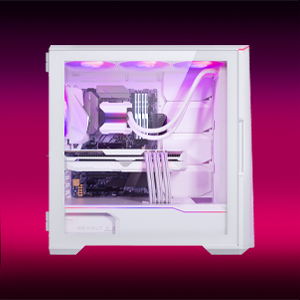
Figure 5: High-end cooling compatibility with various fan and radiator sizes.
2.7 Кабелийн менежмент
The G500A provides ample space and Velcro ties for efficient cable management, ensuring a clean interior and optimal airflow. Cover doors help to conceal cables on the backside of the motherboard tray.
2.8 Суулгалтын видео бичлэгүүд
Video 1: Detailed PC Build Guide in the Phanteks Eclipse G500A (13:33).
Video 2: Another comprehensive PC assembly guide featuring the Phanteks Eclipse G500A (14:01).
3. Ашиглалтын заавар
3.1 Урд талын оролт гаралтын самбар
Урд талын I/O самбар нь чухал портууд болон удирдлагад хялбархан нэвтрэх боломжийг олгодог:
- Цахилгаан товч: To power on/off your system.
- USB 3.0 портууд (x2): USB 3.0 төхөөрөмжүүдийг холбох зориулалттай.
- USB-C Gen2 Port (x1): For high-speed USB-C connectivity.
- Microphone/Headphone Combo Jack: Аудио оролт, гаралтын хувьд.
- D-RGB Mode Button: Cycles through pre-programmed D-RGB lighting effects.
- D-RGB Color Button: Changes the color of the D-RGB lighting.

Figure 6: Front I/O panel with USB-C, USB 3.0, audio, and D-RGB controls.
3.2 D-RGB Lighting Control
The integrated D-RGB lighting can be controlled in two ways:
- Гарын авлагын хяналт: Use the D-RGB Mode and Color buttons on the front I/O panel to cycle through effects and colors without software.
- Эх хавтангийн синхрончлол: Connect the D-RGB controller to a compatible motherboard's D-RGB header to enable software control and synchronization with other D-RGB components.

Figure 7: Integrated D-RGB lighting with included M25-140 D-RGB fans.
4. Засвар үйлчилгээ
Тогтмол засвар үйлчилгээ нь таны компьютерын эд ангиудын оновчтой ажиллагаа, урт хугацааны ашиглалтыг хангахад тусална.
- Тоосны шүүлтүүр: The Ultra-fine Performance Mesh on the front and top panels acts as a dust filter. Periodically remove these panels and clean the mesh to maintain optimal airflow.
- Дотоод цэвэрлэгээ: Use compressed air to remove dust from inside the chassis, especially from fans, heatsinks, and other components. Ensure the system is powered off and unplugged before cleaning.
- Гадна цэвэрлэгээ: Гадна талын гадаргууг зөөлөн арчиж, damp даавуу. Зүлгүүрийн цэвэрлэгч эсвэл уусгагчаас зайлсхий.
5. Алдаа засах
Энэ хэсэгт таны компьютерын гэртэй холбоотой нийтлэг асуудлуудыг авч үзэх болно.
5.1 Эрчим хүчний асуудал
- Систем асахгүй байна:
- Ensure all power cables (24-pin ATX, 8-pin CPU, GPU power) are securely connected to the motherboard and components.
- PSU унтраалга 'ON' байрлалд байгаа эсэхийг шалгана уу.
- Check that the front panel power switch cable is correctly connected to the motherboard's F_PANEL header.
5.2 D-RGB Lighting Issues
- D-RGB not lighting up or incorrect colors:
- Ensure the D-RGB cables from the fans and LED strips are correctly connected to the integrated D-RGB controller.
- If using motherboard synchronization, ensure the D-RGB controller is connected to the motherboard's D-RGB header and that the motherboard's lighting software is configured correctly.
- Verify the D-RGB controller is receiving power (e.g., via SATA power connector).
- Try cycling through modes and colors using the front I/O buttons to rule out software issues.
5.3 Fan Noise or Malfunction
- Хэт их сэнсний дуу чимээ:
- Check for dust buildup on fan blades and clean if necessary.
- Ensure fans are securely mounted and not vibrating against the chassis.
- Verify fan speeds are controlled appropriately by the motherboard or fan controller.
- Сэнс эргэхгүй байна:
- Check fan power connections to the motherboard or fan hub.
- Ensure fan headers are enabled in the BIOS/UEFI settings.
6. Техникийн үзүүлэлтүүд
Detailed technical specifications for the Phanteks Eclipse G500A DRGB Mid Tower Case.
| Онцлог | Тодорхойлолт |
|---|---|
| Загварын нэр | Eclipse G500A DRGB, White |
| Загварын дугаар | PH-EC500GA_DMW01A |
| Form Factor | Дунд цамхаг |
| Хэмжээ (LxWxH) | 19.69 x 9.45 x 20.28 инч (500 x 240 x 515 мм) |
| Зүйлийн жин | 23.2 фунт |
| Материал | Steel Chassis, Tempered Glass |
| Эх хавтангийн дэмжлэг | ATX, micro-ATX, mini-ITX, E-ATX (up to 280mm wide) |
| Өргөтгөх үүрүүд | 7 |
| Босоо GPU дэмжлэг | Yes (with optional bracket PH-VGPUKT4.0_03 or riser cable) |
| Дотоод 3.5 инчийн хөтчийн тавиурууд | 10 (2x included, expandable) |
| Дотоод 2.5 инчийн хөтчийн тавиурууд | 9 (9x included) |
| Урд талын I/O | 2x USB 3.0, USB-C Gen2, Microphone/Headphone Combo, Power Button, D-RGB Mode, D-RGB Color |
| Урьдчилан суулгасан фенүүд | 3x M25-140 D-RGB (Front) |
| GPU-ийн хамгийн их урт | 435 мм / 17.2 инч |
| CPU хөргөгчийн хамгийн их өндөр | 185 мм |
| PSU-ийн хамгийн их урт | 195mm (if all 4 bottom HDD positions used) / 250mm (if 2 bottom HDD used) |
| Хөргөх арга | Сэнс, ус |
7. Баталгаат хугацаа ба дэмжлэг
Phanteks products are manufactured with high-quality standards. For warranty information and technical support, please refer to the official Phanteks webсайт эсвэл харилцагчийн үйлчилгээтэй холбогдоно уу.
Холбоо барих мэдээлэл:
- Webсайт: www.phanteks.com
- Phanteks Taiwan Inc.: 11F., №150, Жиан 1-р гудамж, Жүнхэ дүүрэг. Шинэ Тайбэй хот 235
- Importer EU (Axpertec Int B.V.): Sydneystraat 33, 3047 BP Rotterdam, The Netherlands
- Importer US (Axpertec Inc.): 20465 E Walnut Dr. N, City of Industry, California 91789, United States

Figure 8: Phanteks company and importer details, along with compliance markings (CE, UKCA, RoHS).