
1. Танилцуулга
This document provides essential information for the VANJUNN KEM-495AAA KES-495 replacement optical lens with deck set, designed specifically for the PlayStation 3 Slim 4300 console. This product is intended for repairing a broken, damaged, or defective laser lens within the specified console model.
Please read this manual thoroughly before attempting any installation or repair procedures.
2. Аюулгүй байдлын мэдээлэл ба чухал тэмдэглэлүүд
- Professional Skills Required: The installation of this replacement part requires professional repair skills and specialized tools. Attempting installation without adequate experience may result in damage to the console or the replacement part. It is strongly recommended to seek professional assistance for installation.
- Protective Welded Joint: Most new laser lenses include a protective welded joint (solder point) on the ribbon cable or lens assembly. This joint must be carefully desoldered and removed before the lens can function. Failure to remove this protective joint will prevent the laser from operating.
- Тохиромжтой байдал: This product is compatible ONLY with the PlayStation 3 Slim 4300 console. Verify your console model before proceeding.
- Original Part: This is a replacement part, which may be sourced from dismantled original equipment. It is not a brand-new, factory-sealed component.
3. Бүтээгдэхүүн дууссанview
The KEM-495AAA KES-495 optical lens with deck set is a crucial component for reading game discs and Blu-ray media on your PS3 Slim 4300 console. This set includes the laser lens assembly integrated with its mechanical deck bracket.

Зураг 3.1: Дээрээс доош view of the KEM-495AAA KES-495 optical lens with deck set. This image shows the complete assembly, including the laser lens, motor, and associated circuitry, ready for installation into a PS3 Slim 4300 console.
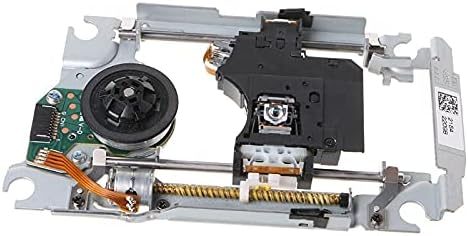
Зураг 3.2: Өнцөг view of the KEM-495AAA KES-495 optical lens assembly. This perspective highlights the laser unit and the mechanical components responsible for disc reading, including the worm gear and guide rails.

Зураг 3.3: Ойрын зураг view of the KEM-495AAA KES-495 laser lens. This detailed image focuses on the optical pickup unit, which contains the laser diode and lens system responsible for reading data from game and movie discs.
4. Суурилуулалт
Due to the complex nature of console disassembly and the precision required for optical drive component replacement, professional installation is highly recommended. This section outlines general considerations rather than step-by-step instructions.
4.1 Суурилуулалтын өмнөх шалгалт
- Confirm Console Model: Ensure your console is a PlayStation 3 Slim 4300 series. This part is not compatible with other PS3 models.
- Verify Part Number: Double-check that the replacement part number (KEM-495AAA / KES-495) matches the required part for your console.
- Статик цэнэг: Always work in a static-free environment and use appropriate anti-static measures (e.g., anti-static wrist strap) to prevent damage to sensitive electronic components.
4.2 Protective Welded Joint Removal
Before installing the new optical lens, locate the protective welded joint (solder point) on the flex cable or the lens unit itself. This joint is a small blob of solder designed to protect the laser during shipping. It must be carefully desoldered and removed using a soldering iron. Failure to do so will prevent the laser from emitting light and reading discs.
4.3 Суурилуулалтын ерөнхий заавар
Суулгах процесс нь ихэвчлэн дараахь зүйлийг агуулна.
- Disassembling the PS3 Slim console to access the optical drive.
- Carefully disconnecting the old optical drive assembly.
- Transferring any necessary components (e.g., circuit board) from the old drive to the new replacement deck, if applicable.
- Installing the new KEM-495AAA KES-495 optical lens with deck set.
- Reconnecting all cables and reassembling the console.
Refer to reputable online repair guides or consult a professional technician for detailed, visual instructions specific to the PS3 Slim 4300 model.
5. Алдаа засах
Суулгасны дараа асуудал гарвал дараах нийтлэг алдааг олж засварлах алхмуудыг анхаарч үзээрэй.
- No Disc Read / Disc Not Detected:
- Ensure the protective welded joint has been completely removed from the new laser lens.
- Check all ribbon cables and power connectors to ensure they are securely seated and not damaged.
- Verify that the console's firmware is up to date.
- Disc Spinning but Not Reading: This often points to an issue with the laser's ability to focus or emit light. Re-check the protective welded joint and cable connections.
- Mechanical Noises: If you hear unusual grinding or clicking, ensure the optical drive mechanism is properly aligned and free of obstructions.
If problems persist, it is advisable to re-evaluate the installation steps or seek assistance from a qualified technician.
6. Техникийн үзүүлэлтүүд
| Онцлог | Тодорхойлолт |
|---|---|
| Бүтээгдэхүүний төрөл | Replacement Optical Laser Lens with Deck Set |
| Загварын дугаар | KEM-495AAA, KES-495 |
| Тохиромжтой байдал | PlayStation 3 Slim (PS3 Slim) 4300 Console Series ONLY |
| Зорилго | Repair of broken, damaged, or defective laser lens |
| Материал | Бат бөх чанар сайтай материал |
| Багцын агуулга | 1x Laser Lens with Deck Kit |
7. Баталгаат хугацаа ба дэмжлэг
For any questions, technical support, or warranty inquiries regarding your VANJUNN KEM-495AAA KES-495 optical lens with deck set, please contact the seller or manufacturer directly through your purchase platform. Please retain your proof of purchase for warranty claims.