
Танилцуулга
Thank you for choosing the Taylor Glass Digital Scale. This manual provides essential information for the proper setup, operation, maintenance, and troubleshooting of your new scale. Please read these instructions carefully before use and retain them for future reference.
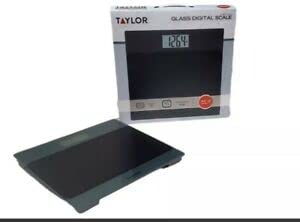
Image: The Taylor Glass Digital Scale, featuring its tempered glass platform and digital display. This image illustrates the overall design and appearance of the scale.
Тохиргоо
1. Зай суурилуулах
Your scale requires 2 AAA batteries (included). To install:
- Жинлүүрийн доод талд зайны тасалгааг ол.
- Зайны тасалгааны тагийг нээ.
- Тасалгааны дотор заасан зөв туйлшралыг (+ ба -) баталгаажуулж 2 AAA батерейг оруулна уу.
- Зайны тасалгааны тагийг сайтар хаа.
2. Хуваарийн байршил
For accurate readings, place the scale on a hard, flat, and level surface. Avoid carpets or uneven flooring, as this can affect measurement precision.
3. Анхны шалгалт тохируулга
Before first use or after moving the scale, it is recommended to perform an initial calibration:
- Gently tap the center of the scale platform with your foot.
- The display will show "0.0" or "0.00" and then turn off. This indicates the scale is calibrated and ready for use.
Ашиглалтын заавар
1. Жинлэх журам
- Хэмжээ нь тэгш, тогтвортой гадаргуу дээр байгаа эсэхийг шалгаарай.
- Gently step onto the scale platform. The scale will automatically turn on.
- Stand still on the platform until your weight is displayed and stabilizes.
- The display will hold the reading for a few seconds before automatically turning off.
2. Нэгжийн хувиргалт
This scale measures in pounds (lbs). If your model supports other units, a unit conversion button (often labeled "UNIT" or "MODE") is typically located on the underside of the scale or near the display. Press this button to cycle through available units.
3. TARE Function (if applicable)
Some models feature a TARE button for weighing items in a container. If your scale has this feature:
- Хоосон савыг жинлүүр дээр тавь.
- Press the "TARE" button. The display will reset to zero.
- Жинлэх зүйл(үүд)-ийг саванд хийнэ. Дэлгэц дээр зүйл(үүд)-ийн цэвэр жинг харуулна.
Засвар үйлчилгээ
1. Цэвэрлэгээ
The tempered glass platform and anti-slip mat can be cleaned with a damp cloth and mild detergent. Avoid abrasive cleaners or harsh chemicals, as these may damage the surface. Do not immerse the scale in water.
2. Хадгалах
Store the scale in a cool, dry place. Avoid extreme temperatures or high humidity. Do not place heavy objects on the scale when not in use.
3. Зай солих
If the display shows a "Lo" indicator or becomes dim, it is time to replace the batteries. Follow the battery installation steps in the "Setup" section.
Алдааг олж засварлах
- No Display / Scale Not Turning On:
- Батерейг зөв туйлшралтайгаар зөв суурилуулсан эсэхийг шалгана уу.
- Хуучин эсвэл дууссан батерейг шинээр солих.
- Буруу уншилтууд:
- Жинлүүрийг хатуу, хавтгай, тэгш гадаргуу дээр байрлуулсан эсэхийг шалгаарай.
- Perform initial calibration by gently tapping the scale and waiting for "0.0" to appear.
- Avoid moving the scale during measurement.
- "Эрр" эсвэл хэт ачааллын индикатор:
- The scale's capacity is 400 lbs. Remove any weight exceeding this limit.
- If "Err" persists, try replacing batteries or recalibrating.
Үзүүлэлтүүд
| Загварын дугаар | 5274503 |
| Брэнд | Generic (Manufactured by Taylor) |
| Жингийн багтаамж | 400 фунт (180 кг) |
| Унших нарийвчлал | 0.2 фунт (0.1 кг) |
| Дэлгэцийн төрөл | LCD (3.2" x 1.5") |
| Платформын материал | Чанартай шил |
| Эрчим хүчний эх үүсвэр | 2 x AAA батерей (дагсан) |
| Хэмжээ | 11.8" x 11.8" (Platform) |
| Онцлог шинж чанарууд | Anti-slip mat, TARE Button, Unit Convert |
Баталгаат болон дэмжлэг
Баталгаат хугацааны мэдээлэл
This product is covered by a limited warranty against defects in materials and workmanship. Please refer to the warranty card included with your purchase or contact customer support for specific details regarding warranty duration and terms. Keep your proof of purchase for warranty claims.
Хэрэглэгчийн дэмжлэг
If you have any questions, require assistance, or encounter issues not covered in this manual, please contact our customer support. Contact information can typically be found on the product packaging or the manufacturer's official webсайт.