
Танилцуулга
Thank you for choosing the sonoro Primus Internet Radio with Bluetooth. This manual provides essential information for setting up, operating, and maintaining your device to ensure optimal performance and longevity. Please read it thoroughly before use.
Аюулгүй байдлын чухал заавар
- Эрчим хүчний эх үүсвэр: Зөвхөн заасан тэжээлийн адаптерийг ашиглана уу. Боть байгаа эсэхийг баталгаажуулна ууtage нь таны орон нутгийн цахилгаан хангамжтай таарч байна.
- Агааржуулалт: Do not block any ventilation openings. Maintain adequate space around the unit for proper airflow.
- Ус ба чийг: Do not expose the unit to rain, moisture, dripping, or splashing. Keep liquids away from the device.
- Дулаан: Радиатор, халаалтын төхөөрөмж, зуух болон бусад төхөөрөмж (үүнд ampөргөгч) дулаан үүсгэдэг.
- Цэвэрлэгээ: Unplug the unit before cleaning. Use a dry cloth only.
- Үйлчилгээ: Энэ бүтээгдэхүүнд өөрөө үйлчлэх гэж бүү оролдоорой. Бүх засвар үйлчилгээг мэргэшсэн үйлчилгээний ажилтнуудад хандаарай.
- Лазер бүтээгдэхүүн: Энэ бүтээгдэхүүн нь 1-р ангиллын лазер агуулдаг. Тагийг нь нээж болохгүй.asing.
Багцын агуулга
Бүх зүйл байгаа эсэхийг шалгана уу:
- sonoro Primus Internet Radio Unit
- Эрчим хүчний адаптер
- Алсын удирдлага (батарейтай)
- Хэрэглэгчийн гарын авлага (энэ баримт бичиг)
Тохиргоо
1. Савлах ба байрлуулах
Carefully remove the unit from its packaging. Place the sonoro Primus on a stable, flat surface, ensuring adequate ventilation around the device. Avoid placing it near strong magnetic fields or direct sunlight.
2. Цахилгааныг холбох
Connect the provided power adapter to the AC IN port on the rear of the unit. Plug the other end into a suitable wall outlet. The unit will enter standby mode.
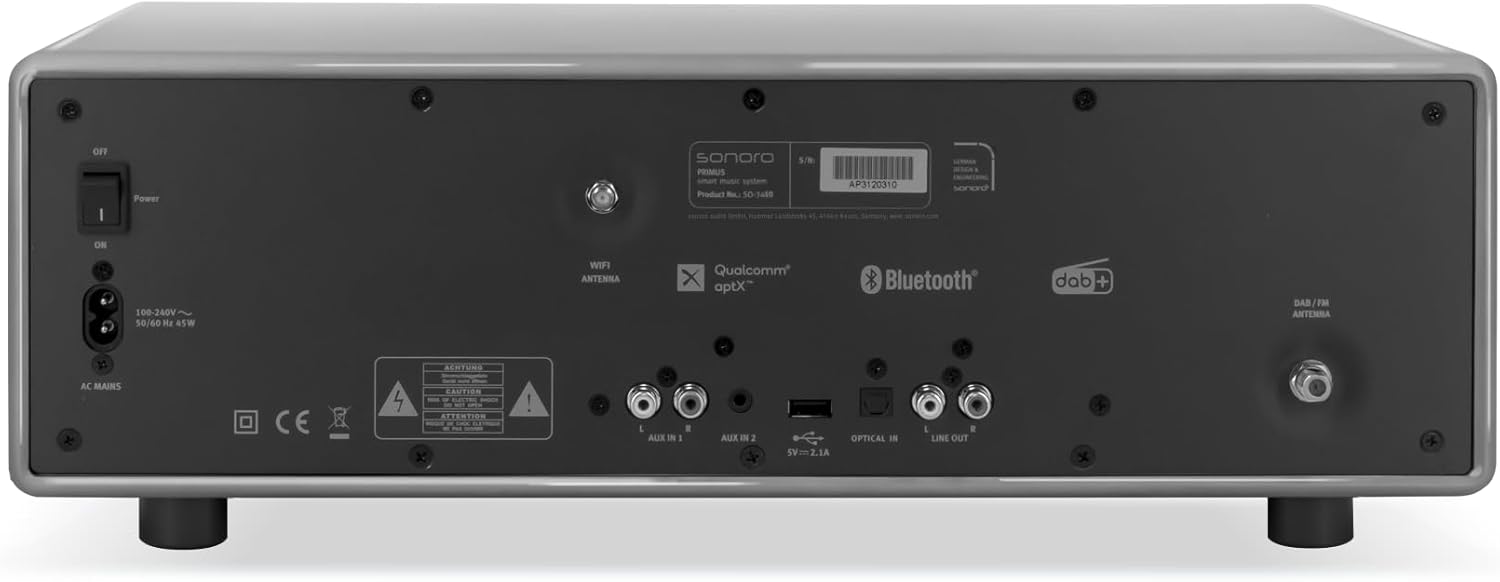
Зураг: Rear panel of the sonoro Primus, highlighting the power input and other connectivity options like AUX-in, Optical-in, and antenna connections.
3. Антенны холболт
For optimal FM and DAB+ reception, connect the included antenna to the appropriate antenna input on the rear panel. Extend the antenna fully for best signal quality.
4. Анхдагч асаалттай
Press the Power button on the front panel or the remote control to turn on the unit. Follow the on-screen instructions for initial setup, including language selection and network configuration.

Зураг: Урд view of the sonoro Primus, displaying the central screen, control knobs, and various buttons for media playback and source selection.
Ашиглалтын заавар
Үндсэн удирдлага
The sonoro Primus features intuitive controls on the front panel and a comprehensive remote control. Key controls include:
- Цахилгаан товч: Төхөөрөмжийг асаах/унтраах эсвэл хүлээлгийн горимд оруулна.
- Эзлэхүүний товчлуур: Мастер дууны түвшинг тохируулна.
- Тохируулах/сонгох товчлуур: Цэс рүү шилжиж, сонголтуудыг сонгоно.
- Эх сурвалжийн товчлуурууд: Selects input sources (Internet Radio, DAB+, FM, Bluetooth, CD, AUX-in, Optical-in).
- Тоглуулах удирдлага: Play/Pause, Skip Forward/Backward for CD and streaming.
Internet Radio and Podcasts
Access over 25,000 internet radio stations and numerous podcasts worldwide. Ensure your device is connected to a stable Wi-Fi network. Navigate through the menu using the Tune/Select knob to find and save your favorite stations.
DAB+ and FM Radio
Switch to DAB+ or FM mode using the source buttons. The unit will automatically scan for available stations. You can manually tune or save presets for quick access to your preferred channels.
Bluetooth холболт
To connect a Bluetooth device (smartphone, tablet, laptop):
- Select the Bluetooth source on the sonoro Primus.
- Гадаад төхөөрөмж дээрээ Bluetooth-г идэвхжүүлнэ үү.
- хайх "sonoro Primus" in your device's Bluetooth settings and pair.
- Холбогдсоны дараа та аудиог төхөөрөмж рүү утасгүй дамжуулах боломжтой.
CD тоглуулах
Insert an audio CD into the CD slot. The unit will automatically detect and begin playback. Use the playback controls to manage your music.
Streaming Services (Spotify Connect, Amazon Music, Deezer)
The sonoro Primus supports various streaming services. To use Spotify Connect, Amazon Music, or Deezer, ensure your device is connected to Wi-Fi and you have an active subscription to the respective service. Follow the instructions within the service's app to connect to your sonoro Primus.
AUX-in and Optical-in
Connect external audio devices using the AUX-in (3.5mm jack) or Optical-in ports on the rear panel. Select the corresponding source on the unit to play audio from these inputs.
Засвар үйлчилгээ
Нэгжийг цэвэрлэх
To clean the exterior of the unit, unplug it from the power source. Use a soft, dry, lint-free cloth. Do not use abrasive cleaners, waxes, or solvents as they may damage the finish.
CD тоглуулагчийн арчилгаа
Handle CDs by their edges to avoid fingerprints. If a CD is dirty, wipe it gently with a soft, dry cloth from the center outwards. Do not use solvents or abrasive cleaners on CDs.
Програм хангамжийн шинэчлэлтүүд
Periodically check for software updates via the unit's menu (if available). Updates can improve performance and add new features. Ensure a stable internet connection during updates.
Алдааг олж засварлах
| Асуудал | Боломжит шалтгаан | Шийдэл |
|---|---|---|
| Хүч чадалгүй | Цахилгаан кабель холбогдоогүй; цахилгаан залгуур гэмтэлтэй. | Цахилгааны кабелийн холболтыг шалгах; өөр гарцаар оролдоно уу. |
| Дуу алга | Volume too low; wrong input source selected; mute activated. | Increase volume; select correct input source; deactivate mute. |
| Радио хүлээн авалт муу | Антенн зөв холбогдоогүй эсвэл сунгаагүй; хөндлөнгийн оролцоо. | Антенны байрлалыг тохируулна уу; төхөөрөмжийг бусад электрон төхөөрөмжөөс холдуулна уу. |
| Bluetooth холболт амжилтгүй боллоо | Device too far; Bluetooth not enabled on external device; unit not in pairing mode. | Ensure devices are close; enable Bluetooth; put sonoro Primus in pairing mode. |
| CD тоглуулахгүй байна | CD inserted incorrectly; CD is dirty or scratched; unsupported disc format. | Reinsert CD correctly; clean or replace CD; ensure it's an audio CD. |
| Wi-Fi холболтын асуудал | Incorrect password; router too far; network interference. | Verify Wi-Fi password; move unit closer to router; restart router. |
Хэрэв асуудал хэвээр байвал хэрэглэгчийн тусламжтай холбогдоно уу.
Үзүүлэлтүүд
- Брэнд: соноро
- Загвар: e60a53a9-4d44-4a55-b129-3386e8f3e186
- Тохируулагч технологи: FM, DAB+
- Аудио гаралтын горим: Стерео
- Дэмжигдсэн аудио форматууд: MP3, AAC, WAV
- Чанга яригчийн тохиргоо: 2.1 (Two coaxial speakers and a powerful 5.25 inch subwoofer)
- Холболт: Optical, Auxiliary, Bluetooth, WLAN
- Тохиромжтой төхөөрөмжүүд: Laptop, MP3 player, Smartphone, Tablet
- Эрчим хүчний эх үүсвэр: Утастай цахилгаан
- Дэлгэцийн төрөл: LCD эсвэл LED
- Оруулсан бүрэлдэхүүн хэсгүүд: Power adapter, Remote control (with Lithium-metal batteries)
- Хэмжээ (багц): 52.6 x 33.2 x 27.4 см
- Жин (багц): 9.45 кг
- Өнгө: Chalk Grey (Note: Other colors may be available for different models)
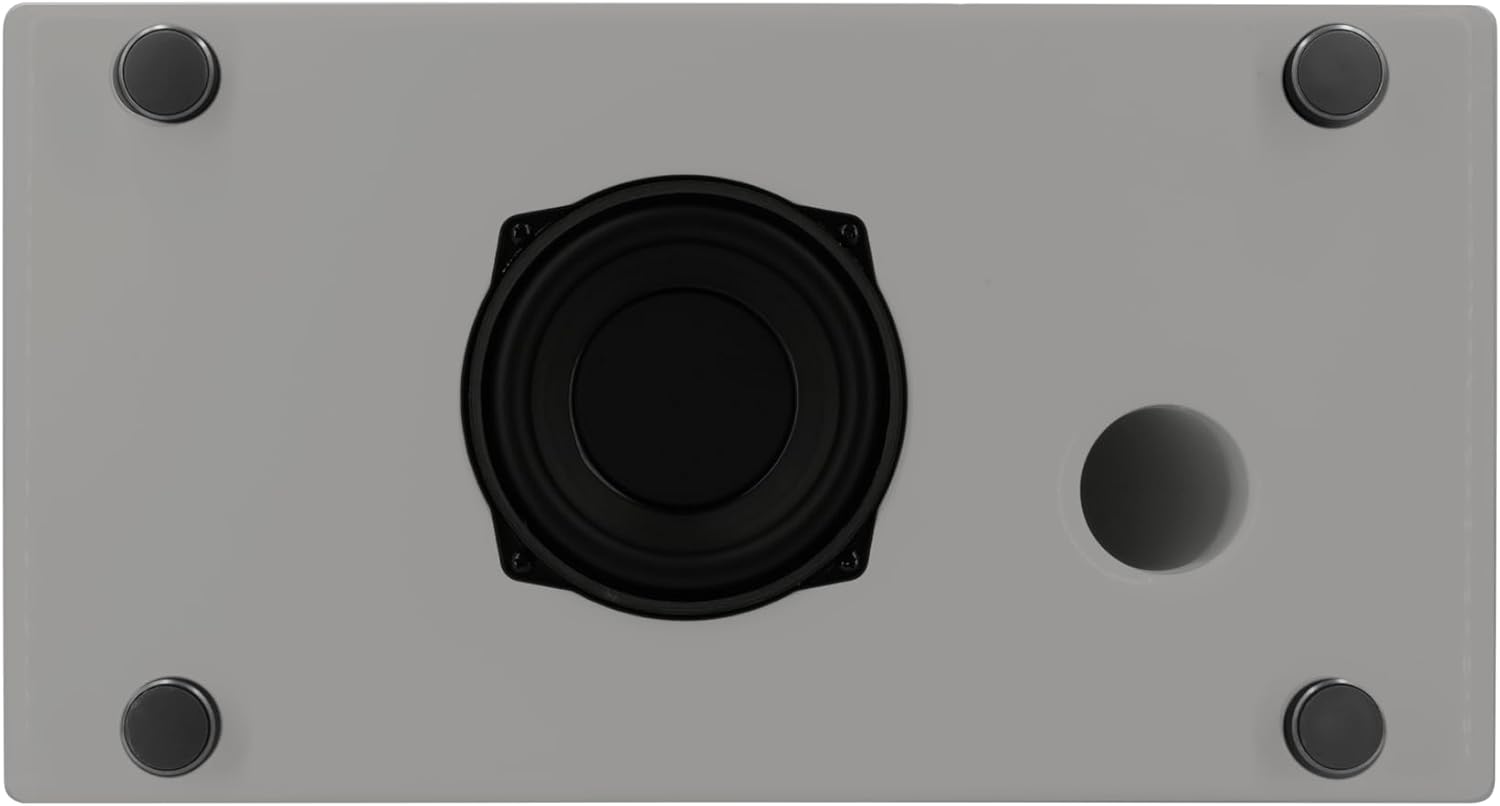
Зураг: Underside of the sonoro Primus, revealing the integrated 5.25-inch subwoofer for enhanced bass performance.
Баталгаат болон дэмжлэг
The sonoro Primus comes with a standard manufacturer's warranty. Please refer to the warranty card included in your package for specific terms and conditions. For technical support, service, or warranty claims, please contact sonoro audio GmbH customer service through their official webсайт эсвэл таны худалдан авалтад өгсөн холбоо барих мэдээлэл.
Үйлдвэрлэгч: sonoro audio GmbH
Эхний боломжтой огноо: 2 оны нэгдүгээр сарын 2023