
1. Танилцуулга
Thank you for choosing the Goshyda Portable Multimedia 1080P Projector. This compact and versatile device is designed to provide a personal cinema experience, supporting various multimedia inputs for entertainment, presentations, and more. Please read this manual carefully before using the projector to ensure proper operation and to maximize its lifespan.

Image 1.1: The Goshyda YG300 Mini Portable Projector in a home entertainment setting.
2. Аюулгүй байдлын мэдээлэл
- Эрчим хүчний хангамж: Use only the specified 5V 2A power adapter or a compatible power bank. Incorrect voltage төхөөрөмжийг гэмтээж болно.
- Агааржуулалт: Агааржуулалтын нүхийг бүү бөглөөрэй. Хэт халалтаас сэргийлж, проекторын эргэн тойронд хангалттай агаарын урсгалыг хангана уу.
- Байгаль орчин: Avoid exposing the projector to water, moisture, dust, or extreme temperatures. Operate in a clean, dry environment.
- Цэвэрлэгээ: Цэвэрлэхийн өмнө цахилгааныг салга. Зөөлөн, хуурай даавуу хэрэглээрэй. Шингэн болон аэрозол цэвэрлэгч хэрэглэж болохгүй.
- Салгах: Проекторыг өөрөө задлах, засах гэж бүү оролдоорой. Бүх үйлчилгээг мэргэшсэн боловсон хүчинд шилжүүлээрэй.
- Нүд хамгаалах: l байх үед проекторын линз рүү шууд харж болохгүйamp асаалттай байна.
3. Багцын агуулга
Хайрцагнаас задлахдаа багцын агуулгыг шалгана уу. Хэрэв ямар нэг зүйл дутуу эсвэл гэмтсэн бол жижиглэн худалдаалагчтайгаа холбоо барина уу.
- Goshyda Portable Projector
- Алсын удирдлага
- АВ кабель
- Эрчим хүчний адаптер
- Хэрэглэгчийн гарын авлага (энэ баримт бичиг)

Image 3.1: Included accessories with the Goshyda Portable Projector.
4. Бүтээгдэхүүн дууссанview
4.1. Projector Features
- 1080P Resolution Support: Delivers clear and detailed images.
- Авсаархан, зөөврийн дизайн: Weighing approximately 290g, it is easy to carry.
- Multi-Port Connectivity: Includes USB, HDMI, AV, memory card slot, and audio output.
- Баригдсан чанга яригч: Provides integrated audio for convenience.
- Уян хатан хүч: Can be powered by a 5V 2A wall charger or power bank.

Image 4.1: Visual representation of the projector's main features.
4.2. Projector Ports and Controls
Familiarize yourself with the various ports and controls on your projector.
- Линз: Урд талын проекцийн линз.
- Фокус бөгж: Зургийн тодорхой байдлыг тохируулна.
- Эрчим хүчний оролт (DC IN): Connects to the 5V 2A power adapter.
- HDMI порт: For connecting devices via HDMI cable.
- USB порт: USB санах ойн төхөөрөмжүүдийг холбоход зориулагдсан.
- AV порт: For connecting devices via AV cable.
- MicroSD картны үүр: Санах ойн карт оруулах зориулалттай.
- Аудио гаралт: Гадаад чанга яригч эсвэл чихэвч холбох зориулалттай.
- Хяналтын товчлуурууд: On the top panel for basic navigation and selection.

Зураг 4.2: Хажуу тал view of the projector highlighting its connectivity ports.

Image 4.3: Close-up of the projector lens.
5. Тохиргоо
5.1. Эрчим хүчний холболт
- Өгөгдсөн тэжээлийн адаптерийг проекторын DC IN порт руу холбоно уу.
- Цахилгаан адаптерийг ердийн цахилгаан залгуурт холбоно уу.
- Alternatively, for portable use, connect a 5V 2A power bank to the DC IN port.

Image 5.1: Powering the projector via wall adapter or power bank.
5.2. Байршуулалт ба төсөөлөл
Place the projector on a stable, flat surface. The optimal projection distance is between 1 to 2.5 meters, allowing for a screen size of up to 60 inches.
- For a 24-inch screen, place the projector approximately 0.8 meters away.
- For a 47-inch screen, place the projector approximately 1.2 meters away.
- For a 60-inch screen, place the projector approximately 1.6 meters away.
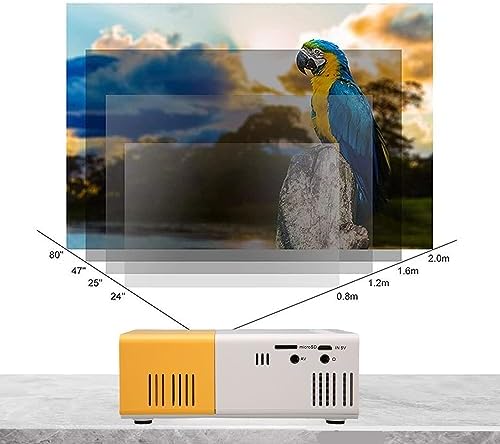
Image 5.2: Projection distance guidelines for various screen sizes. Note: Maximum recommended projection size is 60 inches.
5.3. Фокусын тохируулга
After placing the projector and powering it on, rotate the focus ring located around the lens until the projected image appears clear and sharp.
6. Ашиглалтын заавар
6.1. Асаах/унтраах
- Асаах: Проектор эсвэл алсын удирдлага дээрх цахилгаан товчийг дарна уу.
- Унтраах: Press the power button again. The projector will shut down.
6.2. Оролтын эх үүсвэрийн сонголт
Use the 'Source' button on the remote control or the projector's control panel to cycle through available input sources (HDMI, USB, AV, MicroSD).
6.3. Цэсийн навигаци
Use the arrow buttons on the remote control or projector to navigate through menus. Press 'OK' or 'Enter' to confirm selections. Use the 'Return' or 'Back' button to go back to the previous menu.
7. Холболт
Проектор нь янз бүрийн төхөөрөмжүүдэд зориулсан олон холболтын сонголтыг санал болгодог.

Image 7.1: Connectivity options for the Goshyda projector.
7.1. HDMI холболт
Connect devices such as laptops, TV Sticks, game consoles (e.g., for Xbox One), or Blu-ray players using an HDMI cable. Select 'HDMI' as the input source.
7.2. USB холболт
Медиа тоглуулахын тулд USB флаш дискийг USB порт руу хийнэ үү files directly. Select 'USB' as the input source and navigate through your files.
7.3. AV Connection
Use the provided AV cable to connect older devices like DVD players. Select 'AV' as the input source.
7.4. Smartphone/Tablet Connection
To connect directly to your smartphone or tablet, you will need an appropriate adapter (e.g., Micro USB to HDMI, Type-C to HDMI, or a dedicated HD multimedia interface device), depending on your device's operating system (OS X or Android) and available ports. These adapters are sold separately.
7.5. Аудио гаралт
Connect external speakers or headphones to the audio output port for enhanced sound.
8. Засвар үйлчилгээ
- Линз цэвэрлэх: Проекторын линзийг зөөлөн арчихын тулд оптик линзэнд тусгайлан зориулсан зөөлөн, хөвөнгүй даавуу ашиглаарай. Зүлгүүрийн материал эсвэл хүчтэй химийн бодис бүү хэрэглээрэй.
- Гадна цэвэрлэгээ: Проекторын гадна талыг зөөлөн, хуурай даавуугаар арчина.
- Хадгалах: When not in use for extended periods, store the projector in a cool, dry place, away from direct sunlight and dust.
9. Алдаа засах
| Асуудал | Боломжит шалтгаан | Шийдэл |
|---|---|---|
| Хүч чадалгүй | Power adapter not connected or faulty; insufficient power supply. | Ensure the 5V 2A power adapter is securely connected and plugged into a working outlet. Try a different power source or power bank. |
| Зураг байхгүй | Incorrect input source selected; cable not connected properly; device not outputting signal. | Select the correct input source (HDMI, USB, AV). Check all cable connections. Ensure the connected device is powered on and outputting a signal. |
| Зураг бүдэг байна | Фокусыг тохируулаагүй байна; проектор дэлгэцээс хэт ойрхон/хол байна. | Rotate the focus ring to sharpen the image. Adjust the projection distance within the recommended range (1-2.5m). |
| Дуу алга | Volume too low or muted; external speakers not connected; audio format not supported. | Increase the volume on the projector and the source device. Check if external speakers are properly connected. Ensure the audio format is supported. |
10. Техникийн үзүүлэлтүүд
| Онцлог | Дэлгэрэнгүй |
|---|---|
| Брэнд | Гошида |
| Загварын дугаар | Goshyda89pkbg17g0 |
| Дэлгэцийн нягтрал | 1920 x 1080 (1080P Support) |
| Гэрэлтүүлэг | 200 люмен |
| Харьцаа | 4:3 |
| Проекцийн зай | 1 - 2.5 метр |
| Төслийн хэмжээ | 60 инч хүртэл |
| Холболтын технологи | HDMI, USB, AV, MicroSD, Audio Out |
| Эрчим хүчний оролт | 5V 2А |
| Дэлгэцийн төрөл | LCD |
| Бүтээгдэхүүний хэмжээс | 12L x 8.5W x 4.6H cm (Approx. 4.7 x 3.3 x 1.8 inches) |
| Form Factor | Зөөврийн |
| Суурилуулах төрөл | Ширээний бэхэлгээ |
11. Баталгаат хугацаа ба дэмжлэг
For warranty information and customer support, please refer to the documentation provided with your purchase or contact your retailer directly. Keep your proof of purchase for warranty claims.