
Танилцуулга
Welcome to your new TechniSat Viola CD-1. This portable stereo CD player offers versatile audio playback options including CD, FM radio, and Bluetooth streaming. Its compact design and battery operation make it suitable for both home and on-the-go use. This manual provides essential information for setting up, operating, and maintaining your device.
Аюулгүй байдлын чухал мэдээлэл
- Төхөөрөмжийг ашиглахаасаа өмнө бүх зааврыг сайтар уншина уу.
- Энэ гарын авлагыг цаашид лавлах зорилгоор хадгална уу.
- Төхөөрөмжийг бороо, чийг эсвэл хэт их чийгшилд бүү оруул.
- Хэт халалтаас урьдчилан сэргийлэхийн тулд агааржуулалтын нүх бөглөрөөгүй эсэхийг шалгаарай.
- Зөвхөн үйлдвэрлэгчээс заасан хавсралт, дагалдах хэрэгслийг ашиглана уу.
- Бүх үйлчилгээг мэргэшсэн үйлчилгээний ажилтнуудад шилжүүлээрэй.
Бүтээгдэхүүн дууссанview
Familiarize yourself with the main components and controls of your Viola CD-1.

Урд view of the TechniSat Viola CD-1, highlighting its main controls and central display.

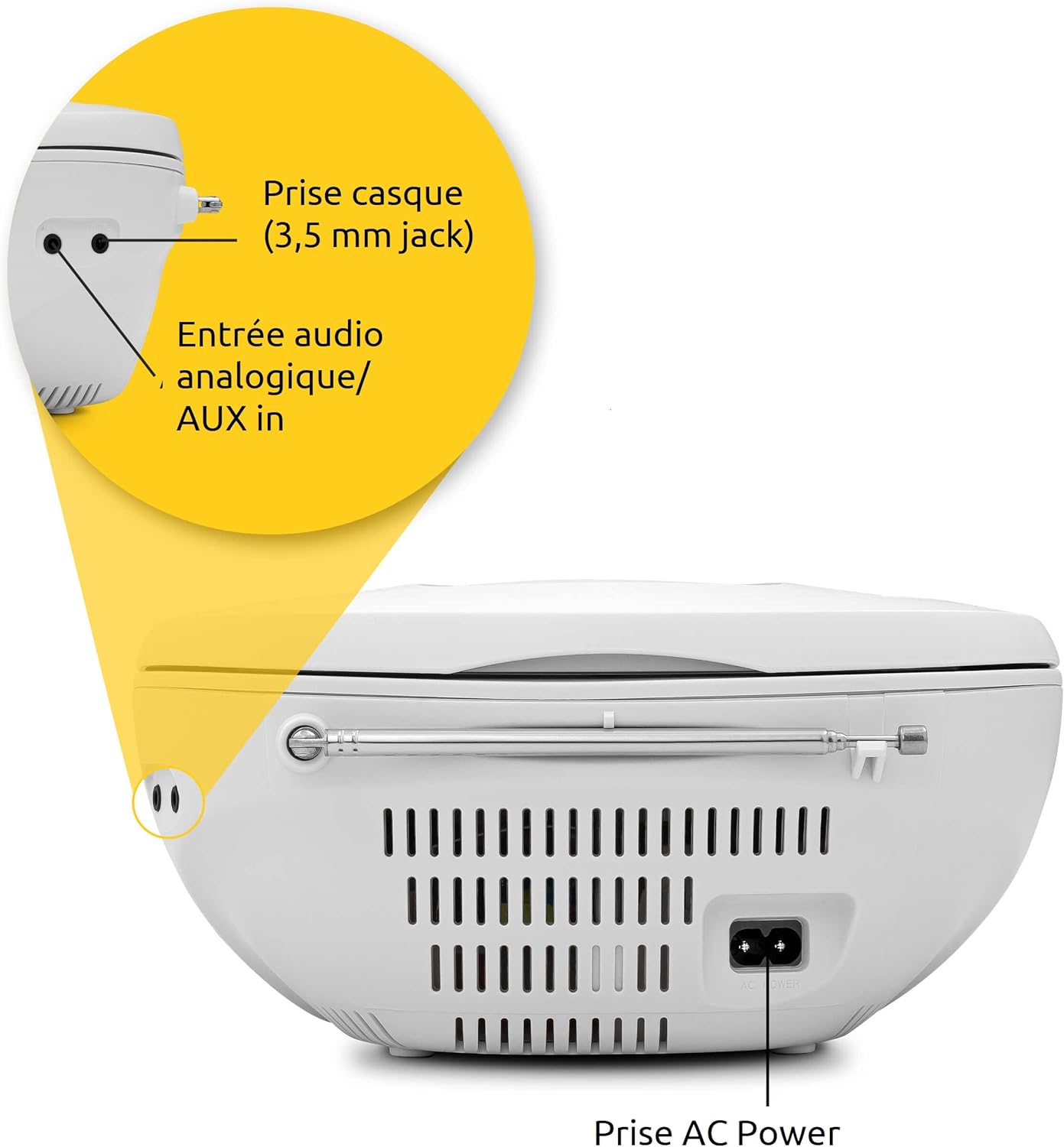
The rear panel of the Viola CD-1 features the AC power input, a 3.5mm AUX in port for external devices, and a 3.5mm headphone jack.
Key Controls and Features:
- Цахилгаан товч: Төхөөрөмжийг асаах эсвэл унтраана.
- Горимын товчлуур: Switches between CD, FM, Bluetooth, and AUX input modes.
- Дууны түвшин +/- Товчлуурууд: Аудио гаралтын түвшинг тохируулна.
- Тоглуулах/түр зогсоох товчлуур: Starts or pauses playback in CD and Bluetooth modes.
- Алгасах/Тохируулах товчлуурууд: Navigates tracks on a CD or tunes radio stations.
- Скан хийх товч: Initiates automatic station search in FM mode.
- Цомгийн товчлуур: For MP3 CDs, navigates between folders.
- Телескоп антен: FM радио хүлээн авах зориулалттай.
- Зөөх бариул: Хялбар зөөвөрлөхийн тулд.
Тохиргоо
Эрчим хүчний хангамж
The Viola CD-1 can be powered by either AC mains or batteries.
- Хувьсах гүйдлийн хүч: Connect the provided power cable to the AC power input on the rear of the unit and then to a standard wall outlet (230V).
- Зайны хүч: For portable use, open the battery compartment located on the bottom of the unit. Insert 6 x 1.5V C-type batteries (R14), ensuring correct polarity (+/-). Close the compartment securely.
Антенны тохиргоо
For optimal FM radio reception, fully extend the telescopic antenna.
Ашиглалтын заавар
CD тоглуулах
- Open the CD compartment lid located on the top of the unit.
- Carefully place a CD (standard audio CD or MP3 CD) onto the spindle with the label side facing up.
- CD тасалгааны тагийг сайтар хаа.
- дээр дарна уу Горим дэлгэц дээр "CD" гарч иртэл товчийг дахин дахин дарна уу.
- дээр дарна уу Тоглуулах/түр зогсоох тоглуулах товчийг дарна уу.
- -г ашиглана уу Алгасах buttons (forward/backward) to navigate between tracks.
- If playing an MP3 CD with multiple folders, use the Цомог button to switch between folders.

To insert a CD, lift the compartment lid as shown and place the disc with the label facing upwards.

The integrated CD player supports standard audio CDs, CD-R, CD-RW, and MP3 CDs.
FM радиогийн үйл ажиллагаа
- Fully extend the telescopic antenna for best reception.
- дээр дарна уу Горим Дэлгэц дээр "FM" гарч иртэл товчийг дахин дахин дарна уу.
- -г удаан дар Сканнердах Боломжтой FM станцуудыг автоматаар хайж, хадгалах товчийг дарна уу.
- -г ашиглана уу Алгасах buttons (forward/backward) to select a stored station.
The Viola CD-1 features an FM radio tuner, allowing reception of various regional radio stations. Extend the telescopic antenna for best reception.
Bluetooth аудио дамжуулалт
- дээр дарна уу Горим button repeatedly until "BT" appears on the display. The "BT" indicator will flash, signifying that the unit is in pairing mode.
- On your smartphone or other Bluetooth-enabled mobile device, enable Bluetooth and search for available devices.
- Select "TechniSat Viola CD-1" from the list of devices to initiate pairing.
- Once successfully paired, the "BT" indicator will stop flashing, and you can stream audio wirelessly from your device to the Viola CD-1.

Wirelessly stream music from your smartphone or tablet to the Viola CD-1 via Bluetooth.
AUX оролт
- Гадаад аудио төхөөрөмжийг (жишээ нь, MP3 тоглуулагч, ухаалаг утас) холбоно уу AUX In jack on the rear of the unit using a 3.5mm audio cable.
- дээр дарна уу Горим дэлгэц дээр "AUX" гарч иртэл товчийг дахин дахин дарна уу.
- Control audio playback and volume directly from your external device.
Чихэвчний хэрэглээ
Connect headphones with a 3.5mm jack to the headphone output on the rear of the unit for private listening. When headphones are connected, sound from the speakers will be muted.

The practical carry handle makes transporting the boombox comfortable and easy.

Integrated stereo speakers provide clear audio with a total output of 2 x 1 Watt.
Засвар үйлчилгээ
Цэвэрлэгээ
- Wipe the exterior of the unit with a soft, dry cloth. Do not use abrasive cleaners, solvents, or chemical sprays, as these can damage the finish.
- For cleaning the CD lens, use a specialized CD lens cleaner disc according to its instructions.
Зай солих
When using battery power, replace all 6 C-type batteries when the unit's performance (e.g., sound quality, volume) begins to degrade. Always replace all batteries at once with new ones of the same type.
Алдааг олж засварлах
If you encounter issues with your Viola CD-1, refer to the table below for common problems and solutions.
| Асуудал | Боломжит шалтгаан | Шийдэл |
|---|---|---|
| Төхөөрөмж асахгүй байна. | No power supply or dead batteries. | Check AC power connection or replace all batteries. |
| CD тоглохгүй байна. | CD inserted incorrectly, dirty, scratched, or unsupported format. | Ensure CD is inserted correctly (label side up). Clean the CD. Try a different CD. Ensure it's an audio CD or MP3 CD. |
| FM радио хүлээн авах чадвар муу. | Антенн сунгаагүй эсвэл дохио сул байна. | Дуран антенныг бүрэн сунгана уу. Илүү сайн дохио авахын тулд төхөөрөмжийн байрлалыг өөрчилж үзнэ үү. |
| Bluetooth төхөөрөмжийг холбох боломжгүй. | Unit not in pairing mode, device too far, or previously paired. | Ensure Viola CD-1 is in Bluetooth pairing mode (BT flashing). Move devices closer. On your device, forget/unpair the Viola CD-1 and try pairing again. |
| Чанга яригчаас дуу гарахгүй. | Volume too low, headphones connected, or incorrect mode selected. | Increase volume. Disconnect headphones. Press the Горим button to select the correct input source. |
Үзүүлэлтүүд
Detailed technical specifications for the TechniSat Viola CD-1.
| Онцлог | Дэлгэрэнгүй |
|---|---|
| Брэнд | TechniSat |
| Загварын дугаар | 0001/2980 |
| Өнгө | Цагаан |
| Холболтын технологи | Auxiliary, Bluetooth (reception) |
| Онцлог шинж чанарууд | AC and Battery operation, MP3 CD Player, Convenient carry handle, Bluetooth audio streaming (reception) |
| Тохиромжтой төхөөрөмжүүд | Чихэвч |
| Эрчим хүчний эх үүсвэр | AC and Battery operation |
| Чанга яригчийн төрөл | Стерео |
| Гаралтын хүч | 2 x 1 ватт RMS |
| Хэмжээ (LxWxH) | 21.5 x 21.5 x 10 см |
| Зүйлийн жин | 828 грамм |
| Зайны шаардлага | 6 x 1.5V C-type batteries (R14) |
Баталгаат болон дэмжлэг
Баталгаат хугацааны мэдээлэл
This product comes with a manufacturer's warranty. Please refer to the warranty card included in the product packaging for specific terms, conditions, and duration of the warranty. (Note: Specific warranty details were not available in the provided product data.)
Хэрэглэгчийн дэмжлэг
For technical assistance, troubleshooting beyond this manual, or service inquiries, please visit the official TechniSat webсайт эсвэл тэдний хэрэглэгчийн дэмжлэгтэй шууд холбогдоно уу.
Албан ёсны Webсайт: www.technisat.com