
Танилцуулга
This document provides instructions for the Generic Replacement Remote Control, designed for use with various Philips Signage LCD HD Displays. It is compatible with models that originally used remote controls such as Philips YKF326-019 and 398GRABDDNEPHT. This remote offers essential functions for controlling your display.
Чухал тэмдэглэл: This is a replacement unit and may not support all advanced or specific functions of your original remote control. No batteries are included with this product.
Тохиргоо: Батерей суурилуулах
Алсын удирдлагыг ашиглаж эхлэхийн тулд та эхлээд батерейг суурилуулах ёстой.
- Зайны тасалгааг нээнэ үү: Locate the battery compartment cover on the back of the remote control. Slide the cover downwards or press the latch and lift to open it.
- Батерейг оруулах: Insert two (2) AAA batteries into the compartment. Ensure that the positive (+) and negative (-) terminals of the batteries align correctly with the indicators inside the compartment. Incorrect insertion can prevent the remote from functioning.
- Тасалгааг хаах: Батерейны тасалгааны тагийг найдвартай товших хүртэл шургуулж орлуулаарай.
- Алсын удирдлагыг турших: Point the remote control towards your Philips display and press the Power button to verify functionality.

Зураг: Буцах view of the remote control, highlighting the battery compartment. This is where you will insert the two AAA batteries.
Ашиглалтын заавар
This remote control operates using infrared (IR) technology. For optimal performance, ensure there is a clear line of sight between the remote's IR emitter (located at the front tip) and your display's IR receiver.
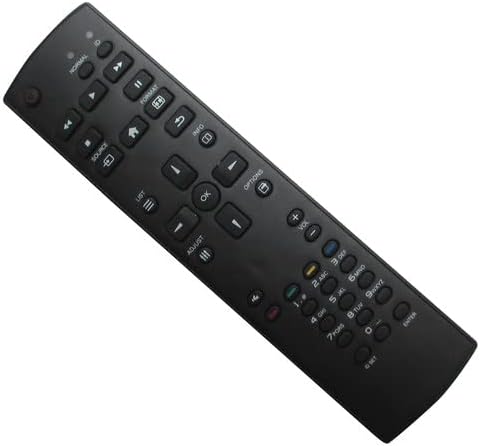
Зураг: Урд view of the remote control, displaying all buttons.
Нийтлэг функцууд:
- Цахилгаан товч: Дэлгэцийг асааж эсвэл унтраадаг.
- Дууны хэмжээг нэмэгдүүлэх/доошруулах: Аудио дууны хэмжээг тохируулна.
- Суваг дээш/доошоо: Changes the television channel (if applicable).
- Эх сурвалж/Оролт: Selects the input source (e.g., HDMI 1, HDMI 2, AV).
- Menu/Options: Accesses the display's on-screen menu or options.
- Навигацийн товчлуурууд (дээш, доош, зүүн, баруун, OK): Цэсээр шилжих, сонголтыг баталгаажуулахад ашигладаг.
- Тооны дэвсгэр: For direct channel entry or numerical input.
- Дууг хаах: Silences the display's audio.
Refer to your display's original user manual for specific functions and menu navigation details, as this replacement remote aims to replicate primary controls.
Засвар үйлчилгээ
Зөв арчилгаа нь таны алсын удирдлагын ашиглалтын хугацааг уртасгах болно:
- Цэвэрлэгээ: Алсын удирдлагыг зөөлөн, хуурай даавуугаар арчина. Шингэн цэвэрлэгч эсвэл зүлгүүрийн материал бүү ашиглаарай.
- Хадгалах: Store the remote in a dry place, away from direct sunlight, high temperatures, and humidity.
- Зай солих: If the remote becomes unresponsive or its range decreases, replace both AAA batteries with new ones. Remove batteries if the remote will not be used for an extended period to prevent leakage.
- Дусалаас зайлсхийх: Алсын удирдлагыг физик нөлөөллөөс хамгаалаарай, учир нь энэ нь дотоод эд ангиудыг гэмтээж болзошгүй.
Алдааг олж засварлах
Хэрэв танд алсын удирдлагатай холбоотой асуудал гарвал дараах шийдлүүдийг туршиж үзээрэй.
- Алсын удирдлага хариу өгөхгүй байна:
- Ensure there is a clear line of sight between the remote and the display's IR receiver.
- Check if the batteries are inserted correctly, observing the positive (+) and negative (-) polarity.
- Батерейг шинэ AAA батерейгаар солино уу.
- Confirm that the display is powered on and not in standby mode.
- Хязгаарлагдмал функциональ байдал:
- As a replacement remote, some advanced or specific functions of your original display remote may not be supported. This is normal for universal or replacement remotes.
- Ensure your display model is listed as compatible. If your model is not listed, full functionality cannot be guaranteed.
Үзүүлэлтүүд
| Брэнд | Ерөнхий |
| Compatible Model (Primary) | Philips YKF326-019 |
| Холболтын технологи | Хэт улаан туяаны (IR) |
| Maximum Number of Supported Devices | 1 |
| Зайны төрөл | ААА |
| Шаардлагатай батерейны тоо | 2 |
| Хамгийн их хүрээ | 10 метр |
| Хянагчийн төрөл | Товчлуурын удирдлага |
Баталгаат болон дэмжлэг
Энэ бүтээгдэхүүн нь хамт ирдэг 90 хоногийн баталгаат хугацаа худалдан авсан өдрөөс эхлэн үйлдвэрлэлийн согогийг хамарна.
For technical support, compatibility inquiries, or warranty claims, please contact the seller directly through your purchase platform. It is recommended to verify your display's model number against the compatible models listed in the product description before purchase.