
1. Бүтээгдэхүүн дууссанview
The ECLIPSE AVN-HS01F is a state-of-the-art car navigation system featuring a floating 10.1-inch HD display. Designed for compatibility with approximately 400 car models, this unit provides high-definition map displays and video content. Its low-reflection screen ensures clear visibility, making route guidance and multimedia viewing a superior experience. The system integrates seamlessly with smartphones via Apple CarPlay and HDMI, allowing access to a wide range of content for an enhanced driving experience.

Image: The ECLIPSE AVN-HS01F unit displaying a detailed navigation map.
2. Үндсэн шинж чанарууд
- 10.1 инчийн HD дэлгэц: Features a low-reflection screen with 1280x720 resolution for crisp, clear visuals of maps and video content.
- Floating Structure: Enables installation in approximately 400 different car models, offering flexible positioning within the vehicle's dashboard.
- Apple CarPlay Support: Connect your iPhone to access navigation, music, messages, and more directly from the unit, with voice control via Siri.
- HDMI оролт/гаралт: Allows connection of external devices like smartphones for high-definition video and game playback on the large screen.
- Мультимедиа тоглуулах: Supports various media formats including SD cards, CDs, and DVDs, in addition to Bluetooth audio streaming.
- VICS WIDE: Provides advanced traffic information for optimized route guidance.

Image: The 10.1-inch large screen of the AVN-HS01F integrated into a car's dashboard.
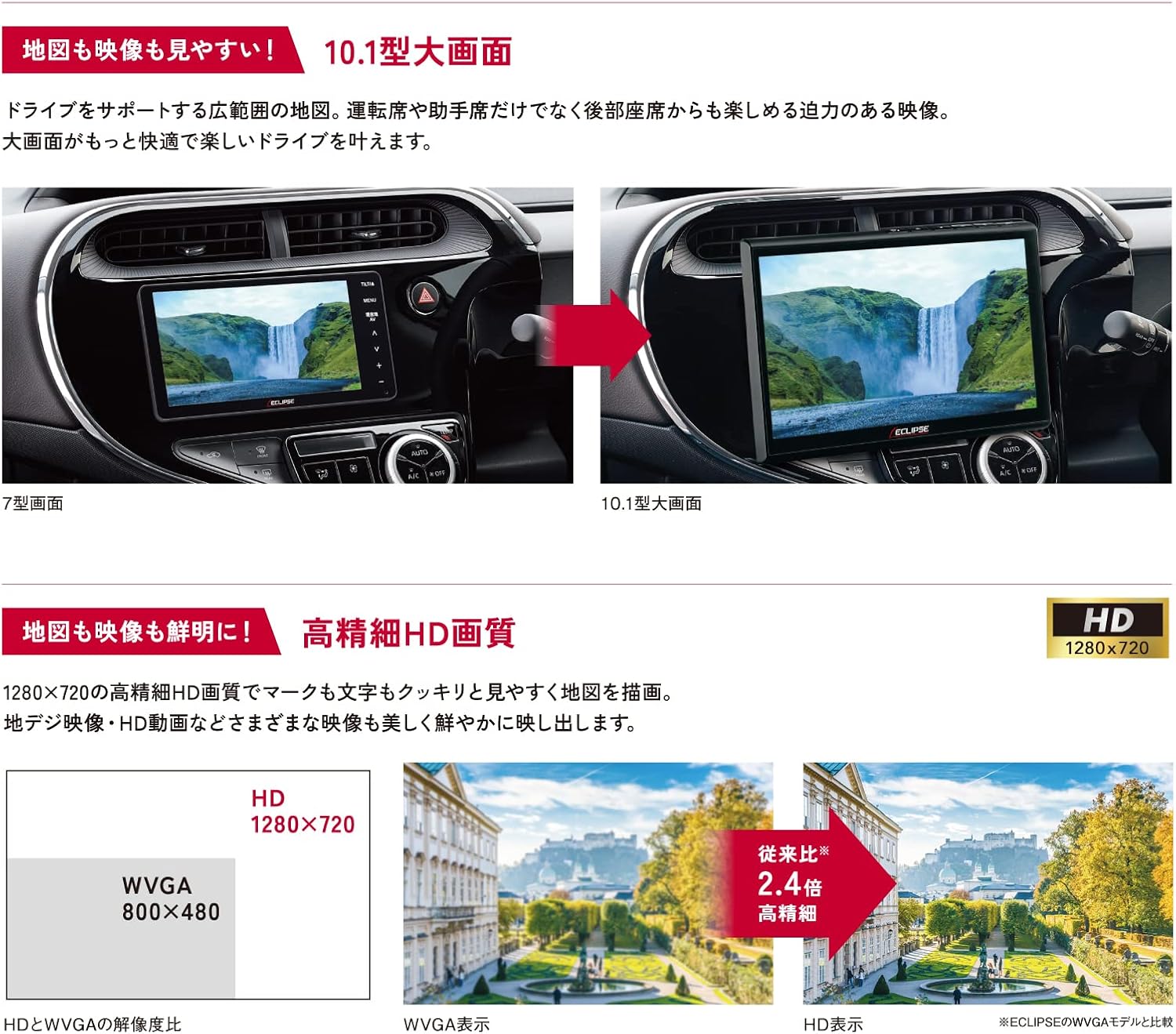
Image: Visual comparison demonstrating the superior HD quality (1280x720) of the AVN-HS01F compared to standard WVGA (800x480).
3. Тохиргоо ба суурилуулалт
The AVN-HS01F utilizes a floating display structure, which allows for installation in a wide variety of vehicles. For detailed installation instructions, including wiring diagrams and mounting procedures, please refer to the dedicated Суурилуулалтын гарын авлага provided with your unit. Professional installation is recommended to ensure proper functionality and safety.

Зураг: Бүтэнview of different ECLIPSE navigation series, highlighting the floating display and various features across models.
4. Ашиглалтын заавар
4.1 Navigation Functions
- Газрын зургийн дэлгэц: View detailed maps in HD quality. Use pinch-to-zoom and swipe gestures for easy navigation.
- Маршрутын заавар: Enter your destination to receive clear, turn-by-turn directions. The HD display ensures route information is highly visible.
- VICS WIDE: Access real-time traffic information to avoid congestion and optimize your travel time.
4.2 Медиа тоглуулах
- CD/DVD: Аудио болон видео тоглуулах зориулалттай үүрэнд дискийг оруулна уу.
- SD карт: Insert an SD card containing audio or video files into the slot.
- Bluetooth Аудио: Pair your smartphone or other Bluetooth-enabled device to stream audio wirelessly.
4.3 Apple CarPlay
Connect your iPhone via USB to enable Apple CarPlay. This allows you to use compatible iPhone apps, make calls, send messages, and control music directly from the navigation screen. Use Siri for hands-free voice commands.
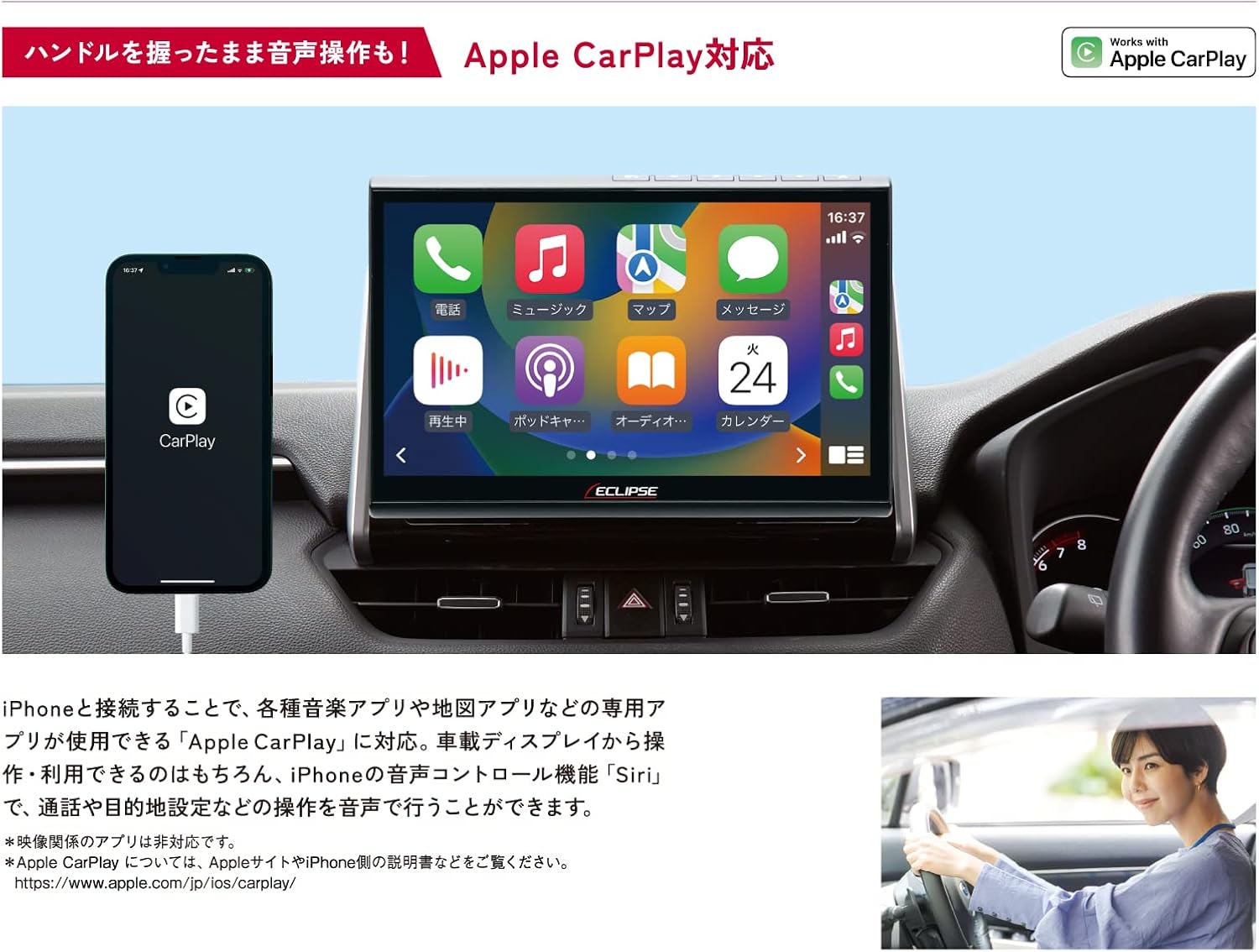
Image: The AVN-HS01F display showing the Apple CarPlay interface, with a connected iPhone.
4.4 HDMI Connectivity
Connect HDMI-compatible devices, such as smartphones or portable media players, to the unit to display their content on the large screen. Enjoy high-definition videos and games.

Image: The AVN-HS01F display showing content mirrored from a smartphone via HDMI connection.
4.5 Дэлгэцийн тохируулга
The floating display allows for flexible positioning to optimize viewing angles and minimize glare. Adjust the screen's tilt (front/back), swivel (left/right), and height (up/down) manually to suit your preference.

Image: Diagrams demonstrating the various adjustable angles and positions of the AVN-HS01F display for optimal viewing.
5. Засвар үйлчилгээ
To ensure the longevity and optimal performance of your ECLIPSE AVN-HS01F, follow these maintenance guidelines:
- Дэлгэц цэвэрлэх: Gently wipe the display with a soft, lint-free cloth. For stubborn smudges, slightly dampдаавуугаар усаар эсвэл дэлгэцэнд аюулгүй цэвэрлэгчээр угаана. Зүлгүүрийн материал эсвэл хатуу химийн бодисоос зайлсхий.
- Нэгж цэвэрлэх: Use a dry, soft cloth to wipe the main unit and surrounding areas. Ensure no dust or debris accumulates in ports or vents.
- Дискний арчилгаа: CD болон DVD-г ирмэгээс нь барь. Тоглуулахтай холбоотой асуудал гарахаас сэргийлж цэвэрхэн, зураасгүй байлга.
- Програм хангамжийн шинэчлэлтүүд: Periodically check the official ECLIPSE website for any available software or map updates to ensure your system is running the latest version.
6. Алдаа засах
If you encounter issues with your AVN-HS01F, try the following basic troubleshooting steps:
- Эрчим хүчгүй: Бүх цахилгаан холболтыг шалгана уу. Тээврийн хэрэгслийн гал асаалттай байгаа эсэхийг шалгаарай.
- Дуугүй: Verify volume settings. Check audio source selection. Ensure speakers are properly connected.
- GPS дохио байхгүй: GPS антенн зөв суурилуулсан бөгөөд тунгалаг байгаа эсэхийг шалгаарай view of the sky. Move the vehicle to an open area if in a covered location.
- Дэлгэцийн асуудлууд: If the screen is blank or distorted, try restarting the vehicle's ignition. Check display cable connections if accessible.
- Мэдрэгчтэй дэлгэц хариу өгөхгүй байна: Perform a system reset if available (refer to the main instruction manual for specific reset procedures).
- Диск тоглуулах алдаа: Ensure the disc is clean and free of scratches. Try a different disc to confirm the issue is not with the media.
For persistent issues or problems not covered here, please contact ECLIPSE customer support or consult a qualified service technician.
7. Техникийн үзүүлэлтүүд
| Онцлог | Тодорхойлолт |
|---|---|
| Брэнд | ХИЧИЛТ |
| Загварын нэр | AVN HS01F |
| Бүтээгдэхүүний загварын дугаар | AVN-HS01F |
| Дэлгэцийн хэмжээ | 10.1 инч |
| Дэлгэцийн нягтрал | HD (1280x720) |
| Санах ойн хадгалах багтаамж | 32 ГБ |
| Холболтын технологи | Bluetooth, HDMI |
| Онцлог шинж чанарууд | VICS/VICS WIDE, Apple CarPlay Support |
| Суурилуулах төрөл | Dashboard Mount (Floating) |
| Тохиромжтой тээврийн хэрэгслийн төрөл | Passenger Cars (approx. 400 models) |
| Газрын зургийн төрөл | Asia, Japan |
| Зүйлийн жин | 5.26 кг |
| Багцын хэмжээ | 35.7 x 33.8 x 20.5 см |
| Оруулсан бүрэлдэхүүн хэсгүүд | Navigation unit, TV antenna, power cord, relay cord, vehicle speed cord, microphone, instruction manual, installation manual |
8. Баталгаат хугацаа ба дэмжлэг
The ECLIPSE AVN-HS01F comes with a 1 жилийн үйлдвэрлэгчийн баталгаа худалдан авсан өдрөөс. Энэхүү баталгаа нь ердийн ашиглалтын үед хийгдсэн материал, хийцийн согогийг хамарна.
For warranty claims, technical support, or further inquiries, please contact ECLIPSE customer service or visit the official ECLIPSE brand store:
Баталгаат баталгааг баталгаажуулахын тулд худалдан авалтаа баталгаажуулна уу.