
Танилцуулга
This manual provides detailed instructions for the installation, operation, and maintenance of your Strong SRT 7040 Digital Satellite HD Receiver. Please read this manual carefully before using the device to ensure proper functionality and to prevent damage.

Image: The Strong SRT 7040 DTT Tuner and its retail packaging.
The Strong SRT 7040 is a Full HD digital satellite receiver designed for Free-To-Air (FTA) channels. It features a USB port for multimedia playback and software updates, and supports Dolby Audio for enhanced sound quality.
1. Тохиргоо
1.1 Савлах
Сав баглаа боодолоос бүх бүрэлдэхүүн хэсгүүдийг болгоомжтой арилгана. Дараах зүйлс байгаа эсэхийг шалгаарай:
- Strong SRT 7040 DTT Tuner
- Алсын удирдлага (2 AAA батерейтай)
- Эрчим хүчний адаптер
- Хэрэглэгчийн гарын авлага
1.2 Төхөөрөмжийг холбох
Follow these steps to connect your SRT 7040 receiver:
- Хиймэл дагуулын оролт: Connect your satellite dish cable to the СУУДЛАА хүлээн авагчийн ар талд байрлах порт.
- Видео гаралт (HDMI): -аас HDMI кабелийг холбоно уу HDMI Хүлээн авагч дээрх портыг телевизор дээрх HDMI оролт руу холбоно уу.
- Видео гаралт (SCART): Alternatively, for older televisions, connect a SCART cable from the ТВ SCART Хүлээн авагч дээрх портыг телевизийнхээ SCART оролт руу холбоно уу.
- Audio Output (Digital): For digital audio, connect a coaxial cable from the COAXIAL S/PDIF port to your digital audio ampнастан.
- Audio Output (Analog): For analog audio, connect RCA cables from the AUDIO R/L ports to your audio Hi-Fi ampнастан.
- USB төхөөрөмж: If desired, connect a USB storage device to the USB port for multimedia playback or software updates.
- Эрчим хүч: Эрчим хүчний адаптерийг 12V === 1.5А input on the receiver, then plug the adapter into a wall outlet.

Image: Rear panel connections of the Strong SRT 7040 DTT Tuner, showing SAT IN, HDMI, TV SCART, COAXIAL S/PDIF, AUDIO R/L, USB, and Power input.
1.3 Анх удаа суулгах болон сувгийн скан хийх
Upon first power-on, the receiver will guide you through an initial setup wizard. Follow the on-screen prompts to select your language, country, and perform an automatic channel scan. This process will detect and store all available satellite channels.
2. Ашиглалтын заавар
2.1 Алсын удирдлагатайview
The included remote control allows you to access all functions of the SRT 7040. Insert the two AAA batteries into the remote control, ensuring correct polarity.

Image: The remote control for the Strong SRT 7040 DTT Tuner, showing buttons for power, numbers, volume, channel, menu, and special functions.
2.2 Үндсэн функцууд
- Эрчим хүч: дээр дарна уу ХҮЧ button to turn the receiver on or off (standby mode).
- Сувгийн сонголт: -г ашиглана уу CH+ / CH- buttons to change channels sequentially, or use the numeric keypad to enter a channel number directly.
- Дууны хяналт: -г ашиглана уу VOL+ / VOL- аудио дууны түвшинг тохируулах товчлуурууд.
- Дууг хаах: дээр дарна уу ЗУРАГ товчийг дарж дууг түр хаах боломжтой.
2.3 Цэсийн навигаци
дээр дарна уу Цэс button to access the main menu. Use the arrow keys (UP, ДООШ, ЗҮҮН, ЗӨВ) to navigate through options and OK to confirm selections. Press ГАРАХ to return to the previous screen or live TV.
2.4 Онцлог шинж чанарууд
- Цаг хэмжигч: The receiver supports programming timers for recording or switching to specific channels at scheduled times. Access this feature via the menu.
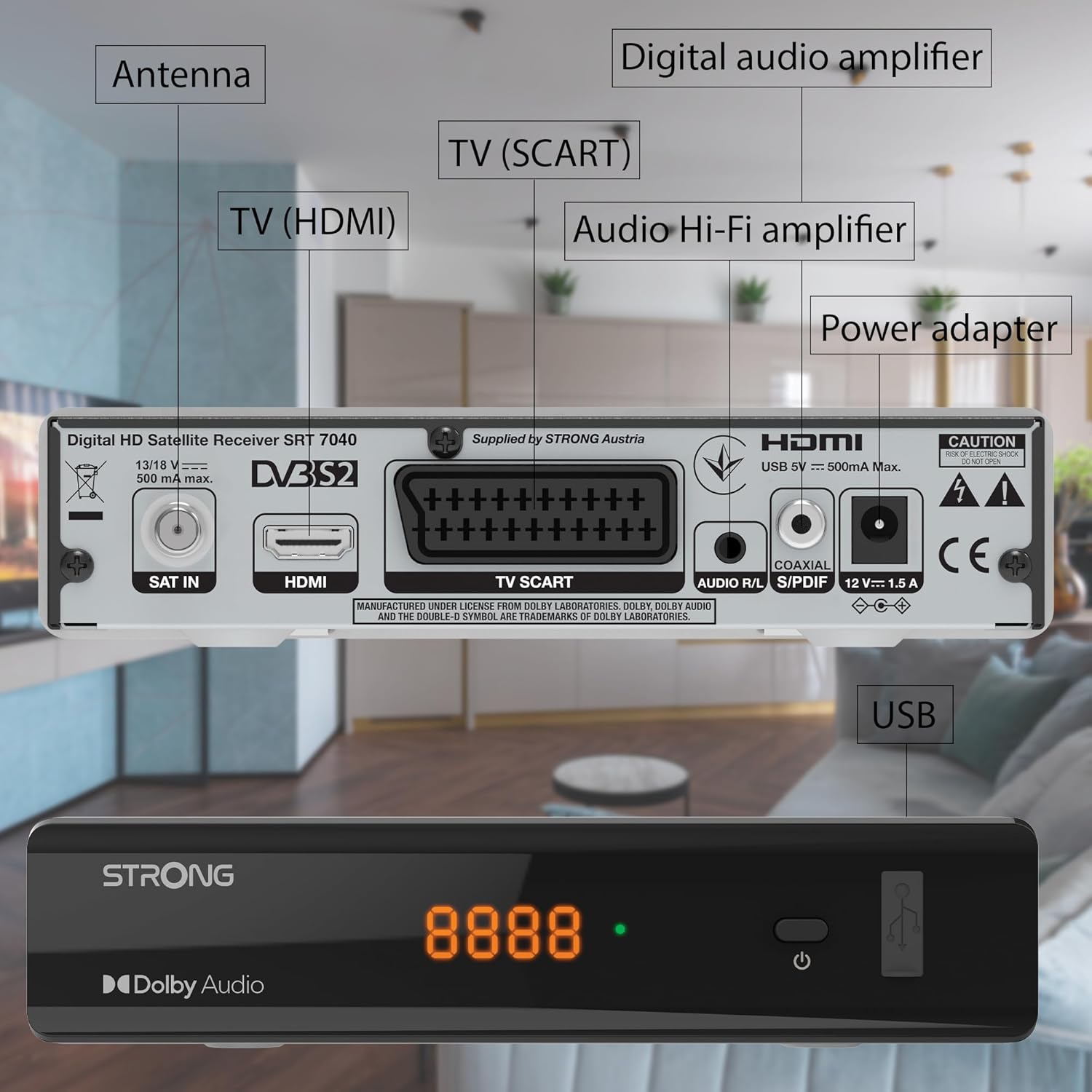
Image: The Strong SRT 7040 DTT Tuner displaying a timer icon, indicating its scheduling capabilities.
- Favorite Lists: Create customized lists of your preferred channels for quick access.
- Хадмал: Enable or disable subtitles for compatible broadcasts using the SUB удирдлага дээрх товчлуур.
- Цахим хөтөлбөрийн гарын авлага (EPG): дээр дарна уу EPG товчийг дарна уу view program information for upcoming broadcasts.
- Dolby Аудио: The receiver supports Dolby Audio for a high-quality sound experience.

Image: The Strong SRT 7040 DTT Tuner with the Dolby Audio logo, illustrating its sound processing capability.
3. Засвар үйлчилгээ
3.1 Цэвэрлэгээ
To clean the receiver, disconnect it from the power supply. Use a soft, dry cloth to wipe the exterior. Do not use liquid cleaners, aerosols, or abrasive materials, as these can damage the finish or internal components.
3.2 Програм хангамжийн шинэчлэлтүүд
Үйлдвэрлэгчийг үе үе шалгаж байгаарай website for available software updates. Updates can improve performance, add new features, or resolve issues. Software updates are typically performed via the USB port following specific instructions provided with the update file.
3.3 Аюулгүй байдлын мэдээлэл
- Хүлээн авагчийг бүү нээasing. Дотор нь хэрэглэгчийн засвар үйлчилгээ хийх хэсэг байхгүй. Бүх үйлчилгээг мэргэшсэн боловсон хүчинд шилжүүлээрэй.
- Хүлээн авагчийг нарны шууд тусгал, дулааны эх үүсвэр, чийгнээс хол байлга.
- Хэт халалтаас урьдчилан сэргийлэхийн тулд төхөөрөмжийн эргэн тойронд хангалттай агааржуулалт хийх хэрэгтэй.
- Зөвхөн өгсөн тэжээлийн адаптерийг ашиглана уу.
4. Алдаа засах
If you encounter problems with your SRT 7040, consult the following table before contacting support.
| Асуудал | Боломжит шалтгаан | Шийдэл |
|---|---|---|
| Хүч чадалгүй | Цахилгаан адаптер холбогдоогүй; Цахилгаан залгуур гэмтэлтэй | Check power adapter connection; Try a different power outlet |
| Дохио байхгүй / Хар дэлгэц | Satellite cable loose or disconnected; Incorrect input selected on TV; Satellite dish alignment issue | Check SAT IN cable connection; Ensure TV is on correct HDMI/SCART input; Perform a channel scan; Consult a professional for dish alignment if necessary |
| Алсын удирдлага ажиллахгүй байна | Batteries depleted or incorrectly inserted; Obstruction between remote and receiver | Replace batteries; Ensure correct polarity; Remove any obstructions; Point remote directly at receiver |
| Зургийн чанар муу | Weak satellite signal; Incorrect display settings | Check satellite signal strength in menu; Adjust TV display settings; Ensure Full HD content is being broadcast |
5. Техникийн үзүүлэлтүүд
The following are the technical specifications for the Strong SRT 7040 Digital Satellite HD Receiver:
- Загвар: SRT 7040 (SAT FTA Full HD)
- Брэнд: Хүчтэй
- Хэмжээ: 3.39 x 6.46 x 1.38 инч (8.6 x 16.4 x 3.5 см)
- Барааны жин: 9.2 унц (260 грамм)
- Өнгө: Хар
- Холболтын технологи: USB
- Ботьtage: 100 - 240 В
- Давтамж: 50 - 60 Гц
- Эрчим хүчний хэрэглээ: 18 kWh (operational, typical)
- Ажлын температурын хүрээ: 0ºC-аас 40ºC хүртэл
- Харьцангуй чийгшил: 10% - 95%
- Батерей: 2 AAA батерей (алсын удирдлагад багтсан)
- Тодорхойлолт хангасан: DVB-S2
- Үүнд: Wally Receiver
6. Баталгаат хугацаа ба дэмжлэг
For warranty information and technical support, please refer to the warranty card included in your product packaging or visit the official Strong webсайт. Худалдан авалтын баримтаа баталгаат нэхэмжлэлд зориулж худалдан авалтын баталгаа болгон хадгална уу.
For further assistance, you may contact Strong customer service through the contact details provided on their official webсайт.