
1. Танилцуулга
This manual provides detailed instructions for the installation, operation, and maintenance of the Generic WS C621E SAGE Motherboard. This motherboard supports 1st and 2nd Generation Intel Xeon Scalable Processors with an LGA3647 socket and features support for 4-way SLI™ / CrossFireX™ technologies. Please read this manual thoroughly before beginning installation to ensure proper setup and to prevent damage to your components.
2. Аюулгүй байдлын мэдээлэл
- Аливаа эд ангид хүрэхээсээ өмнө цахилгааны утсыг ханын залгуураас салга.
- Бүрэлдэхүүн хэсгүүдэд цахилгаан гүйдэл (ESD) гэмтэхээс сэргийлэхийн тулд эсрэг статик бугуйн оосор зүү.
- Бүрэлдэхүүн хэсгүүдийг ирмэгээр нь барьж, зүү эсвэл хэлхээнд хүрэхээс зайлсхий.
- Хэт халалтаас урьдчилан сэргийлэхийн тулд компьютерийнхээ гэрт агааржуулалт сайтай байгаарай.
- Эх хавтанг чийг, хэт температураас хол байлга.
3. Багцын агуулга
Verify that all items are present in your motherboard package. If any items are missing or damaged, contact your retailer.
- Generic WS C621E SAGE Motherboard
- SATA мэдээллийн кабель
- I / O Shield
- Хэрэглэгчийн гарын авлага (энэ баримт бичиг)
- Support DVD/USB drive (containing drivers and utilities)
- SLI/CrossFireX Bridge (if applicable)
4. Тохиргоо ба суурилуулалт
4.1 Эх хавтангийн суурилуулалт
Carefully align the motherboard with the standoffs in your PC case. Ensure the I/O shield is properly seated in the case opening before securing the motherboard with screws. Do not overtighten the screws.

Figure 4.1: WS C621E SAGE Motherboard installed in a system chassis. This image displays the overall layout of the motherboard within a computer case, including the dual CPU sockets, multiple RAM slots, and various expansion slots, along with connected power supply cables and storage bays.
4.2 CPU суурилуулах (LGA3647)
The WS C621E SAGE motherboard features dual LGA3647 sockets for Intel Xeon Platinum 8100/8200, Gold 6100/6200, and Silver 4100/4200 processors. Follow these steps:
- CPU сокетийг хадгалах механизмыг нээнэ үү.
- Carefully align the processor with the socket, ensuring the triangular markers match. Do not force the CPU into the socket.
- CPU-г хамгаалахын тулд хадгалах механизмыг хаа.
- CPU-ийн гадаргуу дээр дулааны оо түрхэнэ.
- Install the CPU cooler according to its manufacturer's instructions. Ensure proper contact and secure mounting.
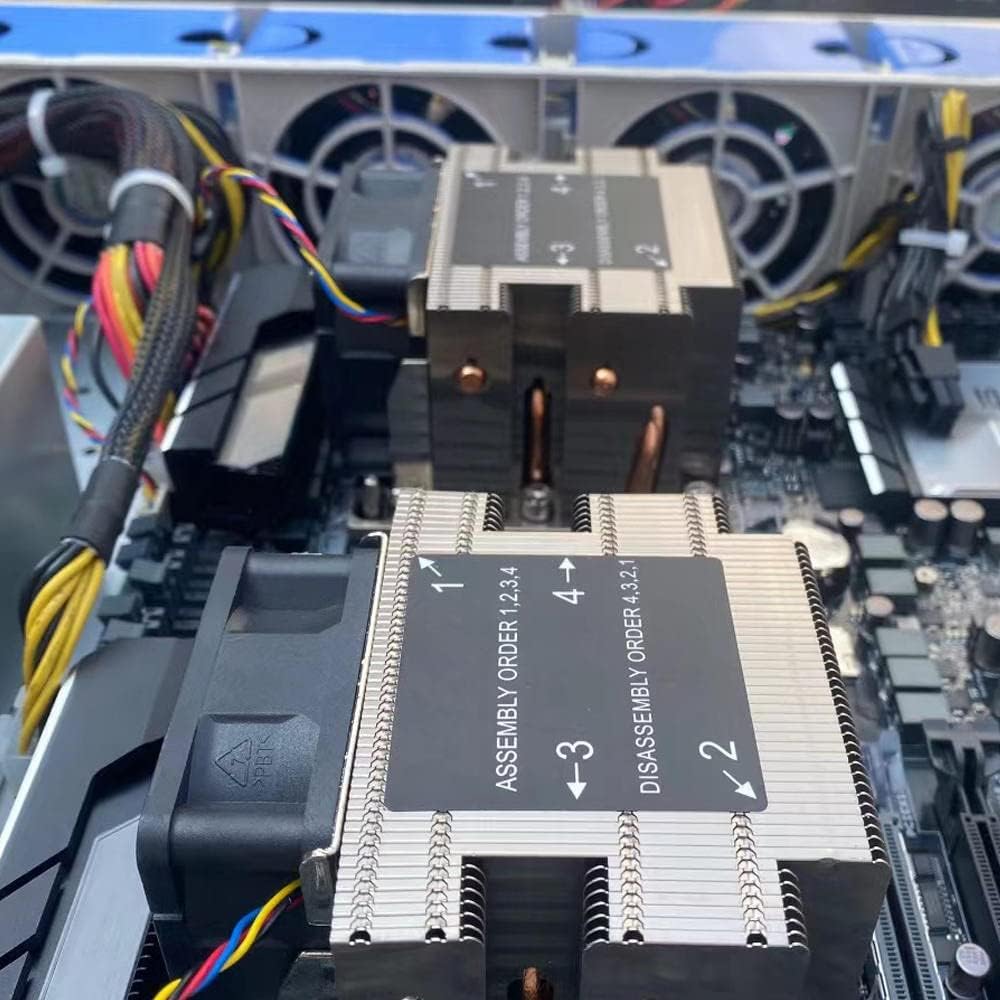
Зураг 4.2: Ойрын зураг view of the CPU coolers on the WS C621E SAGE motherboard. The image highlights the heatsinks and fans, with labels indicating the recommended assembly order (1, 2, 3, 4) and disassembly order (4, 3, 2, 1) for securing the coolers to the CPU sockets.
4.3 RAM суурилуулах (DDR3)
This motherboard supports DDR3 RAM. Refer to the motherboard manual for specific memory slot population guidelines for optimal performance (e.g., quad-channel configuration).
- DIMM үүрний хоёр төгсгөлд байгаа хавчааруудыг нээнэ үү.
- RAM модулийг үүртэй зэрэгцүүлж, модуль дээрх ховил нь үүрэнд байгаа түлхүүртэй тохирч байгаа эсэхийг шалгаарай.
- RAM модулийн хоёр үзүүрийг хавчаарууд нь бэхлэх хүртэл чанга дарна уу.
4.4 Хадгалах төхөөрөмж суурилуулах
The motherboard provides 8 SATA 3 ports. Connect your SATA storage devices (HDDs/SSDs) using SATA data cables to these ports. Connect the power cables from your power supply to the devices.
4.5 PCIe Expansion Cards
Install graphics cards or other PCIe expansion cards into the available PCI Express slots. This motherboard supports 4-way SLI™ and CrossFireX™ configurations. Ensure the card is fully seated and secured with the case latch or screw.
4.6 Эрчим хүчний холболтууд
Connect the 24-pin ATX main power connector and the CPU power connectors (e.g., 8-pin EPS12V) from your power supply to the corresponding ports on the motherboard. Ensure all connections are secure.
4.7 Урд талын самбарын холбогч
Connect the front panel cables from your PC case (power button, reset button, USB ports, audio jacks, LED indicators) to the corresponding headers on the motherboard. Refer to the motherboard's silkscreen labels for correct pin alignment.
5. Ашиглалтын заавар
5.1 Эхний ачаалах
After completing all hardware installations, connect your monitor, keyboard, and mouse. Power on your system. The system should perform a Power-On Self-Test (POST). If successful, you will see the BIOS/UEFI screen or a prompt to install an operating system.
5.2 BIOS/UEFI Settings
To enter the BIOS/UEFI setup utility, press the designated key (usually ДЭЛ or F2) during the POST sequence. Here you can configure boot order, system time, CPU settings, memory timings, and other advanced features. Save changes before exiting.
5.3 Драйвер суурилуулах
After installing your operating system, install the necessary drivers for the motherboard chipset, LAN, audio, and any other integrated components. These drivers are typically provided on the included support DVD/USB or can be downloaded from the manufacturer's webсайт.
6. Засвар үйлчилгээ
- Цэвэрлэгээ: Regularly clean dust from inside your PC case, especially from CPU coolers, fans, and heatsinks, using compressed air. Ensure the system is powered off and unplugged before cleaning.
- BIOS-ийн шинэчлэлтүүд: Үйлдвэрлэгчийг үе үе шалгаж байгаарай website for BIOS/UEFI updates. Updates can improve stability, add support for new hardware, or fix bugs. Follow the update instructions carefully to avoid damaging the motherboard.
- Бүрэлдэхүүн хэсгүүдийн шалгалт: Periodically inspect cables for secure connections and check for any signs of physical damage or corrosion on components.
7. Алдаа засах
7.1 Нийтлэг асуудлууд
- Эрчим хүчгүй: Ensure the power supply is connected correctly to the motherboard (24-pin and CPU power) and that the power supply switch is on. Check the front panel power button connection.
- Дэлгэц/НИЙТЛЭЛ байхгүй: Verify that the CPU, RAM, and graphics card are properly seated. Try booting with only one RAM stick. Check monitor connections.
- Системийн тогтворгүй байдал/гацалт: This can be caused by overheating, faulty RAM, or an unstable overclock. Check temperatures, run memory diagnostic tools, and reset BIOS settings to default.
- Үйлдлийн систем ачаалахгүй байна: Check boot order in BIOS/UEFI. Ensure the storage drive with the OS is detected and functional.
7.2 Diagnostic LEDs/Beep Codes
The motherboard may feature diagnostic LEDs or emit beep codes during POST to indicate specific issues. Refer to the motherboard's specific documentation (if available) for a detailed explanation of these indicators.
8. Техникийн үзүүлэлтүүд
| Онцлог | Тодорхойлолт |
|---|---|
| Брэнд | Ерөнхий |
| Загварын нэр | WS C621E SAGE |
| CPU залгуур | LGA 3647 |
| Тохиромжтой процессорууд | Intel Xeon Platinum 8100/8200, Intel Xeon Gold 6100/6200, Intel Xeon Silver 4100/4200 |
| RAM санах ойн технологи | DDR3 |
| Чипсетийн төрөл | WS C621E SAGE |
| Үндсэн цахилгаан холбогч төрөл | 24 зүү |
| График картын интерфейс | PCI Express |
| Нийт SATA портууд | 8 |
| Total PCIe Ports | 8 |
| Тохиромжтой төхөөрөмжүүд | Сервер, Хувийн компьютер |
9. Баталгаат хугацаа ба дэмжлэг
For warranty information and technical support, please refer to the documentation provided by your retailer or the manufacturer's official webсайт. Баталгаат нэхэмжлэл гаргахын тулд худалдан авалтаа нотлох баримтаа хадгалаарай.