
1. Танилцуулга
This manual provides essential information for the installation, operation, and maintenance of the Cisco Catalyst 9800-L Copper Uplink Wireless LAN Controller (Model C9800-L-C-K9). Please read this manual thoroughly before using the device to ensure proper functionality and safety.
2. Аюулгүй байдлын чухал мэдээлэл
Төхөөрөмжийг гэмтээх, гэмтээхгүйн тулд дараах аюулгүй байдлын арга хэмжээг дагаж мөрдөнө үү.
- Хэт халалтаас урьдчилан сэргийлэхийн тулд төхөөрөмжийг агааржуулалт сайтай газар суурилуулсан эсэхийг шалгаарай.
- Зөвхөн энэ төхөөрөмжид заасан тэжээлийн эх үүсвэрийг ашиглана уу.
- Төхөөрөмжийг чийг, хэт өндөр температурт бүү гарга.
- Засвар, цэвэрлэгээ хийхээс өмнө цахилгааныг салга.
- Бүх үйлчилгээг мэргэшсэн үйлчилгээний ажилтнуудад шилжүүлээрэй.
3. Багцын агуулга
Бүх зүйл багцад байгаа эсэхийг шалгана уу:
- Cisco Catalyst 9800-L Wireless LAN Controller
- CD (containing documentation or software)
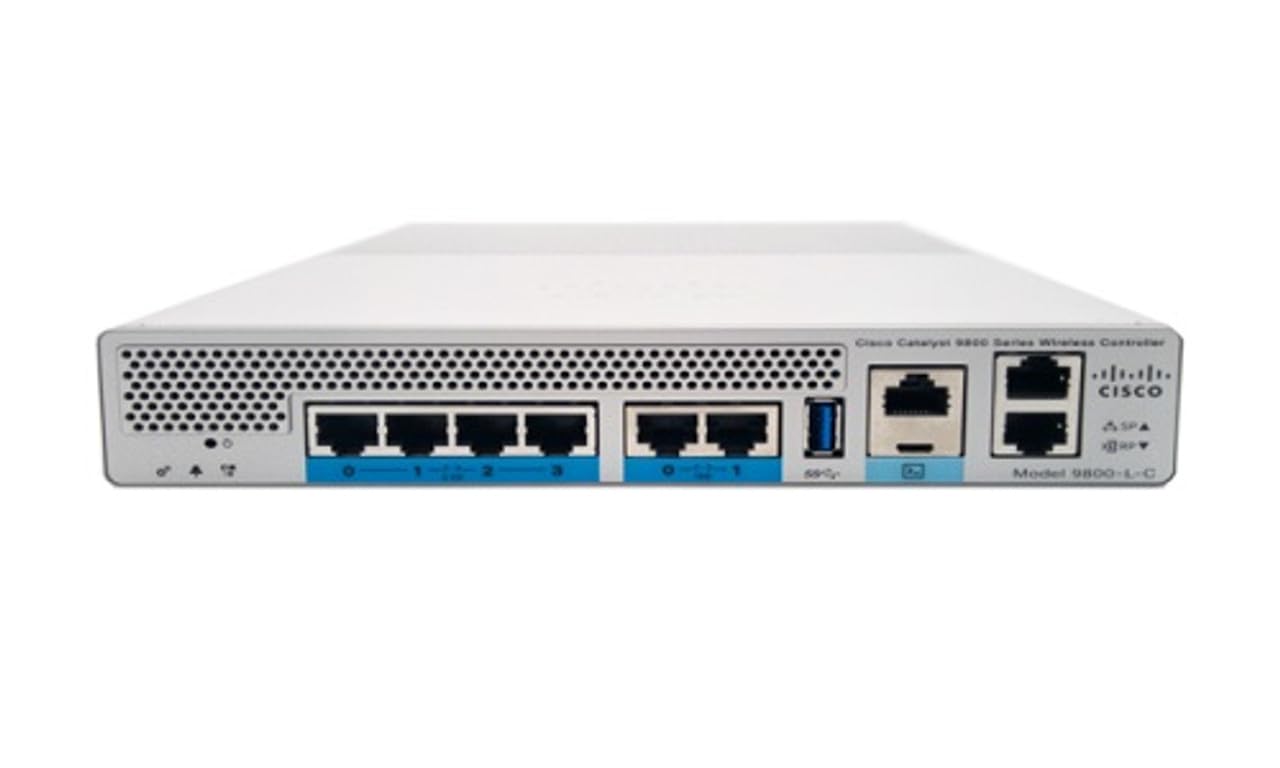
Зураг 1: Урд view of the Cisco Catalyst 9800-L Wireless LAN Controller. This image shows the compact design and port layout of the device.
4. Бүтээгдэхүүн дууссанview
The Cisco Catalyst 9800-L is a compact, fixed-configuration wireless LAN controller designed for small to medium-sized deployments. It provides centralized control for Cisco Aironet access points, offering robust wireless network management capabilities.
Гол онцлогууд:
- Managed, Layer 2.5 (Wireless Controller) functionality
- Copper uplink interfaces
- RJ45 interface type
- 11 ports for connectivity
- Designed for desktop environments
5. Тохиргоо
5.1 Савлах, шалгах
- Хянагчийг савлагаанаас нь болгоомжтой салга.
- Inspect the device for any signs of physical damage. If damage is found, contact your supplier immediately.
5.2 Физик суурилуулалт
- Place the controller on a stable, flat surface, such as a desktop.
- Ensure adequate clearance around the device for proper airflow and ventilation.
5.3 Эрчим хүчний холболт
- Connect the power cord to the power input on the rear of the controller.
- Plug the other end of the power cord into a grounded electrical outlet (220 Volts).
5.4 Сүлжээний холболт
- Connect Ethernet cables from your network infrastructure to the RJ45 uplink ports on the controller.
- Connect access points to the appropriate downlink ports as required by your network design.
5.5 Анхны тохиргооны хандалт
- Refer to the included CD or Cisco's official documentation for detailed instructions on initial console access and software configuration.
- Typically, this involves connecting a console cable to the device and using a terminal emulator.
6. Хянагчийг ажиллуулах
6.1 Үндсэн үйл ажиллагаа
Once powered on and initially configured, the controller will begin managing connected access points. Monitor the status indicators on the device for operational status.
6.2 Хандалтын цэгийн удирдлага
The Cisco Catalyst 9800-L automatically discovers and provisions Cisco Aironet access points. Use the controller's management interface (CLI or GUI) to configure wireless networks, security policies, and guest access.
6.3 Сүлжээний тохиргоо
Detailed network configuration, including VLANs, QoS, and routing, is performed through the controller's operating system. Consult Cisco's official documentation for advanced configuration guides.
7. Засвар үйлчилгээний заавар
- Програм хангамжийн шинэчлэлтүүд: Regularly check for and apply the latest firmware updates from Cisco to ensure optimal performance and security.
- Цэвэрлэгээ: Keep the device clean and free of dust. Use a soft, dry cloth for cleaning. Do not use liquid or aerosol cleaners.
- Байгаль орчны нөхцөл: Ensure the operating environment remains within specified temperature and humidity ranges to prevent hardware failure.
- Нөөцлөлтийн тохиргоо: Periodically back up your controller's configuration to prevent data loss.
8. Алдаа засах
Энэ хэсэгт танд тулгарч болох нийтлэг асуудлуудыг авч үзэх болно:
| Асуудал | Боломжит шалтгаан | Шийдэл |
|---|---|---|
| Хянагч асахгүй байна | Power cable disconnected; Power outlet failure | Check power cable connections; Test power outlet with another device. |
| Access points not connecting | Incorrect network configuration; APs not discovered | Verify network settings on the controller; Ensure APs are on the same network segment or reachable via IP. |
| Slow wireless performance | Interference; Overloaded channels; Outdated firmware | Perform a site survey to identify interference; Optimize channel selection; Update controller and AP firmware. |
9. Техникийн үзүүлэлтүүд
| Тодорхойлолт | Дэлгэрэнгүй |
|---|---|
| Брэнд | Cisco |
| Загварын дугаар | C9800-L-C-K9 |
| Портын тоо | 11 |
| Интерфэйс | RJ45 |
| Шилжүүлэгчийн төрөл | Managed, Layer 2.5 (Wireless Controller) |
| Платформ | Зета |
| Кейсийн материалын төрөл | Зэс |
| Ботьtage | 220 вольт |
| Тохиромжтой төхөөрөмжүүд | Ширээний компьютер |
| Өнгө | Цэнхэр |
| Зүйлийн жин | 3.09 кг |
| UPC | 657768416101 |
| ASIN | B0C3FQPCY4 |
10. Баталгаат хугацааны мэдээлэл
This Cisco Catalyst 9800-L Wireless LAN Controller (Renewed) comes with a 90 хоногийн хязгаарлагдмал баталгаат хугацаа. For specific terms and conditions, please refer to the warranty documentation provided with your purchase or contact your reseller.
11. Хэрэглэгчийн дэмжлэг
For technical assistance, troubleshooting, or further inquiries regarding your Cisco Catalyst 9800-L Wireless LAN Controller, please visit the official Cisco support website or contact your authorized Cisco reseller. Ensure you have your model number (C9800-L-C-K9) and serial number available when seeking support.