
Танилцуулга
The TAXNELE THC30A is a digital programmable timer switch designed for automatic control of various electrical equipment. It features daily and weekly programming capabilities with up to 20 ON/OFF settings, a manual override function, and a built-in lithium battery for power-off memory. This manual provides detailed instructions for installation, operation, and maintenance to ensure safe and efficient use of your timer switch.
Аюулгүй байдлын мэдээлэл
- Суулгах эсвэл засвар үйлчилгээ хийхээс өмнө цахилгаан тэжээлийг салгасан эсэхийг шалгаарай.
- Суурилуулалтыг мэргэшсэн цахилгаанчин эсвэл мэдлэгтэй хүн гүйцэтгэх ёстой.
- 30A / 5000W-ийн хамгийн их ачааллын багтаамжаас хэтрүүлж болохгүй.
- Төхөөрөмжийг ус болон хэт температураас хол байлга.
- Verify correct wiring connections to prevent damage to the device or connected appliances.
Бүтээгдэхүүний онцлог
- Програмчлагдах удирдлага: Up to 20 ON/OFF settings per day or week.
- Унтраах санах ой: Built-in 3V lithium battery maintains timing, display, and data storage for up to 3 years during power interruptions.
- Өндөр нарийвчлал: Industrial-grade chip for accurate timing.
- Гараар хүчингүй болгох: Allows temporary or permanent manual control.
- LCD дэлгэц: Хялбар програмчлах, хянах зориулалттай тунгалаг дижитал дэлгэц.
- Din Rail Mount: Designed for easy installation on a standard DIN rail.
- Өргөн хэрэглээний програм: Suitable for street lights, neon lamps, advertising signs, production equipment, and home appliances.

Figure 1: The THC30A timer switch highlighting its power-off memory function, which retains data for up to 3 years using a built-in CR2032 lithium battery.

Figure 2: The THC30A timer switch featuring a 30A big load relay for stable and safe operation with various electrical loads.
Product Components and Display
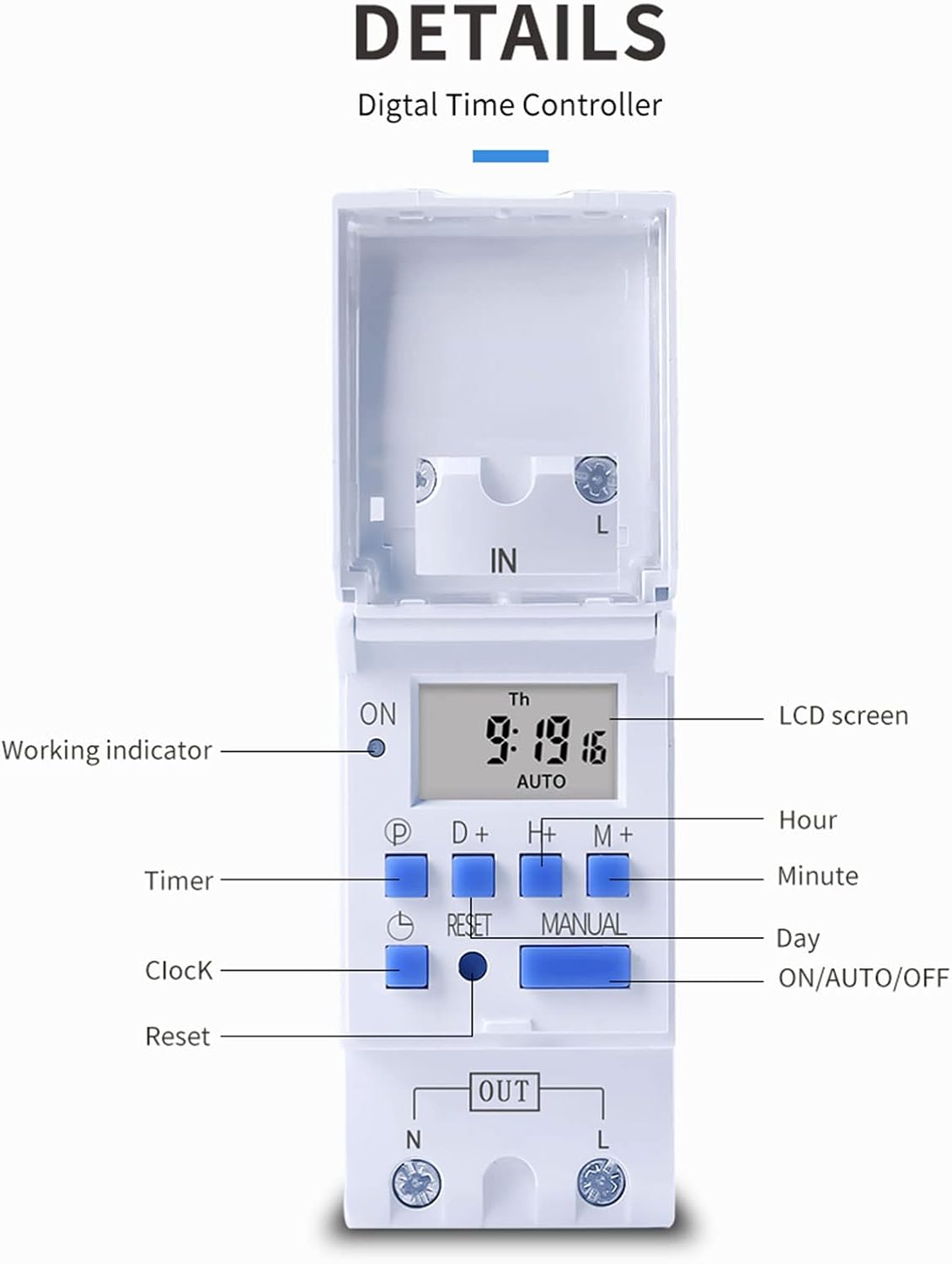
Зураг 3: Нарийвчилсан view of the THC30A timer switch's LCD screen and control buttons. Labels include Working indicator, Timer, Clock, Reset, P (Program), D+ (Day), H+ (Hour), M+ (Minute), Manual, and ON/AUTO/OFF status.
- LCD дэлгэц: Displays current time, day, and ON/OFF status.
- Ажлын үзүүлэлт: LED light indicating operation status.
- P товч: Програмчлалын горимд орно.
- D+ товчлуур: Adjusts day in clock setting or program.
- H+ товчлуур: Adjusts hour in clock setting or program.
- M+ товчлуур: Adjusts minute in clock setting or program.
- Цагны товчлуур: Returns to clock display or exits programming mode.
- Дахин тохируулах товч: Clears all settings and resets the timer.
- Гарын товчлуур: АСААЛТТАЙ, АВТОМАТ болон УНТРААХ горимуудын хооронд шилжүүлнэ.
Үзүүлэлтүүд
| Параметр | Үнэ цэнэ |
|---|---|
| Загвар | THC30A |
| Одоогийн үнэлгээ | 30 А |
| Эрчим хүчний үнэлгээ | 5000 Вт |
| Ботьtage Сонголтууд | 12V DC AC, 24V DC AC, 48V DC AC, 110V AC, 220V AC |
| Цагийн алдаа | ≤2 seconds/day |
| Дэлгэц | LCD |
| Цагийн хүрээ | 1 minute to 168 hours (7 days) |
| ON/OFF тохиргоо | 20 бүлэг |
| Ашиглалтын температур | -20 хэмээс 50 хэм хүртэл |
| Хэмжээ | 86 x 36 x 65 мм (3.38 x 1.41 x 2.56 инч) |
| Эрчим хүчний нөөц | 3V Lithium battery (CR2032 type) for 3 years data retention |

Figure 4: Dimensions of the THC30A timer switch, showing measurements for height, width, and depth for proper installation planning.
Тохиргоо ба суурилуулалт
1. Холбох
The THC30A timer switch is designed for DIN rail mounting. Securely attach the device to a standard 35mm DIN rail in an appropriate electrical enclosure.
2. утас
АНХААРУУЛГА: Утас холбохоосоо өмнө бүх цахилгаан тасарсан эсэхийг шалгаарай.
Connect the input power supply to the "IN" terminals (N for Neutral, L for Live). Connect the load (e.g., light, appliance) to the "OUT" terminals (N for Neutral, L for Live). The timer acts as a switch for the live wire. Refer to the wiring diagram below for correct connections.

Figure 5: Simplified wiring diagram for the THC30A timer switch. The new version offers direct power output, simplifying connections compared to older models.
- Оролт (IN): Connect your main power supply (e.g., AC 12V, 24V, 48V, 110V, 220V) to these terminals.
- Гаралт (OUT): Connect your electrical load (e.g., light, motor) to these terminals. The timer controls the power flow to this output.
Ашиглалтын заавар
1. Анхны тохиргоо / Дахин тохируулах
Upon first use or after a prolonged power outage, the display may be blank. Press the Дахин тохируулах button (located in a small hole, use a pointed object) to clear all settings and initialize the timer. The LCD will display "0:00" and "AUTO".
2. Одоогийн цаг, өдрийг тохируулах
- -г удаан дар Цаг товч.
- Барьж байхдаа Цаг, дарна уу D+ to set the current day (Monday to Sunday).
- Барьж байхдаа Цаг, дарна уу H+ to set the current hour (0-23).
- Барьж байхдаа Цаг, дарна уу M+ to set the current minute (0-59).
- -г суллана Цаг товч. Одоо цаг нь тавигдсан.
3. АСААХ/УНТРААХ Циклийг Програмчлах
Таймер нь 20 хүртэлх АСААХ/УНТРААХ програмыг дэмждэг. Хөтөлбөр бүр АСААХ болон УНТРААХ хугацаанаас бүрдэнэ.
- дээр дарна уу P button once. The display will show "1 ON". This is for the first ON setting.
- дарна уу D+ to select the day(s) for this ON event. You can choose a single day, specific days, or blocks of days (e.g., Mon-Fri, Sat-Sun, Mon-Sun).
- дарна уу H+ to set the hour for the first ON event.
- дарна уу M+ to set the minute for the first ON event.
- дээр дарна уу P button again. The display will show "1 OFF". This is for the first OFF setting.
- Repeat steps 2-4 to set the day(s), hour, and minute for the first OFF event.
- Үргэлжлүүлэн дарна уу P to cycle through "2 ON", "2 OFF", up to "20 ON", "20 OFF" and set additional programs as needed.
- Хүссэн бүх програмаа тохируулсны дараа товчийг дарна уу Цаг Програмчлалын горимоос гарч, одоогийн цагийн дэлгэц рүү буцахын тулд товчийг дарна уу.
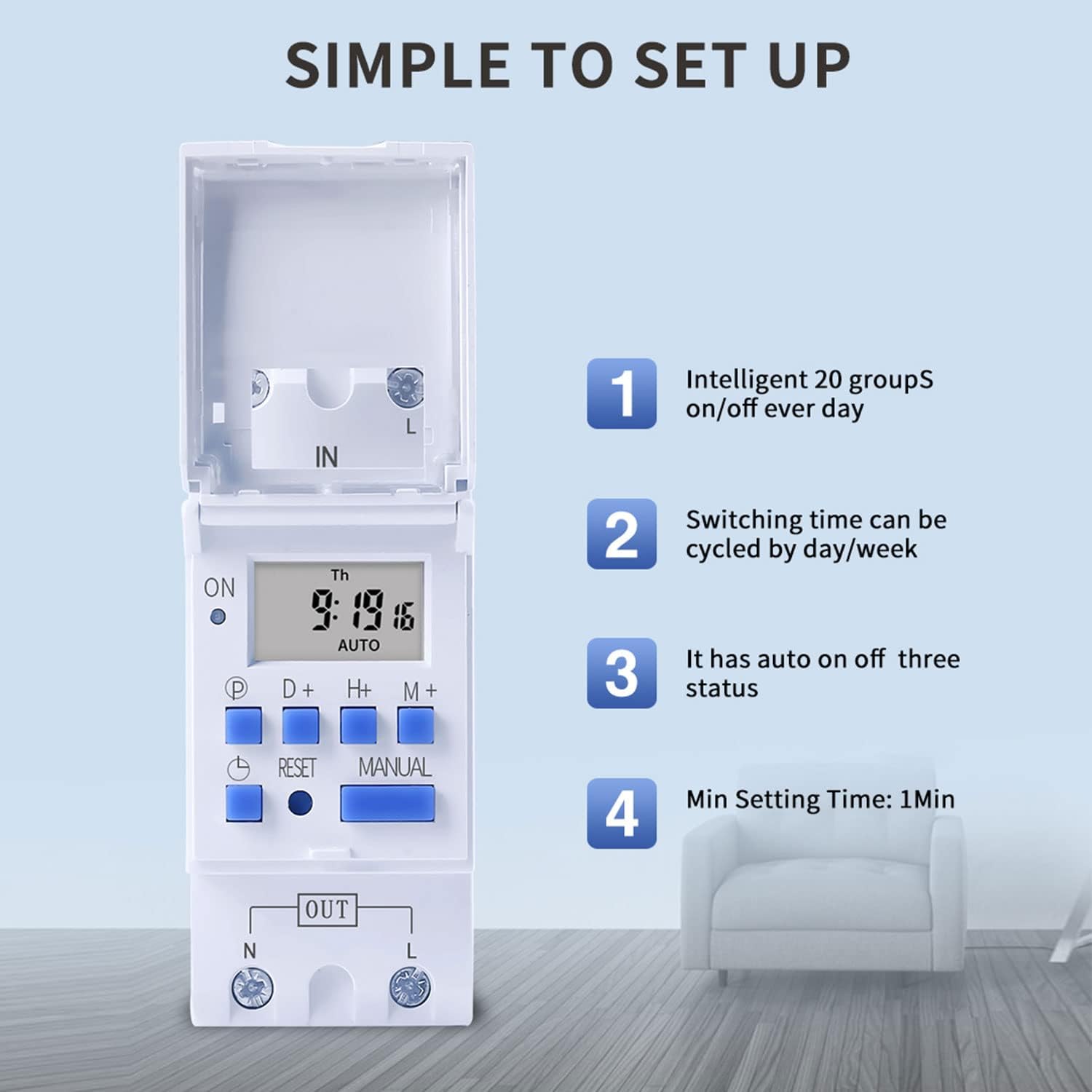
Figure 6: Visual guide to the simple setup of the THC30A timer, highlighting its 20 ON/OFF groups, daily/weekly cycling, auto ON/OFF status, and minimum 1-minute setting time.
4. Гараар хүчингүй болгох
дээр дарна уу Гарын авлага button to cycle through the output modes:
- АСААЛТ: The output is continuously ON, overriding all programs.
- АВТО: The output operates according to the programmed ON/OFF cycles. This is the standard operating mode.
- Унтрааж байна: The output is continuously OFF, overriding all programs.
Цаг хэмжигч асаалттай байгаа эсэхийг шалгана уу АВТО mode for programmed operations to function.
Засвар үйлчилгээ
- Таймерыг цэвэр, тоос шороогүй байлга. Цэвэрлэхэд хуурай, зөөлөн даавуу ашиглаарай.
- Зүлгүүрийн цэвэрлэгч, уусгагчийг бүү ашигла.
- The internal lithium battery (CR2032) has a long lifespan (up to 3 years). If the display consistently goes blank after power outages, the battery may need replacement. This should be done by a qualified technician.
Алдааг олж засварлах
| Асуудал | Боломжит шалтгаан | Шийдэл |
|---|---|---|
| Дэлгэц хоосон байна. | No power supply; internal battery depleted. | Check power connections. Press the Reset button. If problem persists, internal battery may need replacement. |
| Timer does not switch ON/OFF as programmed. | Timer is not in AUTO mode; incorrect program settings; current time/day is wrong. | дарна уу Гарын авлага until "AUTO" is displayed. Verify program settings (ON/OFF times, days). Check and correct current time and day. |
| Output is always ON or always OFF. | Timer is in manual ON or OFF mode. | дарна уу Гарын авлага "AUTO" гарч ирэх хүртэл. |
| Programs are lost after power outage. | Internal backup battery is depleted. | The internal CR2032 battery may need replacement. Contact support if necessary. |
Хэрэглээ
The TAXNELE THC30A timer switch is versatile and can be used in various applications to automate electrical devices:

Зураг 7: Жишээ ньamples of common applications for the THC30A timer switch, including street light control, home appliance control, battery charging control, and advertising light control.
- Street Light Control: Automate the turning ON/OFF of street lights based on time.
- Home Appliance Control: Schedule operation of water heaters, fans, or other household devices.
- Battery Charging Control: Manage charging cycles for batteries to prevent overcharging.
- Advertising Light Control: Program display times for neon signs and advertising boards.
- Production Equipment: Control machinery operation in industrial settings.
Баталгаат болон дэмжлэг
For warranty information or technical support, please refer to the contact details provided with your purchase or visit the official TAXNELE webсайт. Худалдан авалтын баримтаа худалдан авалтын баталгаа болгон хадгалаарай.