
1. Бүтээгдэхүүн дууссанview
The iCarsoft i800 Plus is an advanced OBD2 scanner designed for comprehensive vehicle diagnostics. It provides a range of functions including reading and clearing fault codes, monitoring live data, performing I/M readiness tests, and checking battery health.

Image: The iCarsoft i800 Plus scanner displaying its main menu and diagnostic features.
2. Хайрцагт юу байна
Бүх зүйл багцад байгаа эсэхийг шалгана уу:
- iCarsoft i800 Plus OBD2 Scanner
- Хэрэглэгчийн гарын авлага
- PC Connecting Cable

Image: The iCarsoft i800 Plus package contents, including the scanner, user manual, and PC cable.
3. Тохиргоо ба анхны ажиллагаа
Follow these steps to set up and begin using your iCarsoft i800 Plus diagnostic tool:
- OBDII портыг олох: The OBDII port is typically located under the dashboard on the driver's side of the vehicle.
- Сканнерыг холбоно уу: Plug the scanner's cable firmly into the vehicle's OBDII port.
- Гал асаах: Turn the vehicle's ignition to the 'ON' position without starting the engine. The scanner will power on automatically.
- Цэс рүү шилжих: Use the arrow keys and 'ENTER' button on the scanner to navigate through the diagnostic menu.
Үйлдлийн заавар видео
Video: This video demonstrates the setup and basic operation of the iCarsoft i800 Plus OBD2 Scanner, including connecting to the vehicle, reading and clearing fault codes, and viewшууд өгөгдөл оруулах.
4. Үйл ажиллагааны чиг үүрэг
The iCarsoft i800 Plus offers a variety of diagnostic functions:
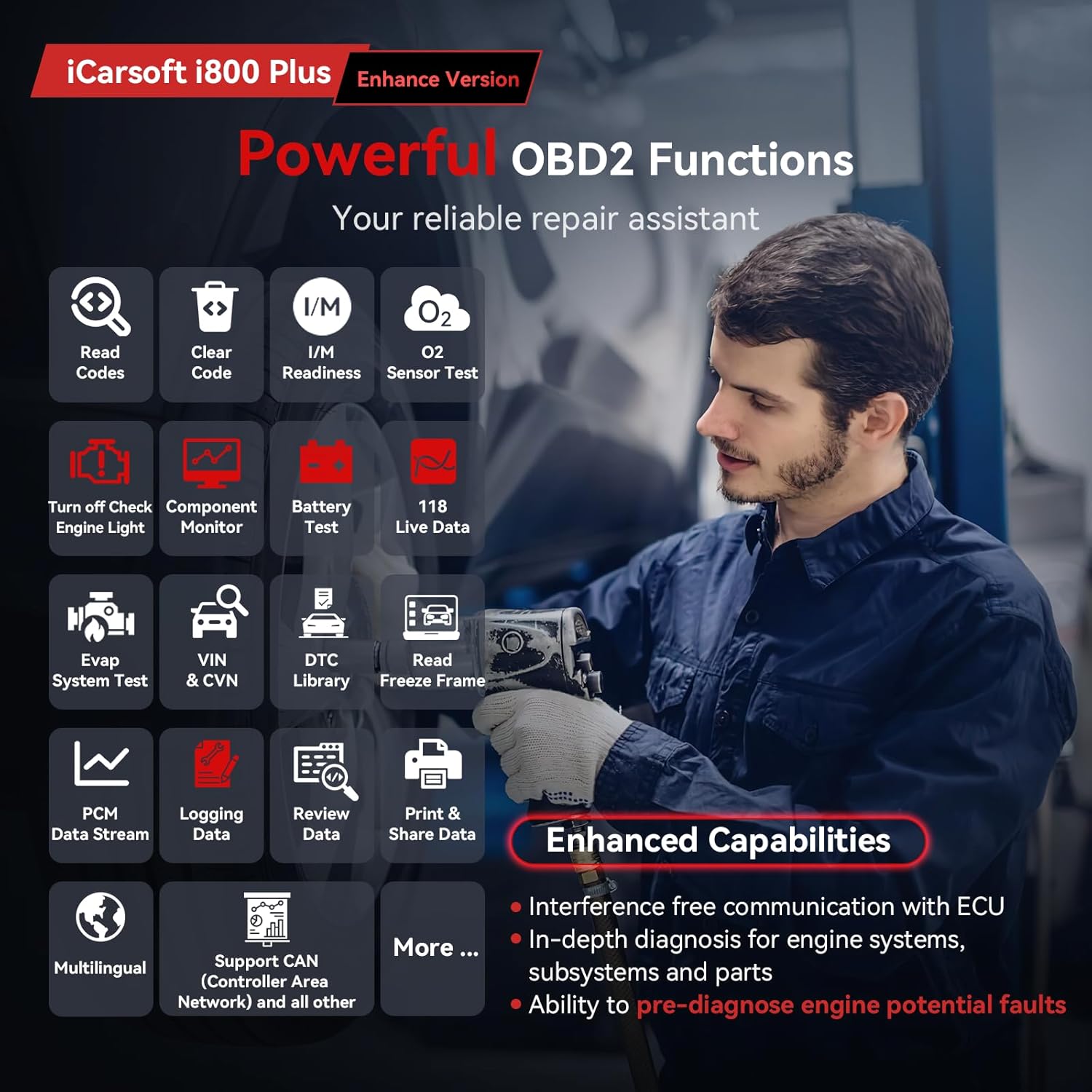
Image: The iCarsoft i800 Plus displaying its comprehensive OBD2 functions.
4.1. Read & Clear Fault Codes
This function allows you to retrieve Diagnostic Trouble Codes (DTCs) from the vehicle's Engine Control Unit (ECU) and clear them. Clearing codes will turn off the Check Engine Light (MIL).
- Үндсэн цэсээс сонгоно уу 'OBDII/EOBD'.
- Сонго 'Read Codes' руу view одоогийн, хүлээгдэж буй болон байнгын кодууд.
- Кодуудыг цэвэрлэхийн тулд сонгоно уу 'Erase Codes'. Confirm the action when prompted. Ensure the ignition is on but the engine is off before clearing codes.
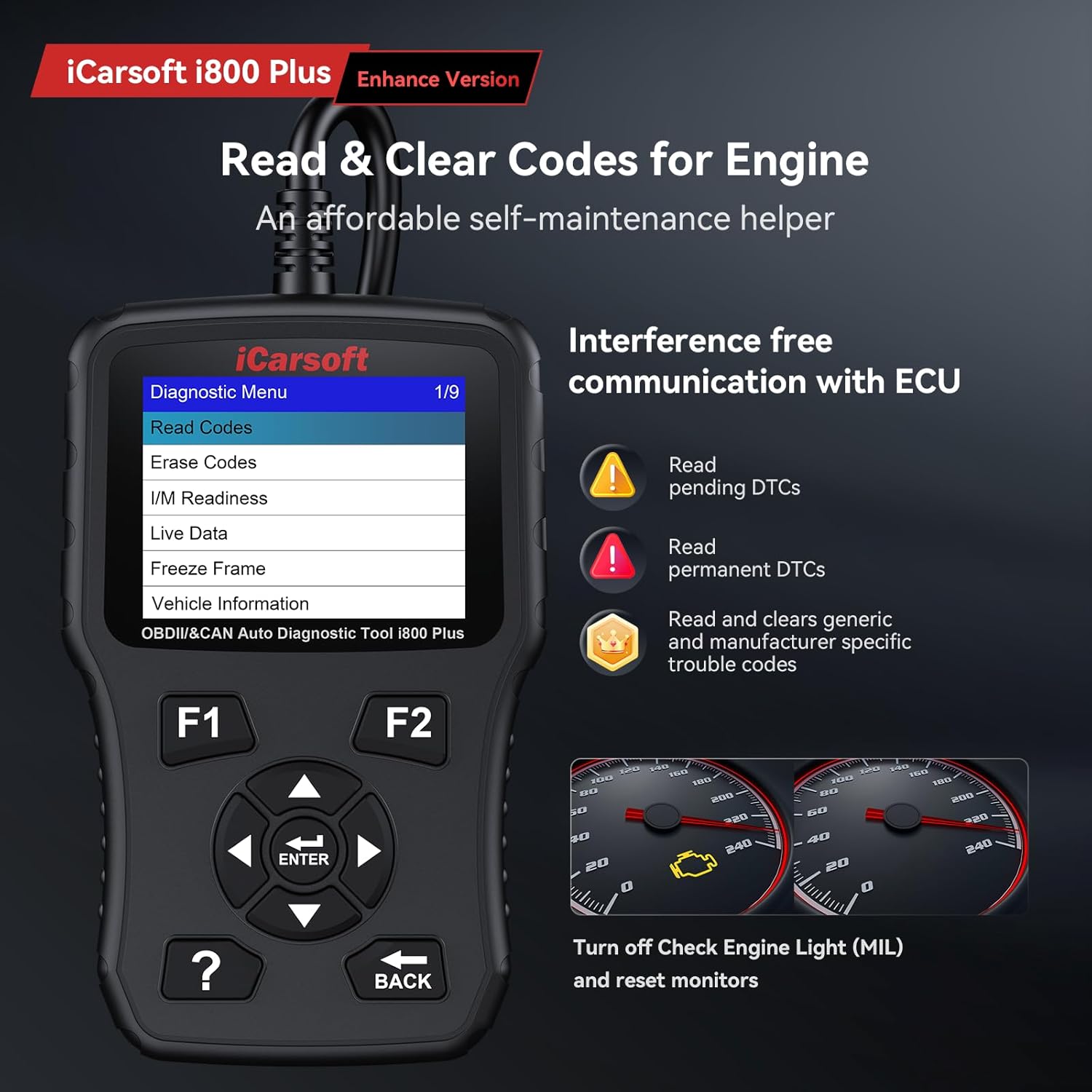
Image: The scanner's screen showing options for reading and erasing кодууд.
4.2. I/M бэлэн байдал
The I/M Readiness function checks the status of the vehicle's emission-related monitoring systems to determine if they are ready for an inspection. A 'Ready' status indicates that the system has completed its diagnostic tests.
- Үндсэн цэсээс сонгоно уу 'OBDII/EOBD'.
- Сонго 'I/M Readiness' руу view the status of various monitors (e.g., Misfire Monitor, Fuel System Monitor, Catalyst Monitor).
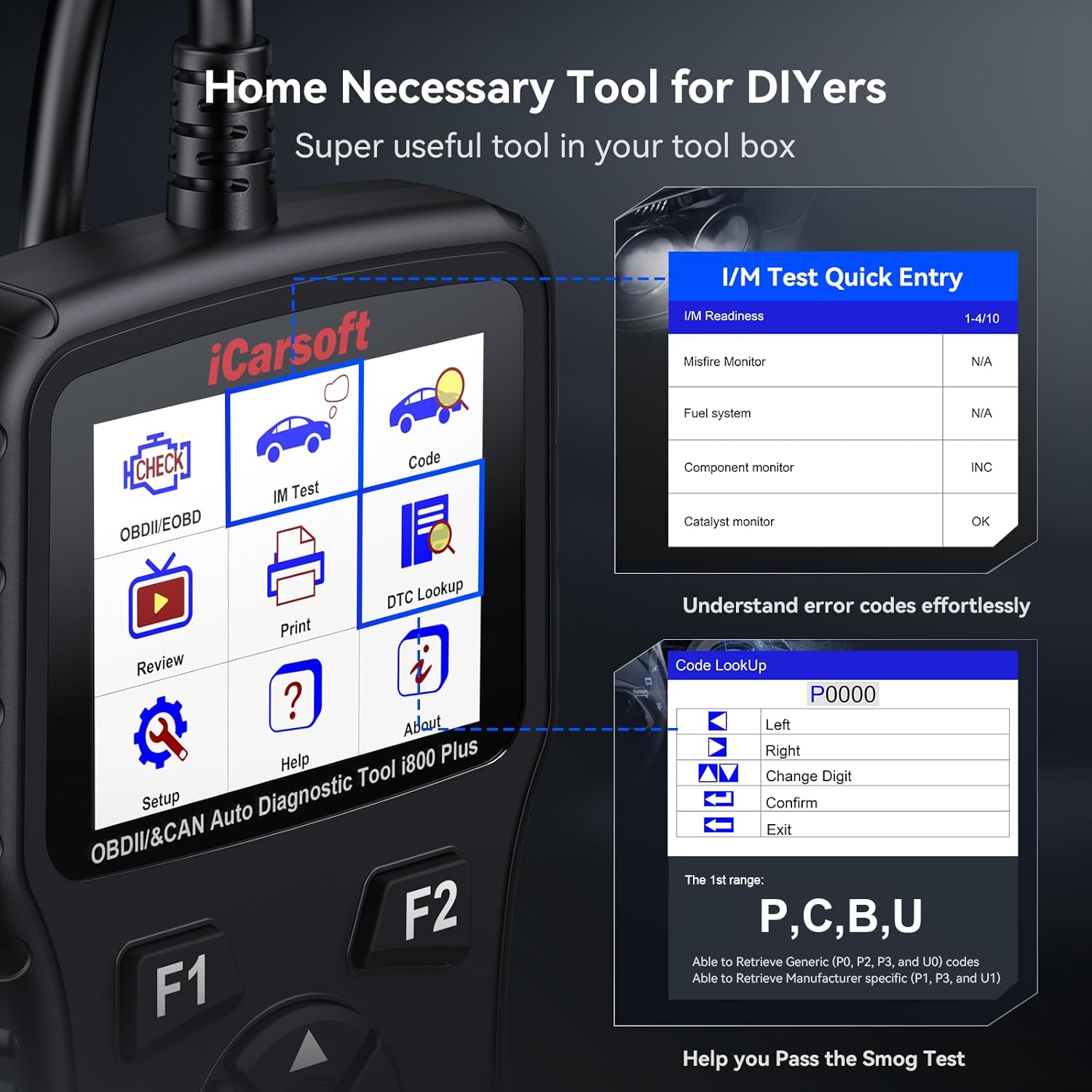
Image: The scanner displaying I/M Readiness monitor status.
4.3. Live Data Monitor
Monitor real-time data from the vehicle's sensors and components. This includes parameters such as engine speed, ignition coil voltage, transmission temperature, oil pressure, coolant temperature, and short-term fuel trim. This data can be displayed in text or graphical format.
- Үндсэн цэсээс сонгоно уу 'OBDII/EOBD'.
- Сонго 'Live Data'. You can select specific parameters to view or choose 'All Supported' to see all available data.
- Use the arrow keys to scroll through data and the 'ENTER' button to switch between text and graph views.
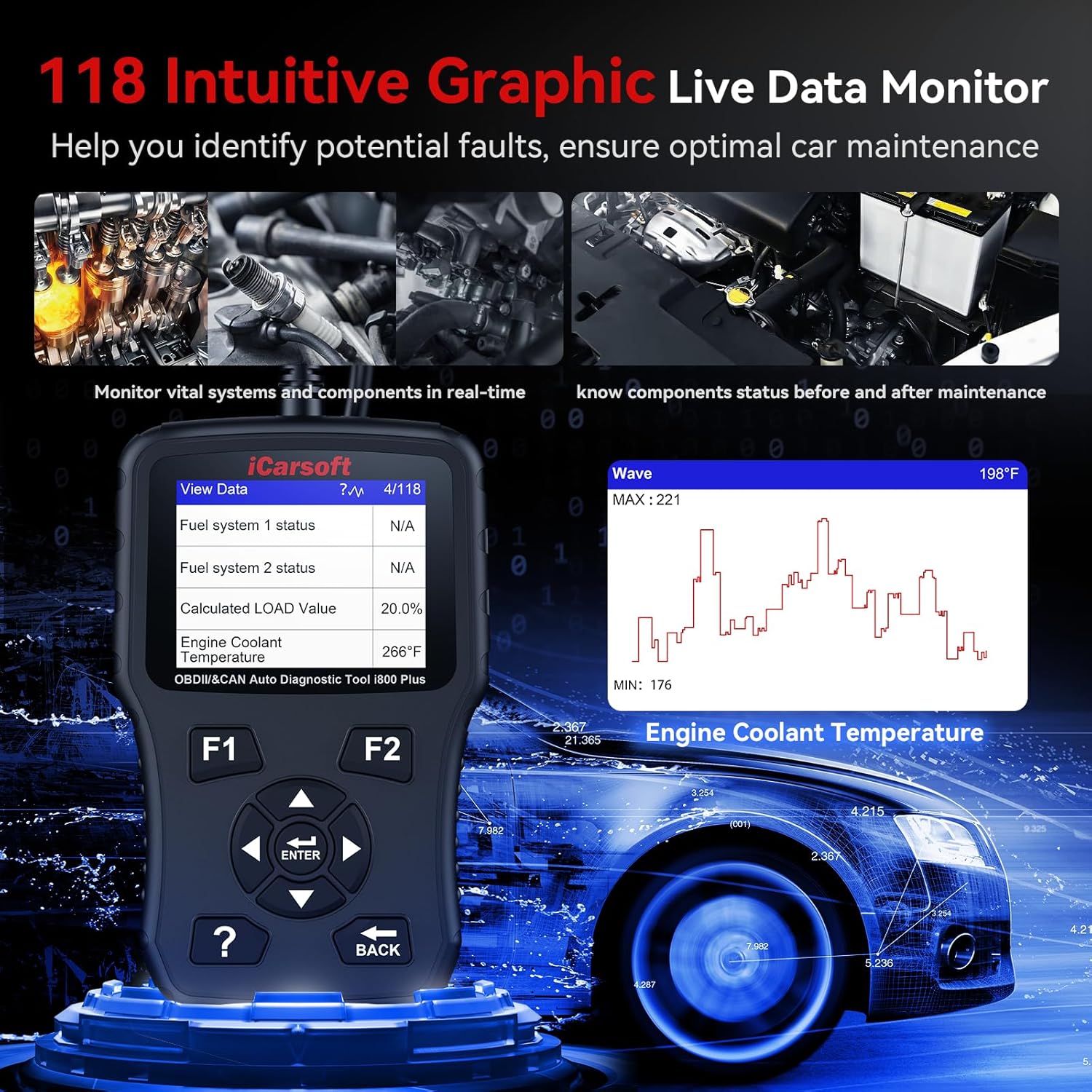
Image: The scanner displaying live data in both numerical and graphical formats.
4.4. Freeze Frame Data
When an emission-related fault occurs, the ECU stores a 'freeze frame' of vehicle operating conditions at the time of the fault. This data can help identify the cause of the problem.
- Үндсэн цэсээс сонгоно уу 'OBDII/EOBD'.
- Сонго 'Freeze Frame' руу view хадгалагдсан өгөгдөл.
4.5. O2 Monitor Test
This function retrieves the oxygen sensor monitor test results for the most recently completed tests from the vehicle's on-board computer.
- Үндсэн цэсээс сонгоно уу 'OBDII/EOBD'.
- Сонго 'O2 Monitor Test' and select the desired sensor to view its test results.
4.6. DTC хайлт
The built-in DTC library allows you to look up definitions for generic and manufacturer-specific trouble codes directly on the device.
- Үндсэн цэсээс сонгоно уу 'DTC Lookup'.
- Enter the DTC code using the arrow keys to change digits and 'ENTER' to confirm.
4.7. Battery Charging System Check
Monitor the vehicle's battery health and charging system status. This helps prevent vehicle startup failures or electrical issues caused by battery problems.
- Үндсэн цэсээс сонгоно уу 'OBDII/EOBD'.
- Сонго 'Battery Test' руу view detailed battery voltage information, often presented with a dynamic graph.
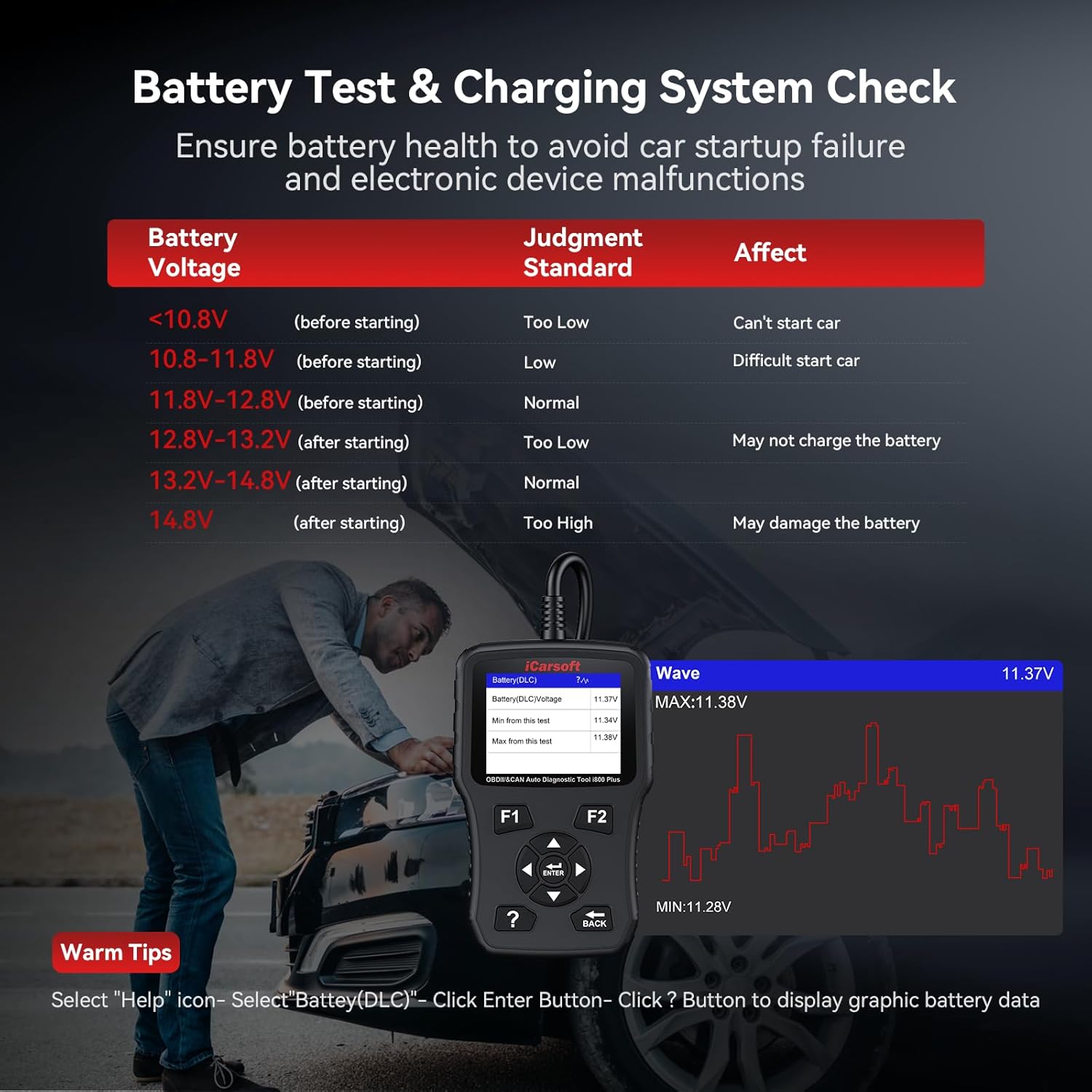
Image: The scanner displaying battery voltage and charging system status.
5. Засвар үйлчилгээ
5.1. Програм хангамжийн шинэчлэлтүүд
iCarsoft provides lifetime free updates for the i800 Plus scanner. Regularly updating the software ensures access to the newest car parameter database for in-depth engine system diagnosis and improved communication with ECU modules. Connect the device to a computer via the provided USB cable and visit the official iCarsoft website for update instructions and software.
5.2. Цэвэрлэгээ
Төхөөрөмжийг цэвэрлэхийн тулд зөөлөн, damp даавуу. Дэлгэцийг гэмтээж болох зүлгүүрийн цэвэрлэгч, уусгагч хэрэглэхээс зайлсхийх, эсвэл casing.
6. Алдаа засах
6.1. Тохиромжтой байдлын асуудал
Due to manufacturer restrictions on certain ECUs and systems in newer or specific car models, compatibility issues may arise. If you encounter any problems, please contact iCarsoft technical support for assistance.

Image: Global vehicle compatibility map for the iCarsoft i800 Plus.
6.2. Төхөөрөмж асахгүй байна
Ensure the scanner is securely connected to the vehicle's OBDII port and the vehicle's ignition is in the 'ON' position. If the issue persists, try connecting the scanner to a different vehicle to rule out a vehicle-specific power supply problem.
7. Техникийн үзүүлэлтүүд
| Онцлог | Дэлгэрэнгүй |
|---|---|
| Брэнд | iCarsoft |
| Загвар | i800 Plus |
| Зүйлийн жин | 12 унц |
| Багцын хэмжээ | 7.95 x 4.84 x 2.09 инч |
| Эрчим хүчний эх үүсвэр | Утастай цахилгаан |
| Үйлдлийн систем | Windows 10 (for updates) |
| Дэлгэцийн хэмжээ | 2.8 инч |
| UPC | 850030851307 |
| Эхний боломжтой огноо | 8 оны тавдугаар сарын 2023 |
8. Баталгаат хугацаа ба дэмжлэг
The iCarsoft i800 Plus comes with a 1-year warranty. iCarsoft also provides lifetime free updates and lifetime free hardware repair. For any concerns or technical support, please contact iCarsoft customer service.