
1. Танилцуулга
This user manual provides detailed instructions for the Rocketek PC/SC USB Smart Card Reader. This device is designed to facilitate secure digital interactions, including online identification, digital signatures, and access to various smart card applications. Please read this manual thoroughly before using the product to ensure proper functionality and longevity.
2. Бүтээгдэхүүн дууссанview
The Rocketek PC/SC USB Smart Card Reader is a versatile device supporting a wide range of smart cards. It features a compact design and a standard USB interface for easy connectivity.
2.1 Багцын агуулга
- Rocketek PC/SC USB Smart Card Reader
- Хэрэглэгчийн гарын авлага (энэ баримт бичиг)
2.2 Төхөөрөмжийн онцлог
The card reader includes dedicated slots for different card types and an indicator light for operational status.
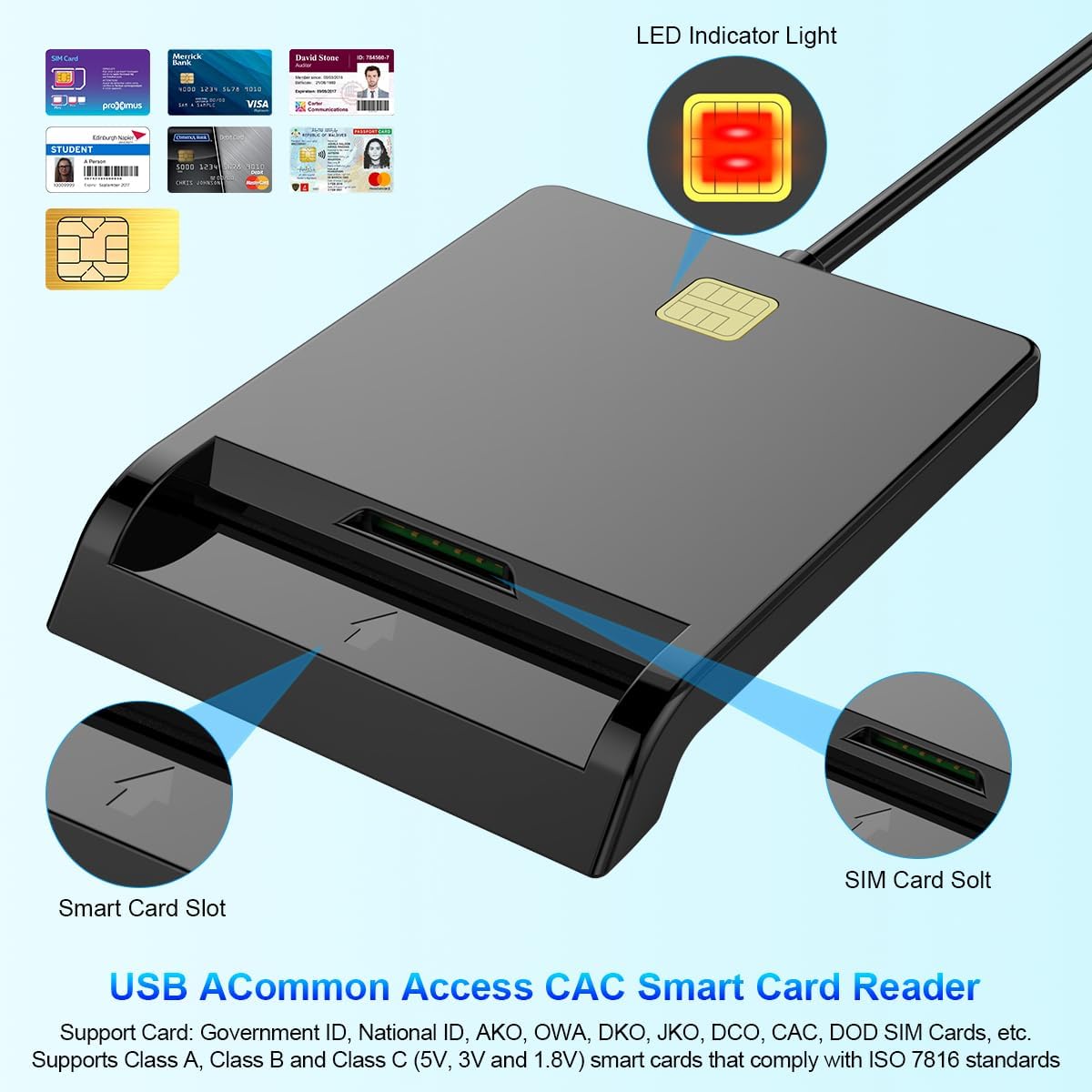
Зураг 1: Урд view of the Rocketek Smart Card Reader, highlighting the LED indicator light, the main smart card slot, and the SIM card slot.

Зураг 2: The Rocketek Smart Card Reader shown with its USB connector, a SIM card, and a standard debit card, illustrating its multi-card compatibility.
3. Тохиргоо
Follow these steps to set up your Rocketek PC/SC USB Smart Card Reader.
3.1 Системийн шаардлага
- Үйлдлийн систем: Windows 98 / Me / 2000 / NT 4.0 / XP / CE / Vista / 7 / 8 / 8.1 / 10 / 11, Chromebook OS, Linux, Ubuntu, Mac OS.
- Интерфэйс: USB порт ашиглах боломжтой.

Зураг 3: The card reader is compatible with various operating systems, including different versions of Windows and Linux.
3.2 Төхөөрөмжийг холбох
- Компьютер эсвэл зөөврийн компьютер дээрээ боломжтой USB портыг олоорой.
- Plug the USB connector of the Rocketek Smart Card Reader into the USB port.
- The device is generally Plug & Play for Windows systems, meaning it should be recognized automatically without manual driver installation. For Mac OS and Linux, or for specific smart card applications (e.g., Belgian eID, CAC cards), additional drivers or official software may be required. Refer to the card issuer's website for necessary software.
4. Ашиглалтын заавар
Using the Rocketek PC/SC USB Smart Card Reader is straightforward.
4.1 Ухаалаг карт оруулах
- Ensure the card reader is connected to your computer.
- For standard smart cards (e.g., ID cards, bank cards), insert the card into the main smart card slot with the chip facing upwards and towards the reader.
- For SIM cards, insert the SIM card into the dedicated SIM card slot.
- The LED indicator light on the reader will illuminate or flash to indicate card detection and activity.
4.2 Карт уншигч ашиглах
- Once the card is inserted and recognized, you can use it with compatible software for tasks such as:
- Online banking
- Тоон гарын үсэг
- Online tax declarations
- Accessing government services (e.g., Belgian eID)
- CAC, AKO, OWA, DKO, JKO, NKO, BOL, GKO, Marinenet, AF-Portal, Pure Edge Viewпрограмууд
- Чухал: The reader is designed to read only one card at a time. Do not attempt to insert multiple cards simultaneously into different slots if they are intended for active use.

Зураг 4: The card reader supports high-speed data transmission but can only process one smart card or SIM card at any given moment.
5. Засвар үйлчилгээ
To ensure optimal performance and extend the lifespan of your card reader, follow these maintenance guidelines:
- Төхөөрөмжийг цэвэр, тоос шороогүй байлга. Цэвэрлэхийн тулд зөөлөн, хуурай даавуу ашиглана уу.
- Уншигчийг хэт өндөр температур, чийгшил эсвэл нарны шууд тусгалд өртөхөөс зайлсхий.
- Do not insert foreign objects into the card slots.
- Handle the USB cable gently to prevent damage.
- Store the reader in a safe place when not in use.
6. Алдаа засах
If you encounter issues with your Rocketek Smart Card Reader, refer to the following common problems and solutions:
6.1 Төхөөрөмжийг танихгүй байна
- USB холболтыг шалгана уу: Ensure the reader is firmly plugged into a working USB port. Try a different USB port or a different computer if possible.
- Компьютерийг дахин эхлүүлэх: Заримдаа энгийн дахин эхлүүлэх нь таних асуудлыг шийдэж чадна.
- Драйвер суурилуулах: While the device is generally plug-and-play for Windows, some specific smart cards (e.g., certain government IDs, health cards) or operating systems (Mac OS, Linux) may require dedicated drivers or middleware. Visit the official website of your smart card issuer or the Rocketek support page for driver downloads.
6.2 Card Not Reading
- Зөв оруулах: Ensure the smart card is inserted correctly with the chip facing the right direction and fully seated in the slot.
- Картын нөхцөл: Check the smart card for any visible damage or dirt on the chip. Clean the chip gently with a soft, dry cloth if necessary.
- Програм хангамжийн нийцтэй байдал: Verify that you have the correct software installed for the specific type of smart card you are trying to read (e.g., eID software for Belgian ID cards).
- Single Card Rule: Ensure only one card is inserted into the reader at a time.
6.3 Удаан гүйцэтгэл
- USB порт: Ensure you are using a high-speed USB port (e.g., USB 2.0 or 3.0).
- Системийн нөөц: Системийн нөөцийг зарцуулж болзошгүй далд ажиллаж байгаа шаардлагагүй програмуудыг хаа.
7. Техникийн үзүүлэлтүүд
| Брэнд | Rocketek |
| Загвар | B0C5LR8DTN |
| Холболтын технологи | USB |
| Тохиромжтой төхөөрөмжүүд | Computers, Laptops |
| Үйлдлийн системүүд | Windows 98 / Me / 2000 / NT 4.0 / XP / CE / Vista / 7 / 8 / 8.1 / 10 / 11, Chromebook OS, Linux, Ubuntu, Mac OS |
| Онцлог шинж чанар | Plug & Play |
| Дэмжигдсэн картын төрлүүд | Smart, ID, CAC, CRS, CNS, IC, SIM, etc. (ISO 7816 Class A, B, C for 5V, 3V and 1.8V smart cards) |
| Хэмжээ (ойролцоогоор) | 84мм (L) x 65mm (W) x 9.5mm (H) |
| Cable Length (Approx.) | 95 см / 2.5 инч |

Зураг 5: Approximate dimensions of the Rocketek Smart Card Reader and its integrated USB cable.
8. Баталгаат хугацаа ба дэмжлэг
Rocketek stands behind the quality of its products.
8.1 Үйлдвэрлэгчийн баталгаа
All Rocketek USB CAC smart card readers come with a worry-free 12 сарын үйлдвэрлэгчийн баталгаа худалдан авсан өдрөөс. Энэхүү баталгаа нь ердийн ашиглалтын үед хийгдсэн материал, хийцийн согогийг хамарна.
8.2 Хэрэглэгчийн дэмжлэг
If you have any questions, require technical assistance, or experience issues with your product, please do not hesitate to contact Rocketek customer support directly. Refer to the product packaging or the Rocketek official webхолбоо барих мэдээлэл авах сайт.