
1. Танилцуулга
Thank you for choosing the CAMKORY DC403 Digital Camera. This compact and easy-to-use camera is designed for capturing high-quality photos and videos, making it suitable for beginners and children. This manual provides essential information on setting up, operating, and maintaining your camera to ensure optimal performance and longevity.

Image 1.1: The CAMKORY DC403 camera is designed to be pocket-sized and easy to use, making it ideal for children and beginners. It has passed drop tests for durability.
2. Бүтээгдэхүүн дууссанview
2.1 Гол онцлогууд
- Өндөр нягтрал: 44 Megapixel photos and 1080p Full HD video recording.
- Дижитал томруулах: 16x digital zoom for capturing distant subjects.
- Зураг тогтворжуулах: Optical image stabilization to reduce blur.
- Дэлгэц: 2.5-inch LCD screen for clear viewing.
- Олон талт горимууд: Includes self-timer, fill light, fun filters, smile capture, burst shooting, and webкамерын функц.
- Зөөврийн чадвар: Compact and lightweight design (9.5 x 5.5 x 2 cm, 120g) for easy carrying.
- Эрчим хүч: Comes with two 3.7V 700mAh rechargeable lithium-polymer batteries.
- Холболт: USB Type-C for charging and data transfer to PC.
2.2 Камерын бүрэлдэхүүн хэсгүүд
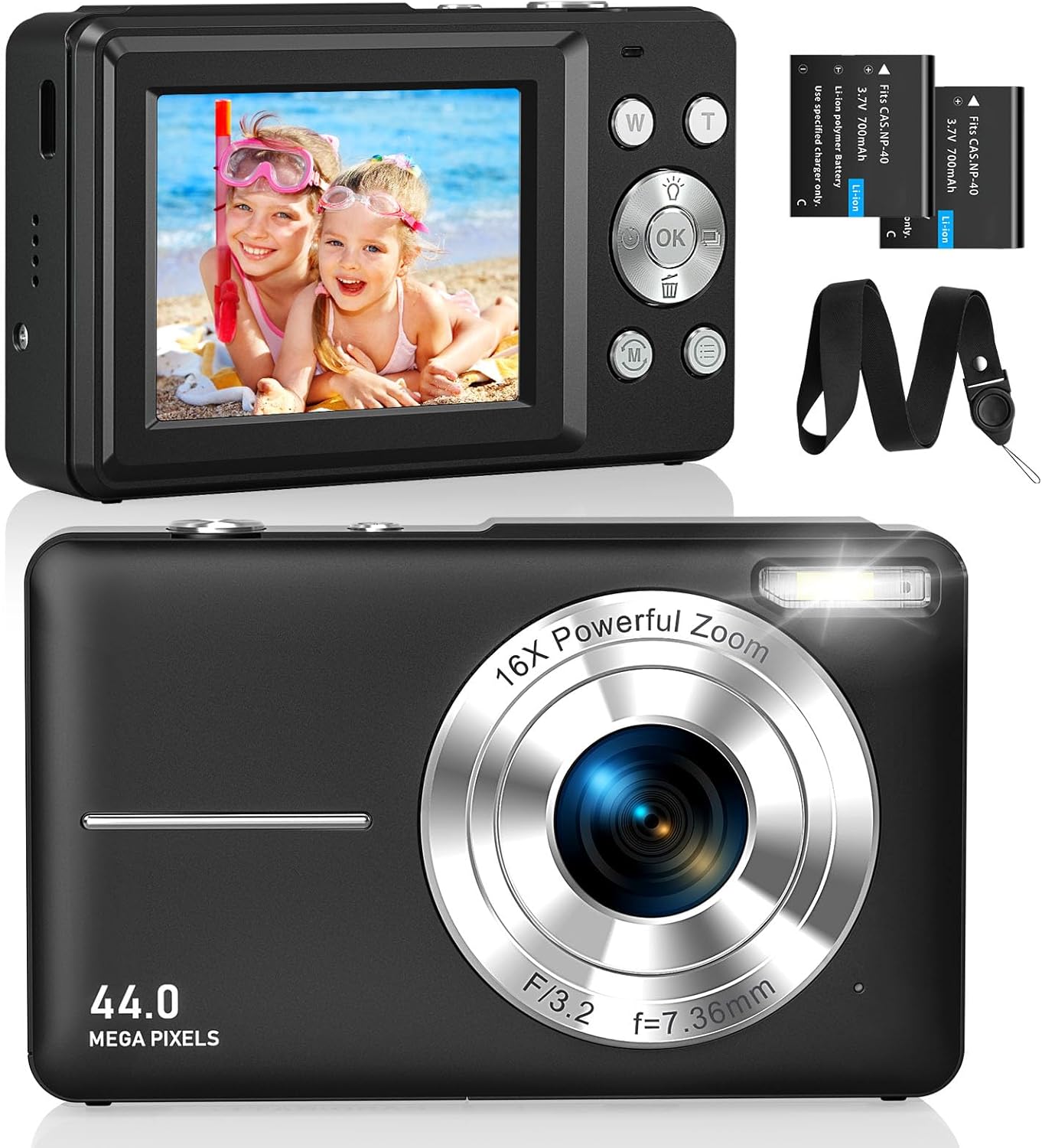
Зураг 2.1: Урд ба хойд views of the CAMKORY DC403 Digital Camera, illustrating the lens, flash, LCD display, and various control buttons. Two rechargeable batteries are also shown.
The camera features an intuitive layout with ergonomically placed buttons suitable for small hands. Key controls include the power button, shutter button, zoom (W/T) buttons, mode button, and an OK button for menu navigation.

Зураг 2.2: Нарийвчилсан view of the camera's side controls, including the ON/OFF button, Shutter, W/T (Zoom), Fill Light, and Mode button.
3. Тохиргоо
3.1 Зайг суурилуулах, цэнэглэх
- Камерын доод талд байгаа зайны тасалгааны тагийг нээнэ үү.
- Insert the two provided 3.7V 700mAh rechargeable lithium-polymer batteries, ensuring correct polarity.
- Зайны тасалгааны тагийг сайтар хаа.
- Connect the camera to a power source using the supplied USB Type-C cable for charging. The charging indicator will show the charging status.
3.2 Санах ойн карт суурилуулах
The camera supports Micro SD memory cards from 4GB to 32GB. A memory card is required to save photos and videos.
- Locate the Micro SD card slot, usually near the battery compartment.
- Insert the Micro SD card with the metal contacts facing the front of the camera until it clicks into place.
- Before first use, it is recommended to format the memory card directly within the camera's settings menu. This ensures compatibility and optimal performance.
3.3 Анхдагч асаалттай
Press and hold the power button (usually located on the top or side of the camera) to turn on the device. The LCD screen will illuminate, and the camera will be ready for use.
4. Ашиглалтын заавар
4.1 Зураг авах
- Камераа асаана уу.
- 2.5 инчийн LCD дэлгэц ашиглан зураг авалтаа хүрээлээрэй.
- Use the W/T buttons to adjust the 16x digital zoom.
- Press the shutter button halfway down to focus, then press it fully to capture the 44MP image.

Image 4.1: The camera captures 44MP images, allowing for detailed and clear photographs.
4.2 Видео бичлэг хийх
- Switch to video mode using the Mode button.
- Press the shutter button to start recording 1080p FHD video.
- Press the shutter button again to pause or stop recording.

Image 4.2: The camera supports 1080p Full HD video recording, allowing users to capture moments with clarity.
4.3 Онцлог шинж чанарууд
- Дижитал томруулах: Use the W/T buttons to zoom in and out. The camera features 16x digital zoom.
- Зураг тогтворжуулах: The optical image stabilization feature helps reduce blur from camera shake.
- Гэрлийг дүүргэх: Activate the fill light for better illumination in low-light conditions.
- Цаг хэмжигч: Set a delay (e.g., 2s, 5s, 10s) before taking a photo, useful for group shots or selfies.
- Тасралтгүй зураг авалт: Зураг авах товчийг удаан дарж, хурдан дараалсан зураг аваарай.
- Шүүлтүүр: Experiment with 20 different built-in filters to add creative effects to your photos.
- Инээмсэглэл илрүүлэх: The camera can automatically detect and capture a photo when a smile is detected.
- Webкамерын горим: Connect the camera to a computer via USB to use it as a webШууд дамжуулалт эсвэл видео дуудлага хийх зориулалттай камер.

Image 4.3: Demonstrations of 16x digital zoom and image stabilization. The zoom feature allows for closer shots, while stabilization helps maintain clarity during movement.

Зураг 4.4: Жишээ ньamples of self-timer, continuous shooting, and fill light functions. These features enhance photographic flexibility and quality in various scenarios.

Image 4.5: The camera can be used as a webcam when connected to a computer, suitable for streaming or video calls.
5. Засвар үйлчилгээ
5.1 Камерыг цэвэрлэх
- Камерын их биеийг цэвэрлэхийн тулд хөвөнгүй зөөлөн даавуугаар цэвэрлээрэй.
- Линз болон LCD дэлгэцийн хувьд тусгай зориулалтын линз цэвэрлэх даавуу, уусмал хэрэглээрэй. Химийн хүчтэй бодисоос зайлсхий.
- Цэвэрлэхийн өмнө камер унтарсан эсэхийг шалгаарай.
5.2 Хадгалалт
- Камерыг нарны шууд тусгал, хэт температураас хол, сэрүүн, хуурай газар хадгална.
- Хэрэв удаан хугацаагаар хадгалах юм бол гоожихоос сэргийлж батерейг салга.
- Use the provided long strap and pouch to protect the camera from drops and scratches during transport.
6. Алдаа засах
If you encounter issues with your CAMKORY DC403 camera, please refer to the following common solutions:
| Асуудал | Боломжит шийдэл |
|---|---|
| Камер асахгүй байна | Ensure batteries are correctly inserted and fully charged. Try using the second battery if available. |
| Cannot take photos/videos | Check if a Micro SD card is inserted and has sufficient free space. Ensure the card is formatted in the camera. |
| Зургууд бүдэг байна | Ensure the lens is clean. Hold the camera steady or use the image stabilization feature. Check lighting conditions. |
| Camera not recognized by PC | Ensure the USB Type-C cable is securely connected to both the camera and the PC. Try a different USB port or cable. |
| Батерей хурдан дуусдаг | Reduce screen brightness. Turn off features like flash or continuous shooting when not needed. Ensure batteries are fully charged before use. |
7. Техникийн үзүүлэлтүүд
| Онцлог | Дэлгэрэнгүй |
|---|---|
| Брэнд | CAMKORY |
| Загварын нэр | DC403 |
| Өнгө | Хар |
| Бүтээгдэхүүний төрөл | Компакт дижитал камер |
| Үр дүнтэй шийдэл | 44 мегапиксел |
| Видеоны нягтрал | 1080p бүрэн HD |
| Дижитал томруулах | 16x |
| Оптик томруулалт | 16x (Note: This appears to be a mislabeling in the source data, likely referring to digital zoom) |
| Зураг тогтворжуулах | Оптик |
| Дэлгэцийн хэмжээ | 2.5 инчийн LCD |
| Холболтын технологи | USB (C төрөл) |
| Дэмжигдсэн санах ойн карт | Micro SD (4-32GB) |
| Зайны төрөл | Lithium-polymer (2 x 3.7V 700mAh included) |
| Хэмжээ (L x W x H) | 9.5 x 2 x 5.5 см |
| Зүйлийн жин | 120 грамм |
| Burst Mode Speed | Секундэд 30 кадр |
| ISO хүрээ | ISO 100 to ISO 1600 |
| Апертур | F3.5-F5.6 |
| Фокусын төрөл | Автомат фокус |
| Усны эсэргүүцлийн түвшин | Ус нэвтэрдэггүй |
8. Баталгаат хугацаа ба дэмжлэг
For any questions, technical support, or warranty inquiries regarding your CAMKORY DC403 Digital Camera, please contact CAMKORY customer service through the retailer's platform or the official CAMKORY webсайт. Баталгаат заргад зориулж худалдан авалтаа нотлох баримтаа үлдээнэ үү.