
1. Танилцуулга
Welcome to your WOOXGEHM 4-in-1 Wired Arcade Fight Stick Joystick. This manual provides essential information for setting up, operating, and maintaining your new arcade controller. Designed for compatibility with Nintendo Switch, PC, PlayStation 3, and Android devices, this joystick enhances your gaming experience with precise control and turbo functions.
2. Аюулгүй байдлын мэдээлэл
Аюулгүй байдлын удирдамж
- Төхөөрөмжийг ус, чийгээс хол байлга.
- Төхөөрөмжийг хэт өндөр температурт байлгахаас зайлсхий.
- Төхөөрөмжийг өөрөө задлах, засах гэж бүү оролдоорой.
- Зөвхөн дагалдах кабель болон дагалдах хэрэгслийг ашиглана уу.
- Бага насны хүүхдээс хол байлга.
3. Багцын агуулга
Юу багтсан бэ
- 1 x Universal Arcade Fight Stick
- 1 x Remote Lever Handle (Joystick)
- 1 x Fixed Small Parts (e.g., suction cups)
- 1 x Зааварчилгааны гарын авлага
4. Бүтээгдэхүүн дууссанview
The WOOXGEHM Arcade Fight Stick is designed for comfort and precision, featuring a spherical metal joystick and six round control buttons. It also includes additional buttons for various functions and platform compatibility.

Зураг 1: WOOXGEHM 4-in-1 Wired Arcade Fight Stick Joystick, top view. A black arcade fight stick with a red spherical joystick on the left and six red circular action buttons on the right. Smaller function buttons are located above the main action buttons. The surface features a racing car graphic.
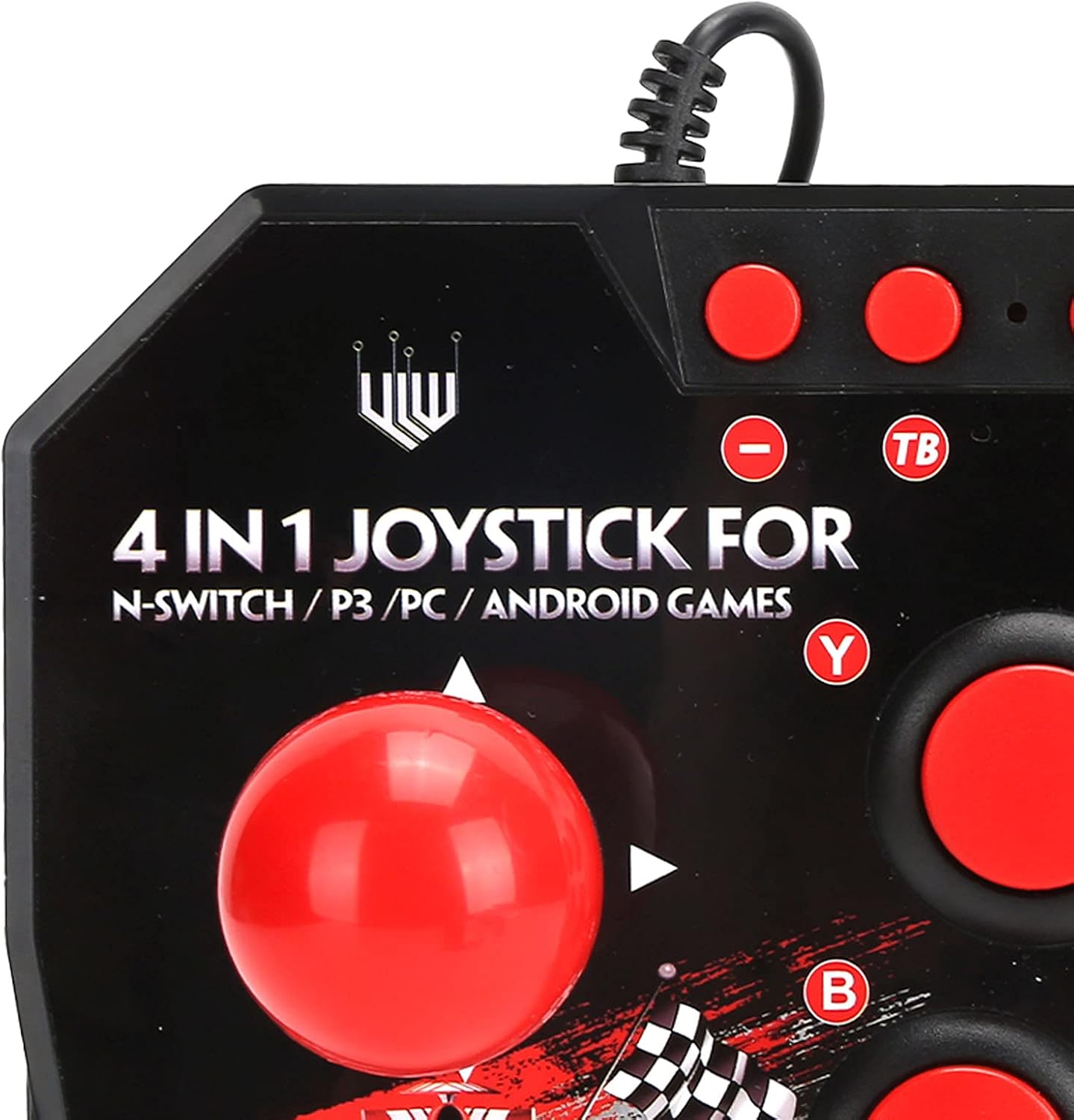
Зураг 2: Close-up of WOOXGEHM 4-in-1 Wired Arcade Fight Stick Joystick buttons. A detailed view of the joystick's top panel, showing the "4 IN 1 JOYSTICK FOR N-SWITCH / P3 / PC / ANDROID GAMES" text, along with the red spherical joystick and several red action buttons labeled Y, B, X, A, L, R, and smaller buttons for Turbo functions.

Зураг 3: Доод талд view of WOOXGEHM 4-in-1 Wired Arcade Fight Stick Joystick with suction cups. The underside of the arcade fight stick, showing four clear suction cups designed to secure the device to a flat surface during use. The label indicates "Input: DC5V / 500mA", "Working current: 20mA", and "MADE IN CHINA".
5. Тохиргоо ба холболт
The arcade fight stick connects via a wired USB cable. Ensure your console or device is powered on before connecting.
5.1 Nintendo Switch Connection
- Connect the USB cable from the arcade fight stick to an available USB port on your Nintendo Switch dock.
- Ensure "Pro Controller Wired Communication" is enabled in your Switch System Settings.
- The controller should be automatically recognized.
5.2 Компьютерийн холболт
- Connect the USB cable from the arcade fight stick to an available USB port on your PC.
- The system should automatically install the necessary drivers. If not, manual driver installation may be required (refer to your PC's operating system documentation).
- The controller will be recognized as a standard USB gamepad.
5.3 PlayStation 3 (PS3) Connection
- Connect the USB cable from the arcade fight stick to an available USB port on your PS3 console.
- The controller should be automatically recognized and ready for use.
5.4 Андройд төхөөрөмжийн холболт
- Connect the USB cable from the arcade fight stick to your Android device using an OTG (On-The-Go) adapter (not included).
- Ensure your Android device supports OTG functionality.
- The controller should be recognized as an external gamepad.

Зураг 4: Multi-platform compatibility. This image illustrates the multi-platform compatibility of the arcade fight stick, showing it connected to a Nintendo Switch console, a PlayStation 3, a PC monitor, and an Android device, highlighting its versatility.

Зураг 5: Plug-and-Play functionality. This image highlights the plug-and-play nature of the arcade fight stick, showing it connected to a PlayStation console, a Nintendo Switch, and a monitor displaying game content, emphasizing ease of use across platforms.
6. Ашиглалтын заавар
6.1 Үндсэн удирдлага
- Жойстик: Use the spherical metal joystick for directional movement.
- Үйлдлийн товчлуурууд: The six large round buttons (A, B, X, Y, L, R) are for primary game actions.
- Функцийн товчлуурууд: Smaller buttons above the main action buttons provide additional controls (e.g., Home, Select, Start).
6.2 Турбо функцууд
The controller features turbo functions for rapid button presses.
- To activate Turbo for a button, press and hold the desired action button, then press the "TB" (Turbo) button. The button will now rapidly repeat its input when held down.
- To deactivate Turbo, press and hold the same action button, then press the "TB" button again.
6.3 Горим солих
The joystick may have a mode switch to toggle between different input modes (e.g., D-Pad, Left Analog Stick, Right Analog Stick) for specific games or platforms. Refer to the small buttons near the top left of the controller for these options.
7. Засвар үйлчилгээ, арчилгаа
Бүтээгдэхүүний арчилгаа
- Цэвэрлэгээ: Wipe the surface of the joystick with a soft, dry cloth. Do not use abrasive cleaners or solvents.
- Хадгалах: Төхөөрөмжийг ашиглаагүй үед нарны шууд тусгалаас хол, сэрүүн, хуурай газар хадгална.
- Кабелийн менежмент: USB кабелийг гэмтээхгүйн тулд хурц гулзайлгах эсвэл хэт их татахаас зайлсхий.
8. Алдаа засах
Нийтлэг асуудал ба шийдэл
- Хянагчийг танихгүй байна:
Шийдэл: Ensure the USB cable is securely connected to both the joystick and the device/console.
Шийдэл: For Nintendo Switch, verify "Pro Controller Wired Communication" is enabled in system settings.
Шийдэл: Өөр USB порт руу холбогдож үзнэ үү.
Шийдэл: Restart your console/PC/Android device. - Товчлуур эсвэл joystick хариу өгөхгүй байна:
Шийдэл: Disconnect and reconnect the joystick.
Шийдэл: Test the joystick on another compatible device to determine if the issue is with the controller or the device. - Турбо функц ажиллахгүй байна:
Шийдэл: Ensure you are correctly activating/deactivating the turbo mode as described in the Operating Instructions.
9. Техникийн үзүүлэлтүүд
Техникийн үзүүлэлтүүд
| Онцлог | Дэлгэрэнгүй |
|---|---|
| Загвар | B0C7GYXMLZ |
| Брэнд | WOOXGEHM |
| Хянагчийн төрөл | Button Control, Joystick |
| Тоног төхөөрөмжийн интерфейс | USB |
| Материал | Акрилонитрил бутадиен стирол (ABS) |
| Зүйлийн жин | 0.52 килограмм (1.14 фунт) |
| Хэмжээ (ойролцоогоор) | 21 x 15 x 6 см (8.3 x 5.9 x 2.4 инч) |
| Ажлын ботьtagд/Одоогийн | DC5V/20mA |
| USB кабелийн урт | 3 м / 9.8 фут |
| Тохиромжтой байдал | Nintendo Switch, PC, PS3, Android Games |

Зураг 6: Technical specifications overview. An image displaying the technical specifications of the arcade fight stick, including item type, material (ABS), size (21 x 15 x 6 cm), working voltage/current (DC5V/20mA), and USB cable length (3m/9.8ft), along with a list of package contents.
10. Баталгаат хугацаа ба дэмжлэг
Баталгаат хугацааны мэдээлэл
This WOOXGEHM product comes with a standard manufacturer's warranty. For specific warranty terms and conditions, please refer to the warranty card included in your package or contact WOOXGEHM customer support.
Хэрэглэгчийн дэмжлэг
If you encounter any issues or have questions regarding your Arcade Fight Stick, please visit the official WOOXGEHM webсайт эсвэл тусламж авахын тулд тэдний харилцагчийн үйлчилгээтэй холбогдоно уу.