
TEYES CC3 2K
TEYES CC3 2K Car Radio Multimedia Navigation System User Manual
Model: CC3 2K | Brand: TEYES
Танилцуулга
This manual provides comprehensive instructions for the installation, operation, and maintenance of your TEYES CC3 2K Car Radio Multimedia Navigation System. Designed for Toyota Sienna 3 XL30 models from 2014-2020, this Android 10 head unit offers advanced multimedia, navigation, and connectivity features. Please read this manual thoroughly before using the device to ensure proper function and safety.
Багцын агуулга
Доор жагсаасан бүх зүйл таны багцад байгаа эсэхийг шалгаарай. Хэрэв ямар нэгэн зүйл дутуу эсвэл эвдэрсэн бол хэрэглэгчийн дэмжлэгтэй холбоо барина уу.

Head Unit CC3 2K: The main display and processing unit.
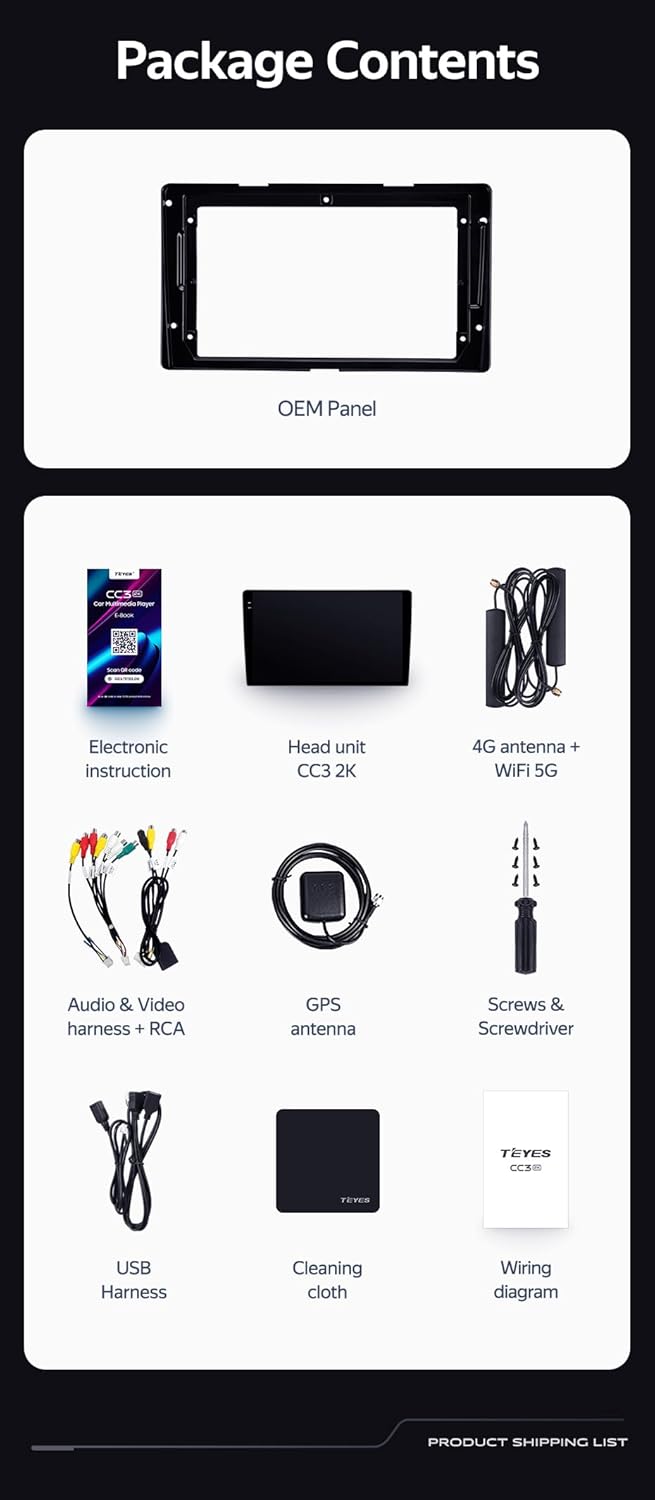
OEM Panel (Frame): Custom-fit panel for seamless integration into your vehicle's dashboard.

USB кабель: For data transfer and connecting external devices.

GPS антена: Нарийвчлалтай навигаци болон байршлын үйлчилгээний хувьд.

AUX кабель: Туслах аудио оролтын хувьд.

4G WiFi Antenna: Сүлжээний холболтын хувьд.

AHD 1080p Rear Camera: For enhanced reverse visibility.

Цахилгааны утас: For connecting the head unit to the vehicle's power supply.
Холболтын диаграм: Essential for correct electrical connections.

Electronic Instruction: Digital manual for detailed guidance.

Цэвэрлэгээний даавуу: For maintaining the display's clarity.
Тохиргоо ба суурилуулалт
Installation of the TEYES CC3 2K head unit requires technical knowledge and familiarity with car audio systems. It is recommended to seek professional installation to avoid damage to your vehicle or the device. Always disconnect the vehicle's battery before beginning installation.
Суурилуулалт дууссанview
- Бэлтгэл: Ensure the vehicle's power is off. Remove the original car radio and dashboard trim.
- Mounting the OEM Panel: Secure the provided OEM panel to the head unit.
- Утасны холболтууд: Connect the power cable, USB cables, GPS antenna, 4G WiFi antenna, AUX cable, and rear camera according to the wiring diagram. Ensure all connections are secure.
- Steering Wheel Control Integration: The unit supports original car steering wheel buttons. Connect the appropriate wires as per the wiring diagram. Configuration may be required in the unit's settings.
- Туршилт: Before fully reassembling the dashboard, connect the battery and power on the unit to test basic functions.
- Эцсийн чуулган: Carefully reassemble the dashboard trim and secure the head unit in place.

Зургийн тайлбар: This image displays a side-by-side comparison of a Toyota Sienna dashboard before and after the installation of the TEYES CC3 2K head unit. The 'before' image shows the original car radio, while the 'after' image shows the integrated TEYES CC3 2K unit, demonstrating a seamless fit and updated aesthetic.

Зургийн тайлбар: Ойрын зураг view of a car's steering wheel with integrated control buttons. The text indicates that the TEYES CC3 2K supports these original car steering wheel buttons, allowing for convenient control of the multimedia system.
Ашиглалтын заавар
The TEYES CC3 2K operates on an Android 10 system, providing a user-friendly interface. The 2K in-cell touch screen offers responsive interaction.
Үндсэн үйл ажиллагаа
- Асаах/унтраах: Press and hold the power button (if physical) or use the vehicle's ignition.
- Мэдрэгчтэй дэлгэцийн навигаци: Swipe, tap, and pinch to navigate through menus and applications.
- Үндсэн дэлгэц: Access frequently used apps and widgets. Customize the layout as desired.
- Дууны хяналт: Adjust volume using the on-screen controls or steering wheel buttons.
Мультимедиа функцууд
- Радио: Access the built-in radio tuner. Supports RDS for enhanced information display.
- Bluetooth: Pair your smartphone for hands-free calling and audio streaming via the upgraded QCC3031QFN Qualcomm Bluetooth module.
- USB тоглуулах: Connect USB drives to play audio and video files.
- Видео тоглуулагч: Play various video formats on the 2K display.
- Аудио гаралт: Utilize the 2*DSP ADAU1701 + ROHM32107 for high-quality audio, including optical and coaxial digital audio output.
Навигаци ба холболт
- GPS навигаци: Use pre-installed navigation apps or download others from the app store. Supports North America maps.
- 4G Internet & WiFi: Connect to the internet via 4G or WiFi hotspot for online services, app downloads, and real-time traffic updates.
- Арын камер: The included AHD 1080p rear camera provides real-time viewing when reversing and supports video recording.
Видео тайлбар: This video demonstrates the TEYES CC3 2K head unit's user interface and features, including its responsive touch screen, multimedia playback, and integration into a car dashboard. It highlights the visual quality and various functionalities of the system.
Зургийн тайлбар: Нарийвчилсан view of the TEYES CC3 2K head unit's display, showcasing its modern user interface with various application icons for video, radio, folders, and Teyes Yahu. It also displays a music player widget and a car speed indicator, illustrating the system's multimedia and informational capabilities.
Засвар үйлчилгээ
Proper maintenance ensures the longevity and optimal performance of your TEYES CC3 2K head unit.
- Дэлгэц цэвэрлэх: Use the provided cleaning cloth or a soft, lint-free cloth with a screen-safe cleaner. Avoid abrasive materials or harsh chemicals.
- Програм хангамжийн шинэчлэлтүүд: Regularly check for and install software updates to ensure the system has the latest features and security patches.
- Байгаль орчны нөхцөл: Төхөөрөмжийг хэт өндөр температурт, нарны шууд тусгалд удаан хугацаагаар өртөхөөс зайлсхий.
- Кабелийн холболтууд: Бүх кабелийн холболтууд найдвартай, гэмтээгүй эсэхийг үе үе шалгаж байгаарай.
Алдааг олж засварлах
If you encounter issues with your TEYES CC3 2K, refer to the following common troubleshooting steps. For persistent problems, contact customer support.
- Төхөөрөмж асахгүй байна:
- Check vehicle's battery connection.
- Verify power cable connections to the head unit.
- Ensure vehicle ignition is on.
- Дуугүй:
- Check volume levels on the unit and vehicle.
- Verify speaker wire connections.
- Ensure correct audio source is selected.
- GPS ажиллахгүй байна:
- GPS-ийн антен зөв холбогдсон, тодорхой байгаа эсэхийг шалгаарай view тэнгэрийн.
- Check GPS settings in the unit's menu.
- Мэдрэгчтэй дэлгэц хариу өгөхгүй байна:
- Restart the head unit.
- Дэлгэц цэвэр, хог хаягдалгүй эсэхийг шалгаарай.
- Bluetooth холболтын асуудал:
- Ensure Bluetooth is enabled on both the head unit and your device.
- Delete previous pairings and re-pair the device.
- Move devices closer to the head unit.
Үзүүлэлтүүд
| Онцлог | Дэлгэрэнгүй |
|---|---|
| Загварын дугаар | CC3 2K |
| Дэлгэцийн хэмжээ | 9.5 инч |
| Үйлдлийн систем | Android 10 |
| RAM | 6 ГБ |
| ROM | 128 ГБ |
| Процессор | 8 цөм 2.0 GHz |
| Дэлгэцийн технологи | 2K In-cell Display, Gamut Coverage 157% |
| Bluetooth модуль | QCC3031QFN Qualcomm |
| Аудио процессорууд | 2*DSP ADAU1701 + ROHM32107 |
| Аудио гаралт | Optical and Coaxial Digital Audio Output, Stereo |
| Холболт | Bluetooth, USB, WiFi, Hotspot, 4G Internet |
| Газрын зургийн төрөл | Хойд Америк |
| Онцлог шинж чанарууд | Touchscreen, RDS Support, Real-time Rear View, Video Recording Support, 3D Software (TEYES Vision & TEYES Yahu) |
| Тээврийн хэрэгслийн үйлчилгээний төрөл | Car (Toyota Sienna 3 XL30 2014-2020) |

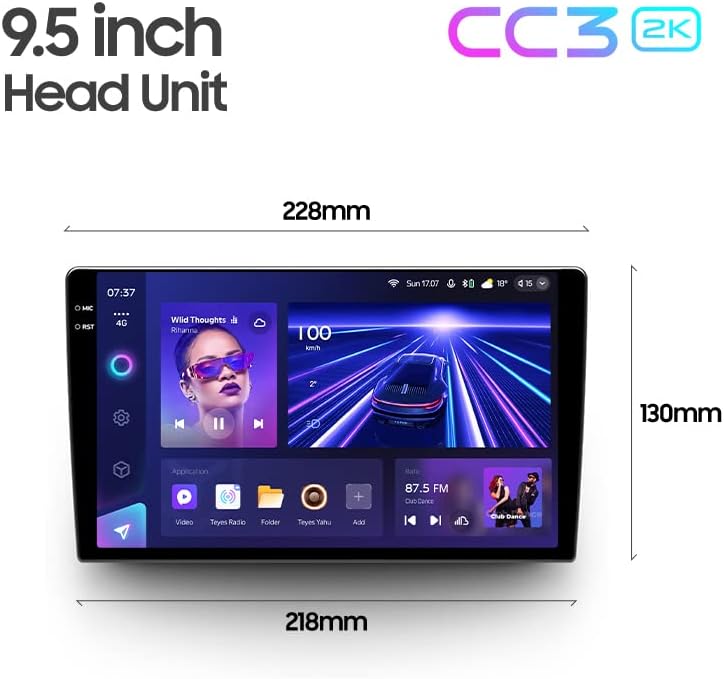
Зургийн тайлбар: This image provides a dimensional diagram of the TEYES CC3 2K 9.5-inch head unit, showing its width (228mm at the top, 218mm at the bottom) and height (130mm). The display also shows the user interface with music playback and car speed information.
Баталгаат хугацааны мэдээлэл
The TEYES CC3 2K Car Radio Multimedia Navigation System comes with a 1 жилийн баталгаат хугацаа from the date of purchase. This warranty covers manufacturing defects and malfunctions under normal use. It does not cover damage caused by improper installation, accidents, misuse, unauthorized repairs, or normal wear and tear. Please retain your proof of purchase for warranty claims.
Хэрэглэгчийн дэмжлэг
For technical assistance, troubleshooting, or warranty inquiries, please contact TEYES customer support. Refer to the contact information provided with your product packaging or visit the official TEYES webтуслах нөөцийн сайт.
Үйлдвэрлэгч: Shenzhen TEYES High tech Co., Ltd.
Ask a question about this manual
Ask about setup, troubleshooting, compatibility, parts, safety, or missing instructions. Manuals+ will review the question and use this page’s manual context to help answer it.