
1. Танилцуулга
The AOPUTTRIVER AP-189A is a high-precision digital manometer designed for measuring differential, positive, and negative pressure. It is widely used in various applications including flow measurement, air quality monitoring, level measurement, gas temperature measurement, and HVAC system control. This manual provides detailed instructions for the safe and effective use of your device.
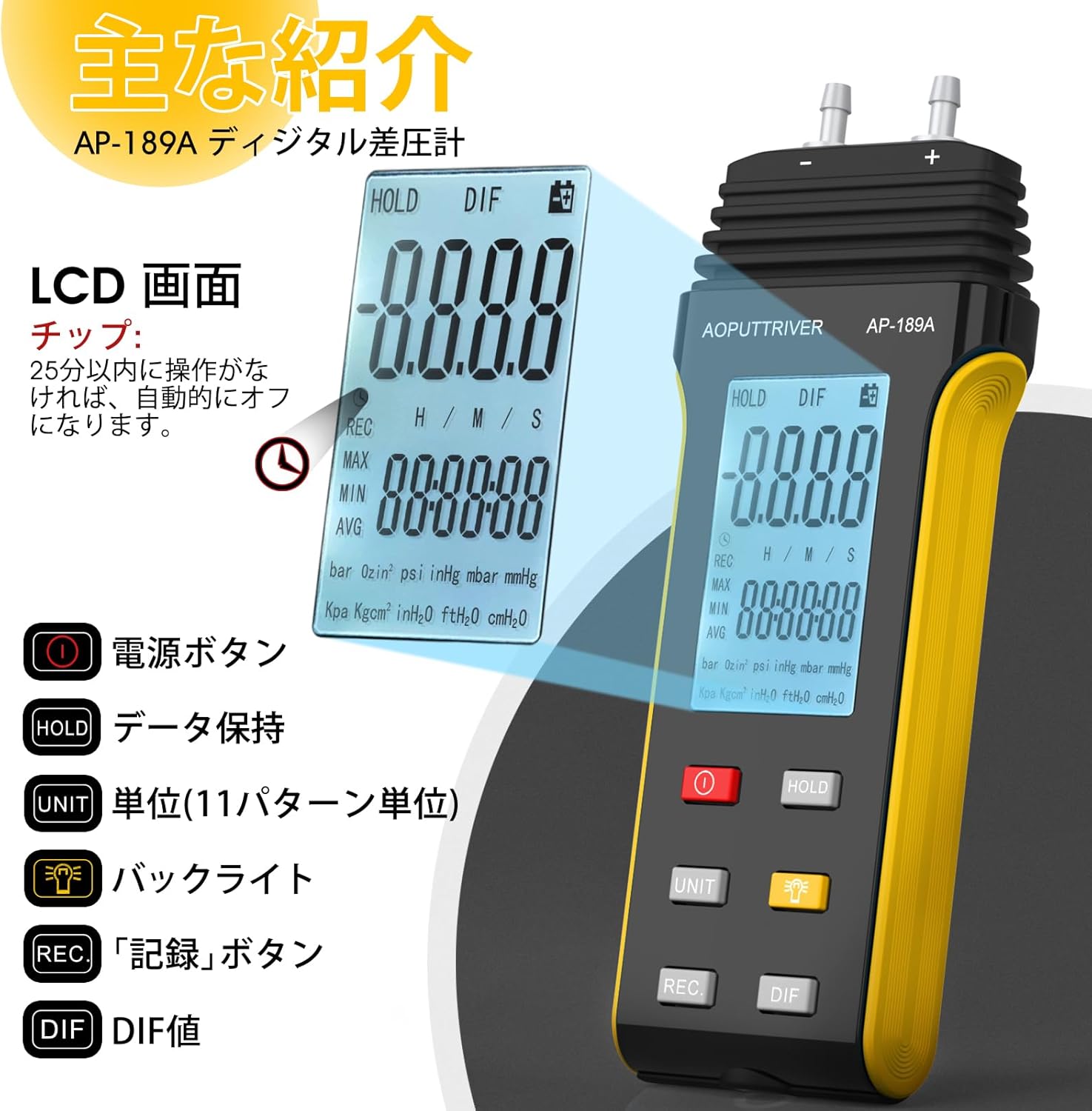
The device features a large LCD with backlight, data hold function, automatic power-off, and the ability to record maximum, minimum, and average values, as well as differential pressure (DIF). It supports 11 selectable pressure units for versatility in professional applications.
2. Бүтээгдэхүүний онцлог
- Өндөр нарийвчлал: Measurement range of ±2.000psi with an accuracy of ±0.3%FSO (at 25°C).
- Олон нэгж: Easily switch between 11 pressure units: Psi, kPa, Kgfcm2, ozin2, Bar, mbar, inHg, mmHg, inH2O, ftH2O, cmH2O.
- Мэдээллийн бичлэг: Records MAX/MIN/AVG values for easy data analysis.
- Тэг тохиргоо: Allows for precise zero calibration before measurements.
- Олон үйлдэлт дэлгэц: Large LCD with backlight for clear readings.
- Эрчим хүчний менежмент: Low battery indicator and automatic power-off after 25 minutes of inactivity to conserve battery life.
- DIF Function: Measures differential pressure.

Зураг: Дууслааview of the AP-189A Digital Manometer's key features and specifications, including accuracy, repeatability, maximum pressure, and various functions like data hold, auto-off, and unit selection.
3. Багцын агуулга
Багцыг нээхдээ бүх зүйл байгаа бөгөөд сайн нөхцөлд байгаа эсэхийг шалгана уу:
- 1 x AP-189A Digital Manometer
- 1 х хамгаалалтын цүнх
- 1 x Small Screwdriver
- 2 x 1.5V AAA батерей
- 1 x User Manual (Japanese)

Image: The complete package contents of the AP-189A Digital Manometer, showing the device, a protective carrying bag, a small screwdriver, two AAA batteries, and the user manual.
4. Тохиргоо
4.1 Батерей суурилуулах
- Төхөөрөмжийн арын хэсэгт зайны тасалгааны тагийг олоорой.
- Use the provided small screwdriver to open the battery compartment.
- Хоёр 1.5V AAA батерейг оруулж, зөв туйлшралыг (+/-) баталгаажуулна.
- Зайны тасалгааны тагийг сольж, боолтоор бэхлээрэй.
4.2 Хоолой холбох
The AP-189A features dual ports for differential pressure measurement. Connect the hoses to the appropriate ports (+ and -) based on your measurement requirements. Ensure a secure connection to prevent leaks.

Зураг: Нарийвчилсан view of the AP-189A Digital Manometer, highlighting its dimensions and the dual port connections at the top for pressure hoses.
5. Ашиглалтын заавар
5.1 Асаах/унтраах
- дээр дарна уу Цахилгаан товч (
 ) to turn the device ON.
 - -г удаан дар Цахилгаан товч for a few seconds to turn the device OFF.
5.2 Тэг тохиргоо
Before taking any measurements, it is crucial to perform a zero setting to ensure accuracy. Disconnect all pressure hoses from the device before performing this step.
- Ensure the device is powered on and no pressure is applied to the ports.
- -г удаан дар БАРЬ товчийг ойролцоогоор 5 секунд дарна уу.
- The display will show "----" indicating that the zero setting is complete.

Image: Visual guide demonstrating how to perform a zero setting on the manometer by long-pressing the HOLD button until the display shows dashes.
5.3 Нэгжийн сонголт
дээр дарна уу НЭГЖ button to cycle through the 11 available pressure units (Psi, kPa, Kgfcm2, ozin2, Bar, mbar, inHg, mmHg, inH2O, ftH2O, cmH2O) until your desired unit is displayed.
5.4 Арын гэрэлтүүлгийн функц
дээр дарна уу Арын гэрэлтүүлгийн товчлуур () to turn the LCD backlight ON or OFF for improved visibility in low-light conditions.
5.5 Мэдээлэл хадгалах
дээр дарна уу БАРЬ button briefly to freeze the current reading on the display. Press it again to release the hold function and resume live readings.
5.6 MAX/MIN/AVG/DIF Recording
дээр дарна уу REC button to enter recording mode. In this mode, the device will track the maximum, minimum, and average pressure values. Press REC repeatedly to cycle through MAX, MIN, AVG, and DIF displays. To exit recording mode, press and hold the REC товч.
5.7 Автомат унтраалт
The device will automatically power off after 25 minutes of inactivity to save battery life. This feature can typically be disabled or adjusted by pressing and holding specific buttons during power-on, as detailed in the full manual.
Image: A close-up of the AP-189A's LCD screen and control buttons, illustrating the functions of the Power, Hold, Unit, Backlight, Record, and DIF buttons.
6. Засвар үйлчилгээ
- Цэвэрлэгээ: Төхөөрөмжийг зөөлөн, хуурай даавуугаар арчина. Зүлгүүрийн цэвэрлэгч, уусгагчийг бүү ашигла.
- Хадгалах: Store the manometer in its protective bag in a cool, dry place when not in use. Remove batteries if storing for extended periods to prevent leakage.
- Шалгалт тохируулга: Regular calibration by a qualified technician is recommended to maintain measurement accuracy, especially for critical applications.
- Зай солих: Батерей бага байгаагийн дохио гарч ирэхэд тасралтгүй ажиллах, өгөгдөл алдагдахаас сэргийлэхийн тулд батерейг нэн даруй солино уу.
7. Алдаа засах
| Асуудал | Боломжит шалтгаан | Шийдэл |
|---|---|---|
| Төхөөрөмж асахгүй байна | Дууссан эсвэл буруу суурилуулсан батерей | Батерейны туйлшралыг шалгах; батерейг солих; |
| Буруу уншилтууд | No zero setting performed; sensor obstruction; device not calibrated | Perform zero setting; ensure ports are clear; consider professional calibration. |
| Display shows "OL" or "Err" | Overload (pressure exceeds maximum limit) | Remove pressure immediately. Ensure pressure does not exceed 6 Psi. |
| Арын гэрэл ажиллахгүй байна | Backlight function off; low battery | Press the backlight button; replace batteries. |
8. Техникийн үзүүлэлтүүд
- Хэмжилтийн хүрээ: ± 2.000psi
- Нарийвчлал: ±0.3%FSO (at 25°C)
- Давтагдах чадвар: ±0.25%FSO
- Linearity/Hysteresis: ±0.1%FSO
- Limited Maximum Pressure: 6 Psi
- Нэгж: Psi, kPa, Kgfcm2, ozin2, Bar, mbar, inHg, mmHg, inH2O, ftH2O, cmH2O
- Чиг үүрэг: Backlight, Data Hold, Auto Power Off (25 min), MAX/MIN/AVG/DIF, Zero Setting
- Эрчим хүчний хангамж: 2 x 1.5V AAA батерей
- Хэмжээ: Ойролцоогоор 166мм x 62мм x 31мм (6.29инч x 2.44инч x 1.22инч)
- Жин: Ойролцоогоор 250 гр
Image: A diagram illustrating the physical dimensions of the AP-189A Digital Manometer, including length, width, and thickness.
9. Баталгаат хугацаа ба дэмжлэг
The AOPUTTRIVER AP-189A Digital Manometer comes with a 365-day warranty and lifetime technical support. If you encounter any quality issues with the product, please contact our customer support team. We are committed to resolving any problems as quickly as possible.
For support, please refer to the contact information provided in your product packaging or visit the official AOPUTTRIVER webсайт.