
1. Танилцуулга
The Generic JM300PRO is a wireless video transmission system designed for professional videographers, photographers, and filmmakers. It consists of a transmitter (TX) and a receiver (RX) unit, enabling high-definition video and audio signal extension up to 200 meters (656 feet) with a low latency of approximately 0.06 seconds. This system supports 1080P60Hz resolution and offers multiple power supply options, app monitoring, and multi-receiver capabilities.
2. Багцын агуулга
Таны багцад бүх зүйл байгаа эсэхийг шалгана уу:
- JM300PRO Transmitter Unit (TX)
- JM300PRO Receiver Unit (RX)
- Antennas (typically 2 per unit)
- Цахилгаан адаптер (хэрэв байгаа бол)
- Хэрэглэгчийн гарын авлага (энэ баримт бичиг)
Жич: Batteries (e.g., NP-F series) are not included and must be purchased separately.
3. Төхөөрөмж дууссанview

Зураг 3.1: JM300PRO Transmitter Unit (TX). This unit sends the video signal from your source device.

Зураг 3.2: JM300PRO Receiver Unit (RX). This unit receives the video signal and outputs it to a display.
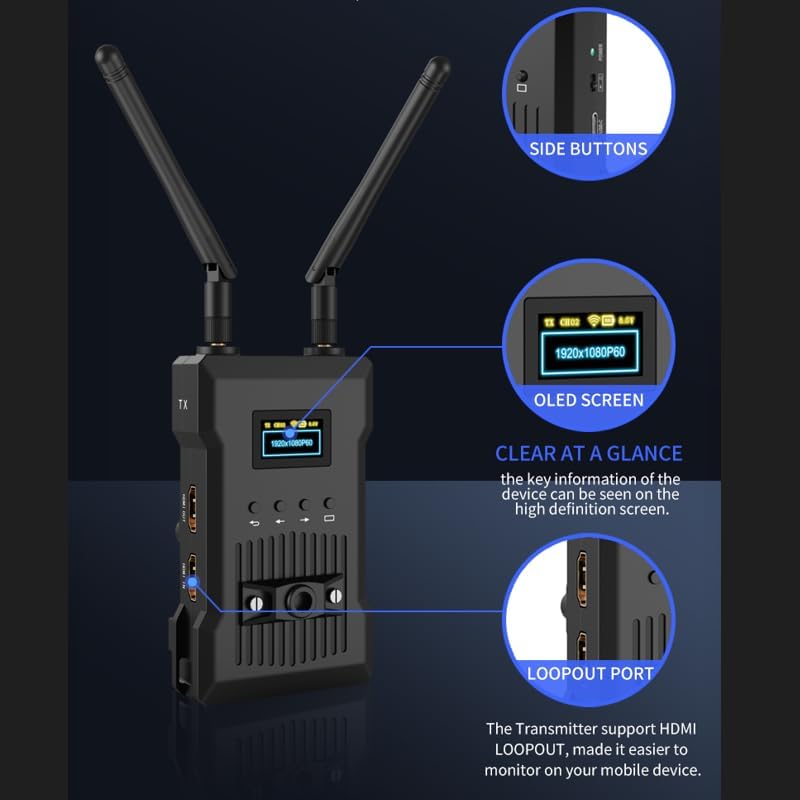
Зураг 3.3: Key features of the JM300PRO unit, including the OLED screen for status display, side buttons for navigation, and the HDMI loopout port.
3.1 Портууд ба үзүүлэлтүүд
- HDMI IN (TX Unit): Connects to your video source (e.g., camera, camcorder).
- HDMI OUT (TX Unit): Provides a loopout for local monitoring on the transmitter.
- HDMI OUT 1 & 2 (RX Unit): Connects to display devices (e.g., monitors, TVs).
- DC 9-16V: Эрчим хүчний оролтын порт.
- USB-C: Alternative power input port.
- Цахилгаан товч: Төхөөрөмжийг асаах/унтраах.
- OLED дэлгэц: Displays status information such as resolution, signal strength, and battery level.
- Хяналтын товчлуурууд: Used for menu navigation and channel selection.

Зураг 3.4: Хажуу тал view of the JM300PRO unit, highlighting the DC 9-16V power input, USB-C port, and power button.
4. Тохируулах заавар
4.1 Антен суурилуулах
- Carefully screw the provided antennas onto the antenna connectors on both the Transmitter (TX) and Receiver (RX) units.
- Ensure the antennas are securely tightened but do not overtighten.
- Adjust the antennas to an upright position for optimal signal transmission.
4.2 Нэгжийг тэжээх
The JM300PRO supports three power supply methods:
- DC 9-16V Power Adapter: Connect the included power adapter to the DC 9-16V port on the unit and plug it into a power outlet.
- NP-F цувралын батерейнууд: Attach a compatible NP-F series battery to the battery plate on the rear of the unit. (Batteries sold separately).
- USB-C тэжээл: Connect a USB-C power source to the USB-C port.

Зураг 4.1: The JM300PRO offers flexible power options including NP-F batteries, DC input, and USB-C.
4.3 Төхөөрөмжүүдийг холбох
- Transmitter (TX) Unit: Connect your video source (e.g., camera, camcorder, DVD player, set-top box) to the HDMI оролт port on the TX unit using an HDMI cable. If local monitoring is desired, connect an external monitor to the HDMI OUT (loopout) port on the TX unit.
- Receiver (RX) Unit: Connect your display device(s) (e.g., HDTV, projector, monitor) to the HDMI OUT 1 or HDMI OUT 2 ports on the RX unit using HDMI cables. The RX unit supports connecting up to two HD monitors simultaneously.
5. Ашиглалтын заавар
5.1 Асаах/унтраах
Press and hold the Power button on each unit until the OLED screen illuminates (for power on) or turns off (for power off).
5.2 Анхны холболт
Once both the TX and RX units are powered on and connected to their respective devices, they should automatically establish a connection. The OLED screen on both units will display the current resolution (e.g., 1920x1080P60) and signal status.
5.3 Channel Scan and Selection
The JM300PRO features a channel scan function to identify the best available wireless channel for optimal performance. This can be done via the unit's control buttons or through the dedicated mobile application.
- Төхөөрөмж дээрх: Use the control buttons next to the OLED screen to navigate the menu and initiate a channel scan. Select a channel with minimal interference.
- Аппликешнээр дамжуулан: Download and install the JM300PRO monitoring application on your smartphone or tablet. Connect your mobile device to the JM300PRO's Wi-Fi network. Within the app, you can perform a channel scan and select the most suitable frequency point. The system offers nine optional frequency points.

Зураг 5.1: The JM300PRO allows selection from nine frequency points to optimize wireless performance.
5.4 APP Monitoring
The mobile application allows for real-time monitoring of the video feed and system status. It also provides control over various settings and enables system upgrades.
- Ensure your smartphone or tablet is connected to the JM300PRO's Wi-Fi network.
- Open the JM300PRO application.
- The app will display the video feed and system information.

Зураг 5.2: The mobile application provides a comprehensive interface for monitoring and controlling the JM300PRO system.
5.5 Олон хүлээн авагчийн ажиллагаа
One JM300PRO Transmitter unit can broadcast to multiple Receiver units (up to 4). To use this feature, simply power on and connect additional RX units as described in Section 4.3. All connected RX units will receive the same video signal from the TX unit.
6. Засвар үйлчилгээ
6.1 Цэвэрлэгээ
Wipe the units with a soft, dry cloth. Do not use liquid cleaners or solvents, as they may damage the device.
6.2 Програм хангамжийн шинэчлэлтүүд
System upgrades can be performed through the mobile application. Ensure the unit has sufficient power and a stable connection during the upgrade process. Follow the instructions provided within the app for a successful update.
6.3 Батерейны арчилгаа
If using NP-F series batteries, ensure they are charged according to the battery manufacturer's instructions. Remove batteries from the unit if it will not be used for an extended period.
7. Алдаа засах
| Асуудал | Боломжит шалтгаан | Шийдэл |
|---|---|---|
| Хүлээн авагч дээр видео дохио байхгүй байна. |
|
|
| Poor video quality or dropped frames. |
|
|
| App monitoring not working. |
|
|
8. Техникийн үзүүлэлтүүд
| Онцлог | Тодорхойлолт |
|---|---|
| Загварын дугаар | JM300PRO |
| Брэнд | Ерөнхий |
| Холболтын технологи | HDMI, Wi-Fi |
| Хянагчийн төрөл | Товчлуур, Апп |
| Макс тогтоол | 1080P60Hz |
| Хоцролт | Ойролцоогоор 0.06 секунд |
| Дамжуулах хүрээ | 200м / 656 фут (саад саадгүй) |
| Тохиромжтой төхөөрөмжүүд | Personal Computer, Smartphone, Speaker, Tablet, Television, DVD, DVR, IPTV, CCTV Blu-ray players, set-top boxes, cable/satellite boxes, game consoles |
| Нийт HDMI портууд | 2 (1 IN, 1 OUT on TX; 2 OUT on RX) |
| Аудио гаралтын горим | Стерео |
| Хүрээлэн буй орчны дууны сувгийн тохиргоо | 5.1, 7.1 |
| Видео кодчилол | H.264, H.265/HEVC |
| Гаралтын хүч | 5 ватт |
| Эрчим хүчний оролт | DC 9-16V, USB-C, NP-F series batteries |
| Сувгийн тоо | 6 (Wireless) |
| Өнгө | Хар |
| Үйлдвэрлэгч | Shenzhen liangtu technology co., ltd. |
9. Баталгаат хугацаа ба дэмжлэг
Баталгаат мэдээлэл болон техникийн дэмжлэг авахыг хүсвэл худалдан авалтад өгөгдсөн баримт бичигт хандах эсвэл худалдагчтай шууд холбогдоно уу. Аливаа баталгаат нэхэмжлэлийн хувьд худалдан авалтаа нотлох баримтаа хадгалаарай.