
1. Танилцуулга
The Walfront MPPT Solar Charge Controller is designed to efficiently manage power flow from your solar panels to your battery bank, optimizing charging performance for off-grid solar systems. This manual provides essential information for the safe and effective installation, operation, and maintenance of your 50A MPPT solar charge controller.

Image 1.1: Walfront MPPT Solar Charge Controller 50A. This image shows the front view of the orange and black controller, featuring an LCD screen displaying PV, Battery, and Load information, along with 'ESC' and 'SET' buttons.
2. Үндсэн шинж чанарууд
- High Efficiency MPPT Tracking: Features MPPT tracking efficiency greater than 99% and a maximum conversion efficiency of up to 98%, maximizing energy harvest from solar panels.
- Wide 180V PV Input and Auto Voltagцахим хүлээн зөвшөөрөлт: Supports a maximum solar input voltage of 180V (at 25℃) and automatically recognizes 12V, 24V, 36V, and 48V battery systems. Compatible with battery voltag9V-ээс 64V хүртэл.
- Clear LCD Display and Smart Protection: Built-in LCD provides real-time system data (voltage, current, operating status). Includes temperature compensation and multiple protection features for safe operation.
- Low No-Load Loss and Reliable Performance: No-load loss of ≤0.4W conserves energy. Designed for reliable operation in temperatures from -10℃ to 65℃ and altitudes up to 3000 meters.
- Суулгах, ашиглахад хялбар: Auto-recognition feature simplifies setup. Compact design allows for straightforward mounting.

Image 2.1: Automatic Voltage Identification. This image highlights the controller's ability to automatically identify 12V, 24V, 36V, and 48V systems, shown with various solar panel application examples.
3. Аюулгүй байдлын мэдээлэл
Please read all instructions carefully before installation and operation. Failure to follow these safety guidelines may result in personal injury, damage to the controller, or other equipment.
- Ensure all wiring is correctly polarized and securely connected. Loose connections can cause overheating and damage.
- Эхлээд батерейг, дараа нь нарны хавтан, эцэст нь ачааллыг үргэлж холбоно уу. Урвуу дарааллаар салга.
- Do not connect the solar panel array to the controller without a battery connected.
- Системийн эзлэхүүнийг баталгаажуулна ууtage of the solar panel and battery are compatible with the controller's specifications.
- Удирдагчийг агааржуулалт сайтай газар, шатамхай материал, нарны шууд тусгалаас хол байрлуулна.
- Avoid touching live terminals. Use insulated tools during installation.
- This device is not waterproof. Protect it from moisture and water exposure.
4. Багцын агуулга
Доор жагсаасан бүх зүйл таны багцад байгаа эсэхийг шалгаарай.
- 1 x Walfront MPPT Solar Charge Controller (50A)
- 4 х эрэг
- 4 х өргөтгөх эрэг
- 1 х хэрэглэгчийн гарын авлага (энэ баримт бичиг)
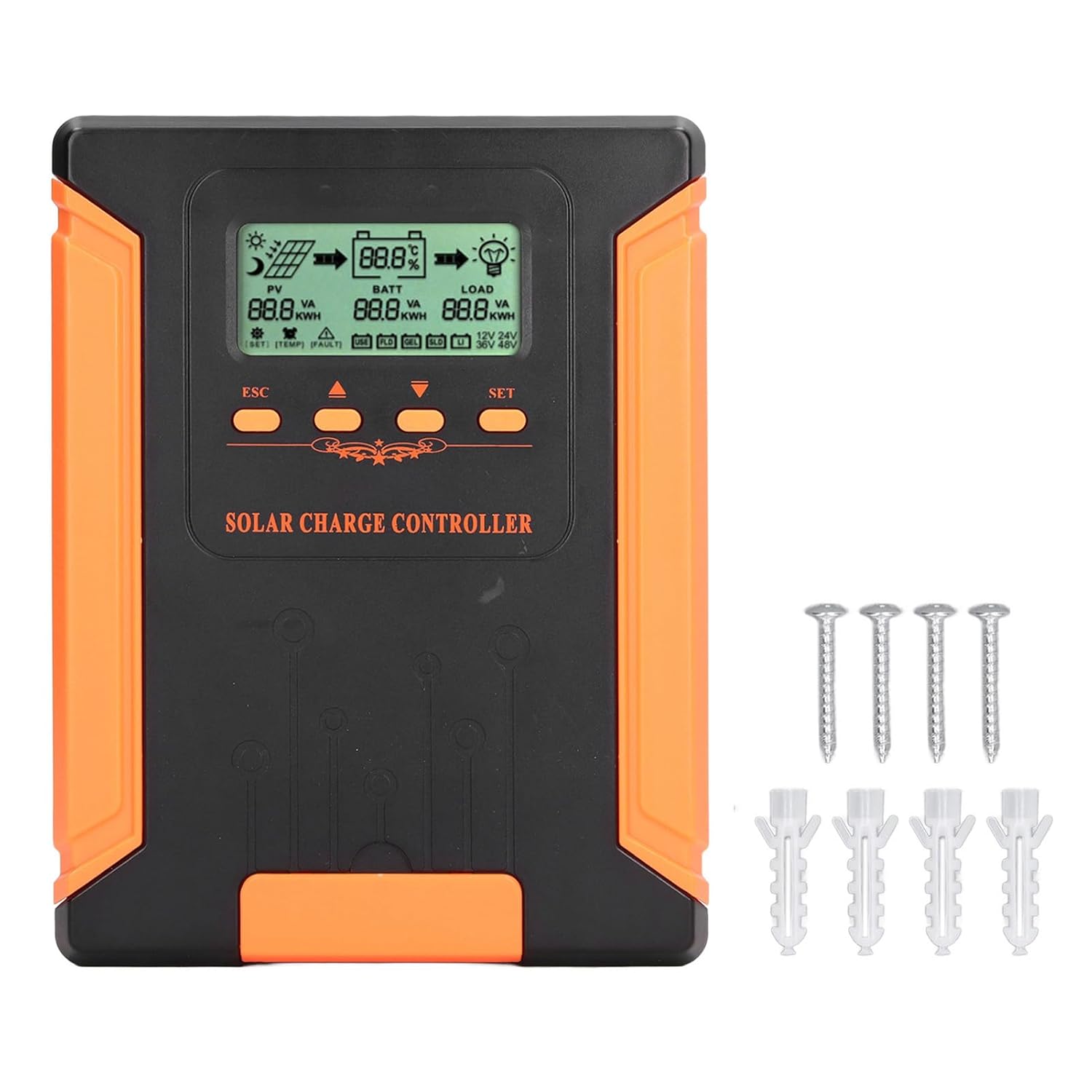
Image 4.1: Package Contents. This image displays the solar charge controller alongside the mounting screws and expansion screws provided in the package.
5. Тохиргоо ба суурилуулалт
Follow these steps for proper installation of your solar charge controller.
5.1 Хянагчийг суурилуулах
- Choose a dry, well-ventilated location, protected from direct sunlight, high temperatures, and moisture.
- Ensure there is sufficient space around the controller for heat dissipation, especially around the cooling fins.
- Mount the controller vertically on a solid surface using the provided screws.
5.2 утас холболт
Refer to the wiring diagrams below for correct connection sequence. Always connect in the following order:
- Батерейг холбоно уу: Connect the battery to the controller's battery terminals. Ensure correct polarity (+ to + and - to -). The controller will automatically detect the battery voltage.
- Нарны хавтанг холбох: Нарны хавтангийн массивыг хянагчийн фотоэлектрик терминалуудтай холбоно уу. Зөв туйлшралыг шалгана уу.
- DC ачааллыг холбох (заавал биш): Тогтмол гүйдлийн ачааллыг хянагчийн ачааллын терминалуудтай холбоно уу. Зөв туйлшралыг шалгана уу.
To disconnect the system, follow the reverse order: disconnect load, then solar panel, then battery.

Image 5.1: Basic System Connection Diagram. This diagram illustrates the connection order: 1. Battery Assembly, 2. Solar Panel Assembly, 3. DC Load. It also shows an AC Load and Inverter connected to the Battery Assembly.

Image 5.2: Detailed System Wiring Diagram. This diagram provides a more comprehensive view of a solar power system, including solar panels, battery, inverter (AC Output/Input), and various AC loads like laptops, lights, air conditioners, televisions, and fans.
6. Ашиглалтын заавар
The controller features an LCD display and control buttons for monitoring and configuration.
6.1 LCD дэлгэц
The LCD screen provides real-time information about your solar system, including:
- PV (Photovoltaic) Status: Оролт ботьtage, current, and power from solar panels.
- BATT (Battery) Status: Батерейны эзлэхүүнtage, charging current, and state of charge.
- LOAD Status: Output current and power to the DC load.
- Системийн ботьtage: Automatically detected battery system voltage (12V/24V/36V/48V).
- Алдааны үзүүлэлтүүд: Displays fault codes or warnings if issues occur.
6.2 хяналтын товчлуур
The controller has three buttons: ESC, Up/Down arrows, and SET.
- ESC товчлуур: Used to exit current menu or cancel an operation.
- Дээш/доош товчлуурууд: Used to navigate through menu options or adjust parameter values.
- SET товчлуур: Used to enter a menu, confirm a selection, or save changes to parameters.

Image 6.1: Control Buttons. This close-up image shows the 'ESC', 'Up arrow', 'Down arrow', and 'SET' buttons on the controller's front panel.
7. Засвар үйлчилгээ
Тогтмол засвар үйлчилгээ нь таны нарны цэнэг хянагчийн оновчтой ажиллагаа, удаан эдэлгээг хангана.
- Цэвэрлэгээ: Periodically clean the controller's exterior with a dry cloth. Ensure the cooling fins are free from dust and debris to maintain proper heat dissipation.
- Холболтууд: Check all wiring connections regularly to ensure they are tight and free from corrosion.
- Шалгалт: Хянагчийг физик гэмтэл, хэт халалт эсвэл ер бусын үнэрийн шинж тэмдэг байгаа эсэхийг шалгана уу.
- Байгаль орчин: Ensure the installation environment remains dry and well-ventilated.

Image 7.1: Cooling Fins. This close-up shows the cooling fins on the top of the controller, which are crucial for heat dissipation and require regular cleaning.
8. Алдаа засах
Хэрэв та хянагчтайгаа холбоотой асуудалтай тулгарвал дараах нийтлэг асуудал болон шийдлүүдийг үзнэ үү.
| Асуудал | Боломжит шалтгаан | Шийдэл |
|---|---|---|
| Controller display is off | No battery connected or battery voltage хэтэрхий бага. | Ensure battery is connected correctly and has sufficient charge (above 9V). |
| No charging current from PV | Solar panels not connected, insufficient sunlight, or PV polarity reversed. | Check PV connections and polarity. Ensure adequate sunlight. Verify PV voltage хүрээ дотор байна. |
| Ачаалах ажиллахгүй байна | Load disconnected, load current too high, or load polarity reversed. | Check load connections and polarity. Ensure load current does not exceed controller's rating. |
| Зай бүрэн цэнэглэгдээгүй байна | Insufficient solar input, undersized solar array, or battery issues. | Increase solar panel capacity or check for shading. Inspect battery health. |
9. Техникийн үзүүлэлтүүд
Below are the technical specifications for the Walfront MPPT Solar Charge Controller 50A.
| Параметр | Тодорхойлолт |
|---|---|
| Системийн ботьtage | 12V / 24V / 36V / 48V Auto |
| Цэнэглэх гүйдлийг үнэлсэн | 50 А |
| No Load Loss | ≤0.4W |
| Solar Maximum Input Voltage | 180V (at 25℃), 150V (at -25℃) |
| Батерейны эзлэхүүнtage Хамрах хүрээ | 9-64 В |
| Power Point-ийн дээд хэмжээtage Хамрах хүрээ | Батерейны эзлэхүүнtage +2V - 150V |
| Хөрвүүлэлтийн үр ашиг | ≤98% |
| MPPT мөрдөх үр ашиг | >99% |
| Температурын нөхөн олговрын коэффициент | -2mv/℃/2V (default value) |
| Ажлын температур | -10 хэмээс 65 хэм хүртэл |
| Хамгаалалтын зэрэг | IP21 |
| Өндөр | ≤3000 Meter / 9842.5ft |

Image 9.1: Model Comparison Table. This table provides a comparison of rated charging current and solar panel maximum input power for CM-50 (50A) and CM-60 (60A) models across different system voltages.
10. Баталгаат хугацаа ба дэмжлэг
For warranty information and technical support, please refer to the documentation provided at the time of purchase or contact your retailer. Keep your purchase receipt as proof of purchase.