
Танилцуулга
This manual provides instructions for the installation, operation, and maintenance of your Generic Case for INOI Note 13S phone, which includes a tempered glass screen protector. Please read this manual carefully before use to ensure proper application and functionality.
Хайрцагт юу байна
- 1 x Phone Case (Hard PC + Soft Silicone)
- 1 х шилэн дэлгэц хамгаалагч
Тохиргоо ба суурилуулалт
1. Installing the Tempered Glass Screen Protector
- Clean the Phone Screen: Use a microfiber cloth to thoroughly clean the INOI Note 13S phone screen, removing all dust, smudges, and fingerprints. Ensure the screen is completely dry.
- Хамгаалалтыг тэгшлэнэ үү: Carefully peel off the protective film from the adhesive side of the tempered glass. Align the protector with the phone's screen, ensuring cutouts for the camera and sensors match.
- Хамгаалагч хэрэглэх: Gently lower the tempered glass onto the screen. It will adhere automatically. If bubbles appear, gently push them towards the edges with a soft cloth or squeegee.

Image: Features of the tempered glass screen protector, including 9H high hardness, perfect adhesion, shatterproof design, case-friendly fit, 99.9% super transparency, and anti-fingerprint properties.

Image: Demonstration of the tempered glass screen protector's scratch-proof capability, showing resistance to sharp objects.
2. Installing the Phone Case
- Утас оруулах: Gently place your INOI Note 13S phone into the soft silicone frame of the case.
- Secure Fit: Ensure all edges of the phone are securely seated within the case. The hard PC backplane will provide additional rigidity.
- Check Cutouts: Verify that all precision cutouts for ports, buttons, and speakers align correctly, allowing full access to all phone features.

Image: Close-up of the phone case highlighting its shockproof design with a soft silicone frame, hard PC backplane, thickened four corners, and a silicone buffer layer for screen and camera protection.
Ашиглалтын заавар
Using the 360° Rotatable Ring Holder
The integrated ring holder provides enhanced grip and serves as a kickstand for hands-free viewing.
- For Grip: Slide your finger through the ring to secure your phone, reducing the risk of drops.
- For Stand Function: Rotate the ring to your desired angle (up to 360°) and prop your phone on a flat surface for comfortable video watching or video calls. The ring can also rotate 180° for different viewөнцөг.
- Нэг гар ажиллагаа: The ring holder assists in reaching more areas of the screen with one hand.
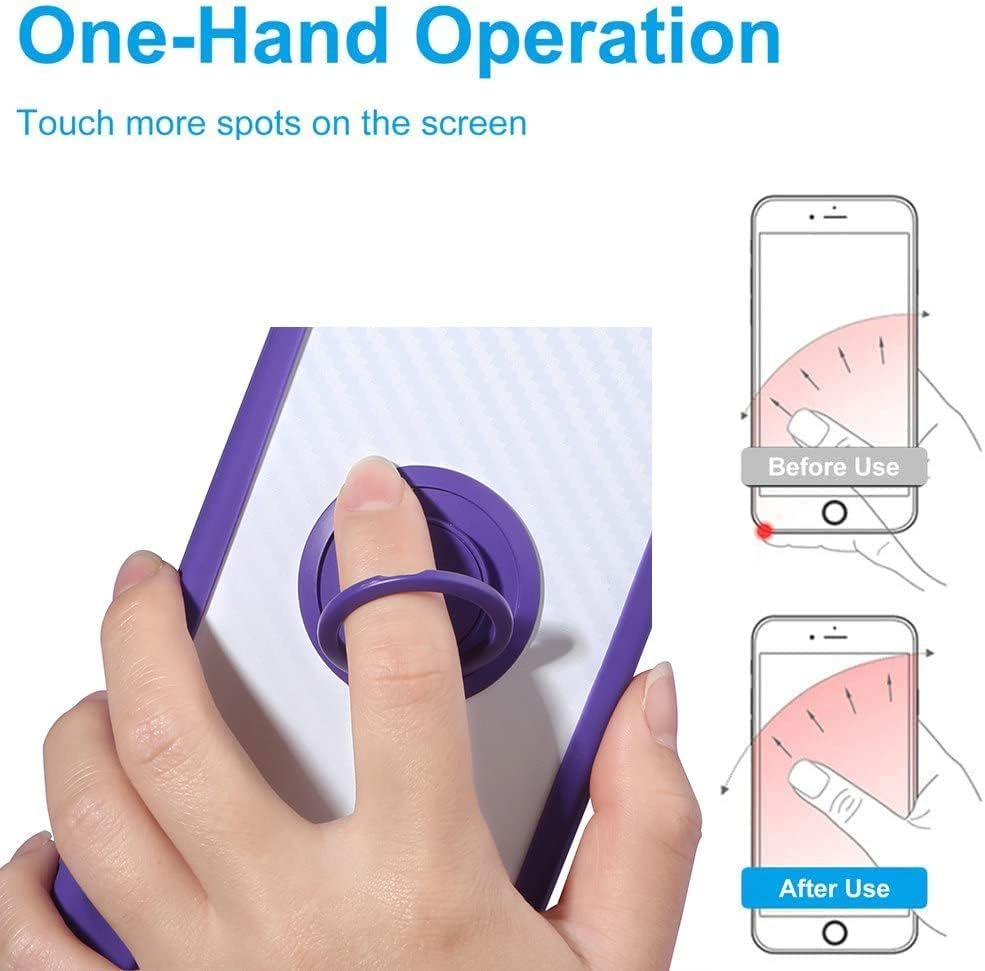
Image: Illustration demonstrating improved one-hand operation and reach on the phone screen with the use of the ring holder.

Зураг: Нарийвчилсан view of the 360-degree rotatable ring holder integrated into the phone case.
Using the Magnetic Car Mount Function
The case features a built-in metal plate compatible with magnetic car mount holders (not included).
- Хавсралт: Simply place the back of the phone case onto a magnetic car mount holder. The case will adhere directly without the need for additional patches.
- Жич: This product does not include a magnetic car mount. Wireless charging may not be supported while the phone is in the case due to the metal plate.

Image: Illustration showing the phone case's compatibility with a magnetic car mount, indicating the 180° and 360° rotation capabilities of the ring holder.
Засвар үйлчилгээ
- Кейс цэвэрлэх: Wipe the phone case with a soft, damp cloth to remove dust and smudges. Avoid harsh chemicals or abrasive cleaners.
- Дэлгэц хамгаалагчийг цэвэрлэх: Use a screen cleaner specifically designed for electronics and a microfiber cloth to clean the tempered glass.
- Онцгой нөхцөл байдлаас зайлсхийх: Do not expose the case or screen protector to extreme temperatures or direct sunlight for prolonged periods.
Алдааг олж засварлах
- Дэлгэц хамгаалагчийн бөмбөлөгүүд: If bubbles persist after installation, gently lift the nearest edge of the protector and reapply, pushing bubbles out as you go. Small bubbles may disappear naturally within 24-48 hours.
- Case Fit Issues: Ensure your phone model is specifically the INOI Note 13S. If the case does not fit correctly, re-check the phone's positioning within the case.
- Magnetic Mount Adhesion: If the case does not adhere strongly to a magnetic car mount, ensure the car mount itself is functioning correctly and is sufficiently strong.
Үзүүлэлтүүд
| Брэнд | Ерөнхий |
| Тохиромжтой утасны загвар | INOI Note 13S |
| Загварын дугаар | GX-230828-49880 |
| Material (Case) | Hard PC (Polycarbonate) + Soft Silicone (TPU) |
| Material (Screen Protector) | Чанартай шил |
| Онцлогууд | 360° Rotatable Ring Holder, Magnetic Car Mount Compatible, Shockproof, Scratch-proof, Anti-fingerprint, Marble Pattern |
| Усны эсэргүүцлийн түвшин | Усанд тэсвэртэй биш |
| Зүйлийн хэмжээ | 0.39 x 0.39 x 0.39 inches (approximate, for case) |
Баталгаат болон дэмжлэг
For warranty information or product support, please refer to the seller's policies on the purchase platform or contact the manufacturer directly. This manual does not provide specific warranty details.


