
1. Танилцуулга
This manual provides essential information for the safe and efficient installation, operation, and maintenance of your ebm-papst K3G250-AI27-05 Axial Cabinet Fan. Please read this manual thoroughly before using the product and retain it for future reference. This fan is designed for ventilation and heat dissipation in various industrial and electronic applications.
2. Аюулгүй байдлын мэдээлэл
Аюулгүй байдлын чухал заавар:
- Суурилуулалт, засвар үйлчилгээ, цэвэрлэгээ хийхээс өмнө цахилгааныг үргэлж салга.
- Цахилгаан цочролоос сэргийлэхийн тулд зөв газардуулга хийх.
- Do not operate the fan with damaged wiring or if the housing is compromised.
- Keep fingers and other objects away from rotating blades.
- Install the fan in a location with adequate ventilation and away from flammable materials.
- This product is intended for professional installation and use. If you are unsure about any aspect of installation or operation, consult a qualified electrician or technician.
- Эрчим хүчний хангамжийн хэмжээг баталгаажуулна ууtage and frequency match the fan's specifications (220-240VAC, 50/60Hz).
3. Багцын агуулга
Verify that all items are present and undamaged upon opening the package. If any components are missing or damaged, contact your supplier immediately.
- 1 x ebm-papst K3G250-AI27-05 Axial Cabinet Fan
- 1 х хэрэглэгчийн гарын авлага (энэ баримт бичиг)
4. Тохиргоо ба суурилуулалт
Proper installation is crucial for the fan's performance and longevity. Follow these steps carefully.
- Суурилуулалт: Securely mount the fan to a stable surface within the cabinet or enclosure using appropriate fasteners. Ensure there is sufficient clearance for airflow on both intake and exhaust sides.
- Цахилгааны холболт:
- Цахилгаан холболт хийхээсээ өмнө цахилгаан тэжээлийг салгасан эсэхээ шалгаарай.
- Connect the fan's power connector (SATA/Molex type) to a compatible power source.
- боть байгаа эсэхийг шалгаарайtage (220-240VAC) and frequency (50/60Hz) of the power supply match the fan's requirements.
- Суларсан контактууд болон болзошгүй аюулаас урьдчилан сэргийлэхийн тулд бүх холболтууд нягт, найдвартай байгаа эсэхийг шалгаарай.
- Агаарын урсгалын чиглэл: Observe the arrows on the fan housing, if present, to ensure correct airflow direction for your application. Typically, axial fans are designed to draw air from one side and expel it from the other.
- Эцсийн шалгалт: Before restoring power, double-check all connections and mounting points. Ensure no wires are obstructing the fan blades.
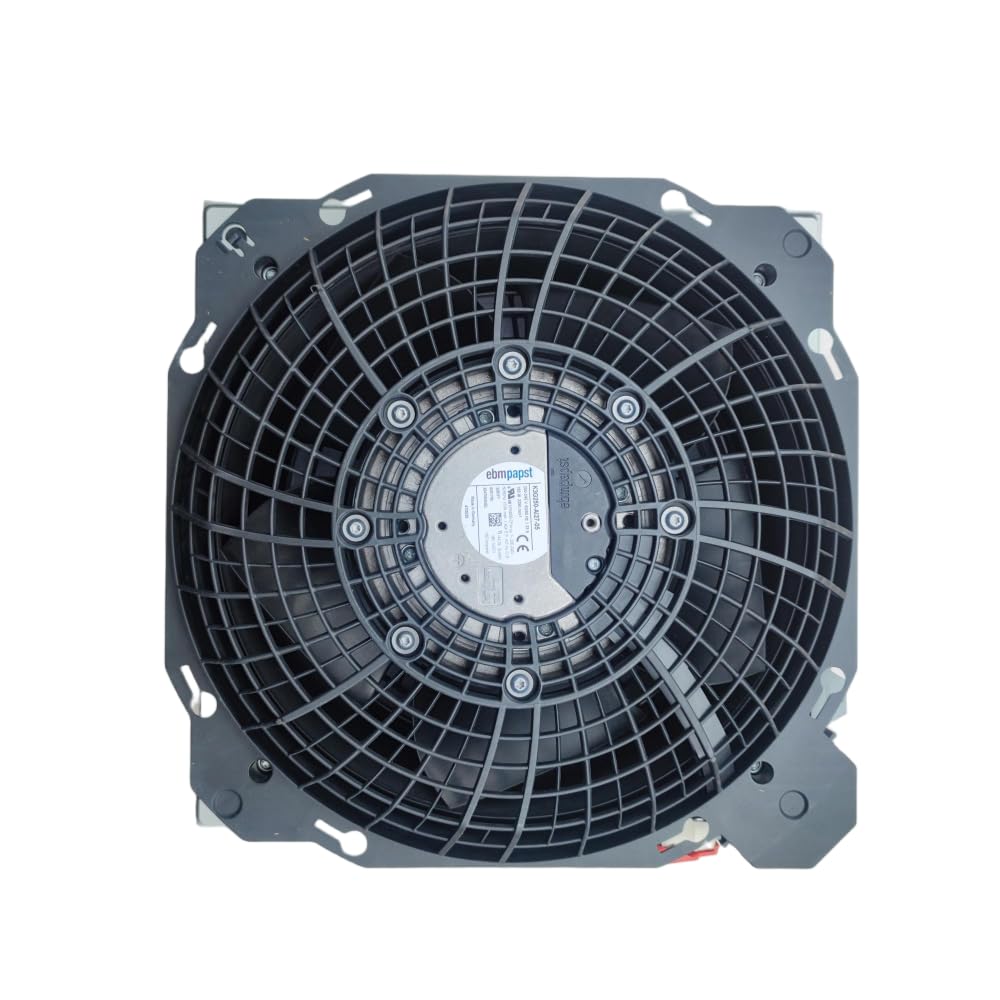
Figure 1: ebm-papst K3G250-AI27-05 Axial Cabinet Fan. This image shows the overall design of the fan, including its housing and blades, ready for installation.
5. Ашиглалтын заавар
Once installed and connected, the fan operates automatically when power is supplied.
- Асаах: Apply power to the circuit the fan is connected to. The fan should start rotating immediately.
- Баталгаажуулалт: Observe the fan to ensure it is rotating smoothly and quietly. Check for proper airflow in the intended direction.
- Унтраах: Disconnect power from the circuit to stop the fan.
The fan is designed for continuous operation within its specified parameters. Avoid frequent power cycling if not necessary for your application.
6. Засвар үйлчилгээ
Тогтмол засвар үйлчилгээ нь оновчтой ажиллагааг хангаж, сэнсний ашиглалтын хугацааг уртасгадаг.
- Цэвэрлэгээ: Periodically inspect the fan blades and housing for dust and debris accumulation. Disconnect power before cleaning. Use a soft brush or compressed air to gently remove dust. Do not use liquids or abrasive cleaners.
- Шалгалт: Regularly check for any signs of wear, such as unusual noises, vibrations, or visible damage to the blades or wiring.
- Тосолгоо: This fan is designed with maintenance-free bearings. No additional lubrication is required.
- Байгаль орчны нөхцөл: Дутуу элэгдэлд орохоос сэргийлж, ашиглалтын орчин нь тогтоосон температур болон чийгшлийн хязгаарт байгаа эсэхийг шалгаарай.
7. Алдаа засах
Хэрэв та фэнтэйгээ холбоотой асуудалтай тулгарвал дараах нийтлэг асуудал, шийдлүүдийг үзнэ үү.
| Асуудал | Боломжит шалтгаан | Шийдэл |
|---|---|---|
| Сэнс эхлэхгүй байна | No power supply; Incorrect wiring; Damaged fan motor | Check power connection and source; Verify wiring according to installation instructions; If motor is damaged, replace the fan. |
| Ер бусын дуу чимээ эсвэл чичиргээ | Loose mounting; Obstruction in fan blades; Worn bearings | Tighten mounting screws; Disconnect power and remove any obstructions; If bearings are worn, replace the fan. |
| Агаарын урсгал багассан | Dust accumulation on blades/grille; Obstruction in airflow path | Disconnect power and clean fan blades and grille; Remove any obstructions from the intake or exhaust. |
| Хэт халалт | Insufficient ventilation; Fan operating outside specified parameters | Ensure adequate space for airflow; Verify operating conditions match specifications. |
Хэрэв эдгээр шийдлүүдийг туршиж үзсэний дараа асуудал хэвээр байвал хэрэглэгчийн дэмжлэгтэй холбоо барина уу.
8. Техникийн үзүүлэлтүүд
| Параметр | Үнэ цэнэ |
|---|---|
| Загвар | K3G250-AI27-05 |
| Брэнд | ebm-papst |
| Төрөл | Axial Cabinet Fan |
| Мотор | M3G055-CF |
| Нэрлэсэн ботьtage | 220-240VAC |
| Давтамж | 50/60 Гц |
| Одоогийн сугалаа | 1.33 А |
| Хүч | 165 Вт |
| Хурд | 3290 эргэлт |
| Тусгаарлалтын ангилал | B |
| Цахилгаан холбогч төрөл | SATA/Molex |
| Хөргөх арга | Агаар |
| Материал | Зэс |
| Дуу чимээний түвшин | 165 децибел (Note: This value seems unusually high for a fan and might be a data entry error. Please refer to official ebm-papst documentation for precise noise levels.) |
| UPC | 761241577118 |
9. Баталгаат хугацаа ба дэмжлэг
For warranty information and technical support, please contact your point of purchase or the official ebm-papst distributor in your region. Keep your purchase receipt as proof of purchase.
For further assistance, you may also refer to the official ebm-papst website for product documentation and contact details.