
1. Оршил ба түүнээс дээшview
The Epson PowerLite 97H is a versatile XGA conference room projector designed for clear and vibrant presentations. Utilizing 3LCD technology, it delivers bright, true-to-life images with excellent color brightness and a wide color gamut. This projector offers a native resolution of 1024x768 (XGA) and a brightness of 2,700 ANSI Lumens, making it suitable for various environments.
Гол онцлогууд нь:
- Гэрэлтүүлэг: 2,700 ANSI люмен
- Шийдвэр: 1024x768 (XGA)
- Харьцаа: 4:3
- Эсрэг заалт: 10,000:1
- Дэлгэцийн технологи: 3LCD for vibrant colors
- Холболт: Multiple options including HDMI, USB, LAN, VGA, S-Video, Composite, and Audio inputs/outputs.
2. Аюулгүй байдлын мэдээлэл
Please read all safety instructions before using the projector to ensure safe operation and to prevent damage to the unit. Keep this manual for future reference.
- Дулааны анхааруулга: Проектор лamp and surrounding areas can become extremely hot during operation and immediately after shutdown. Avoid touching these areas.
- Агааржуулалт: Ensure adequate ventilation around the projector. Do not block ventilation openings, as this can lead to overheating and potential damage.
- Lamp Солих: Always turn off the projector and allow the lamp to cool completely before attempting to replace it. Refer to the lamp replacement instructions in the Maintenance section.
- Эрчим хүчний эх үүсвэр: Use only the specified power supply and cable. Do not overload power outlets.
- Шингэн ба чийг: Do not expose the projector to rain, moisture, or excessive humidity. Do not place objects filled with liquids on or near the projector.
- Цэвэрлэгээ: Цэвэрлэхийн өмнө цахилгааны утсыг салга. Зөөлөн, хуурай даавуу хэрэглээрэй. Шингэн болон аэрозол цэвэрлэгч хэрэглэж болохгүй.
3. Багцын агуулга
Таны багцад бүх зүйл байгаа эсэхийг шалгана уу:
- Epson PowerLite 97H Projector
- Алсын удирдлага
- Цахилгаан кабель
- HDMI кабель
4. Тохиргоо
4.1 Физик байрлал
Place the projector on a stable, flat surface. Ensure there is sufficient space around the projector for proper ventilation. Avoid placing it in direct sunlight or near heat sources. The projector is designed to be portable and can be used for tabletop projection.
4.2 Төхөөрөмжүүдийг холбох
The PowerLite 97H offers a wide range of connectivity options. Refer to the image below for port identification.

Figure 1: Rear panel of the Epson PowerLite 97H Projector showing various input and output ports.
- USB-A: Connect USB storage devices or a document camera.
- USB-B: Connect to a computer for USB display or control.
- LAN (RJ-45): Connect to a network for control and monitoring.
- HDMI 1 & HDMI 2/MHL: Connect to devices with HDMI output (e.g., laptops, Blu-ray players, gaming consoles). HDMI 2 also supports MHL for compatible mobile devices.
- Computer1 (VGA) & Computer2 (VGA): Connect to computers using a VGA cable.
- Audio1 (Mini Jack) & Audio2 (Mini Jack): Connect audio from computers or other devices.
- S-видео: Connect to devices with S-Video output.
- Видео (RCA): Connect to devices with composite video output.
- Audio In (RCA R/L): Connect stereo audio from devices with RCA audio output.
- Мик: Микрофон холбоно уу.
- RS-232C: For serial control of the projector.
- Monitor Out (VGA): Connect an external monitor to display the projector's input signal.
- Аудио гаралт (Мини залгуур): Connect external speakers or an audio system.
4.3 асаалттай байна
- Цахилгааны кабелийг проекторын AC оролтод, дараа нь цахилгаан залгуурт холбоно уу.
- дээр дарна уу Хүч button on the projector's control panel or the remote control. The power light will illuminate, and the projector will begin its startup sequence.
5. Ажиллаж байгаа
5.1 Үндсэн удирдлага
The projector can be operated using the control panel on the top of the unit or the included remote control. The top panel provides essential functions.

Figure 2: Top control panel of the Epson PowerLite 97H Projector.
- Цахилгаан товч: Проекторыг асаах эсвэл унтраана.
- Эх сурвалж хайх: Боломжтой оролтын эх үүсвэрүүдээр дамжин цикл хийнэ.
- Цэс: Дэлгэц дээрх дэлгэцийн (OSD) цэсийг нээнэ.
- H/V (Horizontal/Vertical Keystone): Adjusts image shape to correct trapezoidal distortion.
- Esc: Одоогийн цэс эсвэл функцээс гарна.
- Оруулна уу: Цэснээс сонголтыг баталгаажуулна.
- Сумтай товчлуурууд: Цэсийн сонголтууд руу шилжиж, тохиргоог тохируулна уу.
- Дууны товчлуурууд: Аудио гаралтын түвшинг тохируулна уу.
- Тусламж: Provides on-screen assistance.
- Төлөвийн гэрэл: Indicates projector status (e.g., power on, standby, error).
- Lamp Temp Light: Indicates lamp temperature status.
5.2 Зургийг тохируулах
To achieve a clear and properly sized image:
- Фокус бөгж: Rotate the focus ring located near the lens to sharpen the image.
- Томруулах хөшүүрэг: Use the zoom lever (if present, typically near the lens) to adjust the image size without moving the projector.
- Түлхүүр чулууны залруулга: If the image appears trapezoidal, use the H/V keystone buttons on the control panel or remote to correct the shape.

Figure 3: Front/side view showing the projector lens and ventilation.
5.3 Оролтын сонголт
дээр дарна уу Эх сурвалж хайх button on the control panel or remote control to cycle through the connected input sources (e.g., HDMI 1, Computer1, USB-A). The projector will automatically detect and display the active input.
6. Засвар үйлчилгээ
Тогтмол засвар үйлчилгээ нь таны проекторын ашиглалтын хугацааг уртасгаж, оновчтой гүйцэтгэлийг баталгаажуулдаг.
6.1 лamp Солих
Проектор лamp хязгаарлагдмал хугацаатай. Хэзээ лamp амьдралынхаа төгсгөлд хүрч, Лamp Temp indicator may light up, or the image brightness may decrease significantly. Always use genuine Epson replacement lamps.

Зураг 4: Хажуу тал view of the projector, showing a caution label regarding hot surfaces.
WARNING: Turn off the projector and wait until the lamp has cooled down completely before attempting replacement. Failure to do so can result in severe burns or damage to the projector. Refer to the specific lamp replacement instructions provided in the full Epson service manual for your model.
6.2 Агаар шүүгч цэвэрлэх/солих
The air filter prevents dust from entering the projector and affecting performance. Clean the air filter regularly (e.g., every 100 hours of use) or when prompted by the projector. If the filter is damaged or excessively dirty, replace it.
- Turn off the projector and disconnect the power cable.
- Locate the air filter cover (refer to your full service manual for exact location).
- Remove the cover and carefully extract the filter.
- Use a small vacuum cleaner or soft brush to remove dust from the filter. If replacing, insert a new filter.
- Шүүлтүүрийн тагийг дахин найдвартай бэхлэнэ үү.
6.3 Ерөнхий арчилгаа
- Линз цэвэрлэх: Gently wipe the lens with a soft, non-abrasive lens cleaning cloth. Do not use harsh chemicals.
- Гадна цэвэрлэгээ: Проекторын гадна талыг зөөлөн, хуурай даавуугаар арчина. Зөрүүд шороонд бага зэрэг damp даавуу, зөөлөн угаалгын нунтаг, дараа нь арчина.
- Хадгалах: Удаан хугацаагаар ашиглаагүй үед проекторыг сэрүүн, хуурай газар, хамгийн тохиромжтой нь анхны савлагаанд нь эсвэл хамгаалалтын гэрт нь хадгална уу.
7. Алдаа засах
If you encounter issues with your projector, try the following solutions:
- Зураг байхгүй:
- Ensure the projector is powered on and the power indicator is solid.
- Check all cable connections (HDMI, VGA, etc.) are secure at both the projector and the source device.
- дээр дарна уу Эх сурвалж хайх button to cycle through inputs.
- Verify the source device is powered on and outputting a signal.
- Adjust the focus and zoom.
- Дуугүй:
- Increase the projector's volume using the volume buttons.
- Check audio cable connections (if using separate audio cables).
- Ensure the audio output on your source device is enabled and turned up.
- Алсын удирдлага ажиллахгүй байна:
- Ensure there are no obstructions between the remote and the projector's remote sensor.
- Алсын удирдлага дахь батерейг солино уу.
- Хэт халалтын анхааруулга:
- Ensure all ventilation openings are clear and not blocked.
- Clean the air filter as described in the Maintenance section.
- Проекторыг агааржуулалт сайтай газар ажиллуулна уу.
8. Техникийн үзүүлэлтүүд
| Онцлог | Тодорхойлолт |
|---|---|
| Үйлдвэрлэгч | Epson |
| Загвар | PowerLite 97H |
| Дэлгэцийн төрөл | 3LCD |
| Төрөлхийн тогтоол | 1024 x 768 (XGA) |
| Гэрэлтүүлэг | 2700 ANSI люмен |
| Ялгаатай харьцаа | 10000:1 |
| Харьцаа | 4:3 |
| Холболтын технологи | HDMI, USB, LAN, VGA, S-Video, Composite |
| Аудио оролт | Mini Jack x 2, RCA (L/R), Mic |
| Аудио гаралт | Мини Жак |
| Хяналтын порт | RS-232C |
| Зөвлөмж болгож буй хэрэглээ | Бизнес |
| Онцлог шинж чанар | Зөөврийн |
| Зүйлийн жин | 6 фунт |
9. Баталгаат хугацааны мэдээлэл
For specific warranty details regarding your Epson PowerLite 97H projector, please refer to the warranty card included with your product or contact the seller/manufacturer directly. Warranty terms typically cover manufacturing defects for a specified period from the date of purchase.
10. Дэмжлэг
For technical support, service, or additional assistance with your Epson PowerLite 97H projector, please use the contact information below:
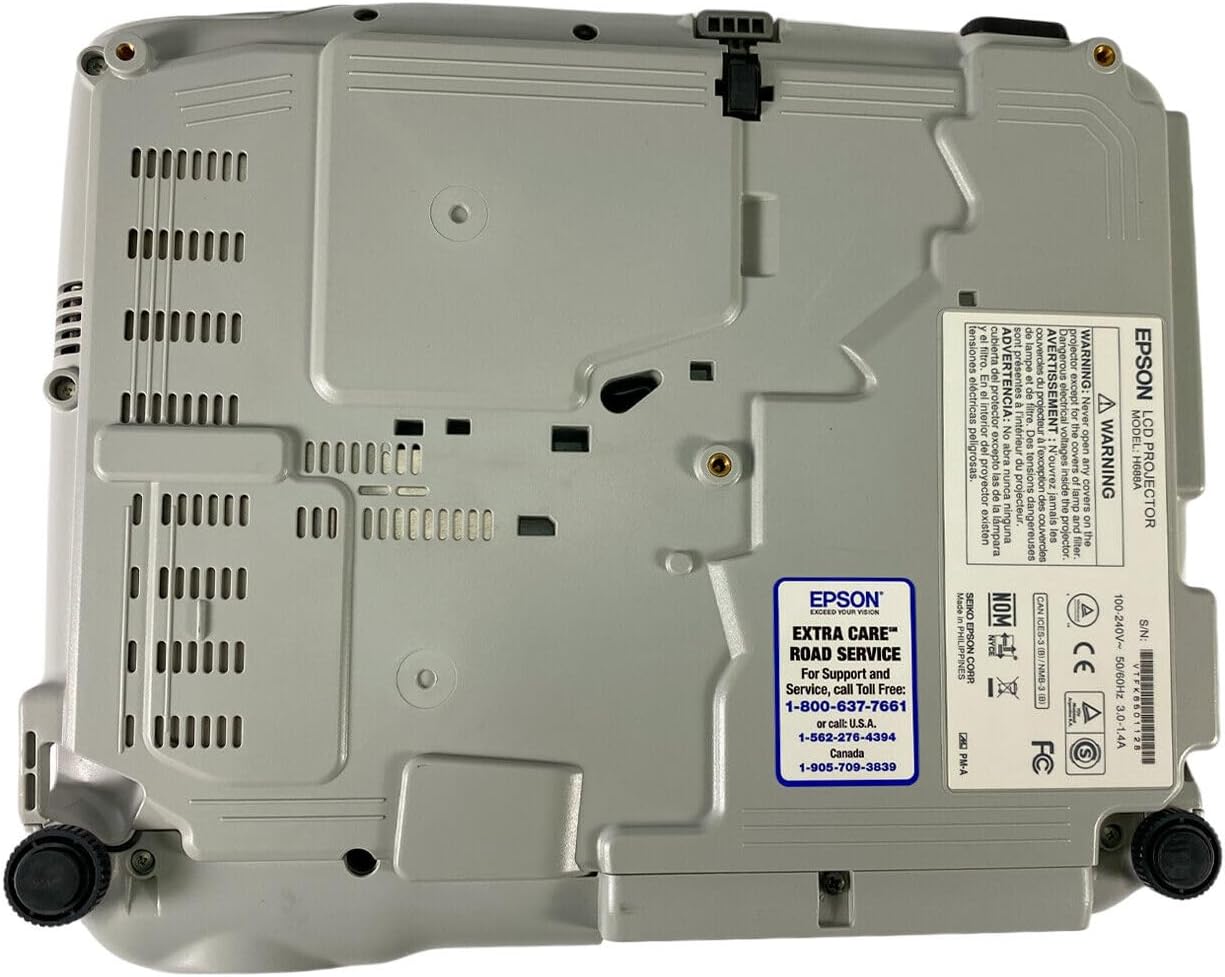
Figure 5: Bottom panel of the projector showing support contact details.
Epson Extra Care Road Service
- For support and service, call:
- АНУ: 1-800-637-7661
- АНУ: 1-866-276-4394
- Канад: 1-905-709-3839