
Topyond F270
Topyond F270 WiFi Endoscope Camera User Manual
Загвар: F270
1. Танилцуулга
This manual provides detailed instructions for the safe and effective use of your Topyond F270 WiFi Endoscope Camera. Please read this manual thoroughly before operating the device and retain it for future reference.
The Topyond F270 is a portable WiFi endoscope camera designed for industrial inspection. It features a 1080P resolution camera with 8 adjustable LED lights, an 8mm lens, and IP67 waterproof rating for the lens, making it suitable for various inspection tasks, including those in damp эсвэл живсэн орчин.
2. Аюулгүй байдлын мэдээлэл
Төхөөрөмжийг гэмтээх, гэмтээхээс сэргийлэхийн тулд дараах аюулгүй байдлын арга хэмжээг дагаж мөрдөнө үү.
- Do not attempt to disassemble or modify the device. Unauthorized modifications can lead to malfunction and void the warranty.
- Төхөөрөмжийг хэт өндөр температур, нарны шууд тусгал болон идэмхий шингэнээс хол байлга.
- Ensure the charging port is dry before connecting the USB charging cable.
- The lens is IP67 waterproof; however, the main control unit is not. Do not submerge the control unit in water.
- Use only the provided charging cable or a certified 5V/1A charger.
- This device is intended for inspection purposes only and should not be used for medical or personal examination.
3. Багцын агуулга
Бүх зүйл багцад байгаа эсэхийг шалгана уу:
- WiFi Endoscope Camera (10-meter cable)
- USB цэнэглэгч кабель
- Соронзон хавсралт
- Толин тусгалын хавсралт
- Дэгээ хавсралт
- Replacement Buckles (2x)

Зураг 3.1: Included accessories with the Topyond F270 WiFi Endoscope Camera.
4. Бүтээгдэхүүн дууссанview
Familiarize yourself with the components of your endoscope camera.

Зураг 4.1: Topyond F270 WiFi Endoscope Camera connected to a smartphone.

Зураг 4.2: Control unit with labeled buttons and charging interface.
- 1. Adjust the light button: Controls the brightness of the 8 LED lights on the camera.
- 2. Turn on/off button: Төхөөрөмжийг асаах эсвэл унтраах.
- 3. Taking pictures button: Хөдөлгөөнгүй зураг авдаг.
- 4. Цэнэглэх интерфейс: Дотоод батерейг цэнэглэх зориулалттай микро USB порт.
- 5. Signal indicator: Displays WiFi connection status and battery level.
5. Тохиргоо
5.1 Төхөөрөмжийг цэнэглэх
Before first use, fully charge the endoscope camera. Connect the provided USB charging cable to the charging interface (4) on the control unit and to a 5V/1A USB power adapter (not included). The signal indicator (5) will show charging status.
The internal 1800mAh lithium battery provides approximately 4 hours of working time on a full charge.
5.2 Програмыг татаж авах, суулгах
руу view the camera feed and control the device, you need to download the companion application on your smartphone or tablet.
- Scan the QR code provided in the product packaging or search for the recommended app (e.g., "WiFi View" or similar, specific app name not provided in product data) in your device's app store (Google Play Store for Android, Apple App Store for iOS).
- Програмыг татаж аваад суулгана уу.
5.3 WiFi-ээр холбогдож байна
Follow these steps to establish a WiFi connection between the endoscope and your smart device:
- Press and hold the "Turn on/off" button (2) on the control unit to power on the endoscope. The signal indicator (5) will illuminate.
- Ухаалаг утас эсвэл таблет дээрээ WiFi тохиргоо руугаа очно уу.
- Locate and connect to the WiFi network named "YPC_XXXXXX" or similar (the exact name will be on the device or in the app instructions). No password is typically required for this direct connection.
- Once connected, open the installed endoscope application. The camera feed should now be visible on your device's screen.

Зураг 5.1: Wireless connection setup for the endoscope camera.
6. Ашиглалтын заавар
6.1 Асаах/унтраах
Press and hold the "Turn on/off" button (2) for a few seconds to power the device on or off.
6.2 LED гэрлийг тохируулах
Press the "Adjust the light button" (1) repeatedly to cycle through different brightness levels for the 8 LED lights on the camera head. This helps illuminate dark inspection areas.
6.3 Зураг болон видео авах
байхад viewing the live feed in the app:
- To take a photo, press the "Taking pictures" button (3) on the control unit or use the corresponding button within the app.
- To record video, use the video recording function within the app.
Captured images and videos will be saved directly to your smartphone or tablet's gallery.
6.4 Хавсралтуудыг ашиглах
The endoscope comes with several attachments for specialized tasks:
- Соронзон: Useful for retrieving small metallic objects from hard-to-reach places.
- Толин тусгал: Хажуу талыг нь хангадаг view for inspecting walls of pipes or other confined spaces.
- Дэгээ: Can be used to retrieve small non-metallic items.
To attach, carefully slide the desired accessory onto the camera head until it is securely in place. Ensure the accessory does not obstruct the camera lens or LED lights.
6.5 Өргөдөлamples
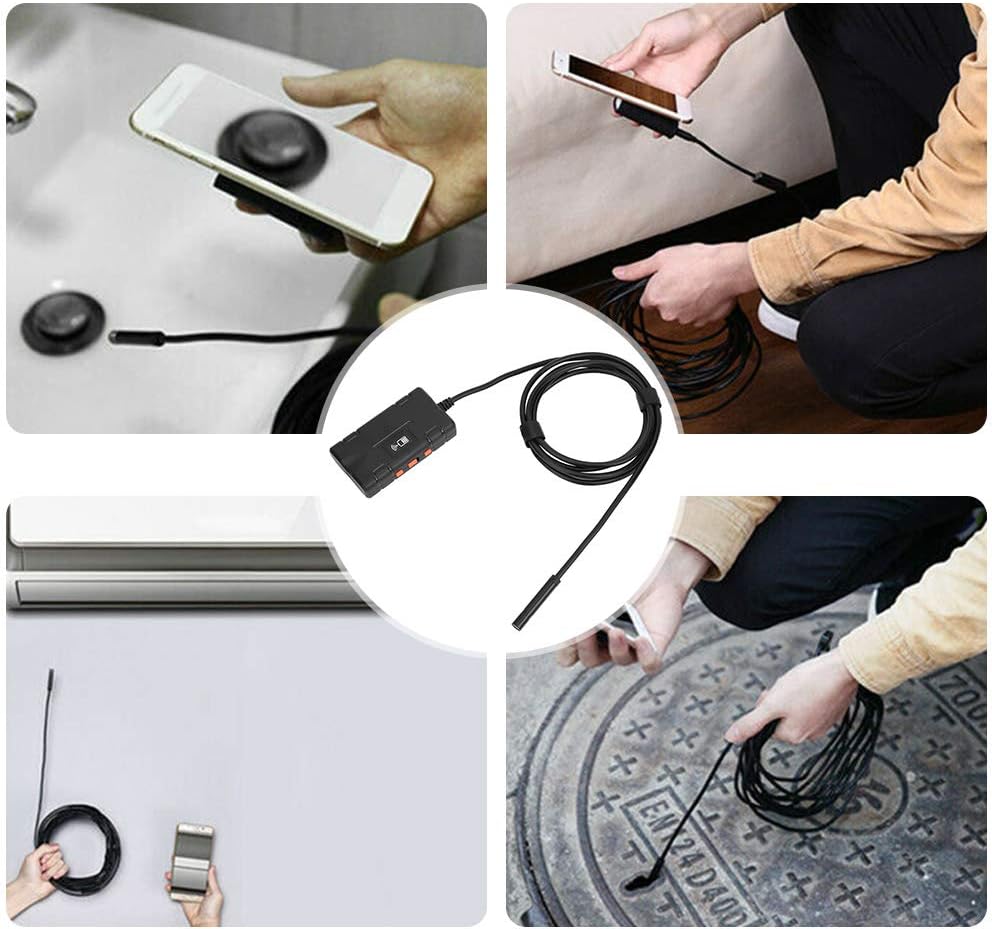
Зураг 6.1: Various uses for the Topyond F270 endoscope camera.

Зураг 6.2: Examples of endoscope use in household inspections.
7. Засвар үйлчилгээ
- Линз цэвэрлэх: After use, especially in dirty or wet environments, gently wipe the camera lens with a soft, dry cloth. For stubborn dirt, a slightly damp даавуу хэрэглэж болно, дараа нь хатаана. Зүлгүүрийн цэвэрлэгч эсвэл уусгагч хэрэглэж болохгүй.
- Хадгалах: Store the endoscope camera in a cool, dry place, away from direct sunlight and extreme temperatures. Coil the cable neatly to prevent kinks or damage.
- Батерейны арчилгаа: Батерейны ашиглалтын хугацааг уртасгахын тулд батерейг байнга бүрэн цэнэггүй болгохоос зайлсхий. Хэрэв удаан хугацаагаар хадгалж байгаа бол хэдэн сар тутамд 50% хүртэл цэнэглээрэй.
8. Алдаа засах
| Асуудал | Боломжит шалтгаан | Шийдэл |
|---|---|---|
| Дэлгэц дээр зураг байхгүй / Апп холбогдоогүй байна |
|
|
| Image is dark or unclear |
|
|
| Төхөөрөмжийг цэнэглэхгүй байна |
|
|
9. Техникийн үзүүлэлтүүд
| Загвар | F270 |
| Линзний диаметр | 8 мм |
| Камерын нягтрал | 1280 x 1080 (2.0 МП) |
| Камерын гэрлийн эх үүсвэр | 8 Тохируулах боломжтой LED гэрэл |
| Waterproof Rating (Lens) | IP67 |
| Фокусын урт | 5см ~ ∞ |
| Viewing өнцөг | 70 градус |
| Батерей | 1800 мАч лити батерей |
| Ажлын цаг | Ойролцоогоор 4 цаг |
| Эрчим хүчний оролт | DC 5V 500 mAh / 1A |
| Ашиглалтын температур | 0-45 ℃ (32-113 ℉) |
| Фото зургийн формат | MJPEG |
| Видео формат | MP4 |
| Кабелийн урт | 10 метр (32.8 фут) |
| Зүйлийн жин | 0.23 килограмм (8.1 унц) |
10. Баталгаат хугацаа ба дэмжлэг
Topyond products are designed for reliability and performance. For warranty information and technical support, please refer to the contact details provided with your purchase or visit the official Topyond webсайт. Худалдан авалтын баримтаа худалдан авалтын баталгаа болгон хадгалаарай.
Холбогдох баримт бичиг - F270
 |
NIDAGE WiFi Endoscope Camera User Manual: Setup, Operation, and Troubleshooting Comprehensive user manual for the NIDAGE WiFi Endoscope Camera (Model AW655). Learn how to connect, operate, and troubleshoot your endoscope for various inspection tasks. Includes safety guidelines and FCC compliance information. |
 |
Teslong NTS300 хяналтын камерын хэрэглэгчийн гарын авлага ба гарын авлага Teslong NTS300 хяналтын камерын дэлгэрэнгүй хэрэглэгчийн гарын авлага, онцлог шинж чанар, техникийн үзүүлэлт, ашиглалтын заавар, тохиргоо болон хэрэглэгчийн дэмжлэгийг дэлгэрэнгүй харуулсан. |
 |
Kinpthy ALS100 утасгүй дурангийн хэрэглэгчийн гарын авлага: Хос линзтэй 2560P HD WiFi бороскоп Kinpthy ALS100 утасгүй дурангийн хэрэглэгчийн дэлгэрэнгүй гарын авлага. Түүний 2560P HD хос линзтэй WiFi бороскоп, IP67 ус нэвтэрдэггүй дизайн, 9 LED гэрэл, Android болон iOS ухаалаг гар утаснуудтай нийцтэй байдлын талаар олж мэдээрэй. Нарийвчилсан тохиргоо, ашиглалт, алдааг олж засварлах мэдээллийг агуулсан. |
 |
DEPSTECH DS580 үйлдвэрлэлийн дурангийн хэрэглэгчийн гарын авлага User manual for the DEPSTECH DS580 industrial endoscope. Learn about product features, operation, safety, specifications, and troubleshooting for this high-performance inspection camera. |
 |
ENWOR T31 Industrial Endoscope User Manual - HD 1080P Inspection Camera Comprehensive user manual for the ENWOR T31 Industrial Endoscope (QWE-741), featuring a 4.3-inch HD 1080P IPS screen, autofocus camera, and replaceable cables for detailed inspections. Includes specifications, safety guidelines, and troubleshooting. |
 |
Inskam128 дижитал үзлэгийн дурангийн хэрэглэгчийн гарын авлага Comprehensive user manual for the Inskam128 digital inspection endoscope, detailing features, operation, installation, troubleshooting, and technical specifications. Features a 3.0-inch HD screen, 5.5mm waterproof camera, and 6 LED lights. |
Ask a question about this manual
Ask about setup, troubleshooting, compatibility, parts, safety, or missing instructions. Manuals+ will review the question and use this page’s manual context to help answer it.