
TEYES CC3 2K
TEYES CC3 2K машины радио мультимедиа видео тоглуулагч навигацийн стерео GPS-ийн үндсэн нэгжийн хэрэглэгчийн гарын авлага
Model: CC3 2K
1. Танилцуулга
This manual provides comprehensive instructions for the installation, operation, and maintenance of your TEYES CC3 2K Car Radio Multimedia Video Player Navigation Stereo GPS Headunit. Please read this manual thoroughly before using the product to ensure proper functionality and safety.

Зураг: Урд view of the TEYES CC3 2K Headunit displaying its user interface.
2. Аюулгүй байдлын мэдээлэл
Төхөөрөмжийг гэмтээх, гэмтээхээс сэргийлэхийн тулд дараах аюулгүй байдлын урьдчилан сэргийлэх арга хэмжээг үргэлж дагаж мөрдөөрэй.
- Төхөөрөмжийг задлах эсвэл өөрчлөх гэж бүү оролдоорой. Энэ нь гэмтэл учруулж, баталгааг хүчингүй болгож болзошгүй.
- Ensure all wiring connections are secure and correctly insulated to prevent short circuits.
- Avoid operating the device in extreme temperatures or high humidity.
- Төхөөрөмжийн агааржуулалтын нүхийг хааж болохгүй.
- Хэрэв та ямар нэгэн алхам хийхдээ эргэлзэж байвал суулгахын тулд мэргэжлийн хүнтэй зөвлөлдөнө үү.
3. Багцын агуулга
Доор жагсаасан бүх зүйл багцад байгаа эсэхийг шалгана уу.
- 1x Head unit (TEYES CC3 2K)
- 1х цахилгаан кабель
- 1x USB кабель
- 1x GPS антен
- 1x AUX кабель
- 1x 4G WiFi antenna
- 1x E-book (digital manual)
- 1x Frame (for BMW X5 E39 E53 1999-2006)
- 1x AHD 1080p rear camera
- 1х Цэвэрлэх даавуу
- 1x Wiring diagram

Image: Visual representation of the TEYES CC3 2K Headunit and its included accessories.
4. Суулгах заавар
This section outlines the general steps for installing the TEYES CC3 2K head unit in compatible BMW X5 E39/E53 models (1999-2006). Professional installation is recommended.
4.1 Суурилуулалтын өмнөх шалгалт
- Машинаа асаахаасаа өмнө асаалттай байгаа эсэхийг шалгаарай, мөн батерейг нь салгасан эсэхийг шалгаарай.
- Verify compatibility with your specific BMW X5 model and year.
- Familiarize yourself with the vehicle's existing dashboard layout and wiring.

Image: Comparison of a BMW X5 dashboard before and after installation of the TEYES CC3 2K head unit.
4.2 Removal of Existing Unit
- Carefully remove the trim pieces surrounding the factory radio.
- Unscrew and pull out the existing head unit.
- Disconnect all wiring harnesses and antenna cables from the old unit.
4.3 Толгойн нэгжийг суурилуулах
- Attach the provided frame to the TEYES CC3 2K head unit.
- Connect the power cable, USB cables, GPS antenna, 4G WiFi antenna, and AUX cable to the corresponding ports on the new head unit. Refer to the included wiring diagram for detailed connections.
- Route the GPS and 4G WiFi antennas to an optimal location for signal reception, typically on the dashboard or under the windshield.
- If installing the rear camera, route its cable from the rear of the vehicle to the head unit and connect it to the designated input.
- Carefully slide the TEYES CC3 2K head unit with the frame into the dashboard opening.
- Secure the unit using the appropriate screws.
- Reattach the dashboard trim pieces.

Image: The OEM panel designed for integrating the TEYES CC3 2K head unit into the vehicle's dashboard.
4.4 Суулгасны дараах
- Тээврийн хэрэгслийн батарейг дахин холбоно уу.
- Turn on the ignition and power on the head unit.
- Perform initial setup, including language, time, and network settings.
- Test all functions: radio, navigation, Bluetooth, USB, and rear camera.
5. Ашиглалтын заавар
The TEYES CC3 2K operates on an Android system, offering a user-friendly interface. Navigate using the touchscreen and physical buttons (if applicable).
5.1 Үндсэн үйл ажиллагаа
- Асаах/унтраах: Цахилгаан товчийг удаан дар.
- Дууны хяналт: Adjust using the on-screen controls or steering wheel buttons.
- Үндсэн дэлгэц: Tap the home icon to return to the main interface.
- Апп шүүгээ: Swipe up or tap the app icon to access all installed applications.

Image: Illustration of the head unit's compatibility with vehicle steering wheel controls for convenient operation.
5.2 Навигац
- Access the pre-installed navigation application from the home screen or app drawer.
- Enter your destination using the on-screen keyboard or voice command.
- The system supports various map types, including North America.
5.3 Мультимедиа тоглуулах
- Радио: Select the "Radio" application to tune into FM/AM stations. Supports RDS.
- USB тоглуулах: Connect USB devices to the available USB ports for audio and video playback. The unit features 3 USB outputs for data transfer.
- Bluetooth Аудио: Pair your smartphone via Bluetooth to stream music.
- Видео тоглуулах: Supports various video formats.

Image: Screenshot of the premium local radio interface on the TEYES CC3 2K head unit.
5.4 Холболт
- Wi-Fi/Hotspot: Connect to a Wi-Fi network or use your phone's hotspot for internet access.
- 4G Internet: The unit supports 4G internet connectivity.
- Bluetooth: For hands-free calling and audio streaming, featuring an upgraded QCC3031QFN Qualcomm module.
- Утасгүй CarPlay ба Android Auto: Built-in support for seamless smartphone integration.

Image: Close-up of the three USB output ports provided for data transfer and device connectivity.
5.5 Нарийвчилсан онцлог
- Дэлгэц хуваах горим: Utilize the "Freestyle Combination Split Screen Mode" to run two applications simultaneously.
- DSP Audio Processing: Features 2*DSP ADAU1701 + ROHM32107 for enhanced audio quality, including a 27-segment EQ, sound filtering, and optical/coaxial digital audio output.
- Арын View Камер: Бодит цагийн viewing of the vehicle's rear view and support for video recording with the included AHD 1080p rear camera.
- TEYES Vision & TEYES Yahu: Explore creative 3D software applications.

Image: The head unit displaying two applications simultaneously in split-screen mode.

Image: User interface for the DSP audio processing, highlighting the dual DSP chips.

Image: Display showing real-time rear view camera feed with video recording functionality.
6. Засвар үйлчилгээ
Proper maintenance ensures the longevity and optimal performance of your TEYES CC3 2K head unit.
- Цэвэрлэгээ: Use the provided cleaning cloth or a soft, dry cloth to wipe the screen and unit exterior. Avoid abrasive cleaners or solvents.
- Програм хангамжийн шинэчлэлтүүд: Periodically check for and install software updates to ensure the latest features and bug fixes.
- Температур: Avoid exposing the unit to direct sunlight for prolonged periods or extreme temperatures.
7. Алдаа засах
Нийтлэг асуудлууд болон тэдгээрийн шийдлүүдийг энэ хэсгээс харна уу. Хэрэв асуудал хэвээр байвал хэрэглэгчийн тусламжтай холбогдоно уу.
| Асуудал | Боломжит шалтгаан | Шийдэл |
|---|---|---|
| Төхөөрөмж асахгүй байна. | Loose power connection, blown fuse, vehicle battery disconnected. | Check power cable connections. Inspect vehicle fuses. Ensure battery is connected. |
| Дууны гаралт байхгүй. | Volume too low, audio cables disconnected, incorrect audio source selected. | Increase volume. Verify speaker wire connections. Select correct audio source (e.g., Radio, USB, Bluetooth). |
| GPS signal weak or lost. | GPS antenna improperly placed or disconnected. | Ensure GPS antenna is securely connected and placed in an unobstructed location. |
| Bluetooth холболтын асуудал. | Device not paired, Bluetooth off on phone/unit, interference. | Хоёр төхөөрөмж дээр Bluetooth асаалттай байгаа эсэхийг шалгана уу. Төхөөрөмжийг дахин холбоно уу. Төхөөрөмж рүү ойртоорой. |

Image: An icon representing the Frequently Asked Questions (FAQ) section, indicating support resources.
8. Техникийн үзүүлэлтүүд
| Онцлог | Дэлгэрэнгүй |
|---|---|
| Загварын дугаар | CC3 2K |
| Дэлгэцийн хэмжээ | 9.5 инч |
| Дэлгэцийн технологи | 2K In-cell Display, Gamut Coverage 157% |
| Үйлдлийн систем | Android 10 |
| Процессор | 8 cores 2.0GHz |
| RAM | 6 ГБ |
| ROM | 128 ГБ |
| Холболт | Bluetooth (QCC3031QFN Qualcomm), USB, Wi-Fi, Hotspot, 4G Internet |
| Аудио гаралтын горим | Стерео |
| DSP | 2*DSP ADAU1701 + ROHM32107 |
| Аудио гаралт | Optical and coaxial digital audio output |
| Онцлог шинж чанарууд | Touchscreen, Built-in wireless CARPLAY and ANDROID AUTO, RDS support, TEYES Vision & TEYES Yahu software, Real-time rear view with recording. |
| Included Rear Camera | AHD 1080p |
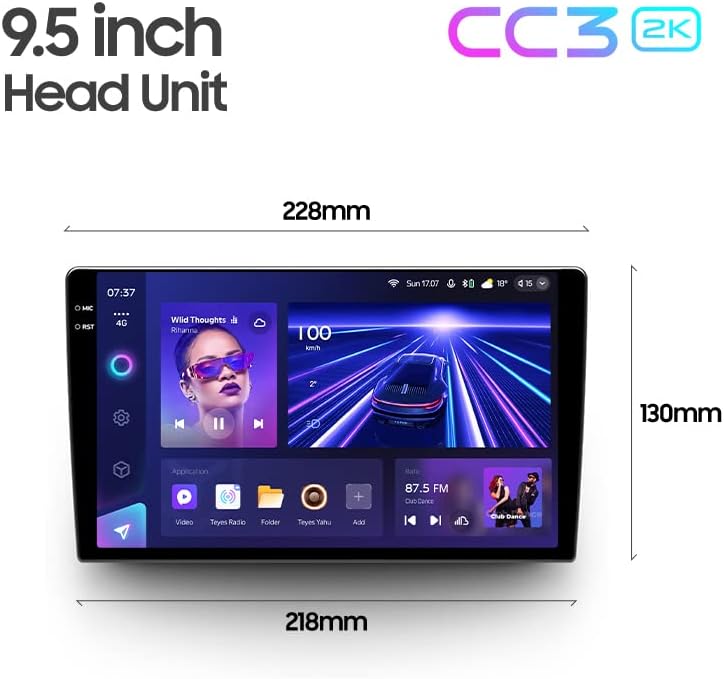
Image: Diagram showing the dimensions of the TEYES CC3 2K Headunit.
9. Баталгаат хугацаа ба дэмжлэг
The TEYES CC3 2K Headunit comes with a 1 жилийн баталгаат хугацаа худалдан авсан өдрөөс.
For technical support, warranty claims, or further assistance, please contact TEYES customer service through their official webбүтээгдэхүүнийг худалдаж авсан сайт эсвэл жижиглэнгийн худалдаачин. Баталгаат хугацааг баталгаажуулахын тулд худалдан авалтын баримтаа хадгална уу.
Manufacturer: Shenzhen TEYES High tech Co., Ltd.
Ask a question about this manual
Ask about setup, troubleshooting, compatibility, parts, safety, or missing instructions. Manuals+ will review the question and use this page’s manual context to help answer it.