
Танилцуулга
This user manual provides detailed instructions for setting up, operating, and maintaining your RGBlink ASKnano 4K-1V2 Wireless HDMI Transmitter and Receiver Kit. This plug-and-play system allows for seamless, high-definition wireless transmission of 4K video and audio from a single source to up to two displays simultaneously, ideal for various applications including home entertainment, presentations, and live broadcasts.
Багцын агуулга
Таны багцад бүх зүйл байгаа эсэхийг шалгана уу:
- 1 x ASK nano 4K TX (Transmitter)
- 2 x ASK nano 4K RX (Receivers)
- 3 x USB AC цахилгаан кабель
- 3 x HDMI эрэгтэйгээс эмэгтэйг хүртэлх өргөтгөгч кабель
- 1 x Микро/Мини HDMI-ээс HDMI адаптер
- 1 х хэрэглэгчийн гарын авлага (энэ баримт бичиг)

RGBlink ASKnano 4K-1V2 Kit contents including transmitter, two receivers, cables, and adapters.
Тохируулах гарын авлага
1. Connecting the Transmitter (TX)
The transmitter (TX) connects to your video source device (e.g., laptop, PC, gaming console, camera).
- Plug the HDMI male interface of the TX directly into the HDMI output port of your source device.
- If the HDMI port is difficult to access, use one of the provided HDMI Male to Female Extender Cables.
- For devices with Micro HDMI or Mini HDMI outputs (e.g., some cameras), use the Micro/Mini HDMI to HDMI Adapter.
- Power Supply for TX: The TX unit typically draws power directly from the HDMI port (especially USB 3.0 compatible ports). If additional power is needed, connect one of the USB A-C Power Cables to the Type-C power supply port on the TX and to a 5V/1A USB power source (e.g., a USB port on your computer or a USB wall adapter).

Diagram showing the RGBlink ASKnano 4K Transmitter (TX) connecting to various HDMI output devices like a PC, laptop, camera, and PS4.
Video: How to connect RGBlink Ask Nano 4K Wireless HDMI Transmitter and Receiver. This video demonstrates the physical connection process for both the transmitter and receiver units.
2. Connecting the Receivers (RX)
The receivers (RX) connect to your display devices (e.g., TV, monitor, projector).
- Plug the HDMI male interface of each RX directly into an available HDMI input port on your display device.
- If the HDMI port is difficult to access, use one of the provided HDMI Male to Female Extender Cables.
- Power Supply for RX: Connect one of the USB A-C Power Cables to the Type-C power supply port on the RX and to a 5V/1A USB power source (e.g., a USB port on your TV/monitor or a USB wall adapter). Ensure sufficient power for optimal performance.

Diagram illustrating the RGBlink ASKnano 4K Receiver (RX) connecting to HDMI input devices such as a projector and TV/display.
3. Pairing (If Needed)
The TX and RX units are pre-paired from the factory. If pairing is lost or you are adding new receivers, follow these steps:
- Long press the RX's middle button until the "reset symbol" appears on the connected display.
- Power on the TX unit and wait for it to automatically pair with the RX.
- Wait 10-20 seconds. The display will show "Paired is OK" once the connection is established.
Ашиглалтын заавар
Залгаад ажиллуулах ажиллагаа
Once the TX and RX units are connected and powered, the system is designed for immediate use. The TX will automatically project the screen of your signal source to the connected RX displays.
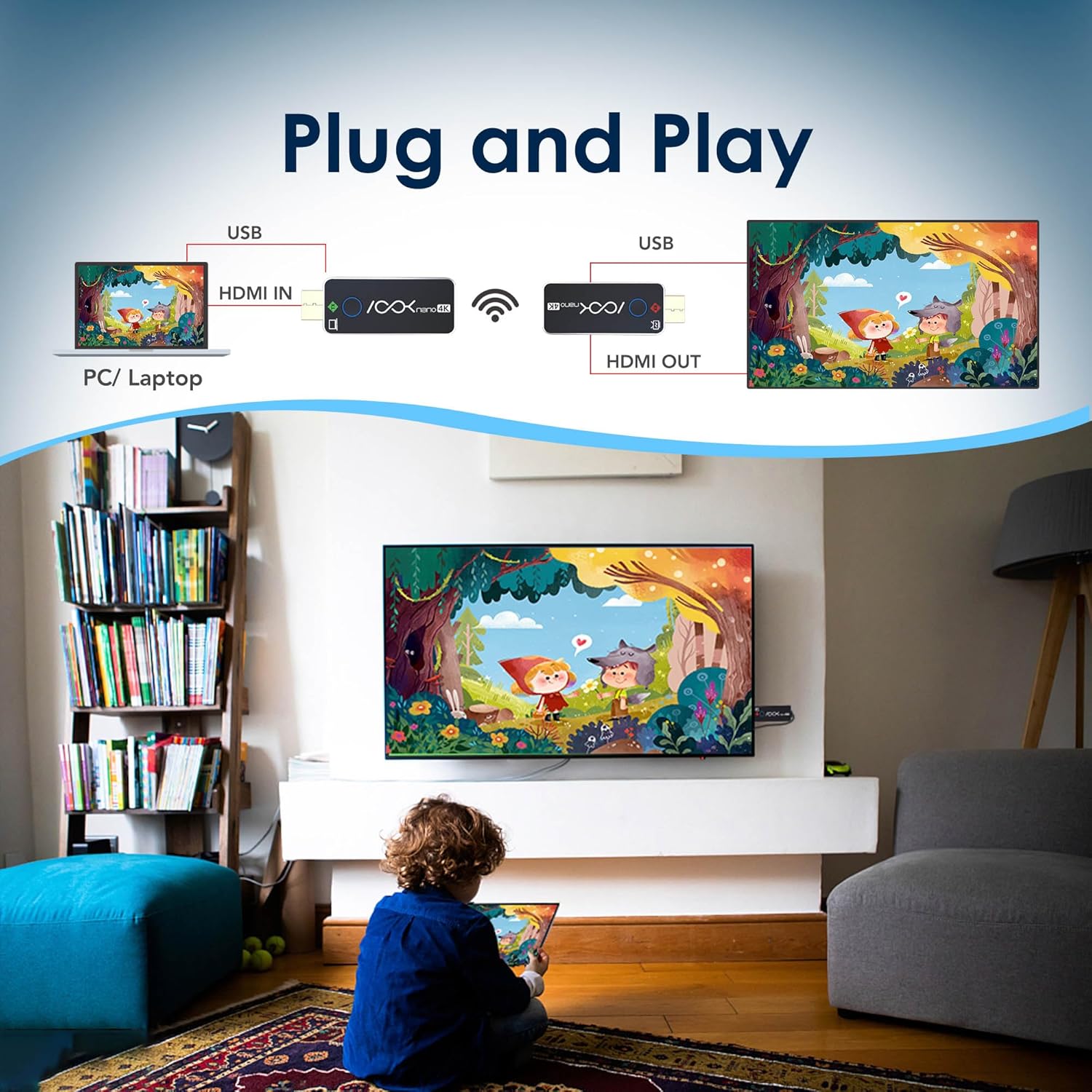
Illustration of the RGBlink ASKnano 4K system in a plug-and-play setup, showing a PC/laptop connected to the TX, wirelessly transmitting to an RX connected to a TV.
Multi-Display Support (1 Transmitter to 2 Receivers)
This kit supports transmitting content from one source (TX) to two displays (RX) simultaneously, providing unmatched flexibility for dual monitor setups, presentations, or extended viewing.

Image showing a laptop wirelessly transmitting to two separate displays, demonstrating the 1-to-2 receiver capability of the RGBlink ASKnano 4K.
Video: How to wirelessly transfer HDMI video to 4 screens. This video demonstrates setting up multiple receivers for multi-screen display.
Утасгүй дамжуулах хүрээ
The RGBlink ASKnano 4K offers a stable signal within a range of 65 feet (20 meters) in open areas without obstructions. For optimal and uninterrupted streaming, a distance of 32 feet (10 meters) is recommended.
Чухал тэмдэглэл:
Do not place the wireless transmitter or receiver in enclosed spaces like drawers or behind TVs, as this may affect signal transmission and lead to interference or signal loss.

Image depicting the RGBlink ASKnano 4K system in a meeting room, illustrating a long-range wireless transmission of up to 100 feet (30 meters) from a laptop to a large display.
Screen Mirroring (via RX)
The RX unit can also function independently for screen mirroring from compatible smartphones or tablets (not compatible with mobile phones or tablets directly via TX, but RX can mirror from them). It supports WIFI 5G transmission protocol and automatically selects the optimal channel.
Video: RGBLink HDMI transmitter + Screen mirroring Operation & Demo. This video demonstrates the screen mirroring functionality using a smartphone.
Засвар үйлчилгээ
To ensure the longevity and optimal performance of your RGBlink ASKnano 4K-1V2 kit, follow these maintenance guidelines:
- Төхөөрөмжүүдийг цэвэр, тоос шороогүй байлга. Цэвэрлэхийн тулд зөөлөн, хуурай даавуу ашиглана уу.
- Төхөөрөмжийг хэт өндөр температур, чийгшил, нарны шууд тусгалд оруулахаас зайлсхий.
- Do not block the ventilation holes on the devices to prevent overheating.
- Handle the HDMI connectors and USB-C ports with care to prevent damage.
- Store the kit in a cool, dry place when not in use.
Алдааг олж засварлах
If you encounter issues with your RGBlink ASKnano 4K-1V2 kit, refer to the following common problems and solutions:
| Асуудал | Боломжит шалтгаан | Шийдэл |
|---|---|---|
| Дохио байхгүй / Хар дэлгэц | Insufficient power, incorrect HDMI input, pairing issue, signal interference. | Ensure both TX and RX have stable 5V/1A power. Verify correct HDMI input on display. Re-pair units if necessary (see Setup Guide). Reduce distance between TX/RX or remove obstructions. |
| Lag / Stuttering Video | Signal interference, excessive distance, obstructions, low power. | Move TX/RX closer together (recommended within 32 feet). Remove physical obstructions. Ensure stable 5V/1A power. Avoid placing units in enclosed spaces. |
| Аудио байхгүй | Audio settings on source/display, HDCP compatibility. | Check audio output settings on your source device and input settings on your display. Ensure HDCP compatibility (TX supports 1.4, RX supports 2.2). |
| Хослуулах алдаа | Incorrect pairing procedure, power issues. | Follow the manual pairing steps precisely (see Setup Guide). Ensure both units are properly powered. |
| Not compatible with mobile phones/tablets | Direct TX connection is not supported for mobile devices. | The TX unit is designed for HDMI output devices. For mobile devices, use the RX unit's screen mirroring function (AirPlay/Miracast) if supported by your mobile device. |
Үзүүлэлтүүд
| Онцлог | Дэлгэрэнгүй |
|---|---|
| Загвар | ASKnano 4K-1V2 |
| Брэнд | RGB холбоос |
| Transmitter (TX) Max Resolution | 4K (3840x2160) @ 24/25/30Hz; 1080P @ 24/25/30/50/60Hz; 720P @ 50/60Hz |
| Receiver (RX) Max Output Resolution | 60Гц-т 4K (3840x2160) хүртэл |
| HDMI стандарт | HDMI 2.0 (RX), HDMI 2.0 / HDCP 2.2 (TX) |
| HDCP-ийн дэмжлэг | TX: HDCP 1.4, RX: HDCP 2.2 |
| Холболтын технологи | Утасгүй (WIFI 5G дамжуулах протокол) |
| Утасгүй сүлжээ | Up to 65 feet (20 meters) in open areas; 32 feet (10 meters) recommended for stable connection. |
| Эрчим хүчний хангамж | USB-C, DC 5V/1A (Max 3.0W) |
| Хэмжээ | 6.7 x 4.72 x 2 инч |
| Зүйлийн жин | 12.6 унц |
Баталгаат болон дэмжлэг
Баталгаат хугацаа болон техникийн дэмжлэг авахыг хүсвэл албан ёсны RGBlink-ээс лавлана уу webсайт эсвэл харилцагчийн үйлчилгээтэй шууд холбогдоно уу. Баталгаат зарга авахын тулд худалдан авалтын баримтаа хадгална уу.
Албан ёсны хэрэглэгчийн гарын авлага (PDF): PDF татаж авах