
1. Танилцуулга
Welcome to the Numark Party Mix MKII DJ Controller Set. This comprehensive bundle includes the Party Mix MKII DJ controller with a built-in audio interface, M-Audio BX3 3.5" Studio Monitor Speakers, and DJ Headphones. Designed for both aspiring and experienced DJs, this set provides all the essential tools for mixing, monitoring, and performing. This manual will guide you through the setup, operation, and maintenance of your new DJ equipment.

Image 1: The complete Numark Party Mix MKII DJ Controller Set, including the controller, studio monitors, and headphones.
2. Хайрцагт юу байна
Your Numark Party Mix MKII DJ Controller Set package should contain the following items:
- Numark Party Mix MKII DJ Controller
- M-Audio BX3 3.5" Studio Monitor Speakers (Pair)
- DJ чихэвч
- USB кабель
- Software Download Card (for Serato DJ Lite)
- Power Adapter for Speakers
- Audio Cables for Speakers
- Түргэн шуурхай ажиллагааны гарын авлага
- Аюулгүй байдал, баталгааны гарын авлага
3. Тохиргоо
3.1 Connecting the DJ Controller
- Connect the included USB cable from the Party Mix MKII controller to an available USB port on your computer (Mac or PC).
- Install the Serato DJ Lite software using the provided download card or by visiting the official Serato webсайт.
- Launch Serato DJ Lite. The software should automatically detect your Party Mix MKII controller.
3.2 Connecting the Studio Monitor Speakers
- Connect the included audio cables from the main output of the Party Mix MKII controller to the input jacks on your M-Audio BX3 Studio Monitor Speakers. The BX3 speakers support 1/4-inch, 1/8-inch, and RCA inputs.
- Connect the power adapter to the active speaker and plug it into a power outlet.
- Өгөгдсөн чанга яригчийн кабелийг ашиглан идэвхгүй чанга яригчийг идэвхтэй чанга яригчтай холбоно уу.
- Чанга яригчийг асаана уу.

Image 2: M-Audio BX3 Studio Monitor Speakers connected in a typical music production environment.
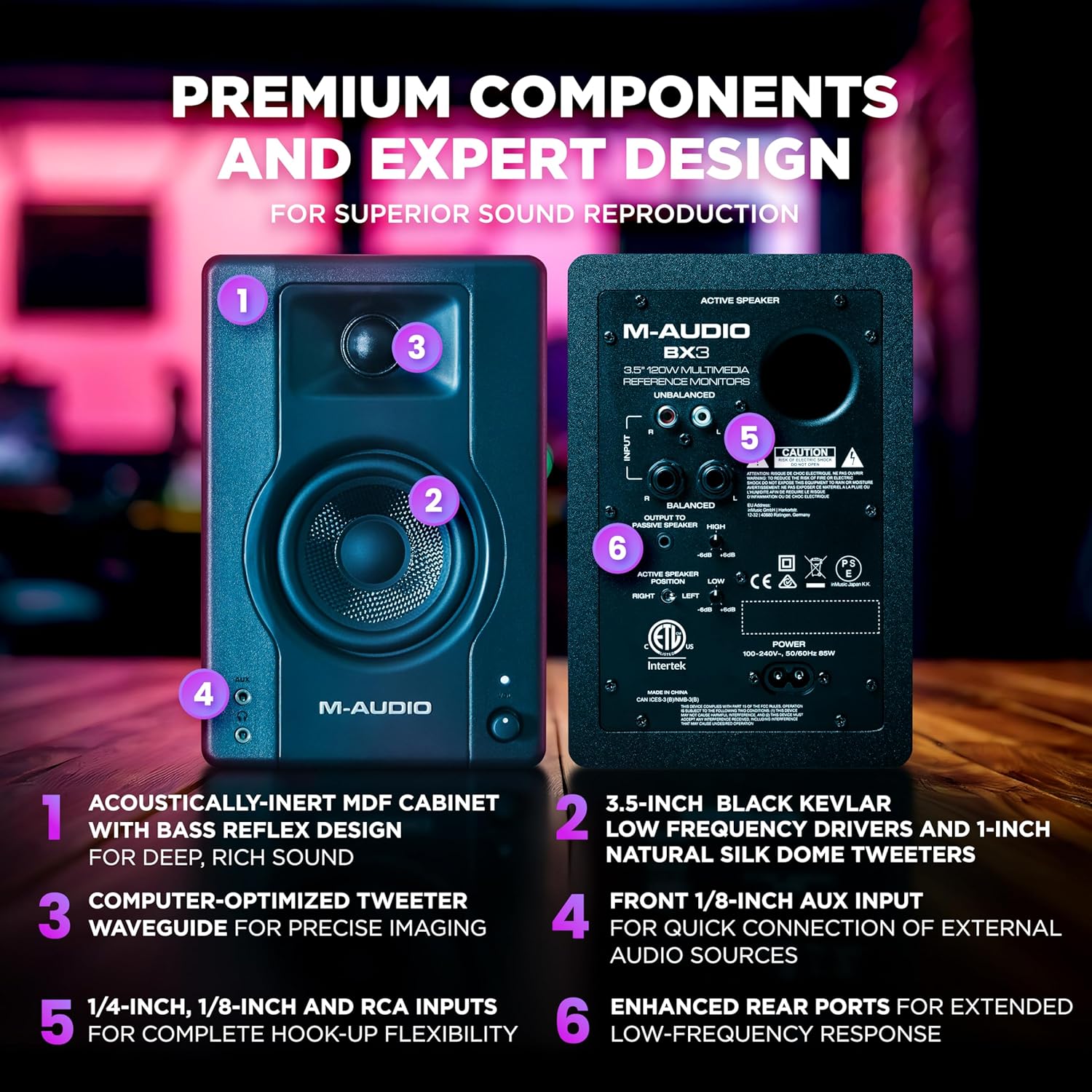
Зураг 3: Нарийвчилсан view of the rear panel of the M-Audio BX3 speakers, highlighting various input options and power connection.
3.3 Connecting the DJ Headphones
Plug your DJ Headphones into the headphone jack located on the front or side of the Party Mix MKII controller. This allows for cueing tracks before playing them live.

Image 4: Close-up of the Numark DJ Headphones, featuring a coiled cable for flexibility.
4. Ашиглалтын заавар
4.1 хяналтview
The Party Mix MKII features a user-friendly layout with two DJ decks, a central mixer section, and performance pads. Familiarize yourself with the controls:

Image 5: Labeled diagram of the Party Mix MKII DJ Controller, indicating the position and function of key controls such as jog wheels, EQ knobs, pitch sliders, and performance pads.
- Гүйлтийн дугуй: Large, touch-sensitive wheels for scratching and track navigation.
- EQ товчлуурууд: Adjust bass and treble for each deck.
- Pitch Sliders: Control the tempo of your tracks.
- Гүйцэтгэлийн дэвсгэр: Trigger hot cues, loops, sampбагасгасан, ба үр нөлөө.
- Sync, Play/Pause & Cue Buttons: Essential transport controls for each deck.
- Шалгах товчлуур: Navigate your music library in Serato DJ Lite.
- Load Buttons: Load selected tracks to Deck 1 or Deck 2.
- Headphone Cue Buttons: Listen to a track in your headphones before playing it live.
4.2 Mixing Tracks
- Load a track to Deck 1 and another to Deck 2 using the Browse knob and Load buttons.
- Use the Headphone Cue buttons to listen to the track on the inactive deck in your headphones.
- Adjust the tempo of the tracks using the Pitch Sliders and the Sync button to match their BPMs.
- Use the crossfader and individual channel faders to blend between the two tracks.
- Experiment with the EQ knobs to shape the sound of each track during your mix.
4.3 Гэрэлтүүлгийн эффектүүд
The Party Mix MKII features built-in LED lighting that syncs to your DJ mix, creating an immersive party atmosphere. A conveniently located mode switch allows you to cycle between 5 different lighting modes.

Image 6: Close-up of the Party Mix MKII DJ Controller showing the multi-coloured LED lights in action, synchronized with the music.
5. Засвар үйлчилгээ
5.1 Цэвэрлэгээ
- Цэвэрлэхийн өмнө цахилгааныг үргэлж салга.
- Use a soft, dry cloth to wipe down the surfaces of the controller, speakers, and headphones.
- Зүлгүүрийн цэвэрлэгч, уусгагч эсвэл хүчтэй химийн бодис хэрэглэхээс зайлсхий, учир нь эдгээр нь өнгөлгөөг гэмтээж болзошгүй.
- For jog wheels and faders, use a soft brush or compressed air to remove dust and debris.
5.2 Хадгалалт
Store your DJ equipment in a cool, dry place away from direct sunlight, extreme temperatures, and excessive humidity. When transporting, use appropriate cases to protect the equipment from physical damage.
6. Алдаа засах
6.1 Дууны гаралт байхгүй
- Ensure all cables (USB, audio, power) are securely connected.
- Check the volume levels on the controller, speakers, and your computer.
- Verify that the correct audio output device is selected in your computer's sound settings and within Serato DJ Lite.
- Make sure the speakers are powered on and their volume is turned up.
6.2 Controller Not Recognized by Software
- Ensure the USB cable is connected directly to your computer, not through a USB hub.
- Компьютер болон Serato DJ Lite програм хангамжаа дахин ажиллуулна уу.
- Check for any available driver updates for your Party Mix MKII controller on the Numark webсайт.
- Confirm that Serato DJ Lite is the correct version and is compatible with your operating system.
6.3 LED гэрэл ажиллахгүй байна
- Хянагч асаалттай, компьютерт холбогдсон эсэхийг шалгаарай.
- Check the lighting mode switch on the controller to ensure it's not set to "off" or a very dim mode.
7. Техникийн үзүүлэлтүүд
7.1 Numark Party Mix MKII DJ Controller
- Брэнд: Нумарк
- Загварын нэр: Party Mix MKII
- Холболтын технологи: USB
- Онцлог шинж чанарууд: Backlit, Compact, Lightweight, Built-in LED DJ light show
- Хяналтын төрөл: DJ хянагч
- Техник хангамжийн интерфейс: USB
- Дэмжигдсэн програм хангамж: Serato DJ Lite
- Тохиромжтой төхөөрөмжүүд: USB-compatible computers and devices, including iOS and macOS systems
- Холигч сувгийн тоо: 2
- Материалын төрөл: Хуванцар, резин
7.2 M-Audio BX3 3.5" Studio Monitor Speakers
- Эрчим хүчний гаралт: 120 ватт
- Woofer: 3.5-inch Black Kevlar
- Жиргээч: 1-inch Natural Silk Dome
- Засгийн газрын танхим Acoustically-inert MDF with Bass Reflex Design
- Оролтууд: 1/4-inch, 1/8-inch, and RCA
7.3 DJ Headphones
- Жолоочийн хэмжээ: 40 mm Neodymium magnet drivers
- Дуу чимээний хяналт: Sound Isolation (soft padded ear cushions)
- Дизайн: Swivel cup closed-back design