
1. Бүтээгдэхүүн дууссанview
The Dioche 1080P HD Smart Camera is designed for home security and monitoring, offering high-definition video, motion detection, and night vision capabilities. This manual provides essential information for setting up, operating, and maintaining your camera.

Зураг 1.1: Урд view of the Dioche 1080P HD Smart Camera.
Видео 1.1: Дууслааview of the Dioche 1080P HD Smart Camera's design and features.
2. Үндсэн шинж чанарууд
- 1080P HD видео: Captures clear, high-definition video for detailed monitoring.
- Нарийвчилсан шөнийн хараа: Provides clear images in low-light conditions, extending visibility up to 40ft.
- Хөдөлгөөн илрүүлэх: Automatically detects movement and sends alerts to your mobile device.
- Хоёр талын аудио: Allows for communication through the camera via the mobile application.
- Алсын хяналт: Шууд видео хангамж болон бичигдсэн foo-д хандахtage from anywhere using your smartphone.
- Үүл хадгалах сан: Offers an option for secure storage of surveillance footage.
- Хялбар суурилуулалт: Хурдан бөгөөд шууд тохируулах зориулалттай.
3. Багцын агуулга
Таны багцад бүх зүйл байгаа эсэхийг шалгана уу:
- 1 x Dioche 1080P HD Smart Camera
- 1 х цэнэглэх кабель
- 1 x Зааварчилгааны гарын авлага (энэ баримт бичиг)
- 2 x Тэлэлтийн хоолой
- 2 х эрэг

Зураг 3.1: Бүтээгдэхүүний багцад багтсан бүх бүрэлдэхүүн хэсгүүд.
4. Бүтээгдэхүүний бүдүүвч
Familiarize yourself with the different parts of your Dioche Smart Camera:
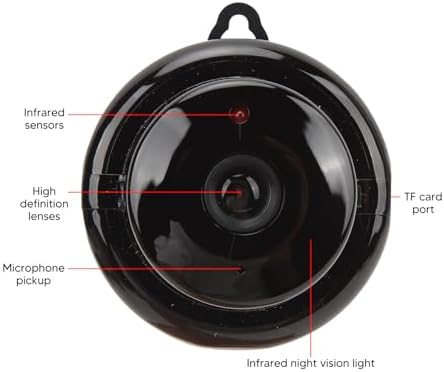
Image 4.1: Labeled diagram of the camera's components.
- Хэт улаан туяаны мэдрэгч: Detect ambient light levels for automatic night vision activation.
- High Definition Lenses: Capture 1080P resolution video.
- Микрофон авах: Records audio and enables two-way communication.
- TF картын порт: Slot for inserting a MicroSD card (not included) for local storage.
- Infrared Night Vision Light: Emits infrared light for clear viewхаранхуй нөхцөлд.
5. Тохируулах заавар
Follow these steps to set up your Dioche Smart Camera:
- Асаах: Connect the camera to a power source using the provided charging cable. The camera will power on automatically.
- Апп татаж авах: Download the recommended mobile application (e.g., "V380 Pro" or similar, refer to packaging for specific app name) from your smartphone's app store (Android or iOS).
- Бүртгэл үүсгэх: Аппликешныг нээгээд шинэ бүртгэлээ бүртгүүлэх эсвэл хэрэв танд бүртгэл байгаа бол нэвтэрнэ үү.
- Төхөөрөмж нэмэх: Follow the in-app instructions to add your new camera. This typically involves scanning a QR code on the camera or manually selecting the device type and connecting to its Wi-Fi hotspot.
- Wi-Fi-д холбогдох: Configure the camera to connect to your home 2.4GHz Wi-Fi network. Ensure your smartphone is also connected to the same network during setup.
- Камер суурилуулах: Choose a suitable location for your camera. It can be placed on a flat surface or mounted to a wall or ceiling using the included screws and expansion tubes. Ensure the camera has a clear view хяналт тавихыг хүсч буй талбайн .

Зураг 5.1: Жишээ ньample of mounting the camera to a surface.
6. Ашиглалтын заавар
Once set up, you can control and monitor your camera using the mobile application:
- Амьд View: Програмаа нээгээд камераа сонгоно уу view шууд видео хангамж.
- Хөдөлгөөн илрүүлэх сэрэмжлүүлэг: Enable motion detection in the app settings to receive push notifications on your phone when movement is detected. Adjust sensitivity as needed.
- Шөнийн хараа: The camera automatically switches to night vision mode in low light. You can typically toggle this feature manually within the app if desired.
- Хоёр талын аудио: Use the microphone and speaker icons in the app to listen to the camera's environment or speak through the camera.
- Бичлэг болон тоглуулах: Бүртгэгдсэн foo руу нэвтрэхtage from the cloud storage or MicroSD card (if installed) through the app's playback feature.
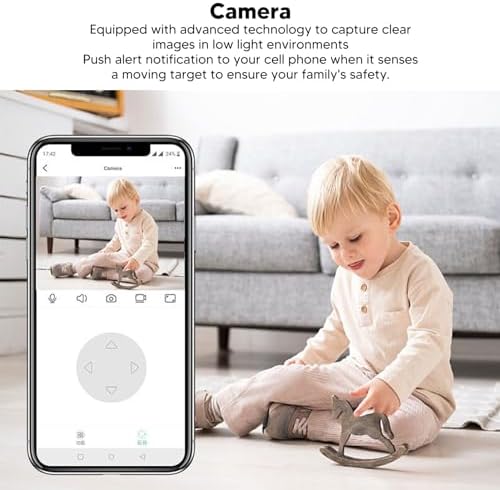
Image 6.1: Using the mobile application for live monitoring.
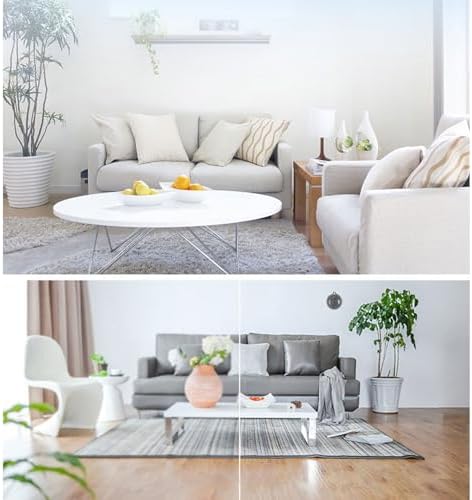
Image 6.2: Demonstration of the camera's night vision capability.
7. Засвар үйлчилгээ
To ensure optimal performance and longevity of your camera:
- Цэвэрлэгээ: Камерын линз болон их биеийг зөөлөн, хуурай даавуугаар зөөлөн арчина. Хүчтэй химийн бодис эсвэл зүлгүүрийн материал хэрэглэхээс зайлсхий.
- Байршил: Камерыг нарны шууд тусгал, хэт өндөр температур, чийгшилээс хол, тогтвортой газар байрлуулсан эсэхийг шалгаарай.
- Програм хангамжийн шинэчлэлтүүд: Regularly check the mobile application for firmware updates for your camera to ensure you have the latest features and security enhancements.
8. Алдаа засах
Хэрэв танд камертай холбоотой асуудал тулгарвал дараах нийтлэг асуудал, шийдлүүдийг үзнэ үү.
| Асуудал | Боломжит шийдэл |
|---|---|
| Камер офлайн байна/Холбогдох боломжгүй байна | Ensure the camera is powered on. Check your Wi-Fi connection and signal strength. Restart the camera and your router. Re-add the camera in the app if necessary. |
| Хөдөлгөөн илрүүлэх дохио байхгүй | Хөдөлгөөн мэдрэгчийг програмын тохиргоонд идэвхжүүлсэн эсэхийг шалгана уу. Мэдрэмжийг тохируулах. Утсан дээрх програмын мэдэгдлийн тохиргоог шалгана уу. |
| Видео чанар муу | Ensure the lens is clean. Check your internet connection speed. Adjust video quality settings in the app if available. |
| Хоёр талын аудио ажиллахгүй байна | Утасныхаа аппликейшны микрофон болон чанга яригчийн зөвшөөрлийг шалгана уу. Хоёр үзүүрийн дуу чанга байгаа эсэхийг шалгана уу. |
Хэрэв асуудал хэвээр байвал хэрэглэгчийн тусламжтай холбогдоно уу.
9. Техникийн үзүүлэлтүүд
Detailed technical specifications for the Dioche 1080P HD Smart Camera:

Image 9.1: Camera dimensions.
| Онцлог | Дэлгэрэнгүй |
|---|---|
| Загварын нэр | Diocherkmcdyn6vq |
| Видео бичлэгийн нягтрал | 1080p |
| Холболтын протокол | Wi-Fi (2.4GHz) |
| Онцлог шинж чанар | Хөдөлгөөн мэдрэгч, шөнийн хараа, хоёр талын аудио |
| Тохиромжтой төхөөрөмжүүд | Ухаалаг утас (Android, iOS) |
| Холбох төрөл | Ханын бэхэлгээ |
| Хаалтны материал | Акрилонитрил бутадиен стирол (ABS) |
| Зөвлөмж болгож буй хэрэглээ | Baby Monitoring, Home Security, Pet Monitoring |
| Батерей шаардлагатай юу | No (Powered via USB cable) |
10. Баталгаат хугацаа ба дэмжлэг
For warranty information and technical support, please refer to the product packaging or contact the retailer where you purchased the Dioche 1080P HD Smart Camera. Keep your proof of purchase for warranty claims.