
1. Танилцуулга
The Moxa UPort 1610-8-G2 is a high-performance USB to 8-port RS-232 serial converter designed for industrial applications. It provides reliable serial communication by converting a single USB port into eight RS-232 serial ports, enabling connectivity for various serial devices to a host computer. This device features USB 3.2 SuperSpeed capability and includes a 512-byte on-chip FIFO cache with flow control for enhanced data transfer performance. It supports a wide operating temperature range of 0 to 60°C, making it suitable for diverse environments.
Гол онцлогууд нь:
- USB 3.2 SuperSpeed capability for high-speed data transfer.
- 512-byte on-chip FIFO cache and flow control for optimized performance.
- Broad operating system driver support, including Windows and Linux.
- Configurable baud rates from 50 bps to 921.6 kbps, with support for nonstandard baud rates.
- Double-sided LEDs indicating power, transmit (TX), and receive (RX) statuses.
2. Багцын агуулга
Суулгалтыг үргэлжлүүлэхийн өмнө багцад дараах зүйлс байгаа эсэхийг шалгаарай.
- Moxa UPort 1610-8-G2 unit
- USB кабель
- Цахилгаан адаптер (хэрэв байгаа бол)
- Documentation CD or link to driver download
- Шуурхай суулгах гарын авлага
If any items are missing or damaged, please contact your vendor or Moxa customer service.
3. Тохиргоо
3.1 Техник хангамж суурилуулах
- USB кабелийг холбоно уу: Connect one end of the provided USB cable to the USB port on the UPort 1610-8-G2 and the other end to an available USB port on your host computer.
- Connect Serial Devices: Connect your RS-232 serial devices to the 8 serial ports on the UPort 1610-8-G2 using appropriate serial cables. Ensure secure connections for all devices.
- Эрчим хүчний холболт: If an external power adapter is included or required, connect it to the UPort 1610-8-G2 and then to a power outlet. The device may draw power directly from the USB port, but external power might be necessary for certain configurations or to ensure stable operation with all 8 ports active.
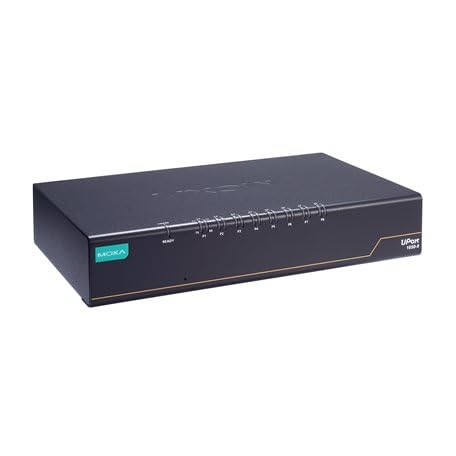
Image: The Moxa UPort 1610-8-G2 USB to 8-Port RS-232 Serial Converter, showing its compact design and multiple serial ports. The USB input port is visible, along with the array of RS-232 connectors for various devices.
3.2 Драйвер суурилуулах
The UPort 1610-8-G2 requires specific drivers to function correctly with your operating system. Drivers are provided for a broad selection of operating systems, including Windows and Linux.
- Obtain Drivers: Download the latest drivers from the official Moxa webсайт (www.moxa.com) by searching for 'UPort 1610-8-G2'. Alternatively, use the provided documentation CD if available.
- Драйверуудыг суулгах: Follow the on-screen instructions to install the drivers. For Windows, this typically involves running an executable file. For Linux, consult the provided installation guide for specific commands and procedures.
- Суулгацыг баталгаажуулах: After installation, check your operating system's Device Manager (Windows) or equivalent system information tool (Linux) to ensure that the UPort 1610-8-G2 and its virtual COM ports are recognized correctly.
4. Ажиллаж байгаа
4.1 Үндсэн үйл ажиллагаа
Once the hardware is connected and drivers are installed, the UPort 1610-8-G2 will create virtual COM ports on your host computer. These virtual COM ports can be accessed by your serial communication software as if they were native serial ports.
- Програм хангамжийн тохиргоо: Configure your serial communication software (e.g., terminal emulator, SCADA system) to use the assigned virtual COM port numbers.
- Baud Rate Settings: Set the baud rate, data bits, parity, and stop bits in your software to match the settings of your connected serial devices. The UPort 1610-8-G2 supports baud rates from 50 bps to 921.6 kbps.
- Өгөгдөл дамжуулах: Initiate data transmission or reception through your software. The UPort 1610-8-G2 will handle the conversion between USB and RS-232 signals.
4.2 LED үзүүлэлтүүд
The UPort 1610-8-G2 features double-sided LEDs located at the corners, providing visual status indications:
- Эрчим хүчний LED: Indicates that the device is receiving power.
- TX (дамжуулах) LED: Flashes when data is being transmitted from the host computer through the serial port.
- RX (хүлээн авах) LED: Flashes when data is being received by the serial port from a connected device.
Monitoring these LEDs can help in diagnosing communication issues.
5. Засвар үйлчилгээ
To ensure the longevity and optimal performance of your Moxa UPort 1610-8-G2, follow these maintenance guidelines:
- Цэвэрлэгээ: Keep the device clean and free from dust. Use a soft, dry cloth for cleaning. Avoid liquid cleaners or solvents.
- Байгаль орчны нөхцөл: Operate the device within its specified temperature range of 0 to 60°C. Avoid exposing it to extreme temperatures, high humidity, or direct sunlight.
- Кабелийн менежмент: Бүх кабелиуд найдвартай холбогдсон, ачаалалгүй байгаа эсэхийг шалгаарай. Кабелийг огцом нугалахаас зайлсхий.
- Програм хангамжийн шинэчлэлтүүд: Moxa-г үе үе шалгаж байгаарай website for any available firmware updates for your device. Firmware updates can improve performance, add features, or fix bugs.
6. Алдаа засах
If you encounter issues with your UPort 1610-8-G2, consider the following troubleshooting steps:
6.1 No Device Recognition
- USB холболтыг шалгана уу: Ensure the USB cable is securely connected to both the UPort and the host computer. Try a different USB port or cable.
- Эрчим хүчний хангамж: Verify that the device is receiving power. Check the Power LED. If using an external adapter, ensure it is properly connected and functional.
- Драйвер суурилуулах: Confirm that the correct drivers are installed. Reinstall drivers if necessary. Check Device Manager (Windows) for any error indicators.
- Компьютерийг дахин эхлүүлэх: A system restart can sometimes resolve recognition issues.
6.2 Харилцаа холбооны алдаа
- Цуваа портын тохиргоо: Double-check that the baud rate, data bits, parity, and stop bits in your software match those of the connected serial device.
- Кабелийн бүрэн бүтэн байдал: Inspect the serial cables for damage. Try a different serial cable.
- Төхөөрөмжийн үйл ажиллагаа: Ensure the connected serial device is powered on and functioning correctly.
- LED Activity: Observe the TX/RX LEDs. If they are not flashing during data transmission, there might be an issue with the software configuration or the connected device.
6.3 Гүйцэтгэлийн асуудлууд
- USB портын төрөл: Ensure the UPort 1610-8-G2 is connected to a USB 3.0/3.1/3.2 port on your host computer to utilize its SuperSpeed capabilities. Connecting to a USB 2.0 port will result in lower speeds.
- Системийн нөөц: Close unnecessary applications on your host computer to free up system resources.
7. Техникийн үзүүлэлтүүд
| Онцлог | Тодорхойлолт |
|---|---|
| Загвар | UPort 1610-8-G2 |
| USB интерфейс | USB 3.2 SuperSpeed |
| Цуваа портууд | 8 x RS-232 |
| Дамжуулах хурд | 50 bps to 921.6 kbps (nonstandard baudrates supported) |
| FIFO Cache | 512-byte on-chip |
| Урсгалын хяналт | Дэмжигдсэн |
| Ашиглалтын температур | 0-аас 60 хэм хүртэл |
| Бүтээгдэхүүний хэмжээс | 8.5 x 4.79 x 1.63 инч |
| Зүйлийн жин | 4 фунт |
| Дэмжигдсэн үйлдлийн систем | Windows, Linux |
8. Баталгаат хугацааны мэдээлэл
Moxa products are backed by a manufacturer's warranty. The specific terms and duration of the warranty may vary by region and product. Please refer to the warranty card included with your product or visit the official Moxa webбаталгаат байдлын дэлгэрэнгүй мэдээлэл, бүртгэлийн журмын талаархи сайт.
Баталгаат нэхэмжлэл гаргахын тулд худалдан авалтаа нотлох баримтаа хадгалаарай.
9. Техникийн дэмжлэг
For further assistance, technical support, or to report issues not covered in this manual, please contact Moxa's customer support team.
- Төө Webсайт: зочилно уу www.moxa.com/support for FAQs, driver downloads, documentation, and contact information.
- Онлайн дэмжлэг: Utilize the online support portal for submitting tickets or accessing knowledge base articles.
When contacting support, please have your product model (UPort 1610-8-G2) and serial number ready.