
Танилцуулга
This manual provides essential instructions for the Generic Replacement Remote Control. This remote is designed to function as a direct replacement for original remote controls of various Polaroid and AKI television models. Please ensure your original remote matches the appearance of this replacement remote for optimal compatibility and functionality.
Тохиргоо
Батерей суурилуулах
The remote control requires two (2) AAA batteries (not included) for operation. Follow these steps to install the batteries:
- Алсын удирдлагын ар талд байгаа зайны тасалгааны тагийг ол.
- Тасалгааг нээхийн тулд табыг доош дарж, тагийг нь доош нь гулсуулна уу.
- Хоёр AAA батерейг оруулаад эерэг (+) ба сөрөг (-) терминалууд тасалгааны доторх тэмдэглэгээтэй зөв таарч байгаа эсэхийг шалгаарай.
- Батерейны тасалгааны тагийг найдвартай товших хүртэл шургуулна уу.
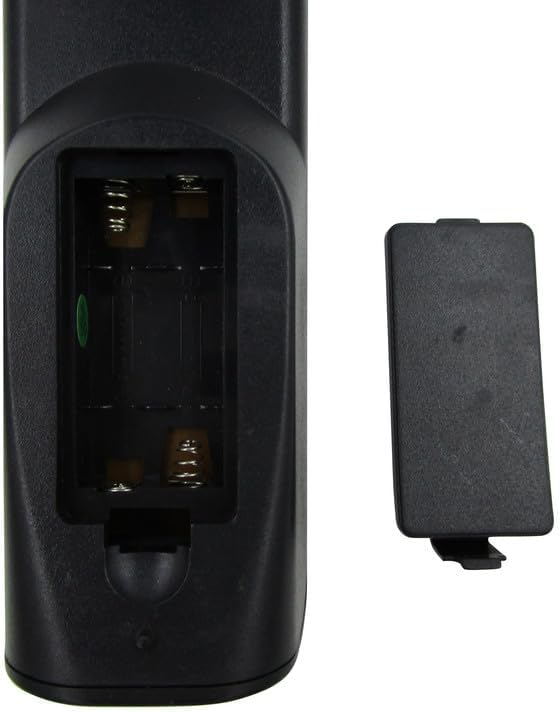
Зураг 1: Open battery compartment of the remote control. Insert two AAA batteries according to polarity markings.
Жич: Always replace both batteries at the same time. Do not mix old and new batteries or different types of batteries. Remove batteries if the remote will not be used for an extended period.
Ашиглалтын заавар
Once batteries are installed, the remote control is ready for use with compatible television models. Point the remote directly at the TV's infrared sensor.
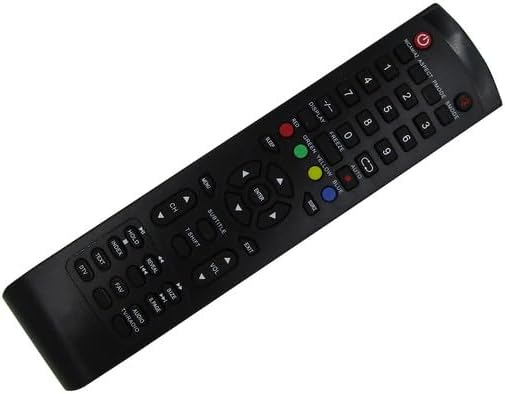
Зураг 2: Урд view товчлуурын зохион байгуулалттай алсын удирдлагын.
Үндсэн функцууд:
- Эрчим хүч (●): Телевизийг асаах эсвэл унтраана.
- Тоон товчлуурууд (0-9): Сувагуудыг шууд сонгох.
- CH +/-: Сувгуудыг дараалан өөрчилдөг.
- VOL +/-: Дууны түвшнийг тохируулна.
- ХААЛТ: Телевизийн дууг хааж эсвэл нээнэ.
- SOURCE/INPUT: Оролтын эх үүсвэрийг сонгоно (HDMI, AV гэх мэт).
- Цэс: ТВ-ийн үндсэн цэсэнд нэвтэрнэ.
- Навигацийн товчлуурууд (Дээш, Доош, Зүүн, Баруун, ОРУУЛАХ): Цэсээр шилжиж, сонголтоо баталгаажуулна уу.
- ГАРАХ: Одоогийн цэс эсвэл функцээс гарна.
- Color Buttons (RED, GREEN, YELLOW, BLUE): Used for specific functions within certain TV menus or smart features, if supported by your TV model.
For advanced functions or specific TV features, refer to your television's original user manual, as this replacement remote provides standard infrared control.
Засвар үйлчилгээ
Цэвэрлэгээ:
Алсын удирдлагыг цэвэрлэхийн тулд зөөлөн, хуурай даавуу ашиглаарай. Зөрүүд бохирдлыг бага зэрэг арчина.ampдаавууг ус эсвэл зөөлөн цэвэрлэх уусмалаар хийнэ. Зүлгүүрийн цэвэрлэгч, спирт, уусгагчийг бүү ашиглаарай, учир нь эдгээр нь алсын удирдлаганы гадаргуу болон дотоод эд ангиудыг гэмтээж болзошгүй.
Хадгалах:
Store the remote control in a cool, dry place away from direct sunlight and extreme temperatures. If the remote will not be used for an extended period, remove the batteries to prevent leakage and potential damage.
Алдааг олж засварлах
- Алсын удирдлага хариу өгөхгүй байна:
- Алсын удирдлага нь телевизийн хэт улаан туяаны мэдрэгч рүү шууд чиглэсэн эсэхийг шалгаарай.
- Check the batteries. Replace them if they are old or depleted. Refer to the Батерей суурилуулах хэсэг.
- Verify there are no obstructions between the remote and the TV.
- Зарим товчлуурууд ажиллахгүй байна:
- This replacement remote is designed for basic TV functions. Some advanced or smart TV features may not be supported if they require specific codes or functions not present on this generic remote.
- Clean the remote's surface, especially around the unresponsive buttons, to ensure no debris is interfering.
- ТВ асаалттай/унтраагдаагүй байна:
- Confirm the TV is plugged into a power source and is not in standby mode due to a power outage.
- Ensure the remote's batteries are fresh and correctly installed.
Хэрэв эдгээр алхмуудыг хийсний дараа асуудал арилахгүй бол хэрэглэгчийн дэмжлэгтэй холбогдоно уу.
Үзүүлэлтүүд
| Брэнд | Ерөнхий |
| Загварын дугаар | Easytry22233 |
| Тохиромжтой төхөөрөмжүүд | Television (Various Polaroid and AKI models) |
| Холболтын технологи | Хэт улаан туяаны (IR) |
| Хамгийн их хүрээ | 8 метр |
| Шаардлагатай батерейны тоо | 2 ААА |
| Өнгө | Хар |
| Онцлог шинж чанар | Ergonomic, Replacement |
Баталгаат хугацааны мэдээлэл
Энэ бүтээгдэхүүн нь хамт ирдэг 90 хоногийн баталгаат хугацаа from the date of purchase. This warranty covers manufacturing defects and ensures hassle-free returns for eligible issues. Please retain your proof of purchase for warranty claims.
Хэрэглэгчийн дэмжлэг
For any questions, concerns, or troubleshooting assistance not covered in this manual, please contact the seller or manufacturer directly. Provide your product model number (Easytry22233) and details of your issue for prompt support.