
IXITAB FS8233Pro
FS8233Pro Touch Smart Digital Multimeter User Manual
Model: FS8233Pro | Brand: IXITAB
1. Танилцуулга
The IXITAB FS8233Pro is an advanced, automatic smart digital multimeter designed for professional electricians and DIY enthusiasts. Featuring an intelligent sensing touch screen, this device offers convenient operation and clear display for various electrical measurements. Its rechargeable lithium battery ensures long-lasting performance without the need for frequent battery replacements. The FS8233Pro is equipped with intelligent anti-burning fuse protection and a durable silicone protective case, enhancing both safety and hardware longevity. This manual provides comprehensive instructions for safe and effective use of your multimeter.
2. Аюулгүй байдлын мэдээлэл
Always adhere to safety precautions when operating electrical testing equipment. Failure to do so may result in injury or damage to the device.
- Хэмжилтийн хүрээ бүрт заасан хамгийн их оролтын утгыг хэтрүүлж болохгүй.
- Хэмжилт хийхээс өмнө туршилтын утаснууд сайн нөхцөлд байгаа бөгөөд зөв холбогдсон эсэхийг шалгаарай.
- Мультиметрийг нойтон орчинд эсвэл нойтон гараар ашиглахаас зайлсхий.
- Эзлэхүүнийг хэмжих гэж бүү оролдооройtage or current on circuits exceeding the device's rated capacity.
- Эсэргүүцэл, багтаамж эсвэл тасралтгүй байдлыг хэмжихийн өмнө хэлхээний тэжээлийг үргэлж салга.
- Хүчтэй хэлхээтэй ажиллахдаа болгоомжтой байгаарай.
- Refer to local electrical codes and safety standards.
3. Багцын агуулга
Таны багцад бүх зүйл байгаа эсэхийг шалгана уу:
- 1 x FS8233Pro Digital Multimeter
- 1 x Зааварчилгааны гарын авлага
- 1 x цэнэглэх кабель (USB)
- 1 x Туршилтын хос утас

Image: The FS8233Pro multimeter shown with its standard accessories, including the red and black test leads and a USB charging cable.
4. Бүтээгдэхүүн дууссанview
The FS8233Pro features a large, clear LCD display and intuitive touch controls for ease of use.

Зураг: Ойрын зураг view of the FS8233Pro's front panel, highlighting its large digital display and touch-sensitive buttons for various functions like HOLD, AUTO, NCV, Live, and input jacks.
4.1 Гол онцлогууд:
- Intelligent Sensing Touch Screen: For convenient operation and clear display.
- Цэнэглэдэг лити батерей: Long life, USB charging.
- Автомат илрүүлэх: Eliminates the need for manual gear shifting.
- Intelligent Anti-Burning Fuse: Enhanced safety protection.
- Силикон хамгаалалтын хайрцаг: Prevents shock and protects hardware.
- Арын гэрэлтүүлэг: Allows clear viewхаранхуй нөхцөлд.
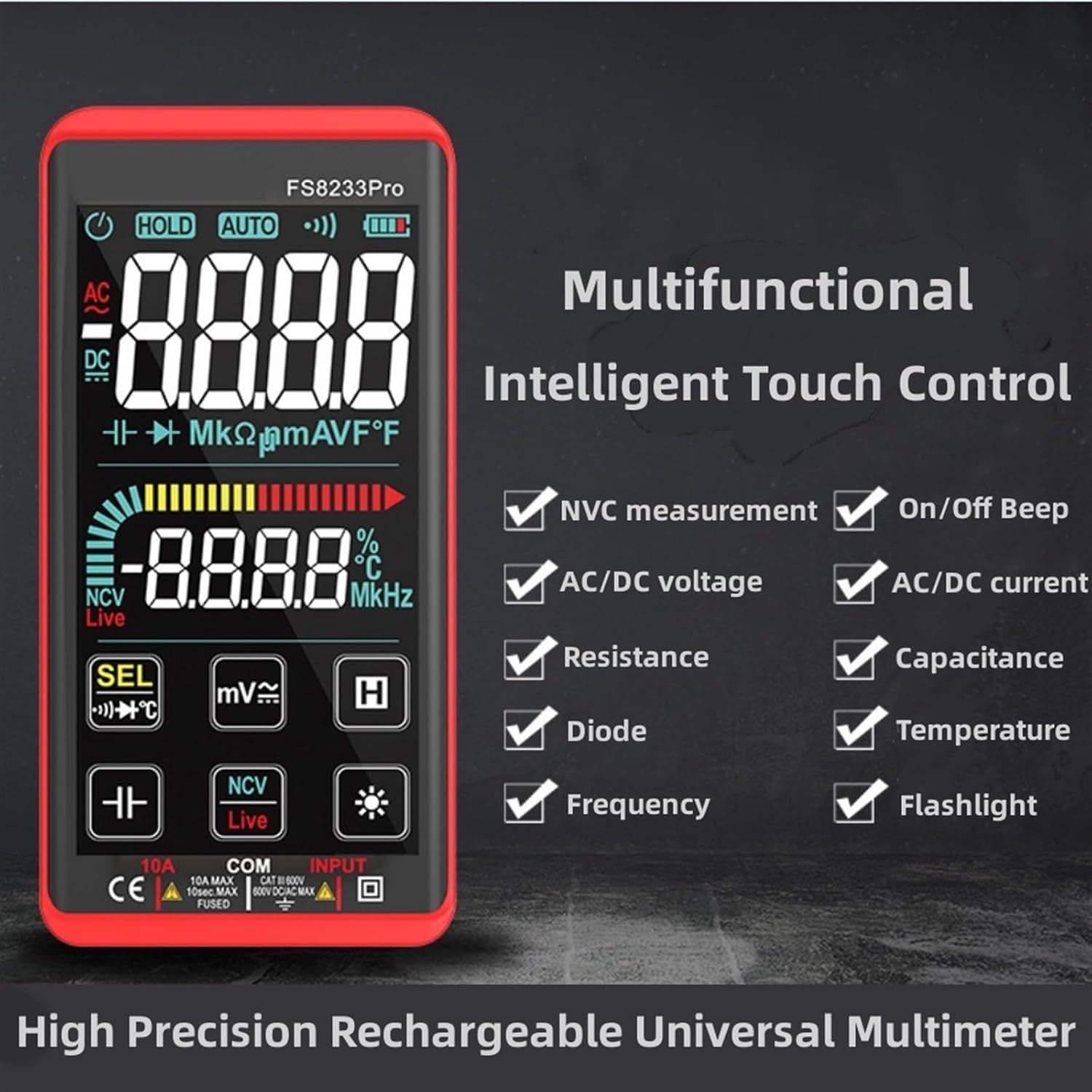
Image: A promotional image showcasing the multifunctional intelligent touch control features of the FS8233Pro, including NVC measurement, AC/DC voltage, resistance, diode, frequency, on/off beep, AC/DC current, capacitance, temperature, and flashlight.
5. Тохиргоо
5.1 Анхны цэнэглэлт
Before first use, fully charge the multimeter's internal lithium battery. Connect the provided USB charging cable to the multimeter's charging port and to a standard USB power adapter (not included) or a computer USB port. The battery indicator on the display will show charging status.
5.2 Туршилтын утсыг холбох
Insert the red test lead into the "INPUT" jack and the black test lead into the "COM" (common) jack. Ensure they are securely inserted.
6. Ашиглалтын заавар
The FS8233Pro features automatic detection, simplifying measurement selection. Simply turn on the device and it will automatically identify the measurement type for most common functions.

Image: A hand interacting with the touch-sensitive display of the FS8233Pro multimeter, demonstrating its "Intelligent Movement Touch Sensing" for sensitive and fast measurements.
6.1 Асаах/унтраах
Press the power button (usually indicated by a power symbol) to turn the multimeter on or off. The device will automatically shut down after approximately 15 minutes of inactivity to conserve battery life.
6.2 АС ботьtage (ACV) Хэмжилт
- Туршилтын утсыг AC вольттой зэрэгцээ холбоно ууtage эх сурвалж.
- The multimeter will automatically detect AC voltage.
- Range: 0.5V-750V (Accuracy: 1%+5)
6.3 DC Voltage (DCV) Хэмжилт
- Туршилтын утсыг DC вольттой зэрэгцээ холбоно ууtage source, observing polarity.
- The multimeter will automatically detect DC voltage.
- Range: 0.5V-1000V (Accuracy: 0.5%+3)
6.4 Эсэргүүцлийн хэмжилт
- Эсэргүүцлийг хэмжихээс өмнө хэлхээг хүчдэлгүй болгосон эсэхийг шалгаарай.
- Туршилтын утсыг хэмжих бүрэлдэхүүн хэсэгт холбоно.
- Range: 0.1Ω-99.999MΩ (Accuracy: 1%+3)
6.5 Давтамжийн хэмжилт
- Туршилтын утсыг дохионы эх үүсвэртэй холбоно уу.
- Range: 40Hz-10000Hz (Accuracy: 0.5%+3)
6.6 Хүчин чадлын хэмжилт
- Ensure the capacitor is discharged before measurement.
- Туршилтын утсыг конденсаторын терминалуудаар холбоно уу.
- Range: 10nF-60000μF (Accuracy: 4.5%+5)
6.7 Температурын хэмжилт
- Use the appropriate temperature probe (if included, or purchased separately) and connect it to the multimeter.
- Range: -40°C to 1000°C (Accuracy: 2%+5)
6.8 On & Off Beep (Continuity)
- Туршилтын утсыг хэлхээ эсвэл бүрэлдэхүүн хэсгийн дагуу холбоно уу.
- If the resistance of the tested circuit is less than 50Ω, the auxiliary buzzer will sound, indicating continuity.
6.9 Диодын туршилт
- Туршилтын утсыг диодын дагуу холбоно уу.
- The display will show the approximate diode forward voltage үнэ цэнэ.
6.10 NCV (Холбоо барихгүй ботьtage) Илрүүлэх
- NCV функцийг сонгоно уу.
- Bring the top of the multimeter close to the AC voltage эх сурвалж.
- There are three alarm modes (visual and audible) according to the detected voltage хүч чадал.
6.11 Live Line Identification
- Шууд функцийг сонгоно уу.
- Insert the red test lead into the suspected live line.
- If it is a live line, "Live" will appear on the screen, and an alarm sound will be emitted.
7. Засвар үйлчилгээ
7.1 Цэвэрлэгээ
Wipe the multimeter's casing зартайamp cloth. Do not use abrasive cleaners or solvents. Ensure the device is off and disconnected from any power source before cleaning.
7.2 Хадгалалт
Store the multimeter in a cool, dry place, away from direct sunlight and extreme temperatures. If storing for extended periods, ensure the battery is partially charged (around 50%) to prolong its lifespan.
7.3 Батерейны арчилгаа
The built-in lithium battery is designed for long life. Avoid fully discharging the battery frequently. Recharge as needed. If the device will not be used for a long time, charge it every 3 months to maintain battery health.
8. Алдаа засах
| Асуудал | Боломжит шалтгаан | Шийдэл |
|---|---|---|
| Мультиметр асахгүй байна. | Батерей дуусч байна. | Дагалдах USB кабелийг ашиглан мультиметрийг цэнэглэнэ үү. |
| Буруу уншилтууд. | Incorrect measurement mode; Damaged test leads; Environmental interference. | Ensure correct mode is selected (though often automatic); Check test leads for damage; Move away from strong electromagnetic fields. |
| Тасралтгүй дохио байхгүй. | Resistance is too high; Test leads not making good contact. | Ensure resistance is below 50Ω; Re-seat test leads firmly. |
| Автомат унтрах нь хэтэрхий хурдан тохиолддог. | Inactivity timer. | The device is designed to shut down after approximately 15 minutes of inactivity. This is normal operation. |
9. Техникийн үзүүлэлтүүд
| Параметр | Хүрээ / утга | Нарийвчлал |
|---|---|---|
| AC ботьtage (ACV) | 0.5V-750V | (1% + 5) |
| DC ботьtage (DCV) | 0.5V-1000V | (0.5% + 3) |
| Эсэргүүцэл | 0.1Ω-99.999МΩ | (1% + 3) |
| Давтамж | 40 Гц-10000 Гц | (0.5% + 3) |
| Багтаамж | 10nF-60000μF | (4.5% + 5) |
| Температур | -40 хэмээс 1000 хэм хүртэл | (2% + 5) |
| Continuity Beep Threshold | < 50 Ом | Үгүй |
| Автомат унтрах | Ойролцоогоор 15 минут идэвхгүй байна | Үгүй |
| Эрчим хүчний эх үүсвэр | Цэнэглэдэг лити батерей | Үгүй |
| Үйлдвэрлэгч | IXITAB | Үгүй |
| Загвар | FS8233Pro | Үгүй |
10. Баталгаат хугацаа ба дэмжлэг
For warranty information and technical support, please refer to the contact details provided by your retailer or visit the official IXITAB webсайт. Худалдан авалтын баримтаа баталгаат нэхэмжлэлд зориулж худалдан авалтын баталгаа болгон хадгална уу.
For additional assistance, you may contact the seller directly through the platform where the product was purchased.
Ask a question about this manual
Ask about setup, troubleshooting, compatibility, parts, safety, or missing instructions. Manuals+ will review the question and use this page’s manual context to help answer it.